How to Send Bitcoin? A Beginner’s Guide


Key Takeaways
- 💸 Once you authorize and broadcast a Bitcoin tranfer, there’s no chargeback and no central rollback—treat the review screen as your last real control point.
- 💸 Even before that, clear the 5 prerequisites before you touch “Send”: wallet access, spendable balance (not “total”), a correct recipient identifier, enough BTC for amount + fee, and working security authentication (PIN/biometric/2FA/hardware confirmation).
- 💸 Match the rail to what the recipient gave you: On-chain address (1, 3, bc1…) = on-chain send; Lightning invoice (ln…) = Lightning send (and it can expire); platform handle/email/username = internal transfer only if you’re both on the same platform.
- 💸 Fees buy probability, not certainty: On-chain fees depend on mempool congestion and transaction size (vbytes/UTXOs); “Economy/Standard/Priority” maps to likely confirmation windows, but nothing is guaranteed.
Contents
- 1. What You Need Before You Send Bitcoin
- 2. Step-by-Step: How to Send Bitcoin
- 3. How to Verify a Bitcoin Address Before Sending
- 4. Bitcoin Network Options (On-Chain vs Lightning vs Platform Transfers)
- 5. How to Send Bitcoin on Popular Platforms
- 6. Fees, Limits, and Timing
- 7. Risks and Key Considerations
- 8. Conclusion
Sending Bitcoin (BTC) describes the user action of authorizing a transfer from your crypto wallet to a recipient's address or payment invoice — a process that commits a crypto transaction to the blockchain, a type of distributed ledger. The procedure looks deceptively simple at the interface level — paste an address, enter an amount, confirm — but the finality of blockchain transactions and the irreversibility of mistakes demand that you understand what happens between those steps before you click ‘Send’.
For many people, this is also their first real-world crypto payment using a digital currency as a payment method in a peer to peer financial operation. If you are a first-time Bitcoin sender who has acquired BTC and need to transfer it for the first time, be it from a centralized platform such as an exchange or a payment app, or from a cold storage device, this guide aims to cover all grounds—Lightning Network included.
What You Need Before You Send Bitcoin

In more traditional systems, you need an account with sufficient balance and you need to know where you’re sending the money. Moreover, although it’s not usually obvious, your access to this account needs to be secure first.
It’s nearly identical with Bitcoin, except instead of the account you have a crypto wallet, sufficient balance means both the sum and network fee, and the destination needs to be an exact recipient address in a special format. Let’s go through them all to help you prepare for sending BTC itself.
What follows assumes the question “what is Bitcoin?” is not entirely new to you. You may also find more specific instructions in our guide on how to pay with crypto.
Wallet
Wallet access can mean two fundamentally different models: custodial platforms and non-custodial wallets. “Custody” refers to the party who has proof of ownership: the cryptographic key pair; non-custodial is also called self-custody because in that arrangement, you are fully responsible for the address and funds.
On a custodial platform — exchanges like Coinbase, apps like PayPal or Cash App — your Bitcoin balance exists as an internal database entry, and "access" means passing the platform's login and KYC gates. You prove access by successfully signing in, completing any requested identity check, and reaching the withdrawal or send screen. The platform controls the private keys; you control account credentials.
In a non-custodial wallet — software like Electrum, hardware wallets like Ledger, or mobile wallets like BlueWallet — you control the private keys directly. Access proof here can be your ability to unlock the wallet (via PIN, passphrase, or biometric), view your balance, and initiate a transaction that the wallet will sign. No intermediary can restrict your send, but you also bear full responsibility for key custody and asset management.
If your wallet supports multiple assets, confirm you are in the correct tab inside a multi-currency wallet so you don’t accidentally initiate the wrong crypto asset transfer when you intend to send BTC: it is possible to sign a valid transaction with unintended inputs (such as a blockchain network) and lose your funds.
If you are using a custodial platform, verify that your account status is "active" or "verified" rather than "pending review" or "restricted," as withdrawal privileges are often the first feature disabled during account holds driven by a compliance requirement or automated compliance check.
Do you still need more information about how to set up a crypto wallet? We have got you covered.
Bitcoin Balance
Wallets display total BTC, but only spendable or available balance can actually be sent. The gap between displayed and spendable arises from pending deposits, exchange holds on recent purchases, or unconfirmed incoming transactions that have not yet been mined into a block.
Some wallets calculate spendable balance by checking each UTXO (Unspent Transaction Output). A UTXO is a specific output from a prior transaction that your wallet can spend; your total balance is the sum of all UTXOs you control, but not all may be mature or confirmed enough to spend immediately.

Practically, this is about being able to manage digital asset availability: “total” balance is not always the same as what you can spend right now.
When planning to send your full balance, verify whether your wallet's "send max" function automatically adjusts for network fees. Normally, wallets should deduct the fee from the send amount but it’s possible the app would require you to manually reserve fee headroom, and selecting "send all" without that adjustment will result in an "insufficient funds" error.
Recipient Address
The destination credential you receive from the recipient must match the BTC rail your wallet supports. Sending to the wrong type of address will either fail outright or deliver funds to an incompatible system where the recipient cannot access them.
There are a few possibilities:
- On-chain address — a string beginning with bc1… (native SegWit), 3… (wrapped SegWit), or 1… (legacy). These addresses receive Bitcoin on the main chain and are the most universally compatible format. Bitcoin on-chain settlement has a variable settlement timeline: a valid transaction with sufficient network fee should be confirmed at least once within approximately 10 minutes but your criteria on whether a transaction is settled for good can include the urgency or the transfer volume.
- Lightning invoice — a time-limited string or QR code starting with ln… that routes payment through the Lightning Network, a Layer 2 protocol for instant, low-fee transfers. Lightning invoices expire (commonly within 10-60 minutes), and you must send before expiration or request a new invoice. Lightning and layer-one are not interoperable; sending on-chain Bitcoin to a Lightning invoice will fail.
- Platform username handles — internal identifiers like $cashtag on Cash App or email-based handles on some exchanges; those trigger an internal transfer within the same platform rather than a blockchain transaction. These are not Bitcoin addresses in the protocol sense; they are database pointers. If the recipient platform or identifier type is incompatible with your wallet, the send will not route correctly.
Network fee Balance
Bitcoin on-chain transactions require a network fee paid in BTC — not a separate token, not fiat currency deducted from your bank account. The fee compensates miners for including your transaction in a block, and the amount you pay determines how quickly your transaction is likely to get included. The fee is deducted from your Bitcoin, either from the amount you send or from your remaining balance, depending on how you structure the transaction.
When you initiate a send, your wallet constructs a transaction that specifies inputs (the UTXOs you are spending), outputs (the recipient's address and the amount), and the fee (the difference between total inputs and total outputs). If you attempt to send an amount that leaves insufficient BTC to cover the fee, the transaction will fail before it even reaches the network.
Bitcoin transactions may be verified or confirmed in seconds to minutes depending on network conditions, so after sending, you should be prepared to track the transaction status using a block explorer or your wallet's activity log. Higher fees generally result in faster confirmation during periods of high network demand but not faster than the general cadence of the network (i.e. you can’t make your transaction be included sooner than the next block is added to the chain).
Security Authentication

Before any Bitcoin transaction leaves your wallet, you should prove that you — and not an attacker who gained access to your device — authorized the send: blockchain cannot recognize intents and only relies on cryptography as proof. The type of authentication required depends on your wallet's security model and whether you are using a custodial platform or non-custodial wallet.
Behind the scenes, this is enforced by cryptographic signing and wallet encryption; the UI prompt is simply the human-facing gate for the additional underlying authentication protocol.
What you may be prompted for:
- PIN or password — a numeric or alphanumeric code you set when configuring the wallet; required on most mobile and desktop wallets before signing a transaction.
- Device biometrics — fingerprint or face recognition, used as a convenience layer on top of PIN entry; common on mobile wallets and some hardware wallet companion apps.
- Hardware wallet confirmation — a physical button press or screen interaction on devices like Ledger or Trezor, ensuring that no malware on your computer can authorize a send without your physical presence and approval.
- 2FA for exchanges — a time-based one-time password (TOTP) from an authenticator app, SMS code, or email confirmation link; custodial platforms layer this on top of account login to verify withdrawal requests.
Testing your authentication flow before you need to send a large or time-sensitive amount is the most reliable way to avoid discovering a locked-out 2FA device or forgotten PIN at the worst possible moment.
Readers in need of more high-level guidance can read our dedicated guide on securing your crypto wallet.
Step-by-Step: How to Send Bitcoin
Bitcoin transfers are executed through wallet software, and sending BTC requires you to navigate a series of decision points before the transaction becomes irreversible.
Navigating the Wallet Interface
Bitcoin wallet software is a transaction initiation interface with three to five key UI elements that remain consistent across platforms, though their visual layout varies. Look for the Send button, typically positioned on the main screen or in a bottom navigation bar, often accompanied by a Receive counterpart. Next, locate the asset selector—a dropdown or toggle that allows you to switch between different cryptocurrencies if your wallet supports multiple coins; you must verify that "Bitcoin" or "BTC" is highlighted, not Bitcoin Cash (BCH), Wrapped Bitcoin (WBTC), or any other asset that shares similar branding. This is especially important in a multi-currency wallet.
The 'From' account selector appears in wallets that manage multiple Bitcoin addresses or accounts; this field determines which UTXO set (unspent transaction outputs) the wallet will draw from, which directly affects your available balance and fee calculation.
Additional interface elements include a network badge or selector that may display "Bitcoin (On-Chain)", "Lightning Network", or "Internal Transfer" depending on wallet features, and a fee or speed control, often represented as a slider or tiered selection (e.g. ‘Economy’/’Standard’/’Priority’). If a memo or tag field is present, just leave this field empty for peer-to-peer sends.
Entering Recipient Details

Recipient address entry is manual typing on;y in the rarest of cases: usually, you’d paste an address string or scan a QR code. The QR scan path reduces error probability because the wallet decodes the address directly from the visual pattern rather than relying on manual character entry. Pasting an address from your clipboard—copied from the recipient's wallet, an email, or a message—is the second most common method and requires you to tap into the recipient address field, then select Paste from your device's input menu.
In fact, manual typing is an anti-pattern and should be avoided entirely: Bitcoin addresses range from 26 to 62 characters (depending on address format), and a single character error will either render the address invalid (triggering a wallet error) or, in rare cases, redirect funds to an unintended destination with no recovery mechanism. If your wallet displays a warning message such as "This address looks invalid/unsupported" or "Address format not recognized," immediately re-check the address format against the recipient's confirmation, verify that both parties are using compatible address types (Legacy, SegWit, Taproot), and confirm you are sending on the correct network. Do not attempt to force-send by dismissing the warning—format errors exist to prevent mistakes you can’t simply fix.
Entering the Amount
Bitcoin amount entry supports toggling between BTC denomination (displaying up to eight decimal places, where 0.00000001 BTC equals 1 satoshi) and local fiat currency equivalent (USD, EUR, etc., currency conversion based on a live currency rate). For example, entering "0.005 BTC" in the amount field may display as "$215.30 USD" in a secondary label below the input box, or you can enter "$215.30" and allow the wallet to calculate the BTC equivalent.
Rounding behavior affects the final fractions called satoshis sent: if you enter a fiat amount that converts to 0.004567891 BTC, the wallet will round to the nearest satoshi, meaning you will send exactly 456,789 sats (0.00456789 BTC), not the fractional amount displayed before rounding.
Many wallets include a "Send Max" or "Send All" button adjacent to the amount field, which auto-populates the field with your entire available balance minus the estimated network fee. Do not use Send Max if you intend to send a precise amount; enter the exact figure manually and confirm the wallet is deducting the fee separately from the send amount.
Confirming the Blockchain Network
The network selector determines which rail your Bitcoin transaction will travel on, and selecting the wrong option can cause the transaction to fail, be rejected by the recipient's wallet, or misroute entirely. Ideally, this should be figured out before you get the recipient’s address.
"Network" in this context refers to either on-chain Bitcoin (the base-layer blockchain), Lightning Network (a Layer 2 payment channel system), or platform/internal transfer (a database entry within a custodial service like an exchange, where no blockchain transaction occurs). For example, when it comes to purchases with crypto, that destination may be issued by a crypto payment gateway that supports both on-chain addresses and Lightning invoices depending on checkout configuration. In any case, each rail serves different use cases and has incompatible address or invoice formats.
Choose on-chain when the recipient provides a standard Bitcoin address (starting with 1, 3, or bc1); this option writes the transaction to the Bitcoin blockchain, incurs miner fees, and requires block confirmations. Choose Lightning only when the recipient provides a Lightning invoice or QR code (typically starting with lnbc or lntb); Lightning payments settle instantly off-chain and use minimal fees, but they require both sender and recipient to have active Lightning channels. Choose platform or internal transfer only when both you and the recipient hold accounts on the same custodial platform; this option avoids blockchain fees and confirmation delays but does not constitute a true Bitcoin transfer, as the platform simply updates internal balances without broadcasting a transaction. Selecting on-chain when the recipient expects Lightning (or vice versa) will result in either an address format error or funds sent to an incompatible destination.
Adjusting the Network Fee
On a technical level, transaction fees on the Bitcoin network pay for block space—the limited data capacity in each 10-minute block that miners produce. Fees do not go to Bitcoin's developers, the wallet provider, or any intermediary; they are claimed entirely by the miner who successfully mines the block containing your transaction. The fee you pay is influenced by three inputs: network congestion (how many other transactions are competing for block space at the same time), transaction size in bytes (determined by the number of UTXOs your wallet must combine to fund the send), and chosen confirmation speed (how quickly you want the transaction included in a block, if this is a feature in your wallet).
Wallets present fee tiers as selectable options: Economy, Standard, and Priority are common labels, an alternative is "Slow," "Medium," and "Fast". Some apps display fee amounts raw in sats/vByte (satoshis per virtual byte). The trade-off for each tier maps to likely confirmation behavior: Economy fees target inclusion within several hours to a day, suitable for non-urgent transfers where you accept the risk of longer wait times during high-congestion periods; Standard fees aim for inclusion in the next one to three blocks (roughly 10 to 30 minutes under normal conditions), balancing cost and speed for typical sends; Priority fees compete for immediate inclusion in the next block, appropriate for time-sensitive payments but costing two to five times more than Standard during peak congestion.
Like finality on Bitcoin, fee estimation is also probabilistic, not guaranteed—selecting Priority does not contractually ensure next-block confirmation, it simply increases the likelihood by outbidding other pending transactions.
Reviewing and Double-Checking
The review screen aggregates all transaction parameters into a final verification checkpoint before authorization, and you should treat this as the last opportunity to catch errors in a process where "undo" does not exist. The fields that warrant your attention are:
- Recipient identifier (the destination address or Lightning invoice)
- Amount in BTC (confirm the exact satoshis being sent, not just the rounded BTC figure)
- Fiat equivalent (if displayed, cross-check that it aligns with your intended send value at the current exchange rate)
- Selected network/rail (on-chain, Lightning, or internal)
- Fee amount (in BTC and sats; compare against your expectation based on the tier chosen)
- Total debited from your wallet (Amount + Fee; this is what leaves your control)
- Transaction type indicator (one-time send vs. recurring/scheduled, if your wallet supports automation)
Most wallets truncate long addresses on the review screen to save space, displaying only a shortened preview such as bc1q7n3...x8z4. Comparing the full 42- or 62-character string is impractical and error-prone; instead, compare the first four characters and the last four characters of the displayed address against the recipient's original address or your clipboard copy. If it’s not enough for you, feel free to make it six or eight characters.

Some wallets provide a checksum preview or visual hash (a color-coded pattern or icon derived from the address) that you can compare to the recipient's wallet display.
If even one character differs in the prefix or suffix comparison, abort the transaction and re-verify the source address; address malware and clipboard hijackers are known attack vectors that replace copied addresses with attacker-controlled alternatives.
Authorization
Authorization is the final reversible step in the Bitcoin send process; once you complete this action and the wallet broadcasts the transaction to the network, cancellation through the wallet interface is generally not possible. Wallets implement authorization through several common methods depending on their custody model and security design: PIN entry (a numeric passcode you set during wallet setup), biometric confirmation (fingerprint or face recognition on mobile devices), hardware wallet confirmation (physical button press on a device like Ledger or Trezor, sometimes combined with on-device screen verification), or two-factor authentication (2FA) for custodial exchanges (a time-based code from an authenticator app or SMS).
After you provide authorization credentials and tap the final "Send" or "Confirm" button, the wallet constructs the signed transaction and broadcasts it to Bitcoin nodes. This is the point of no return. Unlike traditional payment systems where institutions and services can reverse or freeze transfers, Bitcoin's decentralized architecture does not support central rollback authority. If you authorize a send to the wrong address, with the wrong amount, or on the wrong network, no customer service team, blockchain administrator, or technical support channel can undo the broadcast.
The only post-authorization intervention possible in narrow circumstances is Replace-By-Fee (RBF) or Child-Pays-For-Parent (CPFP) fee bumping, which some wallets support for unconfirmed transactions—but these are acceleration tools, not cancellation mechanisms or tools to edit inputs.
Tracking Finality and Settlement
After broadcast, your wallet's transaction history or details screen will display two critical pieces of information you should capture immediately: the transaction ID (‘TXID’ for short, or hash), a 64-character hexadecimal string that uniquely identifies your transaction on the blockchain, and the timestamp, which records when your wallet broadcast the transaction (not when it confirmed).
The hash serves as a receipt and a lookup key for any blockchain explorer (such as Blockstream.info, Mempool.space, or Blockchain.com); pasting it into an explorer's search bar retrieves the transaction's current status, fee rate, input/output details, and confirmation count.
When wallet apps track your transaction, they use status vocabulary that corresponds to different stages in the transaction lifecycle:
- ‘Broadcast’ or ‘Pending’: the wallet successfully transmitted the transaction to the network, but no miner has yet included it in a block; your practical next action is to wait, as this status is normal for the first few minutes after sending
- ‘Unconfirmed’ or ‘In Mempool’: the transaction is circulating in the memory pool (mempool) of Bitcoin nodes, waiting for a miner to include it in a block; if it remains unconfirmed for an extended period (hours or longer), you may have underpaid the fee relative to current network congestion—if your wallet supports RBF or CPFP, you can attempt a fee bump; if not, wait for congestion to clear
- ‘Confirmed’ (1+, 2+, 3+, etc.): a miner included the transaction in a block, and the number indicates how many additional blocks have been mined on top of that block; one confirmation is typically sufficient for low-value transfers, while higher-value recipients often require three to six confirmations to consider the payment final
- ‘Completed’ or ‘Settled’: the wallet considers the transaction irreversible after reaching a predetermined confirmation threshold (usually six confirmations); no further action is required
If the prospect of using a blockchain explorer is novel to you, you might find our guide on using block explorers useful.
How to Verify a Bitcoin Address Before Sending

Bitcoin transactions are irreversible, meaning once you send funds to an address, no support desk or blockchain administrator can retrieve them if the destination was wrong. So, verification before sending is a borderline mandatory protocol for anyone moving value across the Bitcoin Network.
To catch unintentional errors or malicious replacement by malware, some additional steps may need to be taken. You’ll find the examples and explanations right below.
Copy-and-paste
A single mistyped character renders an address invalid, and if the typo produces a valid checksum by chance, you send funds into an unrecoverable voidб so manual address entry carries unacceptable error risk. Copy-and-paste is the baseline mitigation, but it introduces its own attack surface: clipboard-swapping malware that intercepts your paste operation and substitutes an attacker-controlled address without visible change in the UI.
To counteract that possibility, never assume that your copy-pasting carries it with no loss, especially if you switch apps or windows, and always check if the characters match, giving tail ends special attention.
Use your wallet's saved or verified addresses feature only if that address was previously validated through an independent channel—meaning you confirmed it with the recipient via a second communication method (e.g., video call, signed message, or SMS if they initiated contact). An address book populated from a single compromised source is not a safeguard.
QR scanning
QR codes eliminate the transcription risk outlined above but introduce a different verification burden: you must confirm that the data embedded in the code matches what you intended to scan, and that the scanning environment was not compromised. A QR code is simply encoded text; scanning it does not validate the address or prove authenticity.
After scanning, your wallet should display the full destination address, not a truncated or ellipsized version. If the wallet shows "1A2B...XyZ9" instead of the complete string, the app either did not decode the full address or is deliberately hiding it. In that scenario, force a re-scan or switch to manual paste for verification.
QR codes sourced from phishing sites, malicious emails, or compromised web pages can encode attacker-controlled addresses while visually resembling legitimate payment requests. Treat any QR code delivered via an untrusted link or unsolicited message as hostile until verified through an independent channel.
Address format checks
Valid Bitcoin addresses follow strict formatting rules enforced by the protocol, but a well-formed address is not the same as a safe address. Format validation catches syntax errors and checksum failures; it does not confirm ownership or intent.
Observing a correct prefix (bc1, 1, 3) is necessary but not sufficient. An address might pass a visual check but fail the embedded checksum, which your wallet will detect and flag. If your wallet displays "invalid address" or "checksum error" after pasting or scanning, do not attempt to modify the address or force the transaction—request a new address from the recipient.

Invisible characters and whitespace are a common copy-paste failure mode. If you copied an address from an email, chat message, or PDF, hidden line breaks, zero-width spaces, or formatting characters can corrupt the string without visible indication. To surface these characters, paste the address into a plain-text editor (e.g., Notepad, TextEdit in plain-text mode, or a terminal window) before pasting into your wallet. Any extra whitespace or unexpected symbols will appear explicitly.
Some platforms display a "Pay to" label or username in the send interface but still require the underlying address for transaction execution. If your wallet or exchange shows a contact name but does not reveal the full address, locate the "view address" or "details" option and compare the exposed address to the string the recipient provided via a second channel (e.g., SMS if the original instruction came via email). A mismatch indicates either a compromised account or a phishing attempt.
Test Transactions
Sending a small, deliberate transfer before the main amount to confirm that the destination address is controlled by the intended recipient is standard practice in high-value or first-contact scenarios but is often skipped in routine transfers—leading to loss of funds when the address was compromised or incorrectly copied.
Some scenarios are more appropriate for testing than others:
- First-time recipient: You have never successfully sent funds to this address or entity before.
- Large amount: The value being transferred represents a meaningful share of your holdings, or exceeds your personal loss-tolerance threshold.
- New device or wallet: You are using a wallet or device for the first time, or recently restored a wallet from seed.
- Address received via chat or social media: The recipient provided the address through a platform vulnerable to account takeover or man-in-the-middle attacks.
The test workflow is:
- Send a small amount (e.g., the equivalent of $5–$20 USD in BTC) to the provided address.
- Wait for the recipient to confirm receipt—visual confirmation via screenshot, verbal confirmation, or a reply from a verified communication channel.
- Send the remainder to the same address you just tested. Do not re-copy or re-scan; use the address that passed verification.
Address reuse across multiple transactions reduces privacy because it links all transfers to a single identity on the public blockchain. In the context of test transactions, this tradeoff is acceptable: the verification benefit outweighs the privacy cost when the alternative is total loss. Once the transfer is complete, the recipient can provide a fresh address for future transactions if privacy is a priority.
Network alignment is critical. On-chain Bitcoin transactions require one or more confirmations before the receiving wallet reflects the balance, and confirmation time depends on network congestion and the fee rate you selected. If you send a test transaction with a low fee during high network activity, the recipient may not see the funds for several hours. Lightning Network settlements are near-instant once the invoice is paid, but the invoice itself has an expiry window—typically 60 minutes—and becomes invalid after that period. Before paying a Lightning invoice, check the displayed expiry countdown and verify that the amount matches the recipient's stated request. An expired or mismatched invoice will fail, and funds will not leave your wallet, but the attempt wastes time and introduces confusion. According to Bitcoin.org, confirmation and verification timing can vary and is not always instant; users should wait for confirmation appropriate to the wallet and network type before assuming the test transaction succeeded.
Bitcoin Network Options (On-Chain vs Lightning vs Platform Transfers)
Bitcoin transactions move through different rails depending on settlement requirements, speed priorities, and recipient compatibility. Three primary options exist: on-chain transfers settle directly on the Bitcoin blockchain, Lightning Network transactions route through payment channels, and platform transfers execute within centralized exchange or wallet ledgers. Each method trades off finality guarantees, fee structures, transaction speed, and interoperability constraints.
| Comparison Factor | Bitcoin Network (On-Chain) | Lightning Network | Platform Transfers |
|---|---|---|---|
| Settlement layer | On-chain; broadcast to miners, confirmed in blocks | Off-chain; HTLC-based payment channels | Custodial ledger; internal database update |
| Recipient identifier | Bitcoin address (legacy/P2PKH, SegWit/bech32, Taproot/bech32m) | Lightning invoice (BOLT-11 encoded payment request) | Username, email, phone, $cashtag, or platform handle |
| Typical time-to-receipt | Broadcast: seconds; first confirmation: ~10 minutes (variable during congestion) | Near-instant; milliseconds to seconds once route found | Instant; ledger update occurs immediately |
| Fees | Miner fee (sat/vB; scales with network demand and transaction size) | Routing fee (typically <1% or flat sat amount per hop) | Platform fee, spread markup, or zero for internal moves |
| Finality/reversibility | Irreversible after confirmations; no chargeback mechanism | Conditional; HTLC ensures atomicity but invoice expiry/route failure can halt transfer | Platform-controlled; reversals possible via support ticket or account holds |
| When to use | Large-value transfers, cold storage deposits, cross-wallet/exchange sends requiring global interoperability | Small frequent payments, micropayments, merchant point-of-sale, tipping, recurring subscriptions | Moving BTC between accounts on same platform, fiat off-ramps, leveraged positions, quick peer-to-peer within closed ecosystem |
| Compatibility constraints | Both sender and recipient must support Bitcoin addresses; address type mismatch can cause send failures | Both parties need Lightning-enabled wallets; invoice must be valid and non-expired; sufficient channel liquidity required | Recipient must have account on same platform; external withdrawals require KYC completion and may face holding periods |
| Privacy/traceability | Public ledger; all transactions visible on-chain via block explorers; address clustering possible | Route-level privacy; intermediate nodes know payment amount but not origin/destination; invoice metadata leaks to recipient | Full platform visibility; internal ledger tracks all user activity; external withdrawals appear on-chain |
| Failure modes | Mempool congestion (high fees, delayed confirmation), RBF complications, address typos (permanent loss), insufficient fee (stuck transaction) | Invoice expired, route failed/no liquidity path found, recipient wallet offline, amount exceeds channel capacity | Platform outages, account holds/freezes, withdrawal limits hit, pending transfers auto-canceled after timeout |
| Best for | Buying hardware wallet, funding exchange account, sending inheritance/trust distributions, one-time large purchases | Coffee purchases, Nostr zaps, gaming microtransactions, streaming sats, freelancer payments under $100 | Rebalancing portfolio within Binance, cashing out to PayPal balance, moving BTC from Cash App to Cash App contact |
Bitcoin (native)
Choose on-chain when…
- Sending to cold storage or hardware wallets: Ledger, Trezor, and paper wallets exclusively accept on-chain addresses; Lightning channels cannot directly fund hardware devices without an intermediate hot wallet step.
- Depositing to centralized exchanges: Most CEX deposit flows require on-chain confirmations (typically 1-3) before crediting account balance; Lightning deposits remain rare outside specialized platforms.
- Maximizing interoperability: On-chain addresses work across every Bitcoin wallet implementation globally; no liquidity, channel, or invoice compatibility checks needed.
- Executing irreversible, high-value settlements: Legal contracts, real estate closings, and escrow releases demand blockchain-recorded finality; custodial ledgers and Lightning's conditional HTLCs introduce counterparty dependencies.
- Avoiding platform lock-in: Platform transfers restrict you to that ecosystem's withdrawal policies; on-chain sends enforce no such boundary.
Lightning Network
What you need to send via Lightning
- Lightning invoice or QR code: The recipient generates a BOLT-11 encoded invoice containing payment hash, amount (if specified), recipient node pubkey, route hints, and expiry timestamp. This invoice must be scanned or pasted into your wallet's send interface.
- Invoice amount handling: Fixed-amount invoices lock the payment value; the sender cannot alter it. Amountless invoices (also called zero-amount or flexible invoices) allow the sender to specify the sum, but not all wallets support creating or paying them—verify compatibility if using Phoenix, Breez, or Zeus.
- Invoice expiry awareness: Most Lightning invoices expire within 60 minutes of generation, though custom expiry windows exist. Attempting payment after expiry triggers an immediate failure; the recipient must generate a fresh invoice.
- Sufficient outbound liquidity: Your wallet must have enough balance in an active channel and enough outbound capacity on that channel to cover the payment plus routing fees. If your total balance is locked in channels with insufficient outbound liquidity, the payment will fail even though you "own" the BTC.
- Channel state: Your wallet must be online (or use a Lightning Service Provider with always-online infrastructure) to sign the HTLC and relay payment data through the route. Offline sends are impossible in pure Lightning; some wallets use async payment mechanisms but these are non-standard.
Platform Transfers
Internal transfers accept usernames, email addresses, phone numbers, or platform-specific handles (Cash App $cashtags, PayPal email, Coinbase usernames). Finality is platform-controlled, speed is instant, and fees are typically zero. The obvious caveat is that both parties have to be on board and sometimes, pass through identity verification.
In external withdrawal (on-chain or Lightning to external wallet), the platform acts as the sender; you provide a receiving address or invoice. Platforms enforce specific limitations on external wallets: volume-based, time-based, or ID checks.
How to Send Bitcoin on Popular Platforms
This section is going to focus on centralized exchanges and self-custody wallets; for more detailed guides on how to send BTC from PayPal and how to send BTC in Cash App, read our dedicated articles!
Exchange Balance

Best for: Users who hold Bitcoin on centralized trading platforms and need to either move it to external storage or send it to another user on the same exchange.
What you can send: Exchange wallets support both on-chain Bitcoin withdrawals to external addresses and internal transfers to other users on the same platform. On-chain withdrawals create a transaction recorded on the Bitcoin blockchain; internal transfers update account balances in the exchange's database without touching the blockchain. Lightning Network support varies by provider.
Before initiating any send, navigate to your exchange's withdrawal or transfer page and check which network options appear in the drop-down menu or radio button selection. If the interface shows "Bitcoin (BTC)" and "Bitcoin Lightning (BTC-LN)" as separate choices, your exchange supports both rails.
Step-by-step:
- Log into your exchange account and complete any required two-factor authentication prompt.
- Navigate to the withdrawal or send section—typically labeled "Withdraw," "Send," or "Transfer" in the main menu or account dashboard.
- Select Bitcoin (BTC) as the asset from the token drop-down list.
- Choose the destination type—if sending to another user on the same exchange, select "Internal Transfer" or "Send to [Exchange] User"; if sending to an external wallet, select "Withdraw" or "Send to External Address."
- Select the network rail (if prompted)—choose "Bitcoin" for on-chain or "Bitcoin Lightning" for Lightning; this step only appears if your exchange supports multiple rails.
- Paste or scan the recipient address (for on-chain withdrawals) or invoice (for Lightning); for internal transfers, enter the recipient's exchange username, email, or UID.
- Enter the send amount in BTC or your local fiat equivalent; the interface will calculate the inverse figure automatically.
- Review the fee structure—exchanges typically display a fixed withdrawal fee or a percentage-based fee; on-chain network fees are usually higher than Lightning fees.
- Confirm withdrawal limits—check that your requested amount does not exceed daily or per-transaction withdrawal limits; exceeding the limit will cause the transaction to fail before submission.
- Approve the transaction using your PIN, 2FA code, or email confirmation link; some exchanges require manual approval for first-time withdrawal addresses.
Mobile Wallet Apps
Best for: Users who want to send crypto directly from their smartphone using either a custodial app or a non-custodial wallet.
What you can send: Mobile wallet capabilities vary sharply between custodial and non-custodial architectures. To confirm which model your app uses, check whether the app prompted you to write down a 12- or 24-word seed phrase during setup. If it did, you control the keys. If it did not, the provider controls them. Lightning Network support is common in non-custodial wallets and increasingly available in custodial apps, but you must verify that your app explicitly shows a Lightning send option.
Step-by-step:
- Open your mobile wallet app and unlock it using your PIN, biometric authentication, or password.
- Tap the "Send" or "Withdraw" button—typically located on the home screen or in the wallet's main menu.
- Select Bitcoin (BTC) as the asset—if your wallet supports multiple cryptocurrencies, choose BTC from the asset list.
- Choose the send method—if the app supports both on-chain and Lightning, you will see a toggle or tab labeled "On-chain" vs. "Lightning"; select the method that matches the recipient's address or invoice format.
- Paste or scan the recipient address or invoice—tap the QR scanner icon to scan a code, or paste from your clipboard; the app should auto-detect whether the input is an on-chain address or Lightning invoice.
- Enter the amount to send—type the BTC value or toggle to fiat equivalent; most apps calculate the inverse automatically.
- Review the fee and speed options (if on-chain)—many wallets offer "Slow," "Normal," and "Fast" fee tiers; selecting "Slow" may delay confirmation by several hours, while "Fast" prioritizes your transaction but costs more.
- Confirm the transaction details—review recipient, amount, and total fee; if using a non-custodial wallet, you are signing this transaction with your private key, so there is no undo button.
- Approve the send using your PIN or biometric; the app broadcasts the transaction to the Bitcoin Network (on-chain) or routes the payment through Lightning channels.
Hardware Wallet
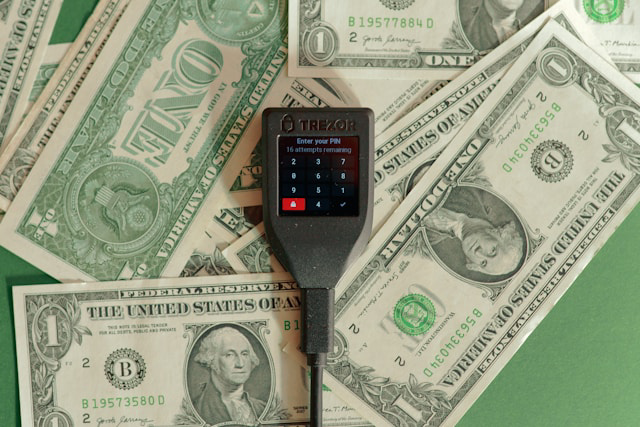
Best for: Users who prioritize security and want to sign Bitcoin transactions using a dedicated hardware device that stores private keys offline.
What you can send: Hardware wallets—such as Ledger, Trezor, and Coldcard—support on-chain Bitcoin transactions exclusively; Lightning Network sends require a companion software wallet that coordinates with the hardware device for signing.
All sends originate from the companion app or desktop client, but the critical signing step happens on the hardware device itself. The device screen displays the recipient address and send amount; you must physically verify these details on the device before approving, because this is the only point in the workflow where malware on your computer cannot alter the transaction undetected.
Step-by-step:
- Connect your hardware wallet to your computer or mobile device using the USB cable or Bluetooth pairing.
- Unlock the hardware device by entering your PIN on the device's physical buttons or touchscreen.
- Open the companion app (Ledger Live, Trezor Suite, Electrum, etc.) and confirm the app detects your hardware wallet.
- Navigate to the "Send" or "Withdraw" section within the companion app.
- Select Bitcoin (BTC) as the asset—if your hardware wallet manages multiple coins, choose BTC from the account list.
- Paste or scan the recipient address—enter the on-chain Bitcoin address in the recipient field; the app will validate the format.
- Enter the send amount in BTC or fiat equivalent; the app calculates the inverse.
- Choose the transaction fee tier—select "Slow," "Normal," or "Fast" based on your urgency; higher fees accelerate confirmation.
- Review the transaction summary in the companion app—check recipient address, amount, and fee.
- Approve the transaction on the companion app—this triggers a signing request sent to your hardware wallet.
- Verify recipient address and amount on the hardware device screen—the device displays the full recipient address and send amount; compare character-by-character against the address you intended to send to.
- Confirm the transaction on the hardware device by pressing the physical "Approve" or "Confirm" button; this signs the transaction with your private key.
- Broadcast the signed transaction—the companion app broadcasts the signed transaction to the Bitcoin Network; you will receive a TXID immediately.
Proof of Payment by Platform Type
After you tap "Send," capturing proof depends on the transfer rail and platform:
- On-chain transactions produce a transaction ID (TXID)—a 64-character hexadecimal hash that uniquely identifies your transaction on the Bitcoin blockchain. Copy the TXID from your wallet's transaction history, paste it into a block explorer (Blockchair, Mempool.space, Blockchain.com), and bookmark the resulting URL as proof. The blockchain record is permanent and publicly verifiable.
- Lightning payments produce a payment hash and optionally a preimage—these identifiers prove you paid a specific invoice. Most Lightning wallets display the payment hash in the transaction details; copy it and save it as proof. Unlike on-chain TXIDs, Lightning payment hashes are not queryable on public block explorers; proof is stored locally in your wallet or shared with the recipient.
- Internal platform transfers generate a platform transaction ID or receipt number—this identifier exists only in the platform's database, not on the blockchain. Navigate to your transaction history, locate the transfer, and download or screenshot the receipt. If you need to dispute the transfer, this platform-issued receipt is your proof, not a blockchain record.
Fees, Limits, and Timing

Minimum Amount
Protocol-level technical constraints and platform-imposed operational floors for sending Bitcoin are not the same. Protocol minimums exist because the Bitcoin Network enforces what is called a dust limit — the smallest economically rational output a transaction can create. Dust refers to an amount so small that spending it would cost more in transaction fees than the value itself. For standard outputs, this threshold sits around 546 satoshis (0.00000546 BTC), though the exact figure depends on output type. Wallet software typically enforces this limit to prevent you from creating unspendable outputs.
Platform-imposed minimums operate independently from protocol constraints. PayPal, for example, enforces a 0.001 BTC minimum for external Bitcoin withdrawals but allows internal transfers between PayPal accounts starting at $0.01. Custodial wallets and exchanges set these floors based on operational cost models rather than technical necessity.
Lightning Network imposes its own minimum logic. Lightning invoice minimums typically range from 1 satoshi to platform-specific floors, but practical routing constraints often make very small payments (under 1,000 sats) fail due to insufficient liquidity in payment channels. The minimums here are not protocol-enforced in the same way dust limits are; they reflect the economics of liquidity provision and routing fee structures.
Maximum Amount
Upper limits manifest as per-transaction caps, rolling time-window limits, and dynamic risk-triggered restrictions, and are all found on platforms rather than in protocol. Per-transaction maximums define the largest single send a platform or wallet will process in one operation. Rolling limits — daily, weekly, or monthly — aggregate all sends within that period and block further transactions once the threshold is breached. Risk or compliance-triggered limits activate when platform algorithms flag unusual behavior patterns, destination types, or account characteristics.
Internal transfers between accounts on the same platform usually bypass or significantly relax the limits applied to external withdrawals. When you approach a limit, platforms rarely allow partial sends that would exceed the cap. The transaction either completes within the allowed range or gets rejected entirely.
Fee Estimation
Wallet fee estimation algorithms pull real-time data from two primary sources: current mempool conditions, dependent on the network conditions, and your target confirmation time preference, set manually. Wallets analyze the fee rates attached to pending transactions to predict what rate will likely secure a spot in the next block or next few blocks. Fee estimation also factors in transaction weight or virtual bytes (vbytes), which measure how much block space your transaction consumes. More inputs and outputs increase vbytes, which increases the total fee required to hit your target fee rate.
Speed is probabilistic on Bitcoin's blockchain, not a guaranteed timer. A "10-minute confirmation" estimate reflects the statistical average block interval, but actual block discovery times vary. During periods of network congestion, even high-priority transactions can face delays if fee competition intensifies faster than your wallet's estimate anticipated, and vice versa.
Mempool

The mempool functions as a staging area where unconfirmed transactions wait for miners to package them into the next block. Every Bitcoin node maintains its own mempool, though mempools converge toward similar contents as transactions propagate across the network. When more transactions compete for the same block space than miners can process in ten minutes, congestion builds. Congestion manifests as rising fee rates, longer confirmation waits for lower-fee transactions, and increased use of fee-replacement mechanisms like RBF and CPFP.
How do transactions compete? Miners prioritize transactions by fee rate (sat/vB), not absolute fee or timestamp, so a transaction paying 100 sat/vB will be selected before a transaction paying 50 sat/vB, even if the latter was broadcast earlier or carries a higher total fee in BTC terms. This auction-like dynamic means that during high-demand windows, previously "safe" fee rates can become insufficient as new higher-paying transactions flood in.
Block Confirmations
Block confirmations is a common metric that measures how many blocks have been added to the blockchain after the block containing your transaction. Each new block increases the confirmation count by one and exponentially reduces the probability that your transaction could be reversed through a chain reorganization.
Practical confirmation thresholds by use case:
- 0-conf (zero confirmations): Transaction broadcast but not yet in a block; carries meaningful double-spend risk and is generally not accepted for high-value or irreversible goods
- 1 confirmation: Typical threshold for low-value transactions and most merchant point-of-sale systems; sufficient for everyday trust assumptions
- 3 confirmations: Common exchange deposit requirement; balances risk against user wait time
- 6 confirmations: Traditional high-assurance threshold; considered final settlement by major platforms and for large-value transfers
Exchange and merchant policies tie directly to confirmation counts because each confirmation represents added security against payment reversal. A transaction marked "confirmed" on a block explorer does not mean "final" in the recipient's system until their internal confirmation threshold is met. This is why a deposit can show one confirmation on-chain but still appear as "processing" on an exchange dashboard waiting for three or six.
Lightning Settlement
Lightning settlement refers to the finality moment when a Lightning Network payment is considered complete — specifically, when the Hash Time-Locked Contract (HTLC) resolves and the payment either succeeds or fails. This is distinct from on-chain confirmation because Lightning payments occur off-chain between nodes via payment channels. When a Lightning send succeeds, the user experiences near-instant settlement: the payment routes through intermediary nodes, HTLCs resolve in seconds, and the recipient's wallet updates immediately.
Reasons a Lightning payment can fail:
- Insufficient liquidity: No route exists with enough capacity to forward your payment amount
- Routing failure: Intermediate nodes are offline, or pathfinding algorithms cannot discover a viable route
- Invoice expiry: Lightning invoices expire after a set time (often 10–60 minutes); payments attempted after expiry are rejected
- Incorrect amount: The payment does not match the invoice amount exactly (Lightning is amount-specific)
Opening and closing payment channels require on-chain Bitcoin transactions. A channel opening broadcasts a funding transaction that locks BTC into a 2-of-2 multisig address. A channel close (cooperative or force-close) broadcasts a settlement transaction that returns the final balances to each party on-chain. Once channels are open, payments between parties route off-chain with no blockchain footprint — until you close the channel.
Risks and Key Considerations

Sending Bitcoin carries different risk categories than traditional payments — because once a transaction is broadcast to the network, no authority can reverse it, and because the responsibility for verifying destination accuracy sits entirely with you before you press send.
Irreversible Transfers
One of the first things to know about Bitcoin transactions is they cannot be undone. No support ticket, no chargeback process, and no "undo" button exists once the network has confirmed your transaction. A lot can go wrong: you enter an incorrect address character, you select the wrong recipient from a saved contact list, or you choose an incompatible network rail. Most sending errors occur during address entry or clipboard paste operations, where a single incorrect character redirects funds to an address that may not even exist — or worse, to an address controlled by someone else.
Your pre-send checklist should verify four decision points at the review screen. First, confirm the network rail you selected matches what the recipient expects — on-chain Bitcoin, Lightning Network invoice, or an internal platform transfer. Second, confirm the address or invoice string displayed in the send preview exactly matches the one the recipient provided, character-for-character. Third, confirm the amount unit being sent matches your intention: some wallets display amounts in BTC, others in satoshis, and some toggle between BTC and fiat-equivalent views. Fourth, confirm whether the recipient requires any additional data field — such as a memo, destination tag, or invoice description — and whether that field was populated correctly. These validations do not replace address verification procedures covered elsewhere; they target the specific risk that arises when the transaction becomes irreversible the moment you authorize it.
Phishing and Impersonation
Phishing attacks succeed by tricking you into sending Bitcoin to an attacker who impersonates a legitimate recipient or service. You might receive a message claiming to be from a wallet provider, exchange support team, or known contact, asking you to send funds, verify your account, or "unlock" a withdrawal. It’s not just fake support channels: direct messages on social media, emails with logos that look official, or community forum accounts with names similar to real support handles; or paid ads and manipulated search results, or spoofed domains. However, these are the most common, and even a minute-long pause and check can slow you down enough to notice the scam.
When you receive an unexpected request, never click embedded links or reply directly. Instead, navigate to the wallet or exchange app by typing the URL manually or using your saved bookmark. Once on the legitimate platform, verify the request appears in your official inbox or notifications panel. If the message claims to be from a person you know, verify their identity through an out-of-band channel — call them, text them on a number you already have saved, or message them on a separate platform where you have an established conversation history. Apply one explicit rule for avoiding support scams: never share your seed phrase, never share 2FA codes, and never install remote-access software at anyone's request. Legitimate support teams will never ask for these.
Clipboard Malware

Clipboard hijackers are a class of malware that monitor your device's clipboard and replace copied Bitcoin addresses with addresses controlled by the attacker. Clipboard malware runs silently in the background, waiting for a string that matches a Bitcoin address format. The moment you paste, the malware substitutes a different address, often one that looks similar at a glance but belongs to the attacker.
The attack vector is particularly dangerous because the visual confirmation step many users perform (glancing at the pasted address) fails if they only check the first few characters or fail to re-check after switching apps.
Measures described above can help: compare the first 6 characters and the last 6 characters of the pasted address against the original address. If either segment does not match exactly, do not proceed. Re-check the address again after switching apps, switching tabs, or locking and unlocking your device — these are the moments when clipboard hijackers often replace content a second time to evade initial verification. If you are scanning a QR code instead of pasting an address, perform one additional check: after the wallet displays the decoded address or invoice preview, still verify the displayed string before you confirm the send. QR codes can be replaced by screen-overlay malware or by physical tampering (stickers placed over legitimate QR codes at payment terminals).
2FA and Device Security
Two-factor authentication (2FA) and device hardening protect different parts of the sending process. For custodial accounts, 2FA protects account login and withdrawal authorization: even if an attacker obtains your password, they cannot log in or approve a withdrawal without the second factor. For non-custodial wallets, 2FA does not exist in the traditional sense because there is no account to log into — access is controlled entirely by possession of the seed phrase or device unlock credentials.
2FA does not protect against on-device compromise (malware that captures your actions after you have already authenticated) and approved withdrawals (once you authorize a send, 2FA does not prevent the blockchain from executing it).
First, keep your operating system and all apps updated to the latest versions; security patches close vulnerabilities that malware exploits. Second, enable a strong screen lock (biometric, six-digit PIN minimum, or passphrase) and configure it to activate after short idle periods. Third, enable biometric or PIN-based authentication specifically within your wallet or exchange app if the option is available. Fourth, disable accessibility permissions for any app that does not explicitly need them; accessibility APIs are a common vector for screen-overlay attacks and clipboard monitoring.
Apply one travel and borrowed-device warning: never send Bitcoin from a device you do not personally control (public computer, borrowed phone, hotel business center) and never log into custodial accounts on public Wi-Fi, at the very least without a secure VPN.
Compliance Holds
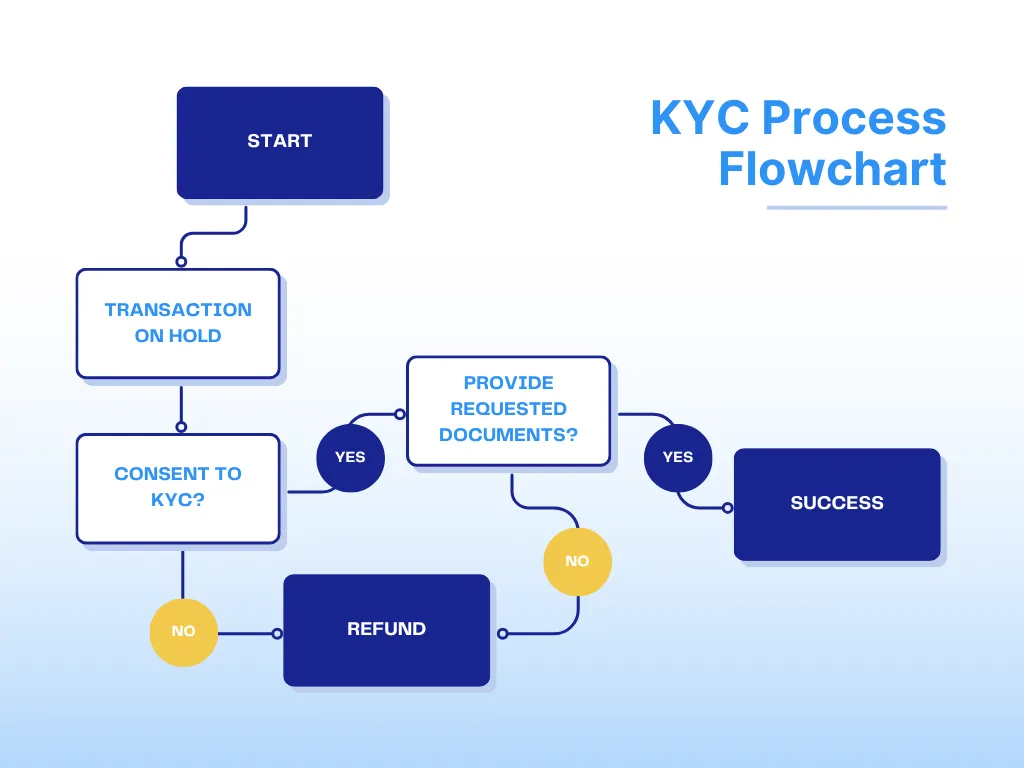
Transfers on centralized platforms can be delayed or blocked even after you initiate them, not because of blockchain congestion but because of platform-level compliance and risk controls. Platforms apply identity verification checks (KYC systems that flag incomplete or inconsistent information), suspicious activity review (large or unusual transactions flagged by automated risk models), limit thresholds (transaction limits that reset hourly, daily, or weekly), and travel rule and AML checks (regulations that require platforms to collect and verify recipient information for transfers above certain amounts). These holds are a platform risk, not a Bitcoin network risk — the blockchain itself has no concept of identity verification or compliance review.
To unblock a compliance hold, check in-app notifications or email for specific instructions from the platform, complete identity verification if prompted (uploading documents, confirming personal information), confirm recipient information if the platform requests additional details about the destination, and understand that some holds are time-bound (automated review periods that resolve within 24-72 hours without action required). If a hold persists beyond the stated review period and you have completed all requested steps, contact platform support directly through an official channel.
Conclusion
Hopefully, the guide has shown that despite all the fundamental differences between traditional payment rails and Bitcoin and cryptocurrencies, from the user’s perspective, transactions are not that unlike what you are used to. Nevertheless, things that are markedly different require your full attention and education, since they can derail the process pretty dramatically. We hope that this guide succeeded in equipping you with this knowledge, too.
More guides and articles on Bitcoin, altcoins, and trading are waiting for you in our blog. Follow our social media to stay tuned for updates: Twitter, Facebook, and Telegram.
Frequently Asked Questions
How long does it take to send Bitcoin?
Bitcoin transactions typically confirm within 10 to 60 minutes, though this window reflects only first-confirmation timing — not the full journey from broadcast to finality confidence. Wallet interfaces frequently display "sent" status the moment your transaction enters the mempool, well before any miner has included it in a block. This creates a disconnect between what users see and what has actually settled on-chain.
How many Bitcoin confirmations are needed?
One confirmation proves your transaction made it into a valid block; six confirmations are widely considered irreversible under normal network conditions. The specific threshold you need depends entirely on the value transferred and the recipient's risk tolerance, not on a universal Bitcoin Network rule. Exchanges and payment processors set their own confirmation requirements as internal compliance policies, independent of what the sender considers sufficient.
Can I cancel a Bitcoin transaction?
Bitcoin transactions transition through three states that define whether cancellation remains possible: not yet broadcast (cancelable within your wallet app), broadcast but unconfirmed (cannot be truly canceled, only replaced if your wallet supports Replace-By-Fee), and confirmed (permanently irreversible). The moment your transaction enters the mempool, you lose direct cancellation authority — the Bitcoin Network has no "undo" function because decentralization means no central authority can reverse transactions on your behalf.
What happens if I send Bitcoin to the wrong address?
Only the recipient's private keys can spend the BTC, meaning if you send funds to an address you don't control, those Bitcoins will be effectively lost unless the legitimate key-holder chooses to return them. This can happen if the address is cryptographically valid but belongs to an unknown third party; if the address does not meet the validity criteria, the transaction won’t broadcast.
Why is my Bitcoin transaction pending?
Transaction pending status originates from one of four root causes, each requiring a different diagnostic approach: insufficient fee rate relative to current mempool congestion (your transaction sits in the queue waiting for space in a block), wallet displaying "pending" before the transaction actually broadcast to the network (local UI issue, not a blockchain issue), node or wallet synchronization delays (your software hasn't caught up to the current blockchain state), or platform compliance holds if you're using a custodial service (internal review processes unrelated to the Bitcoin Network).
Can I send Bitcoin without paying a fee?
Zero-fee Bitcoin transactions are unrealistic on the public mempool — they will either confirm after extreme delays (days or weeks) or expire from the mempool entirely without ever settling. The Bitcoin Network operates on economic incentives: miners receive block rewards plus transaction fees, so they rationally select higher-paying transactions first when block space is limited. Zero-fee transactions only confirm during rare periods of sustained empty blocks when miners include them as filler, a condition that hasn't existed consistently since Bitcoin's early years.
Can I send Bitcoin to an email or phone number?
The Bitcoin Network sends to addresses (32-character alphanumeric strings for on-chain) or Lightning invoices (encoded payment requests), not to email addresses or phone numbers — those identifiers have no meaning in Bitcoin's protocol design. Email or phone-based Bitcoin sending is only possible through custodial applications that maintain internal user directories, mapping your contact information to an associated Bitcoin address on their platform. What appears to be "sending to an email" is actually the platform looking up which wallet address they've assigned to that email, then either moving BTC between internal ledgers (off-chain, instant, no fees) or initiating an on-chain transaction to the address registered under that identifier.
What is the difference between Bitcoin and Lightning?
Bitcoin itself and Lightning represent two settlement layers with fundamentally different trade-offs: Bitcoin operates as the base-layer blockchain where every transaction is recorded permanently and validated by the entire network, while Lightning Network operates as an off-chain layer-2 protocol where payments route through pre-funded channels without touching the blockchain until participants close their channels.