
How to Read Blockchain Transactions? Beginner’s Guide to Block Explorers

Key Takeaways
- 🔍 Locate your transaction hash: Copy the transaction hash directly from your wallet and paste it into the explorer search bar — this is your unique, immutable receipt on-chain.
- 🔍 Read the core fields: Check sender and recipient wallet addresses, transferred amount, and gas fee to confirm the transaction executed exactly as intended.
- 🔍 Understand UTXO vs. account models: Bitcoin tracks unspent outputs; Ethereum tracks account balances — knowing which model applies tells you whether "change" outputs are normal or suspicious.
- 🔍 Verify finality: Confirm status + confirmation count before treating funds as received. 1 confirmation means the transaction has been included in a block; additional confirmations reduce reorg risk.
Contents
- 1. Blockchain Transactions Explained
- 2. Block Explorers: What They Are and How They Work
- 3. Key Transaction Identifiers: Hash, Block, Address
- 4. What You'll See in Block Explorers
- 5. Transaction Structure by Model: UTXO vs Account
- 6. How to Look Up a Transaction in a Block Explorer
- 7. Smart Contract Interactions: Reading Contract Calls
- 8. Privacy, Security, and Key Considerations
- 9. Troubleshooting Common Transaction Issues
- 10. Conclusion
Even if you are a total beginner in crypto, you are very likely to know the definition: blockchain transactions are permanent, publicly verifiable records stored on a distributed ledger. In practice, it means anyone with the right identifier can look them up independently, without asking a bank or intermediary for confirmation.
However, with the long strings of seemingly random characters, each a different thing, the task can seem daunting. By the time you finish reading, you will be able to locate a transaction using a TXID or wallet address, interpret the core fields a block explorer displays, and spot common warning signs that something may be wrong. What this guide does not do: it does not constitute financial advice, and finding an address on-chain does not prove who owns it or what their intent was.
After reading this guide, you will be able to:
- Verify whether a transaction was confirmed and how many confirmations it has received
- Interpret key fields like the transaction hash, sender/receiver addresses, fees, and block height
- Detect red flags such as suspicious contract approvals, unusual fee spikes, or unfamiliar token transfers

This guide is written for beginners exploring their first transaction history, support and operations teams confirming payment status, and analysts auditing on-chain activity. Basic familiarity with sending or receiving crypto from a wallet is assumed (you can refer to our guide on how to pay with crypto to catch up). The examples used later in this guide focus on Bitcoin and Ethereum, the two networks most readers will encounter first.
Now, let’s turn the mystery page full of hashes into something you can read with confidence and peace of mind.
Blockchain Transactions Explained
Some users tend to trip from the get-go when they get confused about cryptocurrency being completely virtual. It’s not very complex: a blockchain transaction is a cryptographically signed message that tells everyone else that value or data has moved from one wallet address to another.
Transaction Lifecycle
These messages are then broadcast across a decentralized network, checked and approved by nodes, grouped into a block, and then finalized through a chain of subsequent confirmations. Here is what actually happens, step by step, and what you can do at each stage.
- Created and signed in your wallet. You enter the recipient's wallet address, amount, and fee parameters. Your wallet software makes the raw transaction with these inputs and signs it locally using your private key. The transaction exists only on your device.
- Broadcast to nodes. Then, the signed transaction is pushed online to the peer-to-peer network. Your wallet or provider communicates with one or more nodes, which relay the message further. This is the moment the blockchain "hears" about your intent.
- Visible in the mempool. Nodes that accept the transaction keep it in a waiting area called the mempool (short for memory pool). At this stage, you can already open a blockchain explorer, paste your transaction hash, and see the transaction listed as unconfirmed. This is your first real verification checkpoint.
- Picked up by a miner or validator. A miner on proof-of-work chains or a validator on proof-of-stake chains selects transactions from the mempool, typically prioritizing those with higher fees or tips. Your transaction moves from "waiting" to "processing."
- Included in a block at height N. The block is proposed, verified by the network, and appended to the blockchain. Your transaction now has a block number, a timestamp, and a confirmed hash. The ledger has been updated.
- Subsequent confirmations accumulate. Every new block added on top of the one containing your transaction counts as an additional confirmation, each additional confirmation reduces the risk of a chain reorganization reversing it.
- (Optional) Replaced or dropped. If the fee was too low or the mempool grew congested, the transaction may be dropped after a timeout — or, on supported chains, replaced by a new transaction with a higher fee using the same nonce.
Practical tip: After sending, copy the transaction ID (called hash) from your wallet history when it becomes available. Searching that ID in a blockchain explorer lets you watch these stage transitions happen in real time — a habit that quickly builds confidence in reading the chain.

What determines how fast a transaction moves? Speed is not random. These concrete factors control where your transaction sits in the queue:
- Fee or gas price and limits. Block producers prioritize higher-paying transactions. A low fee in a busy network means a longer wait — or no inclusion at all. Gas limits on account-based chains define how much computation a transaction is permitted to use.
- Network congestion. When many transactions compete for limited block space, the mempool backlog grows and effective minimum fees spike. Timing your transaction during low-activity periods can save both time and cost.
- Wallet or provider broadcasting reliability. Not all wallets connect to multiple nodes. A wallet that broadcasts to only one node risks slow propagation if that node is slow or temporarily disconnected.
- Nonce gaps on account-based chains. If a prior transaction from your address is stuck or missing, later transactions with higher nonce values cannot be processed until the gap is resolved.
- UTXO selection and FeeRate on UTXO-based chains. How your wallet selects unspent outputs affects the transaction size in bytes, which directly influences the FeeRate you pay per byte of data included in a block.
Transaction Status
Most block explorers display a status label next to every transaction. These labels look simple, but they carry specific technical meanings and even suggest specific next actions.
| Status Label | What It Means | What You Should Do Next |
|---|---|---|
| Pending / Unconfirmed | The transaction is in the mempool, awaiting inclusion in a block. | Check the explorer for mempool position; wait, or consider fee-bumping if urgency is high. |
| Confirmed / Success | The transaction has been included in at least one block. One confirmation means it has been added to a block; wait for more confirmations if the value at risk is significant, as additional confirmations reduce reorg risk. | Verify the recipient address and amount on the explorer; assess whether you need more confirmations for your use case. |
| Failed / Reverted | The transaction reached the network and was processed, but execution failed — common in smart contract interactions where a condition was not met. The fee is still consumed. | Read the failure reason in the explorer's logs; do not resend without diagnosing the cause. |
| Dropped / Not Found | The transaction was never confirmed and is no longer visible in the mempool. It may have been evicted due to low fees or timeout. | Rebroadcast with a higher fee, or check whether you are searching the correct network. |
| Replaced | A newer transaction with the same nonce (account-based chains) or conflicting inputs (UTXO chains) was confirmed instead. | Confirm which transaction went through; the replaced one is permanently void. |
Block Explorers: What They Are and How They Work
A blockchain explorer indexes on-chain data and presents it as a searchable interface. Anyone can look up wallet addresses, transaction hashes, and block details without running a full node. Explorers parse raw ledger entries from the blockchain's consensus layer and organize them into a readable, navigable database, which becomes your window into every confirmed event on a public chain.
Explorer Data Sources

So, essentially, for a beginner, there is all they need to know to start using a block explorer and figure it out along the way. However, if you are more curious about the ins and outs, let’s dive in.
Knowing where explorer data originates helps you interpret what you see and cannot see. Most blockchain explorers follow a consistent pipeline: Node/RPC ingestion → Mempool view → Block indexing → Database → UI/API
At the node/RPC layer, the explorer connects to one or more full nodes that maintain a live copy of the blockchain. Data received here is the raw, authoritative ledger. However, node configurations vary — a node that prunes historical data will limit how far back an explorer can index.
The mempool layer captures unconfirmed transactions broadcast to the network. Mempool data is less readily available than data on confirmed transactions: the former disappears once a transaction becomes the latter or is dropped, and not all explorers surface it equally.
During block indexing, the explorer parses each block's transactions and extracts fields: sender, recipient, value, gas used, block height, and timestamp. Some fields are computed rather than directly sourced from the block. Internal transactions, also called traces, are not stored in blocks at all; they are re-executed by the node and therefore may be absent on explorers that do not run trace-enabled nodes.
The resulting structured data is stored in the explorer's database, which the UI and API query on your behalf. Latency at any stage can produce a temporarily incomplete picture.
With all that in mind, explorers cannot know any real-world or off-chain details related to the transaction: who made it, who owns the addresses, why were the transactions made, and so on. Internal transfers between accounts on centralized exchanges likewise never touch a public blockchain. Last but not least, some transactions with privacy coins or with privacy-preserving features like shielded transactions are normally not publicly viewable.
Which Explorer to Trust?
Many major networks are not limited to a single resource, and it is not just a matter of personal preference. The wrong tool can return incomplete data, display misleading token balances, or even expose you to phishing attempts dressed up as legitimate interfaces. Here is a decision checklist to guide your choice:
1. Network specificity (mainnet vs. testnet)
Confirm that the explorer defaults to the correct network and version: mainnet is what is in production, testnet is a testing environment. A mainnet transaction hash queried on a testnet explorer will return nothing — or worse, a false negative. Always verify the network toggle before drawing conclusions.
2. Multi-chain vs. single-chain scope
Multi-chain explorers like blockchain.com cover several networks in one interface, which is convenient for cross-chain activity. Single-chain explorers, however, typically offer deeper indexing and more granular data for their native network.
3. Token and NFT support
Check whether the UI surfaces ERC-20/BEP-20 token transfers and NFT events alongside native coin movements. An explorer that only displays ETH transfers will silently omit token activity on the same wallet address.

4. Contract-read features
Look for decoded inputs and event logs under the "Contract" tab. Raw hex calldata is unreadable; a good explorer decodes it into human-readable function names and parameters — critical for verifying DeFi interactions.
5. Address labeling and metadata
Some explorers tag known exchange wallets, protocol contracts, and flagged addresses. This transforms a raw chain view into a meaningful one, especially when tracing fund flows.
6. API availability and rate limits
If you plan to automate lookups or build dashboards, check the explorer's API tier. Free plans often cap at 5 requests per second — sufficient for manual use, limiting for bulk analysis.
7. Uptime and latency
An explorer that lags behind the current block height by dozens of blocks is effectively showing you stale data. Cross-check the "Latest Block" timestamp against current consensus when precision matters.
8. Ad and phishing risk cues
Legitimate explorers do not inject pop-ups urging wallet connections. Excessive advertising or unsolicited prompts to "verify" your wallet are strong red flags.
9. Open-source or audited backend
Transparent infrastructure signals accountability. A closed, unaudited indexer is a single point of trust you cannot independently verify.
When two explorers disagree:
- Step 1: Confirm both explorers are set to the same network (mainnet vs. testnet, or the correct chain ID for EVM networks).
- Step 2: Compare the latest indexed block height on each explorer. A node lag of even 2–3 blocks can cause a pending transaction to appear confirmed on one and absent on another.
- Step 3: Verify the exact transaction hash or token contract address character by character. A single mismatched character returns entirely different data.
- Step 4: Check whether one explorer handles chain reorganizations differently — a reorg can cause a block to disappear from one explorer's index before the other has updated.
- Step 5: If balances differ for a token, confirm both explorers reference the same verified contract address, not a similarly named duplicate.
Key Transaction Identifiers: Hash, Block, Address
Every blockchain explorer search begins with one of three lookup keys: a transaction hash, a block number, or a wallet address.
Transaction Hash
A transaction hash (sometimes referred to TXID) is the unique fingerprint assigned to one specific on-chain transaction. It is generated the moment a transaction is broadcast to the network. What you do with it is copy and paste it to look up information about that specific transaction.
It can also be referred to as TXID but some confusion may arise when using centralized services such as exchanges that label their internal transfers as TXID or use this as a separate field to identify transactions in their own system.
Most software and hardware wallets display the hash on the confirmation or activity screen immediately after sending. Centralized exchanges typically list TXIDs under withdrawal history once the transaction is broadcast. You can also find the hash as a path segment in the explorer page URL.
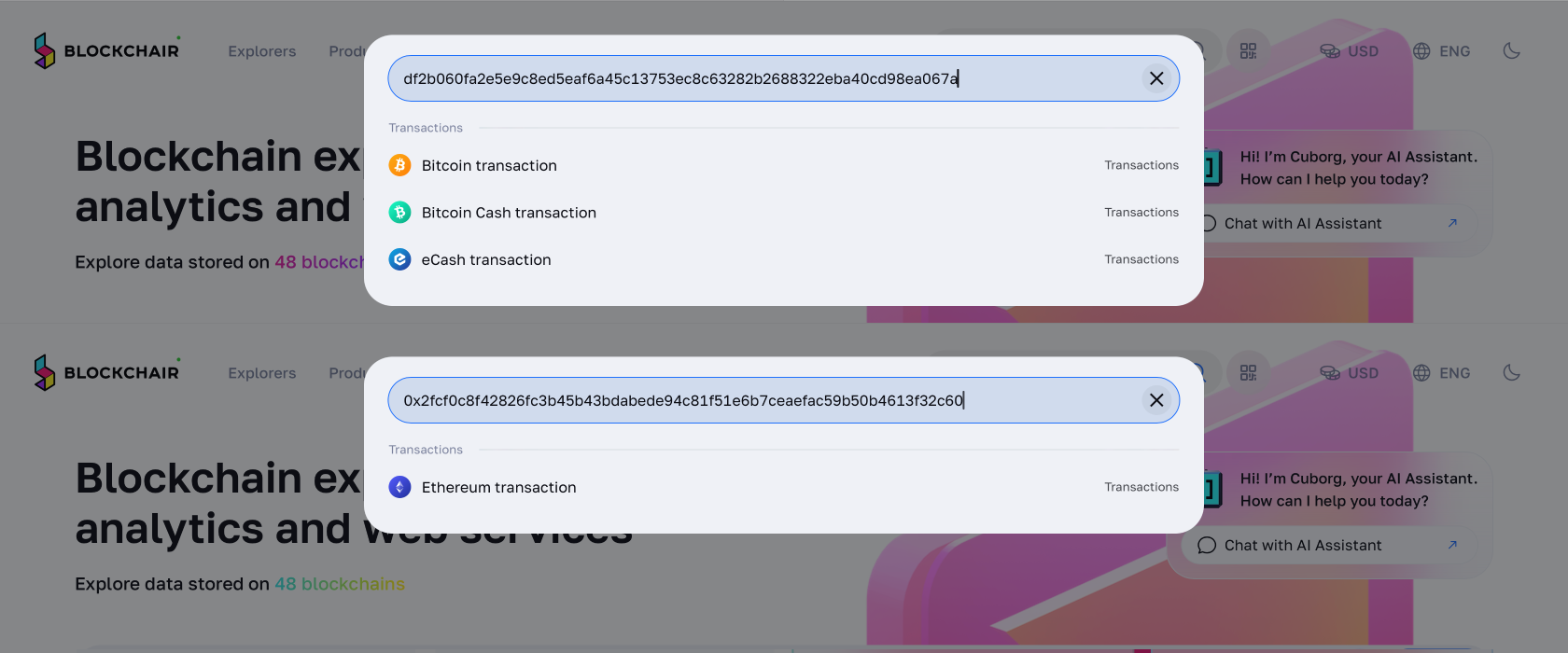
Hashes are chain-specific: a Bitcoin hash searched on an Ethereum explorer will return nothing. However, blockchains that use the same hashing algorithms will use similar formats, so looking up a Bitcoin Cash transaction can lead you to a completely different transaction on the Bitcoin chain. Always confirm you are on the correct network's blockchain explorer before searching.
One more tip: since the hashes are unique identifiers, a replaced transaction generates an entirely new hash.
Block Number
A block number — also called block height on most chains — is a sequential index that marks a block's position in the chain, starting from zero at the genesis block and incrementing by one with every new block added. In a blockchain explorer, entering a block number takes you directly to that block's page, where you can see every transaction included in it.
Often but not always, you can see how many confirmations your transaction has on the transaction’s page. What you almost always are guaranteed to see is the block your transaction was included in; you can also check the number of confirmations by comparing the current block height with its number.
Higher confirmations generally increase confidence that a transaction is permanent, because reversing it would require rewriting not just one block but every block stacked on top.
At least, most of the time: block's position in the chain is not always permanent. During a chain reorganization (reorg), a transaction's block assignment can change if a competing chain branch becomes the longest valid chain. Blockchain explorers may temporarily show "orphaned" or "reorged" status for affected transactions, and confirmation counts can drop or reset. This is rare on major networks but worth understanding if you ever see unexpected status changes in your explorer.
Wallet Address
A blockchain wallet address is a public identifier that represents a destination or origin on the blockchain. Emphasis on address, not wallet: since there are no physical units to hold (like a wallet would do), they are better understood as destinations. Unlike a transaction hash, which pulls up a single event, an address lookup gives you a full picture of everything that has ever interacted with that address on-chain.
What can you do with an address lookup? View the complete inbound and outbound transaction history; see current token and coin balances held at that address; inspect contract interactions, such as approvals or DeFi protocol calls (where applicable); and check explorer-assigned labels or tags, such as exchange hot wallets or flagged addresses, if the blockchain explorer provides them.
Some chains use mixed-case checksums (Ethereum's EIP-55, for example) to distinguish valid addresses from typos, so case sensitivity matters on those networks. Besides, one person or entity can control many addresses simultaneously. An address lookup shows the activity of that address, not the complete financial picture of any individual behind it.
What You'll See in Block Explorers
Block explorers display core transaction fields to verify who sent what, when, and at what cost. These fields — pulled directly from the ledger — give you a structured view of every recorded event on the network, from the wallet address that initiated a transfer to the exact block where it settled.
Sender and Recipient (From/To)

These two fields seem straightforward until you run into a smart contract interaction. The "From" field identifies the initiator — the wallet address that signed and broadcast the transaction. The "To" field identifies the immediate destination, which is often a contract address rather than a human recipient.
This is where misreads happen most frequently. A user sends a token via a decentralized exchange or a bridge, checks the blockchain explorer, and sees an unfamiliar contract address in the "To" field. They might assume something went wrong because it does not match the address they intended to send funds to. In reality, the contract is an intermediary — the ultimate beneficiary is recorded elsewhere.
To find the actual recipient in this scenario, scroll past the main transaction summary and check the Token Transfers or Internal Transactions panel. Explorers like Etherscan surface these as separate event logs beneath the primary fields. The wallet address that ultimately received the assets will appear there, not in the top-level "To" field. Cross-checking both panels together gives you the full picture.
Amount and Token Transfers
This is one of the most consistently misunderstood areas in a transaction record. The Value or Amount field at the top of a transaction shows only the native asset moved — ETH on Ethereum, BNB on BNB Chain, SOL on Solana. If you send an ERC-20 token like USDC or LINK, the native value field will often display zero, or a tiny amount representing the contract call cost.
To confirm tokens have moved, you need to check the Token Transfers panel separately. This log reflects what the contract did: which ERC-20 (or equivalent) token moved, from which address, to which address, and in what quantity.
In short, for native coin transfers you’d want to check “Value” or “ETH Transferred”, for tokens, look for “Token Transfers” or “ERC-20” logs below the main summary.
Fees/Gas
Transaction fees are where the mechanics of the network become most visible. This is especially true for gas fees, which are not simply tips for miners but compensation for the virtual machine work. In this case, you will see a breakdown:
- Gas Limit: The maximum amount of computational work the sender authorized for this transaction.
- Gas Used: The actual amount consumed during execution.
- Gas Price (or Base Fee + Priority Fee on EIP-1559 chains): The cost per unit of gas, typically denominated in Gwei on Ethereum-based networks.
Total Fee becomes Gas Used multiplied by Gas Price.
A transaction can fail and still incur a gas fee — this surprises many users. When a contract call runs out of gas mid-execution, the network still consumed real computational resources up to that point. Miners or validators get compensated for that work regardless of outcome. The result is a failed transaction with a non-zero fee deducted from your wallet.
How do you spot this in a blockchain explorer? Look at the ratio of Gas Used to Gas Limit. If Gas Used equals or nearly equals Gas Limit, the transaction ran out of gas. The transaction hash will also display a "Failed" or "Reverted" status label, but the fee line will confirm why.
Timestamp (Block Time, Age)
The timestamp shown in a blockchain explorer reflects block time — the moment the block containing your transaction was validated and added to the chain, not the moment you clicked "Send" in your wallet. Network congestion, mempool delays, or a low gas fee can push your transaction into a later block by minutes or even hours.
Normally, this nuance can be overlooked, unless you have a reorganization on your hands. When a reorg occurs, a block that was briefly part of the chain gets replaced by an alternative chain of greater cumulative work. Any transaction in that displaced block gets re-entered into the mempool. Its final confirmed timestamp may differ from the first time it appeared to be confirmed.
Because of this, timestamp alone is not a reliable ordering tool. Always read the block number (or block height) alongside the timestamp. Block height is a sequential counter and provides a definitive ordering of events on the ledger. If two transactions show timestamps one second apart but belong to different block heights, the lower block height happened first.
Nonce (Transaction Count)
On account-model chains like Ethereum, every transaction sent from a wallet address carries a nonce — an incrementing integer that starts at zero and increases by one with each outgoing transaction. It enforces ordering: the network will not process transaction #5 until #4 is confirmed. This is how the ledger prevents replay attacks and maintains consistency.
In other words, nonces are tied to the sending address specifically. Each wallet address has its own nonce sequence, independent of others.
To cancel or speed up a pending transaction, you can resubmit a new transaction with the same nonce but a higher gas fee. The network accepts the higher-fee version and discards the original.
Block/Network Confirmations
Confirmations measure how many blocks have been added on top of the block containing your transaction. One confirmation means the transaction has been added to a block. Each subsequent block added on top raises that count by one, and with it, the computational cost of reversing the transaction increases.
In Bitcoin and some older networks, block inclusion is probabilistic, meaning that the probability of reversal decreases with each block or even more simply, there is no universal "safe" number. Bitcoin exchanges might require 3, 6, or even more confirmations before crediting a deposit. Other chains finalize faster by design or introduce deterministic finality. What counts as settled depends on the chain's block time, its consensus mechanism, and the policy of whoever is receiving the funds. Always verify the specific requirement for the platform or counterparty you are transacting with.
Transaction Structure by Model: UTXO vs Account
So far, it has been mentioned in passing but blockchain explorers for Bitcoin and Ethereum show transactions in different structures. To understand what is going on on an explorer page, you will need to know the difference between two main types of these structures: UTXO (Unspent Transaction Output) and account models.
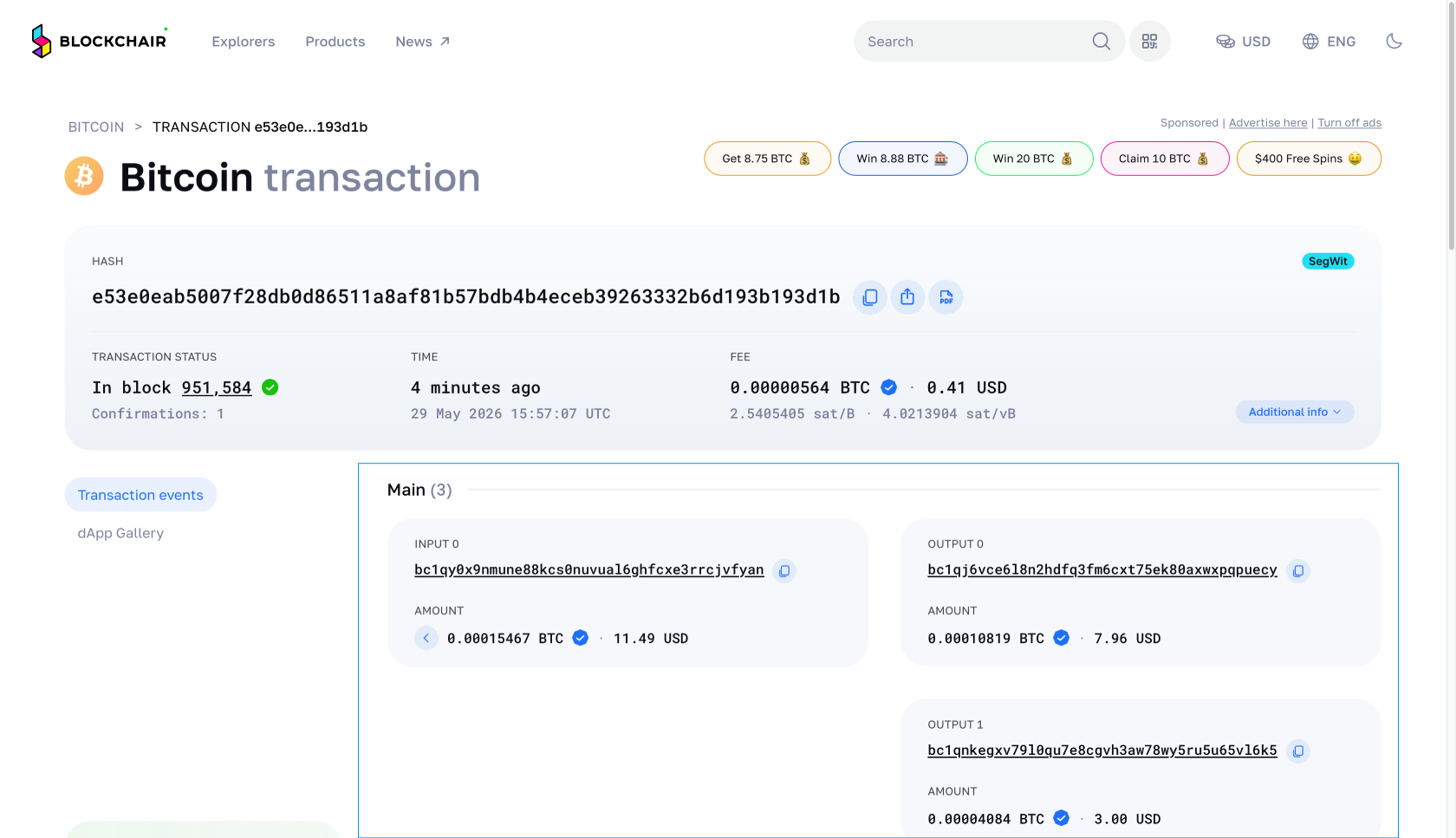
The prime example of a UTXO network is Bitcoin, and Ethereum uses the account model, respectively. Without this context, routine transaction components can look alarming when they're completely normal.
| Dimension | UTXO Model (e.g., Bitcoin) | Account Model (e.g., Ethereum) |
|---|---|---|
| State representation | Set of unspent transaction outputs (UTXOs) | Persistent balance stored per address |
| What "balance" means | Sum of all UTXOs controlled by your keys | A single number updated in the global state |
| Inputs / Outputs | Inputs reference previous UTXOs; outputs create new ones | No inputs/outputs; transaction updates sender and recipient balances directly |
| How fees are represented | Implicit: sum(inputs) − sum(outputs) = fee | Explicit: gas used × effective gas price |
| What "change" means | Leftover value sent back to a sender-controlled address | Not applicable; exact value transferred |
| Multiple recipients | Separate output entries for each recipient address | Requires separate transactions or a contract call |
| Typical identifiers shown | Transaction hash, input addresses, output addresses | Transaction hash, sending address, receiving address, nonce |
| Common user mistake | Mistaking the change output for a second payment recipient | Treating the ETH value field as the total cost including gas |
UTXO Model
The UTXO model tracks ownership by recording discrete chunks of unspent value rather than maintaining a running account balance. Every time you spend Bitcoin, your wallet selects one or more UTXOs as inputs, creates outputs for the recipient and (usually) yourself, and the difference is claimed by the miner as a fee. Nothing is "deducted" from an account — old UTXOs are consumed and new ones are made.
What you see in an explorer vs. what it means:
- Inputs: The specific UTXOs being spent; each references a previous transaction output by its transaction hash and output index (prevout reference).
- Outputs: New UTXOs created by this transaction, each with an amount and a wallet address.
- Value (per output): The exact amount assigned to that output address — not the total moved.
- Fee: Not shown as a standalone output. Calculated as sum(all input values) − sum(all output values). Whatever remains goes to the miner.
- Change output: An output addressed back to the sender's own wallet address, returning the leftover value that wasn't paid to the recipient or consumed as a fee.
- What can look suspicious but isn't: Seeing a second output sent to an unfamiliar-looking address often means the wallet generated a fresh change address — this is standard privacy behavior and does not indicate a third-party recipient.
Input: 1.0 BTC (from address A's previous UTXO)
Output 1: 0.6 BTC → recipient address B
Output 2: 0.3995 BTC → change address C (sender-controlled)
Fee: 1.0 − (0.6 + 0.3995) = 0.0005 BTC to miner
In this example, only 0.6 BTC moved to the recipient. Output 2 looks like a separate payment but is simply the sender's wallet reclaiming unspent value. Misreading it as a second recipient is one of the most frequent mistakes when learning to read Bitcoin transactions on a blockchain explorer.
Account Model
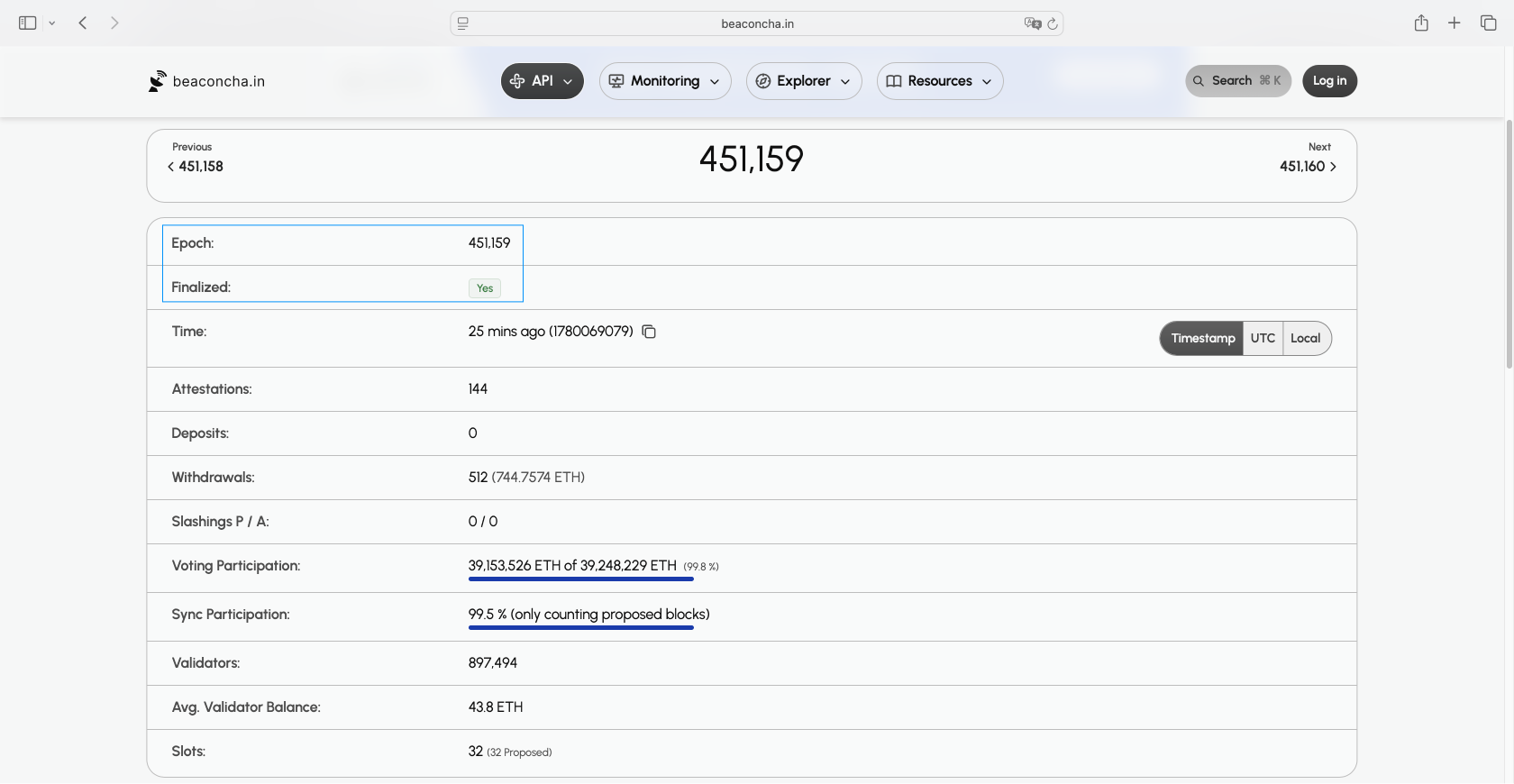
The account model works more similarly to a bank ledger: every address has an explicit balance, and a transaction simply adjusts those balances. There are no inputs to select or outputs to create. When you read an Ethereum transaction on a blockchain explorer, you are reading the description of a state update applied to that ledger.
If an address's balance dropped by more than the amount sent, the difference is always the gas fee, which never appears in the recipient's balance.
For Ethereum, a direct value transfer (in ETH) between two externally owned accounts needs focus on:
- From / To: The sender's and recipient's wallet address.
- Value: The exact amount of ETH transferred to the recipient.
- Gas limit: The maximum units of computation the sender authorized.
- Gas used: The actual computation consumed — for a simple transfer, this is almost always exactly 21,000 gas units.
- Effective gas price: The price per gas unit paid, expressed in Gwei. Includes base fee plus priority tip.
- Transaction fee: Gas used × effective gas price. This is what leaves the sender's account in addition to the value.
- Nonce: A sequential counter for this sender address. It prevents replay attacks and tells you how many transactions this address has sent before this one.
- Receipt status: Success (1) or failure (0). A failed transaction still consumes gas.
When the "To" field shows a contract address rather than a personal wallet address, the transaction is triggering on-chain logic for contract interaction. The field set is identical, but your interpretation changes:
- Value may be 0 even for token swaps — the actual token movement is encoded in the input data and appears as internal transfers on the explorer.
- Gas used will be higher and more variable depending on the complexity of the contract execution.
- Internal transactions / calls will often appear in a separate tab on the explorer. These are operations triggered by the smart contract itself and are not separate user-signed transactions.
How to Look Up a Transaction in a Block Explorer
Now that we have covered what you need for a lookup, what exactly can you look up, and how to read it, let’s repackage that into step-by-step instructions to using a block explorer.
Before you paste anything, use the explorer’s built-in copy buttons whenever you can. Manually retyping a 64-character hash is a very efficient way to “create” a transaction that does not exist.
Transaction Lookup
- Obtain the transaction hash. Open your wallet or exchange account and find the transaction. Copy this transaction’s hash, preferably using the platform's copy icon. Once you have it, paste it directly into the blockchain explorer search bar.
- Confirm you are on the correct explorer. Match the blockchain to its dedicated explorer: for example, do not look up a Layer 2 (such as an Arbitrum or Optimism) hash on the Ethereum mainnet explorer. Cross-chain mix-ups return no results or, worse, a completely unrelated transaction.
- Paste the hash into the search bar. Hit enter or click the search icon.
- Check the status field. The result page can display a status: typically "Success", "Pending", or "Failed".
- Read the block height. A confirmed transaction will show the block number in which it was included. If the field is empty or shows "Pending", the transaction has not been added to a block yet.
- Watch the confirmation count. One confirmation means the transaction has been added to a block; each subsequent block mined on top adds another confirmation. Watch this number increase over time to gauge finality.
- Note the timestamp. Explorers display the time the block was mined. Record this in UTC to avoid timezone ambiguity when sharing proof.
- Verify the From/To addresses. Cross-check that the sender and recipient addresses match what your wallet shows. A mismatch here is a red flag worth investigating immediately.
- Review the value and fee. Confirm the transferred amount and the gas fee (or network fee) charged. On token transfers, check whether the explorer is showing a native coin transfer or a token transfer event — these appear in separate tabs on most explorers and are easy to conflate.
Exchange order IDs and internal reference numbers are not blockchain hashes, even if they are called “Transaction ID”. If the explorer returns no result, go back to the platform and look specifically for "Transaction Hash" or "TxHash".
Copying from PDFs, emails, or certain mobile apps sometimes appends invisible characters. If a valid-looking hash returns no result, clear the search field completely and re-paste.
Address Lookup

Looking up a wallet address gives you a fuller picture than any single transaction receipt. The process breaks down into three distinct data layers, and it is worth checking each one separately.
- Enter the address in the search bar. The explorer will detect it as an address rather than a hash and load the address overview page.
- Read the native balance. This figure at the top of the page shows the current holdings in the chain's base currency — ETH, BNB, SOL, and so on.
- Check token holdings. Navigate to the "Tokens" or "Assets" tab. This lists every token contract that has ever sent tokens to this address, including unsolicited spam tokens.
- Review the transaction list. The main transaction tab shows native coin transfers. This is separate from the token transfer or event list, which logs ERC-20 and similar movements. Scroll through both tabs to build a complete picture of activity.
Block Lookup
A block lookup is useful when you want to verify where a transaction sits in the chain's history or cross-check timing details that your wallet UI may round or display differently.
- Enter the block number (height) or block hash into the search bar. Either will load the block detail page. Block height is the simpler input — it is a plain integer like 19,500,000. Block hash is its unique identifier, not to be confused with transaction hash.
- Read the block time. The timestamp shown is when the block was produced. Compare this against your wallet's reported transaction time to confirm they align.
- Check the miner/validator/producer field. The label varies by network. This field is useful for confirming which entity produced the block to contextualize the block's legitimacy.
- Note the transaction count. This tells you how many transactions were packed into this block. A block with one transaction is unusual on major networks and worth noting in time-sensitive audits.
- Locate your transaction in the block's transaction list. Explorers list all transactions included in a given block. Find your TXID in this list to confirm inclusion directly at the block level, independent of the transaction lookup route.
Smart Contract Interactions: Reading Contract Calls
As you may have understood from explanations of token transfers, whenever smart contracts are involved, the displayed data gets a bit more complicated to parse. But complicated does not mean impossible to understand, so let’s see what other smart contract interactions look like.
Smart contracts execute logic on-chain whenever a transaction targets a contract address rather than a regular wallet.
Function Calls
Every contract interaction begins with a function call, and a blockchain explorer dedicates several distinct fields to describe it.
| Explorer Label | What It Represents | What It does NOT Imply |
|---|---|---|
| Method / Function | First 4 bytes of calldata (function selector) | Does not confirm the function executed successfully |
| To | Contract address receiving the call | Does not mean the contract is the final destination of assets |
| Value | Native token (ETH, BNB, etc.) sent with the call | Value = 0 does NOT mean no assets moved — ERC-20 transfers happen in calldata |
| Input Data / Calldata | Raw encoded arguments passed to the function | Does not show effects; only shows intent |
| Decoded Input | Human-readable version of calldata | Does not confirm the decoded values match what executed |
| Internal Transactions / Traces | Contract-to-contract calls triggered by the top-level call | Does not appear on all explorers; absence ≠ absence of internal movement |
Methods or functions are not random, they are predefined. Some of the most popular ones are: approve(spender, amount) — Grants a third-party contract the right to pull up to amount tokens from your wallet; no tokens move immediately.; transfer(to, amount) — Moves tokens directly from the caller's address to to; not to be confused with transferFrom(from, to, amount) — Moves tokens on behalf of from, requiring prior approval. This is how DEX routers and lending protocols actually execute token pulls.
deposit / withdraw (used by vaults and bridges) locks or releases assets within a protocol. Deposits often mint a receipt token; withdrawals burn it.
If a transaction shows calldata (Input Data field is not empty), the target address shows a contract bytecode indicator, a function name or selector is displayed, and logs were emitted — it is a contract call. If Input Data is empty, the target is a plain wallet, and no logs exist, it is a simple ETH transfer between externally owned accounts (EOAs).
Token Standards
Token standards define the interface a smart contract must implement, and a blockchain explorer reflects those standards in predictable, readable patterns. Knowing which standard you are looking at immediately tells you what to expect in the Logs tab.
Token standards cheat sheet:
| Standard | Explorer Signature | Key Fields |
|---|---|---|
| ERC-20 | Transfer(address indexed from, address indexed to, uint256 value) event; Approval(address indexed owner, address indexed spender, uint256 value) event | from, to, value |
| ERC-721 | Transfer(address indexed from, address indexed to, uint256 indexed tokenId) event | from, to, tokenId (unique NFT identifier) |
| ERC-1155 | TransferSingle(operator, from, to, id, value) or TransferBatch(operator, from, to, ids[], values[]) event | operator, id(s), value(s) — batch moves multiple token types at once |
| Wrapped Native (WETH, WBNB) | Deposit(address indexed dst, uint256 wad) and Withdrawal(address indexed src, uint256 wad) events alongside standard ERC-20 Transfer | wad = amount in wei |
DEX routers and bridges almost universally work with ERC-20 contracts rather than raw native ETH, because smart contracts cannot call standard token interfaces on native ETH. For more on that, read our guide to Wrapped Ether (WETH).
Privacy, Security, and Key Considerations
Block explorers reveal a significant amount of on-chain data to anyone who searches a transaction hash or wallet address. If knowing that all economic activity is transparent on a blockchain does not sit right with you, this section is for you.
Public and Private Data
The amount of information revealed on the blockchain is truly significant: sender and recipient wallet addresses, transaction amounts and token values, smart contract calls, token approvals and allowance amounts, holdings associated with an address and more are typically public.

What is not public is real-world identity behind a wallet address, private keys which are never stored or even visible on-chain, off-chain messages or agreements and any other personal data tied to the transaction. What you should remember is that a wallet address is not a person, and in fact, one real-world person can own as many addresses as they can. Neither does a transaction confirmation prove the real-world identity of either party; only the cryptography is validated. As far as the blockchain is concerned, an attacker can steal all your funds but if they follow the protocol’s rules, all their transactions are valid.
It is not too hard to deanonymize a user if they are not careful and share the information that can link their on-chain credentials with real-world identity. One screenshot with details such as wallet labels in the app’s interface, memo fields in the explorer or dApp interface, connected-app names displayed by browser wallet extensions or off-chain order IDs not removed or blurred, and you are as good as doxed.
Privacy-Focused Blockchains
Privacy-focused blockchains such as Monero change what a blockchain explorer can actually show you. On a transparent chain like Ethereum or Bitcoin, an explorer displays sender address, receiver address, amount, and timestamps in full. On privacy-focused L1s, one or more of these fields may be shielded or entirely hidden from public view.
In practice, this means you may not be able to independently confirm counterparties or amounts from a public explorer, which creates real challenges for receipts, audit trails, and proof-of-payment scenarios. If you are troubleshooting a stuck transaction or confirming receipt for a business, a privacy chain explorer simply may not give you the same verification tools.
It is also worth distinguishing between using a dedicated privacy-focused L1 and applying privacy practices on a transparent chain. On Ethereum or Bitcoin, users can improve their privacy by generating a new address for each transaction, thus avoiding address reuse, and minimizing on-chain links to their real identity. These habits reduce traceability without requiring a separate blockchain entirely.
Explorer Safety
Not every website that looks like a blockchain explorer is safe to use. Before trusting an explorer with your attention — and especially before taking any action on it — confirm the domain correctness, check the UI for red flags:
- Popups or banners asking you to connect your wallet
- Prompts to "claim rewards," "verify your wallet," or "sign a message"
- Unusual login screens or wallet connection modals on what should be a read-only tool
- Requests for your seed phrase or private key under any framing
- Risk score warnings or overlays you did not expect from a read-only explorer
Address Poisoning

Address poisoning is an attack where a malicious actor sends a tiny or zero-value transaction to your wallet address using a lookalike address — one that shares the first and last several characters with a legitimate wallet address you have interacted with before. When you look at your transaction history in a blockchain explorer, these spam transactions appear alongside real ones, making the fake address easy to mistake for a trusted contact. Mitigation is not too hard: check the addresses character by character.
One rule that prevents most address poisoning incidents: never copy a recipient address from your transaction history. Copy only from a trusted address book, a QR code scan, or the recipient's verified official source.
Phishing Links
Phishing links appear in more places than most users expect when reading transaction data. Common locations include:
- Token names and ticker symbols (e.g., a token called "Visit site.com to claim")
- Token logos that link to external sites
- Contract "website" fields in the token metadata
- Comment or memo fields if the explorer supports them
- Airdropped tokens or NFTs with embedded URLs in their metadata
What are you supposed to do if a malicious token or NFT comes your way? If it is really unsolicited, do not visit any URL in the name or metadata, ignore or hide the token in the UI, check your active approvals for that contract and in general and revoke, if necessary.
Malicious Token Approvals
Speaking of which, on EVM chains, a token approval (also called an allowance) is a permission you grant to a smart contract to spend tokens from your wallet address on your behalf. Unlike a simple transfer, an approval can remain active indefinitely. A spender with a max approval (technically max uint256, the largest possible number) can drain the full balance of that token at any point in the future, even long after the original interaction. This makes approvals meaningfully riskier than standard transfers: the exposure does not end when the transaction confirms.
A blockchain explorer is a handy tool to review that. Look for Approval or Allowance events in the transaction logs, check the spender address (separate from the token contract address) and the token contract associated with the approval. You can even see the allowance amount: any amount listed as "Unlimited" or matching max uint256 is a red flag.
Hopefully, you will not see anything fishy there but in case there is a malicious approval, connect to token approval tools in read-only mode, revoke approvals you find suspicious. If you believe your wallet is already compromised, move remaining funds to a fresh wallet address immediately.
Troubleshooting Common Transaction Issues
Why would a regular user need a blockchain explorer? The number one use for these resources is to see what is going on with your transaction. What is the status? Where are the funds? If you run into trouble like that, a reputable block explorer takes precedence over what your wallet is showing you, so you need to know how to interpret this data.
Pending Transactions

The transaction is taking way longer than normal and is not showing up anywhere you look. If it is really stalling, in the explorer it can look like 0 to 1 confirmations, which is usually not enough for most recipients, or have no hash at all: then it’s not found or dropped altogether.
The usual suspects are low fee attached, mempool congestion, nonce gap or a cancellation attempt in progress. You can wait out for the congestion to clear or use replace-by-fee (RBF) if available. Sending a duplicate transaction is almost certain to eventually end up in you spending twice as much as you intended. Alternatively, cancel by sending a 0-value transaction to your own wallet address using the exact same nonce and a higher fee — confirm the replacement is mined before assuming cancellation succeeded.
If the block containing your transaction gets reorganized out of the canonical chain, confirmations can temporarily drop back to zero or the status can flip from confirmed to pending. This is a known behavior on proof-of-work chains with shallow confirmation depths; wait for additional block height to accumulate before taking any action.
Failed Transactions
If a pending transaction can still resolve, a failed transaction requires action but even then, not in every case. These include bounced transactions with insufficient gas, mempool evictions, or nonce conflicts.
If the explorer labels the transaction as failed ("Failed," "Reverted," or "Error"), then look for a reason: compare gas used vs. gas limit, look if you can find a raw revert message, and confirm there was no Transfer event in the logs.
If a transaction is “Dropped and Replaced”, another successful transfer has already occurred and no action is needed. Otherwise, if it bounced back and you still have enough for gas (since failed EVM transactions still consume it), try again after you verify all inputs are valid.
Replaced Transactions
Explorers for account-based chains show two standard replacement scenarios. A speed-up uses the exact same nonce as the original transaction but submits a higher gas fee — the intent is identical, only the fee changes. A cancellation also uses the same nonce but sends 0 value to the sender's own wallet address, effectively replacing the original with a no-op. To verify either, confirm that the nonce on the replacement transaction matches the nonce on the original, and that the gas fee on the replacement is strictly higher than the original.
In case a transaction is replaced, the original is not failed, just replaced. However, it can still be labeled as “Failed” in some apps or platforms. The successor transaction determines whether the funds moved or not.
Mismatched Amounts
Before assuming an error, mind that some tokens have different decimal display settings (e.g., USDC uses 6 decimals, not 18). Also consider that token transfers are not the same as coin transfers and may display with a zero value, which is not the entire truth nor a reason to panic. On UTXO chains, keep in mind that the network fee is subtracted from the sender's outputs.
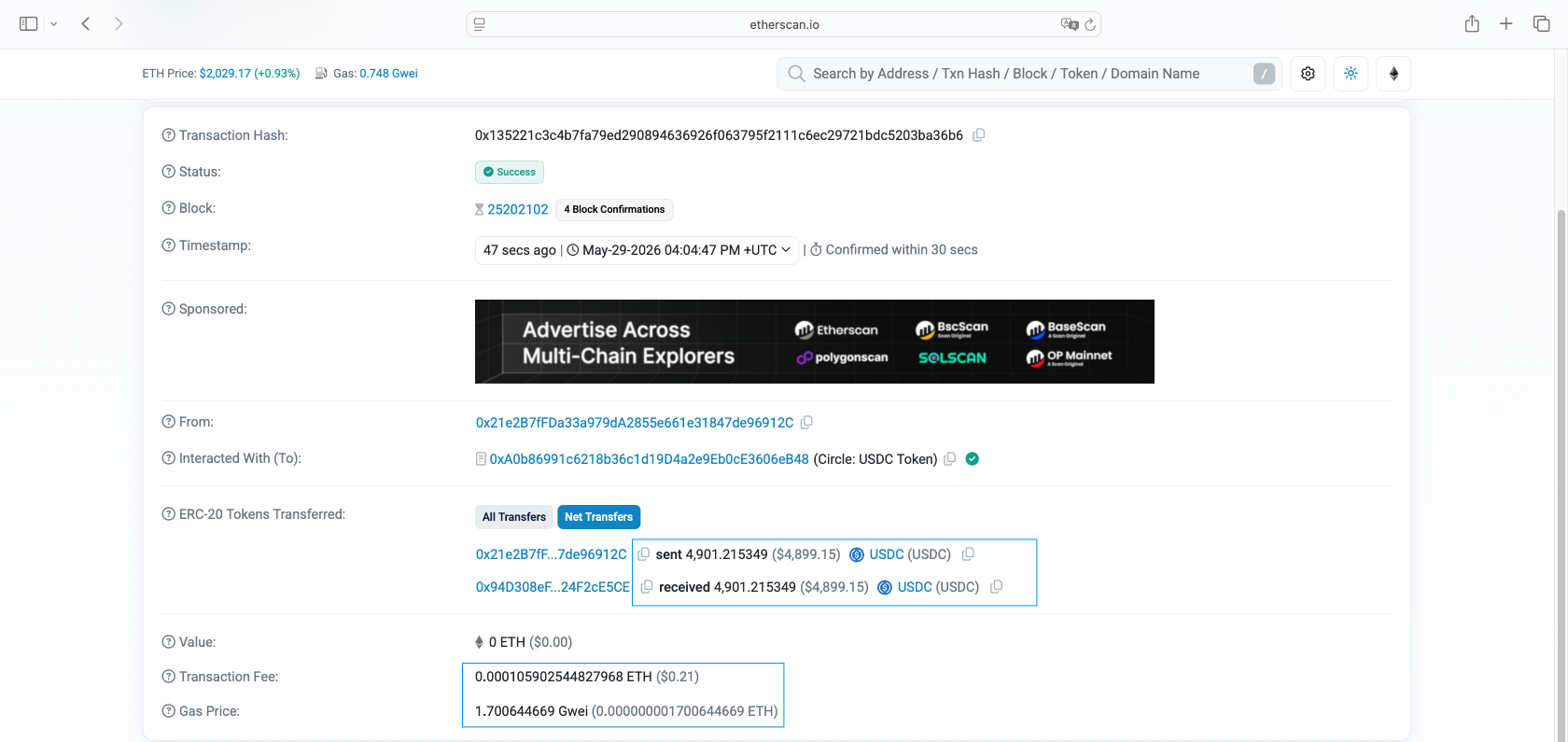
Fiat equivalents shown in explorers use the current or historical price at block time — they will differ from what your wallet displayed at the moment of sending.
Aggregators, swaps and bridges commonly result in a received amount that differs from what was sent — and this is expected behavior, not an error. Look for these artifacts in the explorer to confirm:
- Multiple internal transactions: Visible under the "Internal Transactions" tab; these represent contract-to-contract calls that route or transform your asset.
- Multiple token transfer events: A swap will show at least two Transfer events — one debit of the asset you sent and one credit of the asset you received; amounts will differ by design.
- Contract call method name: The "Method" or "Function" field on the transaction detail will identify the action (e.g., swapExactTokensForTokens, bridge, execute), confirming a contract interaction rather than a simple transfer.
When using a bridge, the transaction hash on the source chain and the receipt on the destination chain are always different. The destination chain assigns its own transaction hash upon execution. To correlate the two, locate the bridge contract's event log on the source chain transaction — it typically emits a Deposit, MessageSent, or protocol-specific event containing a unique message ID or nonce that maps to the corresponding transaction on the destination chain. Search that ID in the destination chain's explorer to find the matching receipt and verify the received amount.
Conclusion
Blockchain explorers give every user the ability to independently verify what happened, when it happened, and what it cost — without relying on any single interface to tell the truth. That independence is the point. Use it to your advantage.
To discover even more insights into crypto, check out our blog. Find ChangeHero on X, Facebook, and Telegram for daily updates and ideas.
Frequently Asked Questions
What is a transaction hash, and how is it different from a receipt or block number?
A transaction hash is the unique identifier for a single transaction on the blockchain. Use it to look up one specific transaction — its status, fees, and participants. A receipt is the post-execution record that includes gas used and logs, and it only exists once the transaction is confirmed. A block number refers to the entire block containing potentially thousands of transactions, so use it for block-level lookups, not individual transfers. In your blockchain explorer, paste the TX hash into the search bar for transaction-level detail.
Where do I find the TxHash, and when will it appear?
Your wallet generates a transaction hash the moment you broadcast a transaction to the network. In practice, you can usually copy the hash from your wallet and paste it into a blockchain explorer's search bar within roughly 1–2 minutes, though delays can occur depending on network congestion. Once it appears, the explorer's Overview tab will show status, block inclusion, and confirmation count. If it does not appear immediately, wait a few minutes before assuming something is wrong.
What do transaction status labels mean across different explorers?
Transaction status labels signal where your transaction sits in the lifecycle. "Pending" means the transaction has been broadcast but not yet included in a block. "Success" confirms execution completed without errors. "Failed" or "Reverted" means the transaction was included in a block but the smart contract execution did not complete (your gas fee is still deducted). "Dropped" or "Replaced" means the transaction was removed from the mempool, often because a higher-fee transaction with the same nonce replaced it. To verify, check the block inclusion field, the confirmation count, and — for failed transactions — the revert reason in the Logs or Internal Transactions tab.
What does "1 confirmation" actually mean?
One confirmation means the transaction has been added to a block for the first time. Each subsequent block added on top of it adds another confirmation, making the transaction progressively harder to reverse. To verify this yourself, open the transaction in your blockchain explorer and check the block height field alongside the confirmation counter. Common practice for BTC is to be considered final after 3–6 confirmations. The specific threshold depends on the platform and asset — always check the requirements of the receiving service.
Why did my Ethereum transaction fail even though I paid gas?
A failed Ethereum transaction still consumes gas because miners expended computational work executing the contract logic, even when it reverted. The key distinction is between gas limit (the maximum you authorized) and gas used (what was actually consumed). A revert can happen because slippage tolerance was exceeded, a condition inside the smart contract was not met, or you set an insufficient gas limit. In your explorer, open the Overview tab to compare gas limit vs. gas used, then check the Logs or Input Data tab for a revert reason string, which often explains exactly where execution stopped.
Why does the amount received differ from the amount sent?
The top-level "Value" field in a blockchain explorer reflects native coin movement only — it does not include token transfers or fees. If you send an ERC-20 token like USDC, the Value field will show 0 ETH while the actual token movement appears in the Token Transfers tab. Gas fees are always deducted separately from the sender's native coin balance, not from the token amount. Internal transactions — triggered by smart contracts — can also move funds in ways the top-level summary does not show. Always cross-check the Token Transfers tab and the Internal Transactions tab against the Overview to get the complete picture.
Can I reverse or cancel a blockchain transaction?
Once a transaction is confirmed on the blockchain, it cannot be reversed — that finality is a core property of distributed ledgers. However, if your transaction is still in "Pending" status, you may be able to cancel or replace it on account-based chains like Ethereum by broadcasting a new transaction using the same nonce with a higher gas fee. Some wallets offer a built-in "cancel" or "speed up" option that does this automatically. In your explorer, check the pending status and nonce field to determine whether a replacement is still viable.
Why does the transaction timestamp look different across explorers or devices?
Explorers display block timestamps in different local timezones depending on your browser or device settings, which can make the same transaction appear to have occurred at different times. The block timestamp itself is fixed and stored in UTC. To cross-check, use the block height as your reference point rather than the displayed time — every explorer agrees on block height regardless of timezone settings. Open the block detail page and verify the UTC timestamp there if precision matters.
Why does my wallet balance not match what the explorer shows?
Several things can cause this mismatch. The most common culprit is checking the wrong network — a wallet address on Ethereum mainnet and the same address on a testnet or a different chain like Polygon will show completely different balances. Beyond that, token holdings are separate from native coin balances and appear under a different tab in most explorers. Internal transactions triggered by smart contracts may also move funds without appearing in the standard transaction list. In your explorer, check the Token Holdings section, the Internal Transactions tab, and confirm you are on the correct network before concluding funds are missing.
I bridged funds — why don't I see them on the destination chain?
Cross-chain bridges execute as two entirely separate transactions with two different transaction hashes. The first transaction on the source chain locks or burns your funds; the second transaction on the destination chain mints or releases them. These are independent events, so you need to check both explorers separately. Start by locating the source-chain transaction in your wallet history and verifying it reached "Success" status, then switch to the destination chain's explorer and search your wallet address for the corresponding mint or release transaction. Bridge delays can range from minutes to hours depending on the protocol.
What can other people see if they have my wallet address?
Anyone with your wallet address can view your complete transaction history, current balances, and every token you hold — blockchain activity is fully public. However, your real-world identity is not inherently attached to an address unless you have linked it elsewhere, for example through a KYC exchange withdrawal. Address reuse increases privacy risk because it makes on-chain clustering easier for analytics tools to connect your activity. For this reason, many wallets generate a new receiving address for each transaction. Be mindful that public explorers display your full on-chain footprint to anyone who looks.
How do I avoid malicious links and spoofed tokens inside an explorer?
Blockchain explorers display every token ever sent to an address, including unsolicited airdrops that may be scam tokens. Never click links embedded in token names or interact with contracts you did not seek out yourself. Always verify a token's contract address against the official project website before assuming it is legitimate. Use the official explorer domain directly — for example, etherscan.io rather than a lookalike URL — and avoid following links to explorers from social media messages. In the explorer UI, cross-reference the contract address shown in the Token Transfers tab with the project's verified contract before taking any action.
What is a nonce, and why does it matter for stuck transactions?
A nonce is a sequential counter assigned to every transaction sent from an account-based wallet address, and no two transactions from the same address can share a nonce. If a transaction gets stuck pending, any new transaction you broadcast from the same address must use the same or a higher nonce to process in order. A gap in the nonce sequence can freeze all subsequent transactions from that address. In your explorer, check the nonce field in the transaction Overview and compare it to your wallet's current nonce to identify whether a stuck transaction is blocking the queue.