Best USDC Wallet in 2026: Review & Guide

Key Takeaways
- 💲 The best USDC wallet in 2026 depends less on the brand name alone and more on the network you use USDC on: Ethereum, Base, Polygon, Solana, or another supported chain;
- 💲 USDC is multi-chain, so “USDC” on one network is not automatically interchangeable with “USDC” on another. Native USDC and bridged USDC variants should be checked before every deposit or withdrawal;
- 💲 A wallet can reduce key-management risk, but it does not remove issuer risk, depegging risk, off-ramp risk, tax reporting obligations, or privacy leakage.
Disclaimer
This guide is for informational purposes only and does not constitute financial, investment, tax, or legal advice. USDC transactions can be irreversible, and using the wrong network may result in delayed, unsupported, or unrecoverable transfers. Always verify the wallet, network, token variant, address, and fee screen before sending funds. Tax treatment depends on jurisdiction and personal circumstances, so consult a qualified tax professional when needed.
Which network do you use USDC on and what do you do with it most often? From here, choosing the best crypto wallet app for USDC in 2026 is considerably easier. A user sending small Solana payments has a different requirement from a user holding USDC cold for months, and both have a different requirement from someone actively using EVM-powered DeFi.
This guide compares software (hot) wallets for daily transactions with hardware (cold) wallets for long-term storage, then maps those choices to network selection, custody model, wallet features, taxes and privacy, and non-wallet risks.
Top Software Wallets for USDC
Software wallets are usually the practical starting point for USDC users who send frequently, interact with dApps, swap tokens, or need mobile access. The first filter is simple: decide where your USDC lives. EVM chains and Solana do not behave the same way, even if the asset ticker is identical.

You will find that there is considerable overlap between the highlights below and our best free crypto wallets. What follows has been narrowed down for USDC specifically but do check out the other guide if you use more than one token.
Coinbase Wallet
- Best for: Users who want a familiar app with built-in USDC buying access and a smoother path between wallet activity and Coinbase’s ecosystem.
- USDC networks that matter here: Ethereum, other EVM chains and Solana, depending on which network you select before receiving or sending.
- Fee or friction factor: Coinbase states there is “no Coinbase fee for buying USDC in Coinbase Wallet”, but “no Coinbase fee” does not mean “no network fee”; at checkout, you may still see network fees depending on the chain and current conditions.
- 1 setup step that prevents mistakes: Before receiving USDC, confirm the selected chain in Coinbase Wallet matches the chain the sender or exchange withdrawal screen is using.
MetaMask
- Best for: EVM users who interact with Ethereum, L2s, DeFi apps, and browser-based dApps.
- USDC networks that matter here: EVM networks.
- Fee or friction factor: Sending USDC on MetaMask still requires the chain’s native gas token, such as ETH, MATIC, or another network token; keep a small gas buffer before attempting to send USDC.
- 1 setup step that prevents mistakes: Add or verify the correct USDC token for the active network before depositing, instead of pasting a token address from a different chain.
Phantom
- Best for: Solana-first users who want a simple mobile or browser wallet for USDC transfers and Solana apps.
- USDC networks that matter here: Solana.
- Fee or friction factor: Phantom notes that network fees apply on Solana, and sending USDC generally requires SOL to pay those fees; if you have 0 SOL, the transaction may fail or cannot be broadcast, so acquire a small amount of SOL first.
- 1 setup step that prevents mistakes: Check that the receiving address is for Solana USDC before sending, especially if the exchange or app shows multiple USDC withdrawal networks.
Trust Wallet
- Best for: Mobile users who want broad multi-chain USDC access in one app.
- USDC networks that matter here: EVM networks, with broad token coverage across many chains.
- Fee or friction factor: Trust Wallet says it supports bridged USDC variants on 70+ EVM chains; that breadth is useful, but it can also create ticker and variant confusion because “native USDC” and bridged USDC variants may appear differently in deposits, withdrawals, and app token lists.
- 1 setup step that prevents mistakes: Match the exact USDC variant, chain, and deposit network shown by the receiving platform before sending from Trust Wallet.
Kraken Wallet
- Best for: Users who already know Kraken’s interface but want a separate self-custody wallet app for on-chain USDC activity.
- USDC networks that matter here: EVM and Solana, depending on current wallet asset and network support.
- Fee or friction factor: Kraken Wallet is not the same place as a Kraken exchange account; verify whether you are using the self-custody Kraken Wallet app or the custodial exchange balance before depositing or withdrawing USDC.
- 1 setup step that prevents mistakes: Send a small test amount first when moving USDC between Kraken’s exchange account and Kraken Wallet, especially if multiple networks are available.
Top Hardware Wallets for USDC
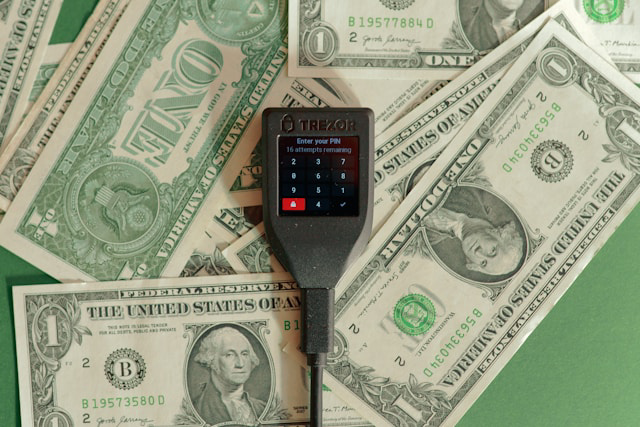
A hardware wallet secures the signing keys for your USDC. That makes it a better fit for long-term storage than an always-online hot wallet, but it does not remove the need to choose the correct USDC network and account in the companion app before receiving or sending funds.
Not all of the best cold crypto wallets support USDC but most of them do. Here are our top picks.
Ledger
- Best for: Long-term USDC storage with occasional transfers, especially if you want one device that can cover both EVM and Solana activity.
- USDC networks you can realistically use: EVM+Solana, though day-to-day support depends on whether you are using Ledger Live or a compatible companion wallet for the specific chain and USDC token.
- Workflow fit: Mobile and desktop friendly; Nano X is better for on-the-go signing because of Bluetooth, while USB-only models fit better for at-home use.
- Friction/gotcha: Ledger devices usually require an upfront hardware cost; the range is $69–399 without extras, so the value makes the most sense when you are storing USDC for the long term and only sending occasionally.
- Pre-purchase checklist: Decide whether Bluetooth matters to you, because that affects which Ledger model fits your mobile workflow.
Trezor
- Best for: Desktop-first USDC holders who want cold wallet signing for EVM-based USDC and do not mind using wallet software to manage the interface.
- USDC networks you can realistically use: EVM-only for most practical USDC workflows; support often depends on the companion app or third-party wallet interface you connect to.
- Workflow fit: Desktop-first and at-home, with the hardware device acting as the signer while the UI, token display, and chain support may come from Trezor Suite or compatible third-party software.
- Friction/gotcha: Many users manage USDC through compatible third-party wallet interfaces, so the device may be capable of signing while the software you choose determines which USDC networks are practically available.
- Pre-purchase checklist: Confirm you are willing to use third-party wallet software if your preferred USDC network or dApp workflow is not fully handled in the default companion app.
Tangem Wallet
- Best for: Mobile-first users who want a card-based hardware wallet for multi-chain USDC and simple occasional sends.
- USDC networks you can realistically use: EVM+Solana, with practical support depending on the Tangem app and the networks it exposes for the USDC version you hold.
- Workflow fit: Mobile-first and on-the-go, because signing is built around tapping the Tangem card with an NFC-capable phone.
- Friction/gotcha: The card-based model is convenient if you like phone-based signing, but it is less ideal if you prefer a desktop-first workflow or want a traditional screen-and-buttons hardware device.
- Pre-purchase checklist: Make sure your phone supports NFC and that you are comfortable with Tangem’s card-based backup set before choosing it for USDC storage.
Remember that at the end of the day, a hardware device protects signing authority, not your decision-making. If you are unsure which USDC network or variant you need, settle the network question before choosing a device.
USDC Network Selection
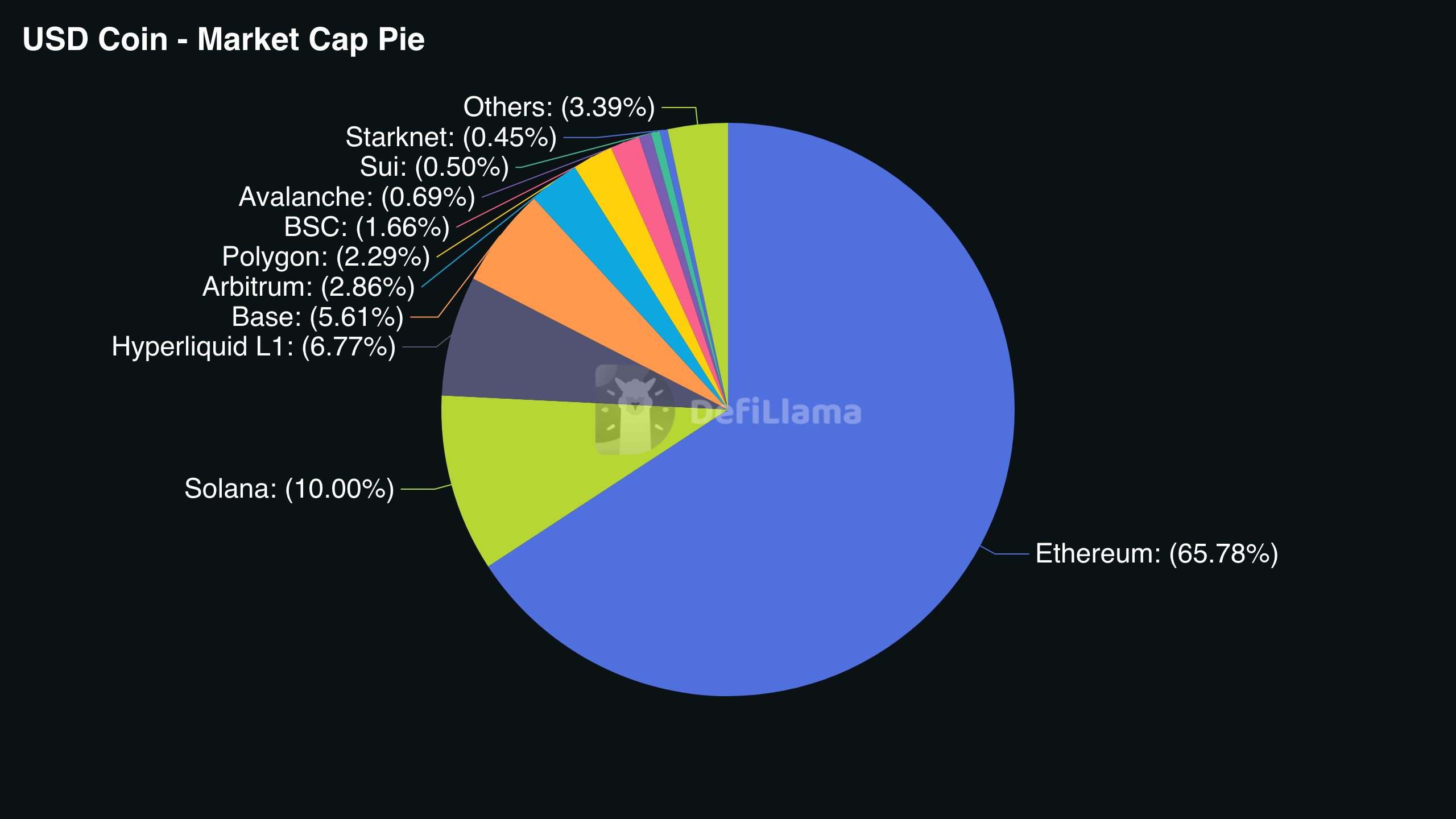
USDC uses the same ticker across chains, but the network determines the gas fee or transaction fee, transfer speed, and whether a transfer is recoverable if sent to the wrong chain. Before you receive or send, check the network shown in the wallet or exchange interface, not just the asset name.
Circle issues USDC natively on 38 blockchains and Layer-2 networks in 2026, which is why users often see multiple USDC network options for the same ticker. More coverage, but it also increases the chance of selecting the wrong rail.
Ethereum and Layer 2 Networks
When users say “Ethereum USDC,” they usually mean USDC on Ethereum mainnet. “L2 USDC” usually refers to USDC on Layer 2 networks built around the Ethereum ecosystem, where fees are often lower than mainnet but the network must still be selected correctly.
What you absolutely need to know and be aware of is recipient addresses can look identical across EVM chains, even when the funds are not moving on the same network. A wallet address that works on Ethereum may also appear valid on an L2, but the sending interface still needs the correct destination network selected.
Before sending, verify three things:
- The destination network in the receiving platform or wallet;
- The token contract address if you are adding USDC manually;
- The chain’s native gas token balance before attempting the transfer.
Solana
Solana is operationally different from EVM networks because it uses SOL for fees, not ETH or another EVM gas token. USDC transfers on Solana are typically faster and cheaper than Ethereum mainnet transfers, but the wallet still needs a small SOL balance to pay the transaction fee.
Unsurprisingly, a common failure point is trying to move USDC while holding 0 SOL. Even if the USDC balance is visible, the send may fail or cannot be submitted until you add a small amount of SOL to cover network fees.
Base and Polygon
Base and Polygon are both common L2 networks for lower-cost USDC activity, especially when users want cheaper transfers than Ethereum mainnet. From a user perspective, the important difference is not the architecture of each chain; it is whether the exchange, wallet, or app you are using supports that exact USDC network.
Some platforms may support USDC on Base but not Polygon, or Polygon but not Base. Always match the network listed on the deposit or withdrawal screen, because selecting the wrong one can create a deposit mismatch even if the asset still says USDC.
Native USDC and Bridged USDC
Native USDC means USDC issued by Circle directly on that blockchain. Bridged USDC means a representation of USDC created through a bridge or third party, and it may appear as a different variant even when the displayed ticker looks similar.

To avoid receiving the wrong variant, check three signals before moving funds:
- The sending platform’s network label;
- Whether the token name includes a bridge or variant marker;
- Whether the receiving exchange explicitly lists that chain plus USDC as supported.
If you are adding the token manually in a wallet, use the correct token contract address for that network rather than copying one from another chain. The asset name is not enough: network, token variant, and receiving support must match.
Security and Custody Model
All of the reviewed wallets are self-custodial but this is not the only option. Custody means who controls the private keys or signing authority for your USDC. It determines who can freeze movement, help recover access, or cause irreversible loss if access is lost. In practice, this is the difference between account recovery through a provider and key recovery through a seed phrase.
Custodial Wallets
A custodial wallet implies a control-versus-convenience tradeoff. You control login access to the account, the provider controls the private keys and transaction signing, and recovery usually means account recovery through the provider rather than on-chain recovery by you.
If you lose your phone or 2FA device, the provider may help restore account access. If you lose a seed phrase in self-custody, that is a wholly different recovery problem.
As a result, account takeover risk in custodial arrangements can affect your ability to move USDC because someone who compromises your email, password, or phone number through a SIM swap may be able to access the account or trigger withdrawal attempts.
Platform restrictions can help in some cases but also stop movement even when your login is secure. Withdrawal holds, compliance freezes, or account reviews may temporarily prevent you from sending USDC until the provider clears the restriction.
Besides, counterparty and operations risk means your access depends on the provider’s systems working. If the platform has an outage, maintenance window, or internal processing delay, your USDC may be visible in the account but not movable on your preferred timeline.
At minimum, use account security controls that reduce login compromise:
- Enable 2FA that is not SMS where possible;
- Keep a device-level lock or biometrics enabled;
- Confirm whether the provider offers withdrawal allowlists or anti-phishing protections.
Self-Custody Wallets
In a self-custody or non-custodial wallet, the user controls the private keys; the wallet app only signs and broadcasts transactions. There is no provider that can reverse a mistaken send, reset the private key, or approve a chargeback after a bad transaction.
Self-custody shifts the main risks from the platform to the user. The first failure mode is key or seed loss, where the funds may be permanently inaccessible because no company has a backup copy of your signing authority. The second failure mode is signing a malicious transaction, where you may still have the wallet installed but approve something that lets an attacker move funds.
Seed Phrases and Recovery
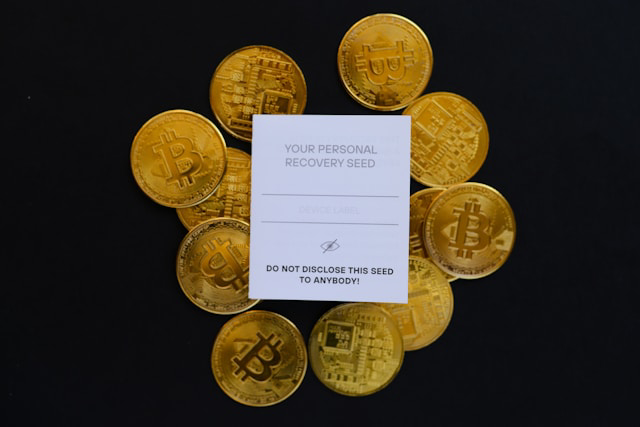
- Seed phrase, also called recovery phrase: This is the master backup for the wallet. It is often also referred to as a mnemonic phrase, and it can restore access to the wallet’s accounts, but it cannot cancel a transaction that was already signed and confirmed.
- Private key: This is the signing key for a specific crypto address. It can authorize movement from that destination, but it is not the same as a general app password.
- Wallet app password and biometrics: These unlock the wallet app on a device. They can block casual device access, but they usually cannot recover funds if the seed phrase or private key is lost.
If a device is lost, the recovery workflow depends on the custody model. For a self-custody wallet, install a trusted wallet app on a new device, choose the recovery option, enter the seed phrase, and then verify that the expected USDC accounts appear before sending or swapping. For a custodial account, recover access through the provider using your login, identity checks, and 2FA reset process if required.
These are different recovery domains: self-custody recovery restores signing authority from the seed phrase, while custodial recovery restores account access through the provider.
The key takeaway here is anyone with the seed phrase can move funds from the wallet. It should never be typed into random websites or untrusted apps, even if they claim to be support or recovery tools. Store it offline with redundancy so one accident does not destroy the only copy.
Hardware Signing
With a sufficiently isolated hardware wallet, the keys never leave the hardware device unless the user compromises it somehow. The phone or computer prepares the transaction, and the device signs it. This keeps the private key isolated from the internet-connected device used to view balances, prepare sends, or interact with wallet software.
That isolation does not make every approval safe. Malware on the computer can still trick you into signing something you did not intend, so the device screen confirmation is the last line of defense before USDC moves.
Before approving on-device, verify:
- Destination address, especially the first and last characters;
- Network or chain shown for the transaction;
- Amount being sent or approved.
Hardware wallets are compatible with many software UIs, including companion wallets and third-party wallet interfaces. The security model is not about where the USDC “lives”; the funds remain on-chain while the hardware device protects the authority to move them.
USDC Wallet Features
Wallet features should be evaluated by mapping them to your USDC lifecycle: how you get USDC in, how you move it across networks, how you spend it, and whether you deploy it for yield. Each step has separate tradeoffs around fees, KYC, network support, and timing.
Fiat On-Ramps
Fiat on-ramping to crypto can happen directly inside the wallet, or through an exchange buy-then-withdraw workflow. An in-wallet on-ramp is convenient because the purchase and delivery happen in one interface, but an exchange workflow may give you more control over order type, withdrawal network, and funding method.
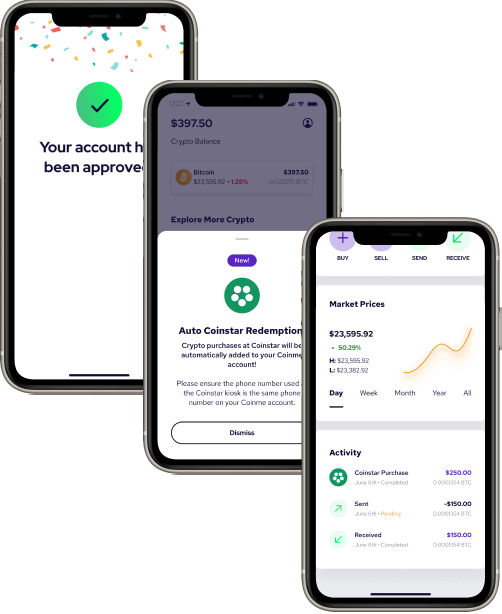
Before buying, check the supported rails such as ACH or card, whether the wallet shows a separate network fee at checkout, and which chain the USDC will land on by default.
In feature comparisons, treat fee claims as screen-specific rather than universal. Coinbase says there is no Coinbase fee for buying USDC in Coinbase Wallet, but network fees may still apply depending on the chain and current conditions, so the final confirmation screen matters more than the marketing line. Coinbase also states that USDC withdrawals are free across all supported networks; nonetheless, clarify whether “free withdrawal” means no platform withdrawal fee, and do not assume that every other wallet, bridge, or on-chain step will also be free.
Before committing to an on-ramp purchase, verify:
- Settlement time: instant availability versus delayed bank settlement;
- Minimum purchase amount and any funding-method limits;
- The default network or chain where the USDC will be delivered;
- Whether you can later withdraw or send on your intended chain without extra bridging steps;
- Whether the checkout separates provider fees from network fees.
The gotcha is simple: a wallet or provider fee can be $0 while the confirmation screen still shows a network fee, depending on the chain and conditions at the time of purchase.
One of the best Solana wallets, Phantom is a useful example of how some wallets bundle bank rails with specific fee policies: Phantom lists swapping Solana USDC into its Cash account as free and says standard ACH withdrawals are free. That does not make every USDC action free; it means the fee policy applies to that specific Cash workflow and rail.
Swaps and Bridges
A cross-chain swap feature lets USDC holders trade into another token without leaving the wallet interface. The main costs to expect are DEX price impact and any wallet swap fee or markup. For example, Coinbase Wallet has been reported as charging a swap fee of up to 1% per trade, which is the kind of wallet-level swap fee users should look for when comparing swap tools.
Some swaps also require a token allowance before the trade can execute. That approval transaction is separate from the swap itself, may require gas, and gives the connected contract permission to spend a defined amount of USDC from the wallet.
A bridge feature moves USDC between networks, such as from one supported chain to another. The user must choose the correct source network and destination network, and some wallets route bridge transactions through third-party providers rather than handling the route directly. That routing can affect fees, timing, supported token variants, and what support path exists if something goes wrong.
The practical decision rule is straightforward: if you have not bought or withdrawn yet, choose an exchange or on-ramp that can deliver USDC directly on the target chain; if you already hold USDC on the wrong chain, compare bridge cost, timing, and route risk before moving it.
Payments and Spending

USDC spending features usually fall into three patterns.
- Pay-to-address: You send USDC directly to another wallet. The user experience depends on confirmation time, network fees, and whether the recipient is on the same chain.
- Merchant checkout or invoice flow: A business asks for USDC through a payment page. Refunds and chargebacks are usually not possible in the same way they are with card payments, so the amount, network, and recipient details need to be checked before sending.
- Gift-card or retail integrations: A wallet or connected spend tool lets you use USDC indirectly. These tools may require KYC, apply regional limits, or convert USDC before the merchant receives value.
Fees users forget are often outside the headline payment feature. Sending USDC still requires a network fee on the chain being used. If the spend tool converts USDC to fiat at checkout, the user may also face a conversion spread or embedded pricing difference. Some “free” payment claims may only apply to specific rails, transfer types, or internal wallet flows, not every USDC payment.
Yield Access
Wallet-integrated yield and external DeFi protocols accessed through the wallet are two different things.
The former is presented inside the app, so the user mainly needs to understand where the yield comes from, whether the wallet provider or a partner is involved, and what deposit or withdrawal controls apply.
External DeFi access means the wallet is only the signing tool. The user connects to a protocol, signs an approval transaction if needed, deposits USDC, and later signs another transaction to withdraw.
Before depositing, verify:
- The network;
- The USDC token variant;
- Whether the position has a lockup, withdrawal delay, or cooldown period;
- Whether the yield action requires a token allowance.
Yield is not just another wallet feature layered on top of idle USDC. It usually introduces smart-contract and/or counterparty exposure beyond holding USDC, so the risk belongs in the same mental category as protocol selection, not just wallet selection.
Taxes and Privacy
On top of everything, USDC creates two separate responsibilities: taxability/reporting and privacy management. Tax reporting is about what you must be able to substantiate later when you convert, swap, spend, bridge, or cash out USDC. Privacy is about how a wallet address, public key activity, exchange account, and transaction history can become linkable across platforms and chains.
IRS Reporting
In the U.S., the IRS does not really care that USDC is designed to stay near $1; it cares whether you disposed of a digital asset, received income, or created a record that needs to be explained. For practical USDC users, the most common record-generating patterns are:
- Converting between USDC and USD or another crypto asset.
Buying USDC with USD, selling USDC back to USD, or converting USDC into another crypto asset can create records you need to reconcile later. For each conversion, keep the date/time, amount of USDC, counter-asset or USD value, fees, and the platform or wallet used.

- Swapping USDC for another token.
A swap from USDC into ETH, SOL, or any other token is still a disposal of USDC, even if you later swap back into USDC. Track the date/time, amount of USDC, token received, USD value at the time of the swap, fees, and the wallet or app where the swap happened. - Using USDC to pay or spend.
Paying an invoice, sending USDC to a merchant, or using a spend tool can be treated like disposing of an asset rather than simply “paying with dollars.” Keep the date/time, amount of USDC spent, USD value at the time, fees, recipient or platform, and whether the payment involved crypto-to-fiat settlement.
A multi-chain USDC workflow can fragment the paper trail quickly. Moving the same ticker across networks, including through a bridge, may look like separate activity across Ethereum, Base, Solana, or another chain. Always label each transaction with the chain/network and the sending and receiving address so a transfer does not get misread as a sale in tax software.
KYC Links
The basic identity-linkage chain that undoes the premise of pseudonymity in blockchain is: KYC account → withdrawal/deposit transaction → on-chain address. Once a regulated platform knows your identity and you move USDC to or from a wallet address, that transaction can create a durable connection between your account and the address involved.
Common KYC points in a USDC workflow include:
- Centralized exchange: Your name, SSN or tax ID, and account records can link to USDC withdrawal and deposit transaction IDs.
- In-wallet fiat on-ramp: The payment provider may connect identity information, card or bank details, and the receiving wallet address.
- Cash-out rail: A bank transfer, card payout, or other crypto-to-fiat settlement path can connect your identity to the deposit address, transaction hash, or payout record.
Switching to a self-custody wallet does not “reset” identity linkage if the funds came from a KYC-gated source. For example, if you withdraw USDC from an exchange to your own wallet and then send USDC from that wallet to another on-chain address, observers may not automatically know the second address owner’s real-world name, but the exchange withdrawal, first wallet address, and later transfer remain observable on-chain.
Wallet Address Visibility
By default, blockchains expose addresses, token transfers, amounts, and timestamps. They do not inherently publish your real-world name, but a wallet address can still become associated with you through exchange records, as discussed above, but also public posting, invoices, payment requests, or repeated use patterns.
Address clustering can connect activity when the same address or related addresses are used across multiple platforms, payers, and transaction types.
Two common privacy failure modes for USDC users are straightforward. First, reusing the same receiving address across payers and platforms can let different counterparties see that they are interacting with the same wallet history. Second, posting an address publicly on social media, a website, or an invoice and later using that same address for personal transfers can connect public identity to private activity.

To improve compartmentalization:
- Use separate addresses/accounts for public receiving and personal holdings;
- Avoid mixing exchange-to-self-custody addresses used for payroll or payments with DeFi activity if privacy matters;
- Label addresses in-wallet to prevent accidental reuse.
Recordkeeping
A minimum viable recordkeeping system for USDC should be simple enough that you actually maintain it. Use one ledger, spreadsheet, or tax app export with columns for: date, chain, tx hash, from/to address, asset, amount, USD value at time, fee, and category such as transfer, swap, or spend.
For KYC platforms, keep screenshots or PDFs of exchange confirmations, on-ramp receipts, cash-out confirmations, and account activity exports. Do not wait until tax season to reconstruct everything; reconcile monthly so missing transaction hashes, mislabeled chains, or unclear wallet labels can be fixed while the activity is still fresh.
For transfers, mark a transaction as internal only when you can prove both sides are yours. The evidence pair should be the receiving wallet address label plus the tx hash, with the from-address and to-address clearly recorded. This is especially important for USDC because a same-owner transfer across wallets or chains can otherwise look like a sale, spend, or unexplained disposal.
USDC Risks Beyond the Wallet
A strong wallet can reduce key-management and transaction-signing risk, but it does not remove the risks of holding USDC itself. This is where the distinction between the wallet and the asset matters. The wallet protects access. It does not guarantee redemption, market liquidity, issuer strength, or off-ramp availability.
Reserve Transparency
When you evaluate USDC as a stablecoin, reserve transparency is the starting point because the core promise depends on whether holders can reasonably trust the backing model. Circle says every USDC is backed by equivalent U.S.-dollar or cash-equivalent assets, which is why the quality, frequency, and limits of reserve disclosures matter to anyone holding meaningful balances.
When validating reserve claims:
- Find the issuer’s reserve or transparency page. Start with Circle’s official USDC site and reserve/transparency materials rather than relying on screenshots, social posts, or third-party summaries.
- Understand the backing claim at a high level. “Backed by cash and cash-equivalents” means the issuer represents that USDC is supported by dollar-denominated assets intended to preserve redeemability, without requiring you to analyze every portfolio holding in detail.
- Check the assurance reports. Circle states that USDC has monthly assurance reports from a Big Four accounting firm. Practically, these provide periodic third-party attestation of reserve information.
- Know the limitations. Monthly assurance is snapshot-based, not continuous real-time verification. It can support confidence, but it does not prove the reserve position every minute of every day.
The decision rule is simple: the larger your USDC balance or the longer you plan to hold it, the more disciplined you should be about checking reserve transparency and understanding what the reports do — and do not — prove.
Depegging Scenarios

USDC is designed to trade near $1, but market conditions can still push it below that level. A depeg does not have to mean the stablecoin has permanently failed; it most likely means the market is pricing uncertainty, liquidity, or access constraints into the token at that moment.
What you would see and what it means for you:
- Market liquidity stress
- What you would see: USDC trades below or above $1 on exchanges, with wider spreads between buy and sell prices.
- What it means for you: Even if your USDC is in a self-custody wallet, the price you can actually get when swapping or selling may be worse than the headline $1 value.
- Confidence shock tied to issuer or reserve headlines
- What you would see: News about Circle, reserves, banking partners, or redemption confidence causes fast selling and visible discounting.
- What it means for you: Your wallet may still show the same USDC balance, but the market value of that balance can move if other holders question redeemability.
- Redemption or access friction
- What you would see: Converting USDC back to USD becomes delayed, limited, or gated through intermediaries such as exchanges, payment providers, or banking rails.
- What it means for you: Self-custody can preserve on-chain control, but it does not guarantee immediate off-ramp access or a frictionless conversion back to dollars.
Before a depeg or liquidity event happens:
- Identify at least one trusted off-ramp you would use to convert USDC back to USD;
- Confirm which chain that off-ramp supports for USDC deposits;
- Understand that converting during stress may involve spread, slippage, or slower execution.
Counterparty Exposure
USDC holders can face counterparty risk even when they use a non-custodial wallet. The key is to separate who controls your keys from who affects the value, redemption path, or exit route of the asset.
There are at least three examples of counterparties to keep in mind:
- The issuer: Circle is the issuer of USDC, so holders are exposed to issuer decisions, reserve management, redemption mechanics, and the ongoing credibility of the USDC liability.
- The on/off-ramp or exchange: The platform used to enter or exit USDC can introduce withdrawal holds, deposit reviews, banking rail interruptions, or temporary processing delays.
- Any yield or DeFi venue: If you deposit USDC into a yield strategy, lending market, pool, or protocol, that venue adds separate risk beyond simply holding USDC in a wallet.
Self-custody removes wallet-provider custody risk, but it does not remove issuer risk or off-ramp risk.
Conclusion
The best USDC wallet is the one that matches your actual workflow. If you transact often, a software wallet with the right network support may be the most practical choice. If you are storing meaningful balances and sending only occasionally, a hardware wallet is usually the stronger security model. In both cases, network selection is the part users underestimate most often.
USDC is not a single operational experience across every chain. Ethereum, Layer 2 networks, Base, Polygon, Solana, native USDC, and bridged USDC variants all create different fee, support, and recovery considerations. The ticker can stay the same while the risk profile changes.
Frequently Asked Questions
What is the safest USDC wallet?
The safest USDC wallet depends on the network you use, whether you want self-custody or provider recovery, and whether you are storing long term or transacting often. Safest for self-custody usually means using a hardware wallet for the USDC network you actually hold. Safest for account recovery convenience usually means using a reputable custodial account where the provider can help restore access.
How do I choose the best wallet for USDC?
Choose the best USDC wallet by matching your network, custody preference, and main usage in this order: identify the USDC chain or variant, pick software or hardware custody, then choose the one feature you will actually use. That feature might be an on-ramp, swaps or bridges, spending, or yield access.
Can I recover my USDC if I lose my wallet?
Whether you can recover USDC depends on the network only after you regain access; the main factor is the custody model and whether you were using a self-custody wallet or a custodial account. In self-custody, recovery depends on restoring the wallet with the recovery phrase. In a custodial account, recovery depends on the provider’s account recovery process.
Can I earn interest on USDC in my wallet?
You can earn yield on USDC if your wallet and network support either wallet-integrated yield access or connections to external DeFi, and the right choice depends on the custody model and how actively you want to manage the position. Wallet-integrated yield is presented inside the app, while external DeFi uses the wallet as the access and signing tool for another protocol. Yield adds smart-contract and/or counterparty exposure beyond simply holding USDC.