
Best Crypto Exchange for Beginners (2026)

Key Takeaways
- 🔘 Beginner outcomes are dominated by interface choice (instant buy vs. advanced trading view), because this is where spreads and convenience fees hide.
- 🔘 A custodial wallet is the default on most beginner-friendly platforms; buying crypto is not the same as controlling private keys.
- 🔘 The safest “Day 1” setup is boring on purpose: 2FA via authenticator app, withdrawal allowlisting, anti-phishing code, small test deposit, small test withdrawal.
- 🔘 Regional availability is a real constraint. An exchange can be “available” in your country while still blocking fiat rails, staking, or withdrawals.
Disclaimer
Crypto is volatile. Prices, platform availability, supported assets, and fee schedules can change significantly, and what’s accessible in one country may not be available in another. This is not financial advice. Always verify current fee schedules, supported assets, and regional availability directly with the exchange before depositing funds. Robinhood, Coinbase, and Kraken, for instance, each operate under different regulatory frameworks depending on jurisdiction, which affects which features are available to you.
Contents
- 1. What Crypto Exchanges Are and How They Work
- 2. What Makes a Crypto Exchange Beginner-Friendly
- 3. Beginner-Friendly ≠ Best for Everyone
- 4. Best Crypto Exchanges for Beginners
- 5. Exchange Comparison Factors for Beginners
- 6. Regional Availability and Supported Countries
- 7. Getting Started: Step-by-Step
- 8. Risks, Drawbacks, and Key Considerations
- 9. Conclusion
What Crypto Exchanges Are and How They Work
The most common point of entry into crypto for retail investors is through a crypto exchange: a platform that lets users buy, sell, and trade cryptocurrency using fiat currency or other digital assets. Exchanges match buyers with sellers, execute transactions, and record balances — but unlike an on-chain wallet, your exchange account balance is held by the platform, not directly by you on the blockchain.
Exchange vs. Wallet vs. Blockchain
- Crypto Exchange — A platform (website/app). It controls your account balance in its internal ledger; you can trade, deposit, and withdraw fiat or crypto through it.
- Wallet — Software or hardware that holds private keys. It controls access to your on-chain funds; you can send, receive, and store cryptocurrency independently of any company.
- Blockchain — A decentralized public ledger. It records confirmed on-chain transactions permanently.
CEX, DEX, and Brokerage-Style Apps
On a Centralized Exchange (CEX), a company operates the platform and holds the private keys to your funds (in blockchain terms, “your” funds are actually theirs). Pricing is formed through an order book — a live list of buy and sell orders submitted by users. In the UI, beginners typically see a dashboard with a price chart, a buy/sell panel, and a transaction history.
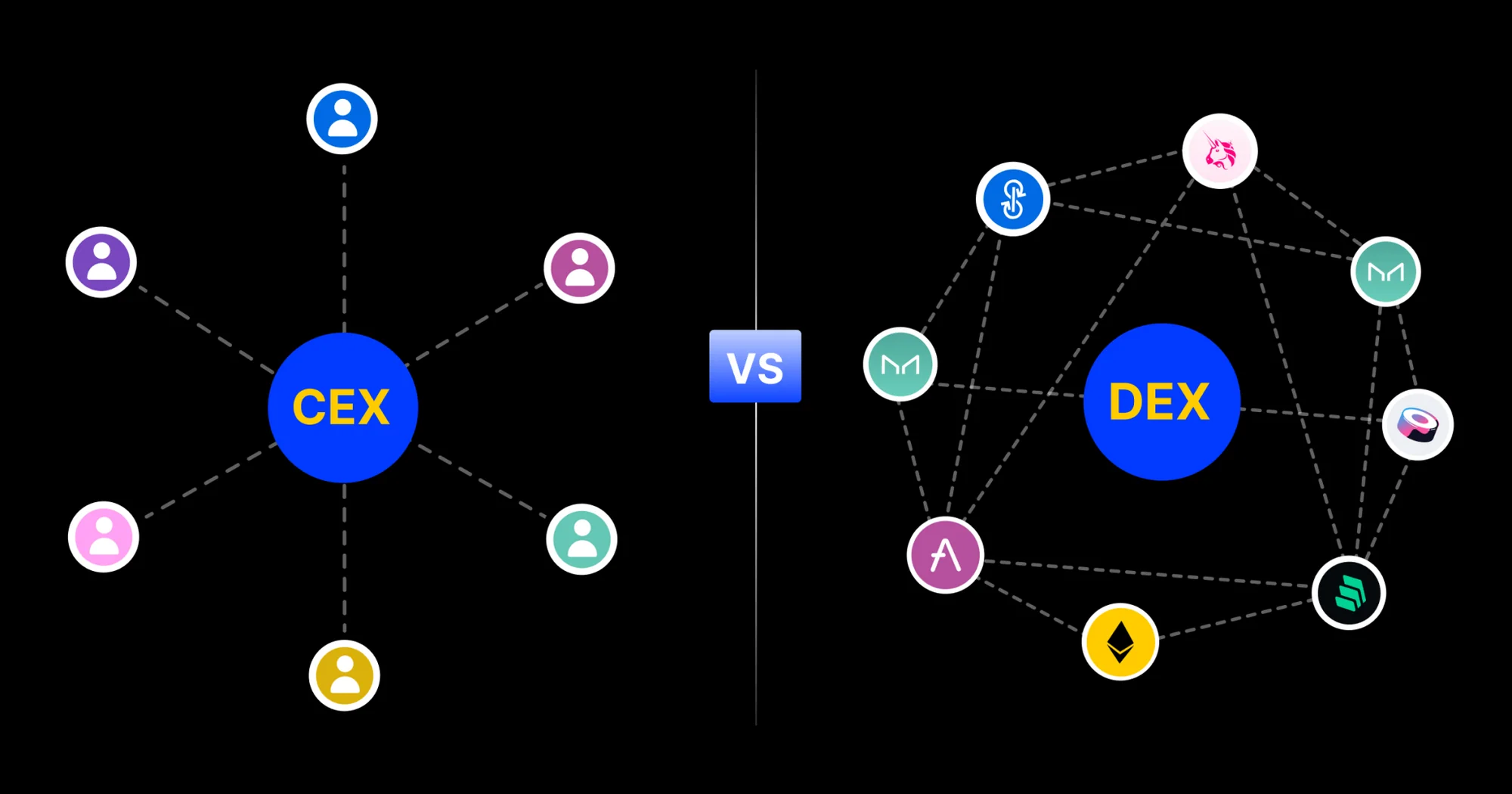
As opposed to that, on a Decentralized Exchange (DEX) no single company holds your keys — you connect your own non-custodial wallet and trade directly from it. Pricing is determined by an Automated Market Maker (AMM), a smart contract algorithm that sets prices based on the ratio of assets in a liquidity pool rather than a traditional order book.
Last but not least, Brokerage-Style Apps like Robinhood act as the counterparty or use a Request-for-Quote (RFQ) / instant-quote model: you request a price, the app quotes you one, and you accept or decline. The platform holds your keys in a custodial wallet, like a CEX would. The UI is the simplest of the three — often just a buy button with a quoted price — making it beginner-friendly but typically more expensive due to wider spreads.
Lifecycle of a First Purchase
From sign-up to holding crypto, a CEX or crypto app user goes through this step by step:
- Account creation — You register with an email and password on a centralized exchange or brokerage app.
- KYC/AML check — The platform verifies your identity (government ID, sometimes a selfie) to comply with Know Your Customer (KYC) and Anti-Money Laundering (AML) regulations.
- Funding via fiat — You deposit fiat currency (USD, EUR, etc.) via bank transfer or debit/credit card. This deposit is recorded on the exchange’s internal ledger — no blockchain transaction occurs yet. Card deposits often carry an immediate fee.
- Quote and spread disclosure — If it is an instant purchase or with brokers, before you confirm, the platform shows you a price. This price includes a spread (the difference between the buy and sell price) and/or a trading fee. Read this screen carefully.
- Execution — You confirm the purchase. The exchange’s matching engine pairs your order with a seller (on a CEX order book) or fills it from its own inventory (brokerage model). Your balance updates instantly on the exchange’s internal ledger — this is not yet an on-chain transaction.
- Settlement — For internal trades between exchange users, settlement is a database update on the exchange’s ledger. No Bitcoin or Ethereum moves on the blockchain at this point. Network fees (gas) only appear when assets actually move on-chain.
- Optional withdrawal to wallet — If you choose to move your crypto to a personal wallet, the exchange initiates an on-chain transaction. This is when a blockchain network fee (transaction fee/gas) is charged by the network, separate from any platform withdrawal fee the exchange may and most likely will also charge.
Platform fees and spreads which are paid to the exchange are separate charges from network fees paid to blockchain validators/miners!
How Trades Are Priced and Matched
On a BTC/USD market as an example:
| Term | Definition |
|---|---|
| Trading pair | Two assets quoted against each other. BTC/USD means you are buying or selling Bitcoin priced in US dollars. |
| Bid/Ask | The bid is the highest price a buyer will pay for BTC; the ask is the lowest price a seller will accept. |
| Spread | The gap between bid and ask. If the bid is $99,900 and the ask is $100,100, the spread is $200. This is a cost you absorb on entry. |
| Liquidity | How easily BTC/USD can be bought or sold without moving the price. High liquidity = tight spreads and fast fills. |
| Order book | A real-time list of all open buy and sell orders for BTC/USD at various price levels, displayed by a centralized exchange. |
| Slippage | The difference between the price you expected and the price you actually received. Slippage increases when liquidity is low or your order size is large relative to available orders. |
Common Order Types
On an exchange, crypto or not, each trade tends to come as order, of one of the following distinct types:
Market order — Buys or sells BTC/USD immediately at the best available price. Use it when speed matters more than price precision; avoid it during high volatility, as it can fill at a significantly worse price than expected due to slippage.
Limit order — Buys or sells only at a specific price you set (or better). Use it when you have a target entry or exit price; don’t use it if you need an immediate fill, since it may never execute if the market doesn’t reach your price.
Stop order — Triggers a market or limit order when the price hits a specified level. Use it to automate a buy above current price or to set a floor below which you’d want to sell; be aware the stop price is a trigger, not a guaranteed fill price.
Custody Modes: Custodial vs Non-custodial
Briefly talked about before, custody essentially means ownership of crypto assets. However, this definition can make a distinction between custodial and non-custodial modes slightly confusing. If it helps, non-custodial is the same and often interchangeable with “self-custodial”, meaning you yourself own the assets.
So, in a custodial wallet (exchange-controlled), the exchange holds the private keys to your crypto. Your “balance” is a liability the exchange owes you, recorded on their internal ledger. Three things to check in-app:
- Can you withdraw to an external address? Custodial accounts allow this, but withdrawals go through the exchange’s processes.
- Is there a seed phrase? No — because you don’t hold the keys, there is no seed phrase for you to back up.
- How does account recovery work? Through standard account recovery (email reset, identity verification).
Opposite to that, in a non-custodial wallet (user-controlled), you hold the private keys, usually represented by a seed phrase (12–24 words). Three major differences to know from the get-go:
- You can withdraw or send crypto to any address without platform approval.
- Your seed phrase is your only recovery mechanism — lose it, lose access permanently.
- Account recovery via email does not exist.
Fees You May Pay on an Exchange
(a) Trading fees
The most common type of trading fees a CEX charges is maker-taker. “Makers” add liquidity (often via limit order) and pay less; “takers” remove liquidity (often via market order) and pay more. Brokerage-style apps often use a spread-based model with no explicit fee line — their profit is built into the price quote.
(b) Deposit and withdrawal fees
Bank transfers are often virtually or actually free; card deposits typically carry a more noticeable fee. Withdrawal fees vary by platform.
(c) Blockchain network fees (gas)
These fees are charged when crypto moves on-chain. This fee usually fluctuates with congestion and is separate from any platform withdrawal fee.

Simple or “instant buy” interfaces are designed for ease of use, but that convenience has a price. According to NerdWallet's analysis of a $200 Bitcoin purchase, the fee on Coinbase's standard interface was $5.68 (2.84%), while the same purchase on Kraken cost $1.98 (0.99%)—and Kraken's own instant-buy interface charges a 1% fee, still notably less than simpler competitors. Advanced trading views typically offer significantly lower maker-taker fees because you are interacting directly with the order book rather than using a simplified quote engine.
Compliance & Safety Controls
| Control | What it is | User action or exchange practice? |
|---|---|---|
| KYC (Know Your Customer) | Identity verification requiring government-issued ID before trading. | User action |
| AML (Anti-Money Laundering) | Monitoring systems to detect and prevent illicit activity. | Exchange practice |
| Two-factor authentication (2FA) | Second verification step at login/withdrawal beyond your password. | User action |
| Hot wallet | Exchange-held wallets connected to the internet for liquidity/withdrawals. | Exchange practice |
| Cold storage | Offline storage of private keys to secure the majority of funds. | Exchange practice |
What Makes a Crypto Exchange Beginner-Friendly
“Beginner-friendly” is not marketing language — it is observable design. You can verify most of it in under five minutes well before you ever submit KYC.
Interface Type: Brokerage-Style vs. Advanced Trading View
What to look for: A beginner-friendly exchange offers a simple buy/sell screen (often called brokerage or instant-buy). An advanced trading interface shows an order book and requires you to choose order types.
How to verify in 1–2 minutes: Open the app or website without logging in. If you’re forced to pick a trading pair and order type, you’re in an advanced interface. If it asks “how much do you want to buy?” you’re in a brokerage view.
Common failure mode: A beginner lands on an advanced ticket, clicks market order, and absorbs a worse fill than expected during volatility — or freezes because the screen is overwhelming.
Graduation path: Once you understand the basics, moving to the advanced interface and using limit orders often reduces costs materially due to maker-taker pricing.
Fee Transparency: Where Fees Actually Hide
Four fee types catch beginners off guard: (1) the spread, (2) an instant-buy convenience fee, (3) the maker-taker fee on advanced views, and (4) deposit and withdrawal fees by funding method.
How to verify in 1–2 minutes: Locate the fee schedule. If it takes more than two clicks to find — or if it lists maker-taker fees without explaining spread/instant-buy pricing — treat that as a transparency warning.
The fee structure you choose matters more than the exchange you choose, especially early on. Some platforms advertise no-commission trading but widen the spread instead — always check both. Platforms like Robinhood use this model. Investopedia notes that fixed or simplified fee models can actually be more predictable for beginners than tiered maker-taker schedules, particularly when minimum deposit thresholds are low. (per Investopedia)
Minimum Viable Security

Five security features every beginner should confirm before depositing funds:
- ✅ Two-factor authentication (2FA)
- ✅ Withdrawal address allowlisting/whitelisting
- ✅ Device and session management
- ✅ Phishing code (anti-phishing code)
- ✅ Cold storage indicated in documentation
How to verify in 1–2 minutes: Log in → Security Settings. If 2FA is not front-and-center, that’s a usability problem. Confirm withdrawal whitelisting exists at all.
One warning: The most common first-loss scenario is not a platform hack — it’s impersonation on Telegram, Discord, or X. No legitimate exchange support agent will ask for your login credentials or seed phrase.
Custody and Withdrawals: Buying Is Not the Same as Owning
What to look for: Whether you can withdraw crypto to an external address — and whether that is immediate, delayed, or restricted. For example, sending Bitcoin from PayPal was not always available.
How to verify in 1–2 minutes: Search the help center for “send crypto” or “withdraw crypto.” If you see a waitlist or a restriction notice, you do not have full withdrawal access.
Onboarding and KYC
A beginner-friendly KYC flow tells you upfront which documents are accepted, typical verification times, what triggers manual review, and whether trading/deposit holds apply.
Pre-KYC prep checklist:
- Valid government-issued ID (check expiry date)
- Address and phone consistency (utility bill if needed)
- Name matches your bank account
A usable beginner exchange supports bank transfer (ACH or equivalent), debit card, and ideally wire transfer.
Decision rule:
- Lowest fees → ACH/bank transfer
- Fastest first trade → debit card (fees apply)
- Larger sums → wire transfer
For beginners, Bitcoin and Ethereum access is typically enough. Hundreds of obscure tokens are not a beneficial feature if you can’t evaluate liquidity and risk yet.
Customer Support Quality and In-App Guidance
Education, usually in the form of a help center and knowledge base, is operational safety, not a blog. Look for tooltips on order types, network selection, a glossary, and a beginner-mode toggle.
Common failure mode: Sending tokens on the wrong network because the UI did not warn you, or placing a market order without understanding slippage.
Before you deposit anything meaningful, verify you can reach support, and that an account-recovery path exists. If support is only reachable via social media accounts, or no documented account-recovery flow, treat is as a red flag.
Beginner-Friendly ≠ Best for Everyone
Beginner-optimized platforms involve trade-offs that become limiting over time.
- Fee-sensitive frequent traders will eventually outgrow instant-buy spreads. Maker-taker fee structures and full order books become economically important as volume increases.
- Users needing advanced order types (stop-limit, conditional orders, margin) will hit the ceiling of simplified interfaces. This is also where more complex best crypto exchanges are often discussed by experienced users, even though they are not positioned as beginner-first onramps in this guide.
Choosing a beginner-friendly exchange is the right starting point. The goal is to understand what you’re graduating from — and why.
Best Crypto Exchanges for Beginners
Not all exchanges are built the same way. For a beginner, the gap between “beginner mode” and an advanced interface often determines whether your first buy is clean or chaotic. Custody expectations vary as well: some platforms hold your crypto on your behalf (custodial wallet), while others let you transfer it out quickly or even deliver directly to your own wallet. Fees also differ significantly between instant-buy flows and pro trading interfaces, so the summaries below highlight both.
ChangeHero
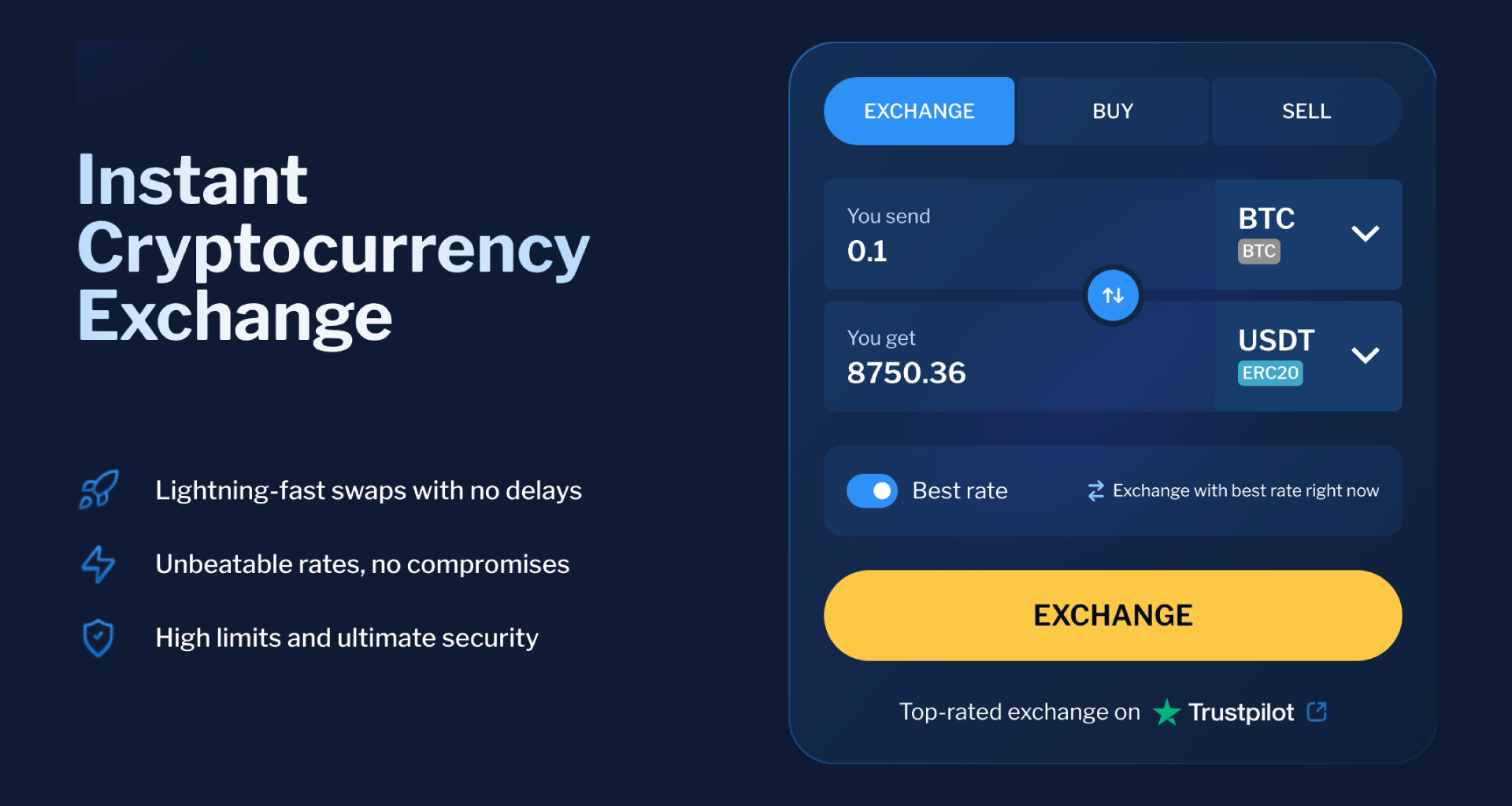
Best for: Beginners who want to skip the complexity of a CEX and third-party custody.
Why beginners like it:
- Straightforward process with clearly communicated progress
- A similarly simple crypto on-ramp for Bitcoin, Ethereum, and 100+ listed cryptocurrencies
- Responsive and helpful 24/7 support
Main tradeoffs:
- The 0.5% service commission stacks with the quoted price
- 400+ assets listed cover most beginners’ needs but are lagging behind competitors
- Advanced features like limit orders or recurring buys are not available
Fees beginners actually hit:
With all spreads and commissions added up, crypto-to-crypto swaps tend to land between 1% and as much as 8%, depending on the pair and other factors such as volatility or network congestion. Given that the bulk of the spread in a typical swap comes from the liquidity provider (exchange), ChangeHero tends to provide standard rates with a discount compared to its competitors. Fiat-to-crypto and cashouts are provided by third-party onramps, so in addition to exchange spreads, they charge their own fee, which is usually even higher than 0.5%.
Safety/compliance signals to check before using:
- Have a self-custody wallet ready at least for the cryptocurrency you will be exchanging to. For best security practices for crypto wallets, read our guide.
- Take a moment to educate yourself on risk factors that increase the chance of a swap getting paused for a KYC check. ChangeHero AML/KYC practices are mentioned in this article.
- In case your swap meets the criteria for scrutiny, proceed with the expectation of a KYC procedure.
Coinbase
Best for: Beginners who want the simplest possible onboarding and are willing to pay a small premium for convenience.
Why beginners like it:
- Step-by-step KYC verification with clear progress indicators
- A simplified buy flow for Bitcoin, Ethereum, and 200+ listed cryptocurrencies
- Recurring buys for dollar-cost averaging
Main tradeoffs:
- The instant-buy interface charges higher spreads than the pro interface
- Discovery can feel overwhelming with 200+ assets listed
- Advanced features require migrating to a separate interface
Fees beginners actually hit:
On a $200 market order via the standard interface, Coinbase charges around $2.99–$5.99 depending on payment method. Paying by debit card pushes fees toward the higher end—up to roughly 3.99%—while an ACH bank deposit is cheaper but slower. The Coinbase card carries its own fee ceiling beginners should check before using it for purchases. Cost transparency note: Always preview the order summary screen before confirming.
Safety/compliance signals to check before depositing:
- Enable two-factor authentication (2FA) in Security Settings (authenticator app over SMS where possible).
- Review active device management and remove unrecognized sessions.
- Set up login alerts for new sign-ins.
- Check whether a withdrawal address allowlist (allowlisting) is available and activate it.
- Confirm your KYC verification tier matches the limits you expect to use.
Kraken
Best for: Cost-conscious beginners who plan to grow into more advanced trading without switching platforms.
Why beginners like it:
- Low minimum deposit
- Predictable fee structure for small buys on the standard platform
- Long compliance track record
Main tradeoffs:
- Less visually polished than Coinbase
- Narrower asset selection than some competitors
- Kraken Pro’s maker-taker model requires learning limit orders vs. market orders
Fees beginners actually hit:
On a $200 purchase through the basic platform, Kraken charges a fixed fee that is competitive relative to Coinbase’s standard interface for the same trade size. Path to lower fees: Kraken Pro uses a maker-taker fee schedule where limit orders (maker) cost less than market orders (maker side often 0.16% vs. taker 0.26% at entry tiers).
Safety/compliance signals to check before depositing:
- Activate 2FA for login and withdrawals separately.
- Review Global Settings Lock.
- Configure withdrawal address allowlist before your first deposit.
- Review account activity logs after initial setup.
- Verify your KYC tier fits your deposit/withdrawal needs.
Robinhood
Best for: Beginners who already use Robinhood for stocks and want to add crypto exposure inside the same app.
Why beginners like it:
- Unified brokerage interface and familiar onboarding if you’re already verified
- Recurring purchase capability
- Commission-free headline pricing, with margin embedded into the spread
Main tradeoffs:
- Crypto feature depth: 35+ cryptocurrencies is a meaningful limitation
- Custodial wallet model historically limited direct withdrawals to external wallets
- Exchange-native tools (advanced order types, broad staking) are limited
Fees beginners actually hit:
No explicit per-trade commission, but Robinhood earns through the bid-ask spread. For small buys, the cost is embedded — compare the quoted price against a reference market price before confirming.
Safety/compliance signals to check before depositing:
- Enable two-factor authentication.
- Review linked bank accounts.
- Turn on login notification alerts.
- Check device management for unrecognized devices.
- Confirm what withdrawal options are available for crypto in your account tier.
Gemini
Best for: Security-conscious beginners who prioritize a regulated, audited platform and are comfortable with a slightly more structured interface. Gemini has completed SOC 1 Type 2 and SOC 2 Type 2 examinations and holds ISO 27001:2022 certification — frameworks that verify internal security processes and controls. This does not eliminate risk, but it is a meaningful operational signal.
Why beginners like it:
- New York trust company status (state-level regulation)
- Optional ActiveTrader interface (clear upgrade path)
- Recurring buys and a clean mobile app
Main tradeoffs:
- Basic interface fees are higher than ActiveTrader fees
- Smaller asset selection than Binance.US or Crypto.com
- Compliance-first posture can make some features feel gated
Fees beginners actually hit:
Standard interface trades carry a convenience fee; ActiveTrader uses a maker-taker fee schedule that rewards limit orders with lower costs. Check your fee tier before deposit.
Safety/compliance signals to check before depositing:
- Enable 2FA (Gemini supports hardware keys).
- Set up a withdrawal address allowlist.
- Review login history after account creation.
- Confirm KYC verification is complete before depositing.
- Review Gemini’s cold storage disclosure.
Binance.US
Best for: U.S.-based beginners who want a wide asset selection and competitive fees and have confirmed state availability.
Why beginners like it:
- One of the broader asset catalogs for U.S. retail users
- Competitive maker-taker fee model
- Recurring buy features for gradual accumulation
Main tradeoffs:
- More limited than global Binance due to U.S. regulatory requirements
- Interface can feel complex for day one
- Customer support and state availability have been variable
Fees beginners actually hit:
Spot trading starts at a competitive taker fee for new users, with reductions available as volume grows or if you hold the platform’s native token. ACH deposit is typically free; other methods may carry fees — verify at signup.
Compliance/availability caution for U.S. beginners: Binance.US availability varies by state. Confirm support during signup before funding your account.
Safety/compliance signals to check before depositing:
- Complete full KYC verification before deposit.
- Enable 2FA on login and withdrawals.
- Configure withdrawal address allowlisting.
- Review active sessions/devices.
- Confirm state eligibility directly on the platform.
Crypto.com
Best for: Beginners who want broad asset selection and an all-in-one ecosystem and are willing to learn the fee structure.
Why beginners like it:
- Over 100 million users globally
- App bundles spot trading, crypto card, and earn/staking products
- Wide range of assets and pairs
Main tradeoffs:
- Ecosystem breadth can obscure costs
- Tiered fee structure tied to holding the platform’s native token adds complexity
- Customer support responsiveness is a recurring community concern
Fees beginners actually hit:
Spot fees follow a maker-taker model and vary by 30-day volume and whether you hold the platform’s native token. For small, first-time market orders, the default taker fee applies — check the current schedule at account creation.
Safety/compliance signals to check before depositing:
- Enable 2FA immediately.
- Set an anti-phishing code.
- Review device authorization and revoke unknown devices.
- Confirm withdrawal address allowlisting is active.
- Check which KYC tier you need for your limits.
Exchange Comparison Factors for Beginners
Choosing your first exchange gets easier when you evaluate it the same way every time. The six factors below are the reusable framework.
Ease of Use
Unless one is the selling feature, most exchanges effectively ship two products: a simple buy flow and an advanced trade view. Your first job is to identify which one you’re using, where applicable:
- Default order type shown
- Presence of a price chart vs. an order ticket
- Whether a limit order is accessible without switching modes
- Confirmation screen line items
- KYC gating on features
Practically, “Simple mode” trades convenience for price transparency. When the interface hides the order book and collapses costs into a single quote, you lose the ability to compare your execution price against the live market — which matters most when spreads widen during volatile periods.
Fees
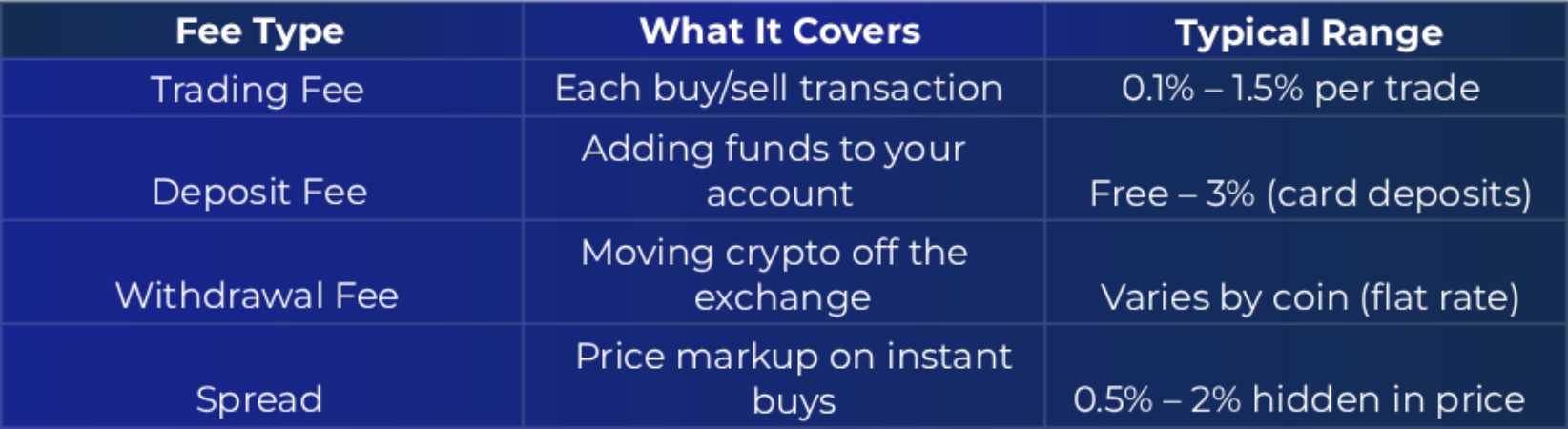
Crypto fees fragment into cost categories that don’t overlap, and missing one distorts your all-in cost.
- Trading fee (maker-taker vs. flat)
- Spread / price slippage
- Deposit fees
- Withdrawal fees (fiat vs. crypto)
When a platform advertises “no commission,” inspect the spread carefully. Instant-buy screens routinely embed costs in the spread even when the commission line reads $0. The all-in cost is commission + spread, not commission alone.
How to estimate your all-in cost with the $200 test trade method:
- Quote preview: Initiate (but don’t confirm) a $200 buy of BTC or ETH. Note the quoted price.
- Confirm line items: Identify every line item on the confirmation screen.
- Compare executed price to spot: After execution, compare your fill price to a neutral spot price source. The gap is your effective spread cost on top of any stated fee.
Using this method on platforms like Coinbase can reveal that a “free” instant buy on a less-liquid altcoin costs more than a limit order on the advanced interface.
Security
Security on a crypto exchange splits into two layers: what you control, and what the platform signals about its own discipline.
Baseline security bundle to enable on Day 1:
- Two-factor authentication (2FA) (authenticator app, not SMS)
- Withdrawal allowlist / address whitelisting
- Anti-phishing code
- Device and session management
- Passkey support (if available)
Platform-level signals — what to look for:
- Third-party audits and certifications (SOC exams, ISO 27001)
- Cold storage disclosures
- Insurance language (and its scope)
Certifications and insurance disclosures are positive signals but still not guarantees against loss. They indicate process maturity yet they do not mean your funds are managed risk-free.
Asset Selection
Coin count is not the beginner metric. Liquidity is.
Decision criteria beyond coin count:
- Liquidity (tight spreads, order book depth)
- Availability of major pairs
- Stablecoins supported
- Multi-network transfer support
If your entry to crypto was one of the illiquid “microcaps” (coins and tokens with market capitalization below $50M), wide spreads and thin order books can make you “down” the moment you buy — and sometimes make exiting hard. If you can’t see reliable depth or a clean quote, avoid the asset until you can evaluate it properly.
Customer Support
One thing worth keeping in mind is when you need support, it is at the worst moment: on a crypto exchange, it can be anything from account lockout or failed withdrawal to suspicious activity. Test the support infrastructure well before you need it:
| Channel | What to Check |
|---|---|
| Live chat | 24/7? human or bot-gated? |
| Email ticketing | SLA stated? ticket number issued? |
| Phone support | available? tier-gated? |
| In-app help center | searchable? includes account recovery? |
| Status page | public incident updates? |
Regional Availability and Supported Countries
Crypto itself may be advertised as borderless but the reality is, not every exchange operates everywhere — and even when one does, it may not offer the same features in every location.
United States
The U.S. is notoriously heavily regulated, although it is for the benefit of the user in the end, and availability varies by state.
Before the signup, U.S. users have to verify:
- State eligibility
- Separate U.S. entity?
- KYC/AML identity requirements
- Fiat funding and withdrawal methods
- Feature gating by state
- Customer support and dispute options
| Common U.S. Availability Blockers | What you'll see | What to do |
|---|---|---|
| Not available in my state | Sign-up blocked, or notice after KYC | Check supported-states page; choose an alternative |
| Identity verification fails | KYC rejected or stuck pending | Confirm document requirements; contact support |
| Bank linking not supported | ACH/wire options missing | Check supported banks; use debit card or wire |
| Feature not offered in my state | Feature tabs missing | Check state-by-state feature page |
| Account restricted due to residency/travel | Access limited when traveling | Notify support; avoid VPNs |
If you keep running into state restrictions, Gemini is worth checking first. Gemini is available to traders in all 50 states, making it one of the most consistently accessible centralized exchange options for U.S.-based beginners regardless of where you live.
Worldwide Comparison
Outside the United States, users may need to separate exchange availability from feature availability. For instance, you can have access to the app while lacking local fiat deposits, staking, or bank withdrawals. Additionally, app store availability is not a reliable indicator of full exchange access.
Feature-related questions to ask before signing up from outside the U.S.:
- Can I deposit/withdraw my local fiat currency?
- Are local bank rails supported?
- Are withdrawals back to a bank available?
- Is staking geofenced?
- Are card purchases supported?
- Is the platform available in my language and local currency display?
| Exchange Availability at a Glance | Primary regions served | Fiat on-ramp coverage | Notes for beginners |
|---|---|---|---|
| ChangeHero | Global | Moderate | Crypto-to-crypto and fiat tracks are separate |
| Coinbase | U.S., EU, UK, select global markets | Broad | Verify local fiat deposit options |
| Kraken | U.S., EU, UK, Canada, Australia, and more | Broad | Verify your country on supported countries page |
| Robinhood | U.S. only | U.S. only (ACH) | Not available internationally; no direct crypto withdrawal to external wallets |
| Gemini | U.S. (all 50 states), select international | Moderate | International availability more limited |
| Crypto.com | Global (150+ countries) | Broad | Features vary by region |
| Binance.US | U.S. only | U.S. (ACH/wire/debit) | Separate from Binance global |
Always verify current availability directly on each exchange’s website, as supported regions change.
How to Verify Supported Countries Safely
- Use the exchange’s official supported-countries page.
- Confirm the legal entity shown during signup matches your region.
- Check bank deposit and withdrawal pages before finishing KYC.
Getting Started: Step-by-Step
Account Creation
Your first decision isn’t which coin to buy — it’s which mode you are opening: a centralized exchange environment or a brokerage-style app experience inside a platform that also offers advanced tools.
Before you create your account, confirm you’re on the correct URL or official app store listing (publisher name matches the exchange exactly). If the platform offers an anti-phishing code, it’s a good idea to enable it immediately after signup. Make sure your device OS and browser are fully updated.
During the account creation, use preferably a unique email address not tied to other financial accounts and set a randomized password via a password manager (1Password, Bitwarden, or similar). Enable two-factor authentication (2FA) immediately (TOTP authenticator app is more secure than SMS), and don’t forget to save 2FA backup codes offline.
Identity Verification
Most exchanges require KYC (Know Your Customer) verification and operate under AML (Anti-Money Laundering) obligations.
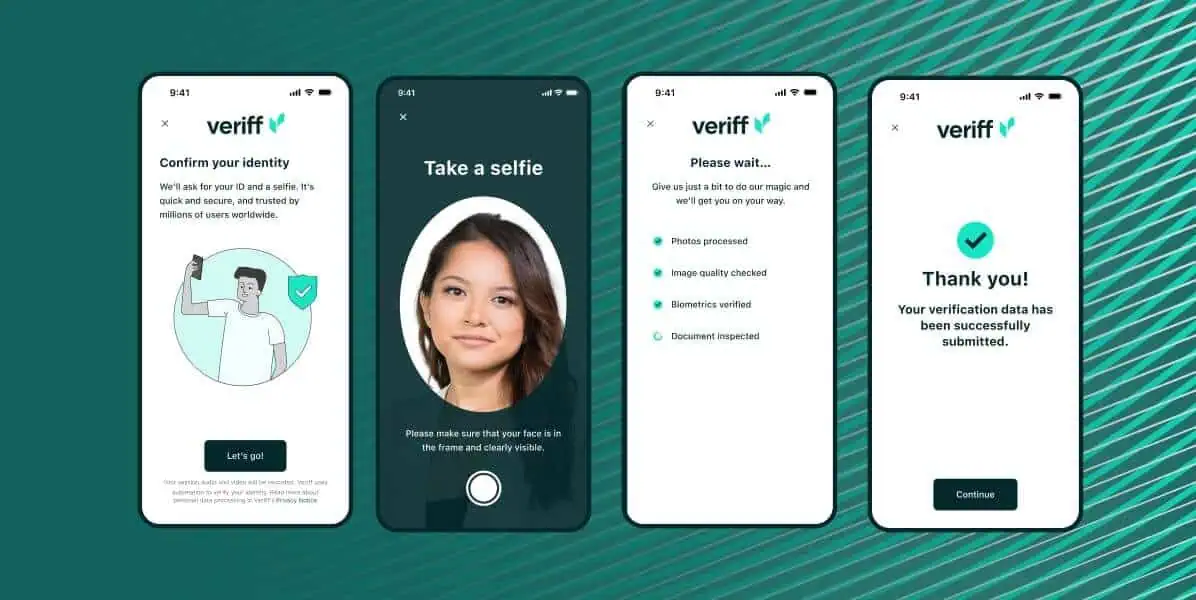
The path to KYC success has some non-obvious failure points: extra steps may be required if the name/address do not match bank records exactly, ID is expired, photo quality is not clean enough (glare or cropping are the usual pitfalls), or selfie/liveness prompts are not followed precisely.
What’s restricted before KYC clears:
- Withdrawal limits are capped (sometimes to zero for fiat withdrawals)
- Bank/ACH transfers may be locked until higher verification tiers
- Certain order types and higher-volume trading may be unavailable
Complete verification before funding your account — deposits can sit inaccessible if KYC is pending when you try to withdraw.
Funding Methods
There are four most common ways to fund your account with fiat currencies, so how do they compare?
- ACH / Bank Transfer
- Speed: 3–5 business days to fully settle
- Fees: Low to none (often $0)
- Best for: Regular deposits and larger amounts
- Debit Card
- Speed: Instant
- Fees: High — Coinbase charges up to 3.99% for card purchases; Kraken's instant buy carries its own spread on top of any stated fee
- Best for: Very small first purchases where speed matters and you accept the fee
- Wire Transfer
- Speed: Same day to 1 business day
- Fees: Bank wire fees plus possible receiving fees
- Best for: Larger deposits where ACH limits are too low
- Crypto Deposit
- Speed: Minutes to ~1 hour depending on network confirmations
- Fees: You pay the blockchain network fee from the sending wallet
- Best for: Moving existing crypto
For the first deposit on a new platform, follow a safety rule: send a small test deposit ($10–$20) first.
First Trade
In general, the first trade follows these steps:
- Choose Bitcoin (BTC) or Ethereum (ETH). Use a USD-denominated pair (BTC/USD or ETH/USD).
- Choose order type:
- Market order for a small first execution
- Limit order when entry price matters
- Review the order preview.
- Place the order.
- Confirm it in the order history.
Don’t neglect to compare the quoted execution price to the live mid-price. Also, if possible, avoid making your first market order altogether during extreme volatility.
Wallets
The crypto wallet types, instead of a single distinction, characterize multiple dimensions: we already talked about custody but internet connectivity also plays into the categorization. In addition to custodial vs non-custodial wallets, you have to choose between hot and cold wallets; simply put, whether it is an application with online connectivity or a dedicated device isolated from the internet, respectively.
When exactly do you need each?
| Situation | Recommendation |
|---|---|
| Small learning balance (under ~$500) | Keep on exchange |
| Active trading | Keep on exchange |
| Long-term holdings | Move to cold storage |
| Any amount you can’t afford to lose to platform failure | Withdraw to non-custodial storage |
To make a withdrawal to a self-custodied wallet safely, confirm the networks and assets match, copy-paste the address instead of typing; verify first 6 and last 6 characters.
We have made a guide on how to store seed phrase safely but the gist is to never write it down where it could leak from (i.e. note apps or photos), ideally physically, and never share it with anyone (especially someone claiming to be support or the like).
Risks, Drawbacks, and Key Considerations
Market Risk
First and foremost, because no matter if you are a beginner or an experienced trader, market risk applies to all. Beyond simple “price goes down”, it is spread, slippage, and execution during volatility — especially in instant-buy flows.

A few tips to mitigate it are: give preference to limit orders for non-urgent buys, avoid margin trading and leverage entirely. Set position-sizing rules before you buy and use recurring buys or even dollar-cost averaging (DCA) to reduce timing risk. Using stablecoins is not a way to escape the market risk: remember, this is not just about the price.
What you should also know is that during periods of extreme volatility, exchanges including Robinhood and Crypto.com have experienced halted withdrawals, degraded app performance, and significantly widened spreads. If this happens: do not panic sell into a broken order book. Wait for confirmations. Check order history, not just portfolio balance.
Scams
Beginners in crypto get targeted disproportionately, for one because operational mistakes are irreversible. The hurdle is the feature but it also means what clearly is fraud on the social level, from the blockchain’s perspective a perfectly valid transaction. Examples include social engineering such as impersonating support or pig-butchering, phishing, wallet-draining through fake giveaways or airdrops and malicious approvals. To make things worse, some users get scammed twice with crypto recovery scams when trying to recover lost crypto.
Novel schemes are rare; most often, bad actors operate with known tactics, just at a large scale, hunting for someone not in the know. To avoid the majority of crypto scams, watch out for the red flags: anyone asking for your seed phrase or remote screen-sharing, moving conversation to Telegram/WhatsApp, requesting to disable 2FA or make test transactions, and all the while pressuring to keep things private. This can happen during peer-to-peer trades or after an unsolicited “support” outreach, which in itself is a red flag. Spotting phishing requires either attention to notice URLs or app details are close but not exact, or cross-checking with primary sources, for example, when you receive an email purportedly from an exchange or wallet manufacturer. Scam promotion is often characterized by urgency or pressure and promises of guaranteed returns.
If you suspect a scam, stop immediately and freeze all activity. Change the exchange password from a clean device and revoke active sessions. Contact official support in-app only and bank/card issuer if applicable. Document everything (TXIDs, screenshots) to file a report with the exchange and law enforcement (IC3, Action Fraud, local authority).
Legal Risk
What beginners do not always realize is that crypto regulation is not uniform, and restrictions can apply at country or state/province level. KYC and AML are legal compliance requirements. Failing checks can lead to freezes or closures.
Before you deposit — a legal and tax readiness checklist:
- Confirm the exchange operates in your jurisdiction.
- Read deposit/withdrawal restrictions for your payment methods and fiat currency.
- Understand taxable events at a high level.
- Keep records from day one.
- Track cost basis per asset.
Keep in mind that exchanges can delist assets, geo-restrict features, or exit markets with little warning. Maintain an exit plan: know how you would withdraw if restrictions hit tomorrow, and test it with a small transfer.
Conclusion
Choosing your first crypto exchange is less about finding a universally “best” platform and more about matching the platform to your actual starting conditions: your region, funding method, fee sensitivity, and how quickly you want to graduate from instant buy to an order book.
Frequently Asked Questions
Which Crypto Exchange is the Easiest to Use?
“Easiest” depends on which step you are trying to complete: for the first-ever buy with fiat currencies, Coinbase and Robinhood, where available, are popular picks for a reason. For exchanging one cryptocurrency to another without jumping through too many hoops, instant exchanges like ChangeHero are at the very least worth considering.
Can I start with $10? Yes — Coinbase, Kraken, and Robinhood support purchases below $20, though minimums vary by asset and payment method.
Which Crypto Exchange is the Safest for a Beginner?
The recommended platforms in this article are overall employing adequate security measures to protect beginners: two-factor authentication (2FA), address books with allowlists, and phishing protections (anti-phishing code and security alerts for new device logins). They also deploy measures to protect the user funds in their custody: cold storage policies, independent security audits, partial insurance, and proof of reserves.
A custodial exchange (Coinbase, Kraken, Gemini, Robinhood) holds your private keys on your behalf, which allows account recovery — but the platform controls the assets. A non-custodial wallet gives you direct control of private keys; losing the seed phrase means permanent loss. Custodial is a practical starting point for a first purchase, as long as you understand the tradeoff.
Which Fees Crypto Beginners Have to Know about?
The fee stack a beginner would encounter on a crypto exchange starts with instant buy/sell fee or maker-taker trading fee (in advanced view). Both include the spread (price difference between the highest buying and lowest selling available prices). Upon withdrawal, users are charged withdrawal fees (sometimes on deposits too) and network fee (gas fee), which are separate from each other: the former is charged by the platform and the latter — by the blockchain.
Card-based crypto purchases can reach up to 3.99% on some platforms. Bank transfer/ACH is usually lower-cost for beginners.
Why did fees look higher at checkout than advertised? Because advertised rates often reflect trading fees only. Checkout totals include spreads priced in real time.
How to Complete ID Verification on a Crypto Exchange for the First Time?
KYC (Know Your Customer) is identity verification. AML (Anti-Money Laundering) is the broader framework of controls that detect and report suspicious activity. Together, they explain why regulated exchanges — including Coinbase, Kraken, Gemini, and Robinhood — require identity documents before allowing financial transactions.
A Step-by-Step KYC Process looks like this: first, create your account and when prompted, submit a government-issued ID and complete a selfie/liveness check. Confirm your address (if required). Wait for review in anywhere between minutes to 24–72 hours to receive confirmation and access (limits may still vary by tier).