
Beginner’s Guide to Types of Wallets for Crypto


Key Takeaways
- 🪙 The two most commonly highlighted types of crypto wallet apps define whether they connect to the Internet. Hot wallets have online features while cold wallets keep private keys isolated from outside networks.
- 🪙 Another classification of cryptocurrency wallet types tells users if a separate device that stores the private keys is involved. If yes, those are hardware wallets, while the opposite is software wallets. Although there is a major overlap, the difference here is not the same as between hot and cold wallets;
- 🪙 Apps in which the provider takes care of the private keys and those that entrust them to the user are also different kinds of wallets. The former are called custodial or centralized and the latter are referred to as non-custodial, self-custodial, or decentralized.
Wouldn’t things be easier if crypto wallets were one-size-fits-all? At the very start of using crypto, you might feel like it but these variations exist for a reason. What makes it even less approachable is different types of crypto wallets are not mutually exclusive — a wallet can be hot and non-custodial, or cold and custodial, depending on how it is designed and who holds the keys. But this is exactly what this guide aims to unpack: you’ll see that this is not hard to understand at all and learn which types meet your needs.
Crypto Wallet Basics
A crypto wallet is a key-management and transaction-signing tool that controls access to funds recorded on a blockchain. It does not store coins or tokens. Instead, it holds the cryptographic keys that authorize you to move assets. Without a wallet, you cannot initiate, sign, or broadcast a transaction on any blockchain network.
Crypto Wallet Definition
Despite what the name might imply, a crypto wallet is not a container — it is an authorization layer. Your funds live on the blockchain itself, and the wallet holds the credentials required to prove you have the right to move them.
To clear up the most likely points of beginner confusion, let’s introduce four core concepts:
- Wallet app or device: The software or hardware interface you interact with — it generates and stores your keys and builds transactions for broadcasting.
- Private key: The secret cryptographic string that proves ownership and authorizes transaction signing; whoever holds it controls the funds.
- Public key: A mathematically derived counterpart to the private key, used to verify signatures without exposing the private key.
- Address: A shortened, encoded version of the public key that others use to send funds to you — analogous (but not a direct counterpart) to an account number. A public key and address can be safely shared: the private key is not derivable from either.
What might create some confusion is that blockchain addresses are also sometimes called “wallets”. For example, in the sentence “To start the ETH - BTC conversion, enter the amount of ETH and click “Exchange”. Provide the BTC wallet address”, ‘wallet’ refers to a unique BTC blockchain address. If a blockchain analyst talks about funds moving between wallets, they mean addresses. However, in this sentence: “ChangeHero will generate a separate deposit address for your ETH - BTC exchange, use your wallet to send ETH there”, ‘wallet’ means the application. Where not explicitly described (‘wallet address’ or ‘wallet app’), you might have to rely on context clues.
Once again: funds are never "inside" the wallet app or device. They exist as entries on the blockchain ledger (records). The wallet controls the authorization to move them — nothing more, nothing less.
Moreover, it might be useful to introduce more of the terms related to crypto wallets:
- Seed phrase / mnemonic phrase: A human-readable backup of 12–24 words that encodes your master private key; 12 words is the most common length in modern wallets. (Source: Investopedia)
- Recovery phrase: An alternate term for seed phrase or mnemonic phrase — all three refer to the same backup mechanism.
- Transaction signing: The process of applying your private key to a transaction to prove authorization before it is broadcast to the network.
Why Crypto Wallets Matter
Wallet choice is not for life but it is not cosmetic either. It determines what you can do on-chain, how much friction you accept in daily use, and which failure mode you are choosing to live with.
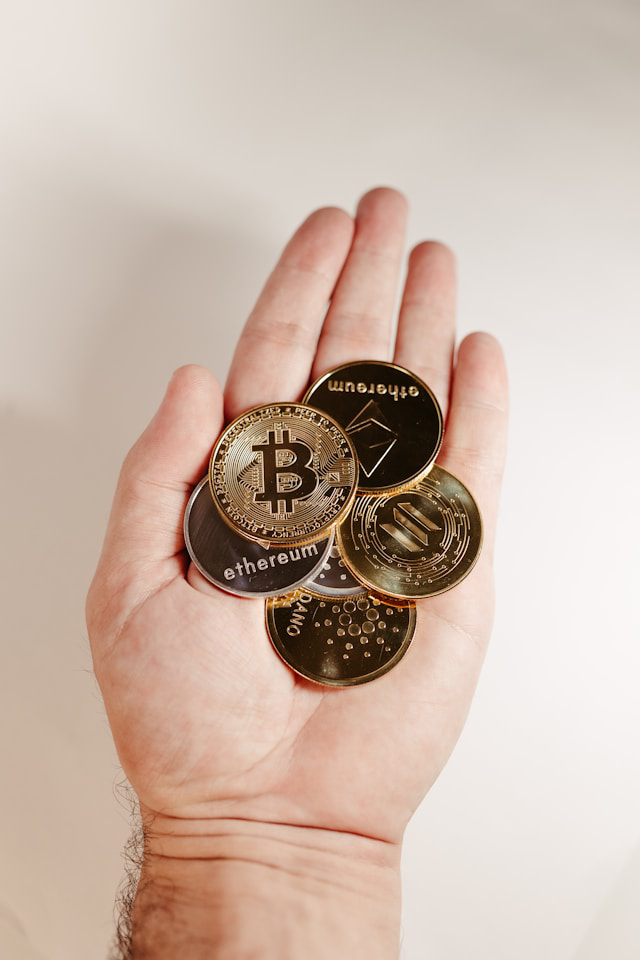
Three example scenarios can make that boundary more clear:
- Exchange account vs. self-custody: Funds on an exchange are held by a custodian; you hold a claim, not keys. In self-custody (also referred to as non-custodial), you hold the keys directly. The choice affects recoverability and counterparty risk: exchange insolvency or account freezes affect custodial users; key loss affects self-custody users.
- Long-term storage vs. daily spending: Keeping Bitcoin in cold storage maximizes security but makes quick payments inconvenient. Keeping funds in a hot wallet for daily use maximizes accessibility but increases exposure. There is a security-vs-convenience trade-off.
- DeFi on Ethereum or Solana: To use decentralized finance (DeFi) applications — lending protocols, DEXs, yield platforms — you must connect a non-custodial wallet directly. The protocol interacts with your keys in real time. The choice of a wallet affects speed and control: slow signing interfaces or custodial accounts cannot connect at all.
One of the first choices about crypto wallets a beginner has to make is whether to store crypto on an exchange balance or withdraw it to their own wallet. Below is what the choice means in more detail:
You are responsible for (non-custodial):
| The custodian handles (custodial):
|
How Crypto Wallets Work
We have established that wallets (meaning wallet apps) are tools to make transactions on a blockchain. Knowing how exactly it works may help you understand why they do not hold the coins and what actually needs to be kept safe, for later in this guide.
Every outgoing transaction on a blockchain — whether Bitcoin, Ethereum, or any other network — follows the same underlying sequence:
- Creating a transaction: The wallet app software constructs a transaction object containing the sender address, recipient address, and amount.
- Choosing the network/chain: The correct blockchain network needs to be selected; sending on the wrong chain is one of the most common and irreversible errors.
- Estimating the fee: The wallet calculates a network fee (gas on Ethereum, miner fee on Bitcoin) based on current demand and transaction complexity.
- Signing with private key: The transaction data is cryptographically signed using your private key — this is the authorization step that proves you own the funds.
- Broadcasting: The signed transaction is transmitted to network nodes; at this point, it is public and pending.
- Confirming: If all is well, nodes validate and miners or validators include the transaction in a block; additional blocks stack on top to increase finality (Bitcoin etc.). Alternatively, every once in a while the network state is finalized (Ethereum etc.)
- Balance updating: Once the transaction reaches sufficient confirmations, the blockchain ledger reflects the updated balances for both sender and recipient.

As for the second step, if you send assets on the wrong chain — for example, sending an ERC-20 token to a Solana address, or sending funds to an address format incompatible with the selected network — the transaction will either fail outright or the funds will arrive at an address no one controls. In most cases, the assets become permanently inaccessible. This is a high-stakes consequence of the irreversible nature of blockchain transactions.
Steps four and five, signing and broadcasting are two distinct steps for a reason. Signing does not require an internet connection and can happen offline — your private key applies a cryptographic signature to the transaction data. This is why a hardware wallet can remain air-gapped and still authorize transactions: it signs locally, then passes the signed data to an online device for broadcasting. Broadcasting is the act of sending that already-signed transaction to the network. In a custodial setup, neither step is performed by the user — the custodian holds the keys, signs internally, and broadcasts on your behalf.
Crypto Wallet Categories Explained
Crypto wallet categories map to three distinct axes: internet connectivity (hot vs. cold), cryptographic key custody (custodial vs. non-custodial), and signing architecture (single-sig vs. multisig vs. MPC).
A single wallet product can occupy multiple categories simultaneously: for example, a browser extension wallet is hot and usually non-custodial. A hardware device used inside a multisig setup is cold and multisig. Wallets are broadly classified into hot and cold categories at the connectivity level, but custody and signing architecture layer on top of that independently.
Online or Hot Wallets
Hot wallets are internet-connected wallets where the private key is stored on a device that has — or regularly has — online access, and transaction signing occurs on that same device. That connectivity is what defines "hot": the key material is reachable by anything the device can reach.
The private key (and often the mnemonic phrase used to derive it) lives in software running on an online-capable device — a phone, desktop, or browser. Signing happens locally on that device before the signed transaction is broadcast to the blockchain.
Because the signing environment is online, hot wallets are exposed to malware, phishing attacks, and browser extension compromise. The key never needs to leave the device, but a compromised device is a compromised key.
Regardless, hot wallets are still the best fit for small balances, high-frequency transactions, and active DeFi or smart contract interactions where signing speed and dApp connectivity matter.
Offline or Cold Wallets
On the other hand, cold wallets keep private keys offline — meaning the key is generated and stored in an environment that is never exposed to the internet, and it stays there. Operationally, a transaction is constructed on an online device, transferred to the offline device for signing, and only the signed transaction (not the key) is broadcast to the blockchain. The private key never leaves the offline environment.
Offline keys mean the signing device is air-gapped or physically isolated. The key itself remains on the cold device, only the transaction data moves between the devices or environments.
Cold storage introduces deliberate workflow friction — physically approving transactions takes more steps. It also creates a dependency on device integrity and backup: losing the device without a secure mnemonic phrase backup means permanent loss of access.
It makes sense that the best fit scenario for cold wallets is the opposite to hot wallet use cases: long-term storage of larger balances where transaction frequency is low and security priority is high. That being said, cold wallets are not incompatible with DeFi. A user can construct a smart contract interaction online, sign it on an offline device, and broadcast the completed transaction.
Custodial Wallets
Moving on to the next categorization, in a custodial wallet, a third party holds the private key — which means that third party controls the authorization to move funds, not you. Account recovery in a custodial setup is provider-controlled: if you lose access, the provider can reset your credentials using identity verification. There is also no seed phrase for you to manage, because you don't hold the key.
Despite “not your keys, not your coins” being a hard principle in crypto, custodial storage is acceptable when you're new to crypto and prioritize account recovery over key sovereignty, you need fiat on/off-ramps where the custodian handles regulatory compliance, or you're holding assets short-term before moving them elsewhere.
When you're storing a significant balance you cannot afford to lose to platform insolvency, hacking, or withdrawal restrictions or operating in a jurisdiction or context where censorship or account freezing is a risk, custodial storage becomes a liability. The practical tradeoff is straightforward: custodial wallets reduce operational burden but introduce counterparty risk. The provider's security posture, solvency, and policies become your risk exposure.
Non-Custodial Wallets
A non-custodial wallet is not strictly better: this type means you hold the private key — and therefore bear full operational responsibility for it. This is also referred to as "self-custody," and it means private-key control rests entirely with the user. The app or wallet provider (if there is one) cannot restore your funds, reset your access, or reverse a transaction.
When you create a non-custodial wallet, a mnemonic phrase (typically 12 or 24 words) is generated. This phrase is the master backup for your private key. Losing a private key means losing ownership of one address but a seed phrase creates many addresses, and therefore, losing it means access to all funds in wallets derived from this phrase is permanently gone.
Recovery means importing your mnemonic phrase into a compatible wallet. If you back it up adequately, this is usually not a problem but if anything goes wrong, there is no customer support escalation path.
Likewise, sending funds to a wrong address, losing your seed phrase, or approving a malicious smart contract interaction results in unrecoverable loss.
Multisignature Wallets
A multisignature (multisig) wallet requires more than one cryptographic signature to authorize a transaction, defined by an approval threshold. A common configuration is 2-of-3: three private keys exist, and any two must sign to execute a transaction. This structure eliminates single-point-of-failure risk — no single compromised or lost key can move funds unilaterally.
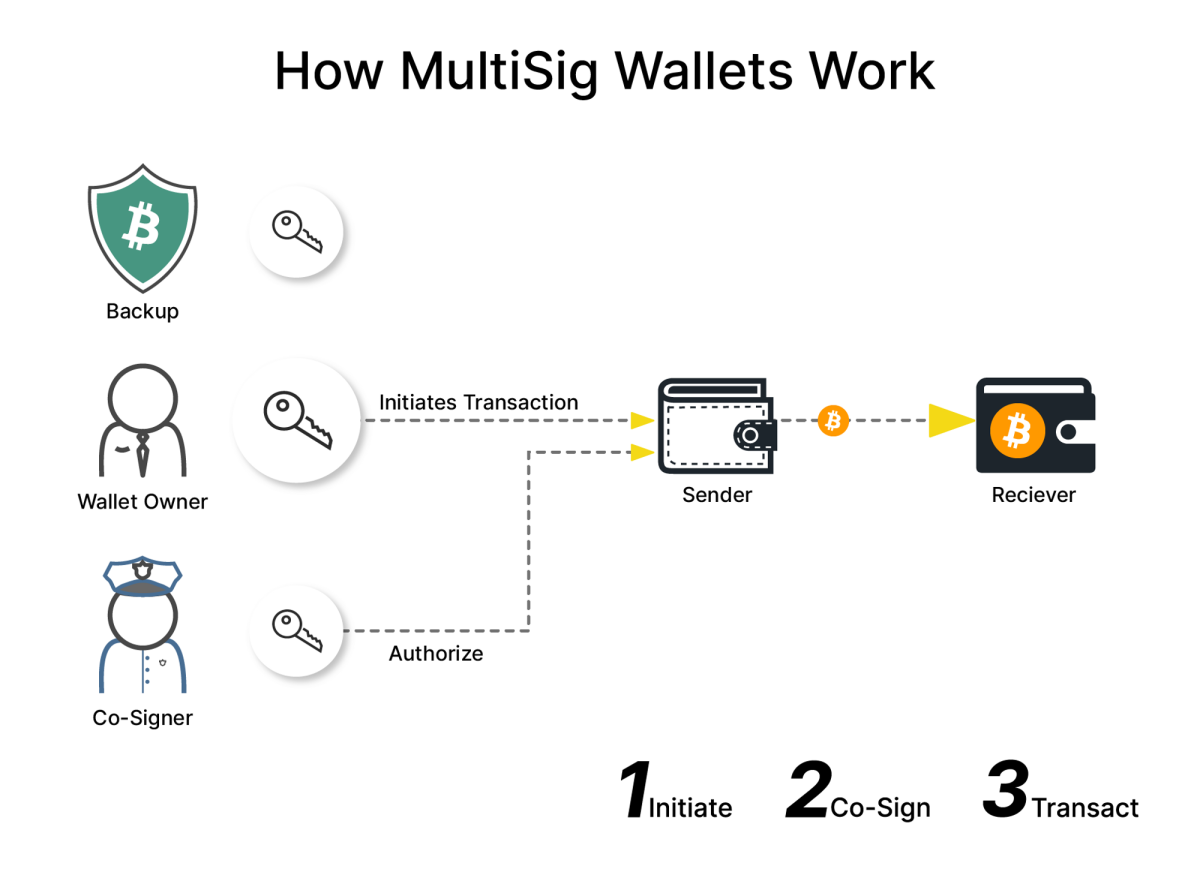
One practical setup pattern for example: hold one key on a hardware device, one on a separate software wallet, and assign a third to a trusted party or secure backup location. Any two of those three can authorize. The threshold is enforceable at the blockchain level, typically via a smart contract or protocol-native multisig scheme.
The primary failure mode for this type of crypto storage is threshold loss: in other words, if you lose enough keys to fall below the required threshold (e.g., two of your three keys in a 2-of-3 setup), the wallet is permanently inaccessible. Multisig increases resilience against compromise but requires disciplined key management across all signers.
MPC Wallets
MPC (Multi-Party Computation) wallets are frequently confused with multisig, but the underlying architecture is different. In a multisig setup, multiple independent private keys exist and each signs separately. In an MPC wallet, there is no single complete private key at any point — instead, the key is split into cryptographic "key shares" distributed across multiple parties. A transaction is authorized through a collaborative computation that produces a valid signature without ever assembling the full key in one place. From the blockchain's perspective, an MPC-authorized transaction looks like a standard single-signature transaction.
MPC is most frequently found in institutional and team setups or consumer wallets that abstract complexity. In the first case, MPC allows organizations to distribute key shares across employees, departments, or geographic locations, requiring coordinated authorization without any single person holding a complete key. Some wallets use MPC to split a key share between the user's device and a server, enabling account recovery and simpler UX without a traditional mnemonic phrase backup.
This security model depends on who controls the key shares and how that coordination is managed. If one party controls multiple shares, or if the coordination infrastructure is compromised, the security assumptions weaken. MPC also introduces availability requirements — all required parties must be reachable to sign.
How to Choose a Crypto Wallet
Picking the right wallet is a decision that directly affects what you can do, what you might lose, and how hard recovery becomes if something goes wrong, not simply a preference. Your goal should be to disqualify the wrong category early, then compare the remaining options on operational details: chain support, recovery model, fees, and trust signals.
Use-Case Fit
Match your primary goal to the features that actually matter for it—then use the "avoid if" signal to disqualify mismatched options early.
- Long-term holding (cold storage)
- Must-haves: hardware wallet support (e.g., Ledger), offline private key generation, no mandatory app connectivity for balances
- Avoid if: the wallet requires a persistent internet connection to function or stores keys on a cloud server
- Active trading
- Must-haves: fast transaction signing, exchange integrations or built-in swap, support for multiple networks without manual switching
- Avoid if: the wallet adds a high spread on swaps with no fee disclosure, or signing confirmations are slow/require physical button presses each time

- DeFi / DEX use
- Must-haves: WalletConnect support, dApp browser or injected provider (e.g., MetaMask browser extension), Ethereum and EVM-compatible network support
- Avoid if: the wallet does not support custom RPC networks or blocks dApp connections by default—this makes DeFi protocols unreachable
- NFT use
- Must-haves: NFT display and transfer support, correct address format for the relevant chain (e.g., EVM hex address for Ethereum NFTs), metadata rendering
- Avoid if: the wallet only shows token balances and cannot display or send NFTs—some mobile wallets still have this gap
- Receiving payments
- Must-haves: stable, shareable address format, QR code generation, optional address labeling for accounting
- Avoid if: the wallet rotates addresses without clear tracking history, which can cause senders to use outdated addresses or make reconciliation difficult for Bitcoin payment workflows
Supported Assets and Networks
Asset and blockchain support are major points of competition for popular multi-currency wallet apps. Before committing to a wallet, confirm whether it really supports what you need:
- Exact ticker and contract address. For tokens—especially stablecoins—look up the official contract address on a blockchain explorer (e.g., Etherscan for ERC-20 tokens). USDT, for example, exists on Ethereum, Tron, Solana, BNB Chain, and several other networks. Each deployment is a different contract. If you receive USDT on Tron (TRC-20) into a wallet that only supports Ethereum (ERC-20), the funds will not appear and may be unrecoverable without specialized tooling.
- Token standard support. Verify whether the wallet supports the specific token standard your asset uses—ERC-20, BEP-20, SPL, and so on. A wallet that supports Ethereum does not automatically support all EVM-compatible chain tokens without the correct network configured.
- Viewing vs. sending/swapping capability. Some wallets display a token balance but cannot send or swap it natively; they are view-only. If you need to move or exchange the asset, confirm the full transaction capability exists before funding the address.
The same asset ticker can exist on multiple, entirely separate networks. This distinction is decision-critical.
Bitcoin on the Bitcoin network and "Wrapped Bitcoin" (WBTC) on Ethereum are not interchangeable at the wallet level. Confirm which version of an asset your wallet actually holds and which network the counterparty expects.
Some wallets support an asset natively on one chain and require a third-party bridge to move it to another, and bridges add steps, fees, and smart contract risk. Look up whether your wallet handles this internally or routes you to an external protocol.
Last but not least, layer 2 networks (e.g., Arbitrum, Optimism) and sidechains (e.g., Polygon PoS) are distinct from the Ethereum mainnet. A wallet may display an Ethereum address for all of them, but funds sent to the wrong layer are not immediately accessible without bridging.
MetaMask and Trust Wallet both support manual network additions, but network spoofing is a common crypto wallet scam tactic, so you still need to verify the RPC settings from an official source.
Fees and Transaction Costs

More experienced crypto users know that fees expect you around any corner, and wallets vary significantly in how—and whether—they disclose each kind:
- Network-level gas fee or transaction fee: Paid to the blockchain network (e.g., Ethereum gas), not the wallet provider. When using a blockchain, this is non-negotiable, but some wallets let you set custom gas limits and priority fees. If a wallet offers no fee customization, you lose the ability to manage stuck or pending transactions during congestion.
- Wallet app fee and swap spread: When using a wallet's built-in swap feature, many wallets add a service fee or take a spread on the exchange rate. This is often not displayed as a line item. Compare the quoted swap rate against a reference price (e.g., CoinGecko) to detect undisclosed spreads.
- Third-party on-ramp / off-ramp fees: Purchasing crypto directly through a wallet (via integrated providers like MoonPay or Transak) typically carries fees of 1–4% or higher. These are separate from both network fees and wallet fees.
Moreover, if you are evaluating hardware wallets such as Ledger devices, factor in that hardware wallets typically cost $100–$200. Experienced users often budget for a backup device as well. It’s unadvisable to circumvent an authorized retailer even for a nice cost cut—counterfeit hardware wallets have been used to steal funds. If the budget doesn't support hardware, a well-audited non-custodial software wallet becomes the next-best option rather than a compromised hardware purchase.
Backup and Recovery Options
Not all wallets recover the same way. Understanding the model before onboarding tells you exactly what to verify in settings:
- Seed phrase / mnemonic recovery: The standard model for non-custodial wallets. The wallet generates a mnemonic phrase during setup—most modern wallets generate a 12-word mnemonic seed phrase, though seed phrases can range from 12–24 words depending on the wallet and security standard. During onboarding, you should be prompted to write it down and verify it. If a wallet skips this step or never shows you a seed phrase without explanation, treat that as a red flag requiring investigation before you fund the wallet.
- Device-based backup: Some wallets (often mobile) tie recovery to a device backup (iCloud, Google Drive). This is more convenient but shifts trust to the cloud provider and platform account security.
- Custodial account recovery: Custodial wallets (exchanges, some apps) use email/password recovery like a standard web account. Recovery is easier, but you are dependent on the platform's availability and policies.
You can do a recovery drill to check the quality of your backup before you make a serious commitment. On a spare device or a secondary test wallet, attempt a full restore using only your seed phrase or backup method. A successful test means: (1) the restored wallet generates the same addresses as the original, and (2) balances appear correctly after the wallet finishes syncing with the network. If either condition fails, resolve it before moving meaningful funds.
Device and Platform Compatibility

Installing a smartphone wallet app? Check the wallet's minimum iOS and Android version requirements. Older devices running unsupported OS versions may install the app but experience bugs or be locked out of updates.
Browser-based wallets like MetaMask require a supported browser (Chrome, Firefox, Brave, Edge). Safari support is limited for many extensions. Confirm the extension is available in the browser you actually use.
If you plan to pair a software wallet with a hardware device, confirm the connection method. Ledger devices use USB-C (or USB-A on older models); some support Bluetooth for mobile. Your device must have the matching port or Bluetooth capability.
Moreover, some wallets allow simultaneous use across desktop and mobile using the same seed phrase import.; others treat each installation as independent. Know which model applies if you want to manage funds from multiple devices.
Consider using separate device profiles—or a dedicated device—for high-value cold storage versus daily spending activity.
Support, Reputation, and Open-Source Audits
A wallet's trustworthiness is verifiable before you use it. Check whether the wallet's code is publicly available (e.g., on GitHub). If yes, look at recent commit activity—an abandoned repository is a warning sign. MetaMask and Trust Wallet are both open-source; this is the baseline expectation for a reputable non-custodial wallet.
Reputable wallets publish audit reports from named security firms in their documentation or repository. Verify that an audit exists, and if yes, who conducted it, and when. An audit from two years ago with no follow-up is weaker than a recent one.
Past incidents are not always disqualifying. Search for a history of known vulnerabilities or breaches associated with the wallet. Responsible teams publish postmortems. The absence of any incident history isn't automatically good—it may mean incidents weren't disclosed.
Where available, legitimate wallet support operates through official help centers, documentation sites, and ticketing systems accessible from the wallet's official domain. Wallets that direct users to Telegram groups or Discord DMs for support are higher-risk environments for social engineering attacks.
Setup and Daily Use Guide
Create a Wallet
The ChangeHero team has previously made a guide on how to set up a blockchain wallet, but here is the short version.
Even before you launch a wallet app, confirm your device is free of malware and running an up-to-date OS version. Download the wallet app only from the official website or verified app store listing—double-check the developer name and URL.
If this applies to you, decide whether you are creating a new wallet (generates a fresh mnemonic phrase and private key) or importing an existing one (requires your existing seed phrase). Consider your network environment: avoid public Wi-Fi when setting up a non-custodial wallet for the first time. Close unnecessary apps and browser tabs before proceeding.
Creating a new crypto wallet takes a few steps:
- Open the official wallet app and select "Create new wallet" (not "Import" or "Restore").
- Set a strong app password or enable biometric authentication when prompted.
If using a custodial wallet, skip steps 3–5 accordingly. - Read the seed phrase warning screens before proceeding—do not skip them.
- Record your seed phrase offline immediately.
- If there is a confirmation quiz, complete it—this verifies you recorded the phrase correctly.
If the app asks for your seed phrase before installation is complete, or skips the confirmation quiz entirely, treat this as a red flag and do not proceed.
Back Up a Wallet
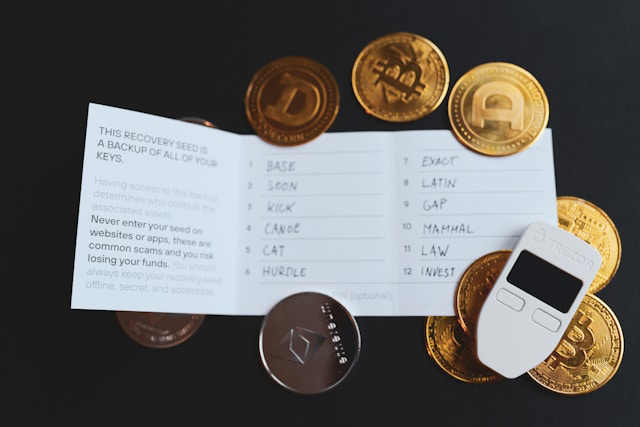
A complete crypto wallet backup often involves two separate objects: a mnemonic seed phrase and the
app/device password. The former is 12–24 words in a specific order which recover your wallet and private key on any compatible app and the latter can come as PIN, passphrase, or biometric passkey that unlocks the wallet app on your current device only.
For the complete list of the seed phrase best security practices, refer to our guide. Below is a condensed version.
Write your mnemonic phrase on paper with a pen—word by word, in exact order, numbered. At the same time, write your app password in a separate physical location from the seed phrase. Do not store either in the same place as your device.
Make a duplicate copy of the seed phrase and store it in a second physically separate location (e.g., a home safe and a safety deposit box). Label each backup with the wallet name, the blockchain(s) it controls, and the creation date—this matters for inheritance and forensics.
Verify both copies against each other before closing the backup session. If you made any, destroy any digital drafts or screenshots you created during this process. This entire process is best kept off any digital and internet-connected device at all times.
Why? Many apps perform backup to the cloud in the background, and if it leaks, your sensitive information will never be deleted from the internet. Do not take a photo of the seed phrase, save it to cloud notes (iCloud, Google Drive, Notion, etc.), email it to yourself, or send it via chat or SMS.
Receive Crypto
Logically, receiving should not require too much action as opposed to sending but still, the inputs have to be correct, especially given the blockchain’s immutable nature.
For this example, let’s assume you are moving crypto between your own wallets. Open your wallet and navigate to the asset you want to receive. Verify the network/chain: confirm the sender will use the same blockchain your wallet is on (e.g., Ethereum mainnet, not BNB Chain, if your address is an Ethereum address). The address format also has to match the expected asset (e.g., a Bitcoin address will not work for an ERC-20 token).
If your wallet supports on-device address confirmation (common on hardware wallets), trigger it and match the address character-by-character on the physical device screen. Share your address using the copy button—never retype it manually. For assets that require a Memo or Tag (see our guide on what is memo and where to find it), confirm this value before sharing.
If you can afford to, before transferring a large amount, send a small test deposit first. After sending the test, check the transaction hash in a blockchain explorer and wait for the required number of confirmations. If receiving from an exchange, confirm whether the exchange requires a memo/tag—missing it can result in lost funds that require manual recovery (if possible at all).
Send Crypto
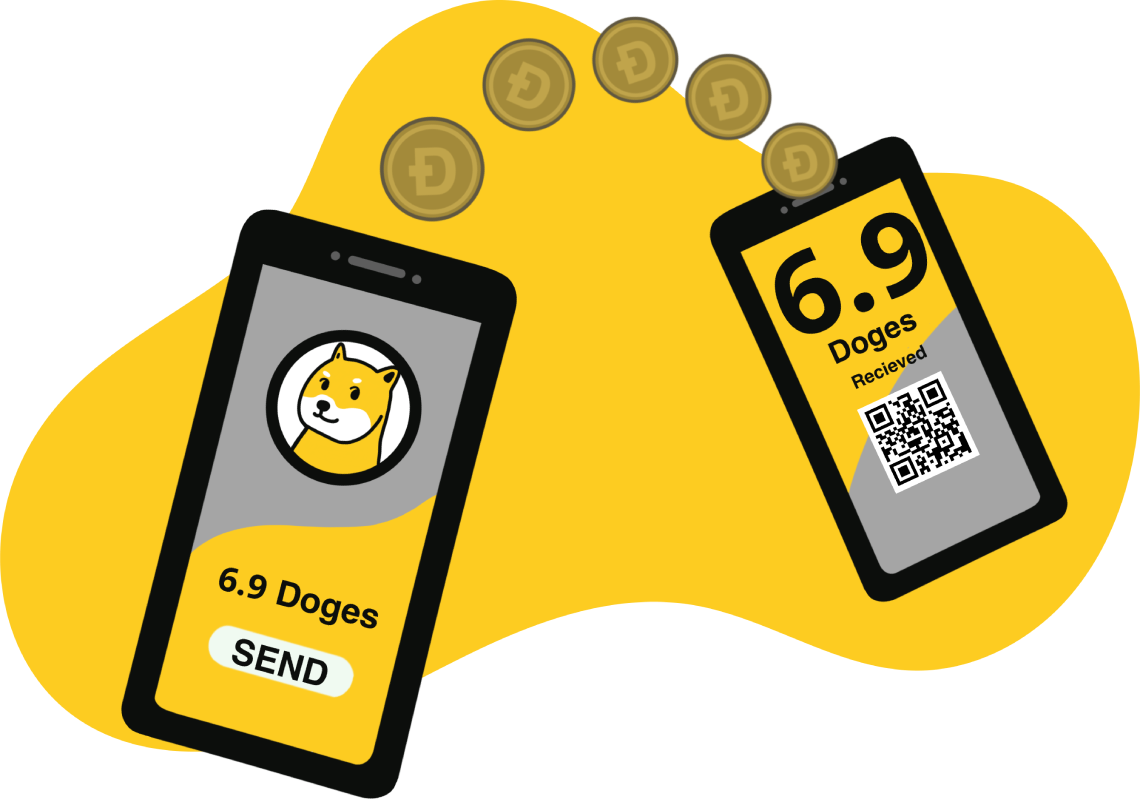
As you already gather, sending crypto is almost always irreversible. Use the pre-send risk gate every time, without exception:
- Confirm the asset and network match what the recipient expects.
- Check that your available balance covers both the send amount and the network fee; do not assume the fee is negligible.
- Determine whether the destination is an exchange deposit address that requires a memo/tag. If yes, include it before sending.
- If the transaction involves interacting with a smart contract or dApp, check that you are not unintentionally granting token approvals. If you see approval prompts you did not expect, stop and investigate before signing.
- Double-check the recipient address: paste it, then verify the first 6 and last 6 characters against the intended address. Especially do not skip this on large sends.
- Enter the amount, then re-read the total including fees before signing.
- Select your fee/speed tier, if prompted: low for non-urgent, normal for daily use, high for time-sensitive transactions.
- Sign and broadcast the transaction. Copy and set aside the transaction hash immediately.
- Monitor the transaction in a blockchain explorer. "Pending" means the transaction is in the mempool but not yet included in a block. "Confirmed" means it has been included and finalized.
- Do not resend the same transaction while it is pending. Doing so can result in duplicate sends or nonce conflicts depending on the network.
Restore a Wallet
If you are not making your first crypto wallet, you may need to import one, for example, on a new device. If you do so, install the official wallet app on your new device from a verified source only. Select "Import wallet" or "Restore from seed phrase"—not "Create new." Enter your mnemonic phrase carefully, word by word, in exact order; check spelling against your written backup. Set a new app password when prompted.
The recovery is successful if expected accounts and addresses appear in the wallet interface, and balances are visible after adding the correct network(s) if required. For good measure, run a small test and receive a transaction before sending anything.
If you reconnect a hardware wallet, connect the device to your computer or smartphone. Open the companion app (e.g., Ledger Live, Trezor Suite) from the official source. Follow the device's on-screen prompt to unlock with your PIN—you are not re-entering the seed phrase for a simple reconnection.
If the device was reset or replaced, use the seed phrase entry process described above, but enter the phrase directly on the hardware device's physical interface, never into a browser or desktop form. Use the same success criteria to make sure the import is successful.
Your seed phrase should only be entered into a trusted, officially sourced wallet app during a legitimate restore process. It should never be typed into a browser form, a website claiming to "recover" your wallet, or a browser extension popup requesting your phrase. These are scams. No legitimate wallet recovery requires entering your mnemonic phrase into a website.
Set Up a Hardware Wallet

When unboxing a hardware device you purchased from the manufacturer's official store or a well-documented authorized reseller, confirm that packaging seals are intact and show no signs of tampering. Also make sure that the device has not been pre-initialized—a legitimate hardware wallet arrives in factory state and requires you to initialize it yourself. If it arrives with a PIN already set or a seed phrase already written on an included card, do not use it.
- Connect the device and follow the on-screen prompts to initialize it yourself—select "Set up as new device," not restore.
- Set a strong PIN directly on the device's physical interface.
- When the device displays your seed phrase, write it down offline immediately—this is the same mnemonic phrase process described in Back Up a Wallet.
- Complete the device's built-in seed confirmation step before disconnecting.
- Install or open the official companion app (e.g., Ledger Live, Trezor Suite) on your computer.
- Perform any available firmware update through the official companion app only—do not download firmware from third-party sites.
- Add the accounts/assets you need through the companion app.
- Verify receiving addresses on the device: Before using the wallet, trigger an address display from the companion app and confirm the address shown in the app exactly matches the address shown on the hardware device's screen. If they differ, stop and contact official support.
Risks and Key Considerations
Irreversible Transactions and User Error
Long story short, transactions recorded on a blockchain are final. There is no support ticket, no chargeback, and no protocol-level undo. The most damaging mistakes are not exotic attacks—they are ordinary errors made under time pressure or inattention:
- Wrong network/chain selection — sending ETH on the Ethereum mainnet to an address on a different EVM-compatible chain (or vice versa) can leave funds permanently inaccessible if the receiving wallet or exchange does not support that network.
- Sending to an unsupported address type — for example, sending Bitcoin to a Bech32 (native SegWit) address from a wallet that only handles legacy P2PKH addresses, or sending to a smart-contract address that cannot process the asset.
- Missing or incorrect memo/tag for exchange deposits — many CEX platforms (especially for XRP, XLM, or EOS) require a destination tag; omitting it means the exchange cannot credit the deposit to your account.
- Signing a transaction with unexpected calldata — approving a signature request in MetaMask without verifying the calldata can authorize an action you did not intend, including transferring assets to an attacker's address.
- Copy-paste address manipulation (clipboard hijacking) — malware silently replaces a copied address; the error is invisible until the transaction confirms.
It might be a good idea to send a small test transaction first when sending to a new address, a new network, or an exchange deposit address you have not used before. Skip the test only when the destination has been verified through a hardware wallet's own display—such as confirming the address on a Ledger screen—and when the cost of the test transaction materially exceeds the value at risk.
Custodial Risk and Exchange Insolvency

When funds are held on a CEX, the exchange holds the private key—you hold essentially an IOU. That distinction has concrete failure modes that no amount of personal diligence can fully eliminate. Regardless, users can take steps to prevent completely avoidable pitfalls.
Enabling strong 2FA (a hardware security key such as YubiKey rather than SMS) to reduce unauthorized-withdrawal risk, setting withdrawal allowlists so only pre-approved addresses can receive funds from your account, and spreading balances across multiple venues to reduce single-point-of-failure exposure are all good advice.
What you can’t normally control and have to accept as risk are exchange insolvency or fractional-reserve practices (funds may be unavailable or permanently lost), unilateral withdrawal freezes during periods of market stress or regulatory action, or internal fraud or key mismanagement by exchange personnel.
Smart-Contract and Token Approval Risk
When you interact with a DEX or any decentralized application, you typically sign a token approval—a standing permission recorded on-chain that grants a smart contract the right to move a specified token, up to a specified amount, on your behalf. Three fields define every approval: the spender (the contract address), the token (e.g., USDC), and the amount (exact or unlimited). Critically, that permission persists after the swap or interaction is complete. You retain the token balance, but the contract retains the right to move it again in the future unless you explicitly revoke the approval.
High-risk approval patterns include:
- Unlimited approvals — granting type(uint256).max as the approved amount is the default in many interfaces; it is efficient but means a compromised or malicious contract can drain the full token balance at any point.
- Approvals to new or unaudited contracts — a contract that has not been independently audited or that was deployed recently offers little assurance that the approval cannot be exploited.
- Blind signing — confirming an approval in MetaMask or another wallet without reading or decoding the calldata, particularly on mobile interfaces that show only a hex string.
Where the DEX or protocol interface allows it, choose exact-amount approvals (approve only what the current transaction requires) rather than unlimited approvals. The gas overhead is minimal compared to the reduction in standing exposure.
Privacy Tradeoffs and On-Chain Traceability
A common misconception is that crypto is completely anonymous. In reality, wallet addresses are pseudonymous, not anonymous. Every transaction is permanently and publicly recorded on the blockchain. While an address is not inherently linked to a real-world identity at the protocol level, activity can be associated with an individual through clustering analysis (grouping addresses that co-sign transactions or interact repeatedly) and through metadata collected at the network edge.
Even when using public networks, avoiding several patterns can significantly reduce privacy leakage:
- Address reuse — using the same address for multiple transactions makes it trivially easy to build a complete transaction history and associate all activity with a single entity.
- Exchange deposit and withdrawal linkage — when you send funds to or from a CEX, the exchange's KYC data creates a link between your verified identity and the on-chain address used for that transaction.
- ENS and name services — registering a human-readable name (e.g., a .eth ENS name) and associating it with a wallet address makes that address permanently and publicly searchable.
- Public social sharing of addresses — posting a receiving address publicly (e.g., for donations) permanently associates that address—and all its transaction history—with your public identity.
Separate addresses by purpose when privacy matters. A dedicated address for DEX interactions, a separate one for exchange withdrawals, and a distinct one for any publicly shared identity reduces the ability of third parties to reconstruct a unified financial picture.
Physical Security and “$5 Wrench Attack” Risk
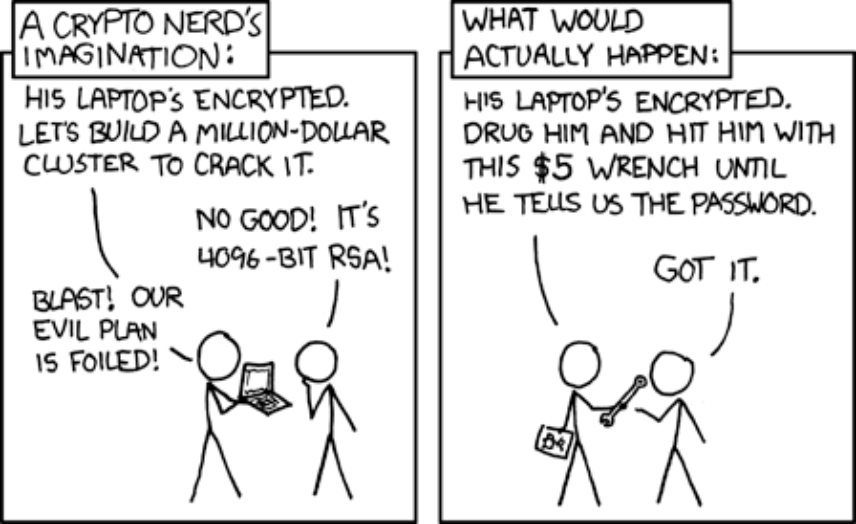
Most wallet security discussions focus on remote attackers or frankly esoteric man-in-the-middle attacks. Physical coercion is a different threat model: an attacker who has physical access to you can compel disclosure of a private key or mnemonic phrase without any technical exploit. This risk—colloquially called the "$5 wrench attack" after an XKCD strip—differs from hacking in a fundamental way: technical safeguards like strong passwords or hardware wallet PINs do not protect against someone who can apply direct physical pressure. The concern is a documented pattern in high-value theft cases and applies to anyone whose holdings are publicly known or discoverable.
- Limit hot-wallet balances — keep only the amount needed for near-term transactions in any internet-connected wallet; the rest belongs in cold storage.
- Decoy wallet strategy — maintain a secondary wallet with a modest balance that can be disclosed under duress, reducing the incentive to press further (sometimes called a "duress wallet" or passphrase-protected decoy account on devices that support BIP39 passphrases).
- Multisig or MPC for high-value storage — requiring multiple independent approvals to authorize a transaction means no single point of physical compromise can authorize a full transfer; this is particularly relevant for hardware wallet setups where the device alone (e.g., a Ledger) would otherwise be sufficient to sign.
Inheritance and Emergency Access Planning
Self-custody introduces a continuity problem: if you are the only person who knows where your private key or mnemonic phrase is stored and how to use it, those assets may become permanently inaccessible when you are incapacitated or die. This is a distinct planning challenge from security—here, the goal is to ensure access for the right people at the right time, rather than to prevent access.
Incapacitation/emergency access (you are alive but temporarily unable to act—e.g., medical emergency) requires a different access path than death/inheritance (a legal process that involves your estate). Both need to be planned for separately.
Conclusion
Keeping the two primary classification axes — hot vs. cold and custodial vs. non-custodial — as your mental model will make nearly every wallet decision easier, whether you're storing Bitcoin, Ethereum, Dogecoin, or any other asset.
Did you find the guide useful to learn how to store crypto for your needs? Read and learn more from the ChangeHero blog! Let us know your thoughts on Telegram, X, and Facebook, and don’t forget to follow.
Frequently Asked Questions
Do You Need a Crypto Wallet to Buy Crypto?
No—not always, but it depends on what you mean by "wallet" and what you plan to do with your crypto. The word "wallet" can describe either an app/device you control or an exchange account that holds keys on your behalf, depending on custody. When you buy on a custodial exchange like Coinbase or Binance, the CEX acts as your custodial wallet—you get price exposure without managing private keys; similarly, platforms like Crypto.com also operate as custodial venues where you can buy and hold without handling a seed phrase. When you buy into a non-custodial wallet like MetaMask, you hold your own keys from the start.
Are Hardware Wallets Safer Than Software Wallets?
For most long-term holders, yes—but hardware wallets solve a specific set of threats, not all of them. Hardware wallets like Ledger reduce risks tied to malware and private key exfiltration on a daily-use computer by keeping keys offline. What they don't automatically solve: phishing attacks, signing malicious transactions you approved, or losing your seed phrase.
Should You Use Multiple Wallets?
Yes, for most active crypto users a segmented approach meaningfully reduces risk exposure, even if the wallets are of the same type. Using a single wallet for everything means one compromise affects everything you hold.
What Happens If You Lose Your Wallet or Seed Phrase?
The outcome depends entirely on custody type and whether you still have your seed phrase. For a custodial account on an exchange like Coinbase or Binance, standard account recovery (email, ID verification) typically restores access. For a non-custodial wallet, there is no recovery without the seed phrase—no company holds your private key, so loss is permanent.