
Crypto Wallet Scams: Beginner’s Survival Guide

If You Already Interacted with a Scam
- 🚨 Containment — Disconnect your wallet from all dApps now. Do not send any additional transactions until you have assessed the damage.
- 🚨 Wallet migration — If you have shared your seed phrase or private key with anyone, assume the wallet is fully compromised. Create a new wallet on a clean device and transfer remaining assets immediately.
- 🚨 Approval revocation — If you signed a suspicious transaction but did not share your seed phrase, revoke all token approvals via a trusted revocation tool (see the Approval Revocation section). Monitor the wallet for outbound activity.
- 🚨 Evidence preservation — Screenshot transaction IDs (TXIDs), URLs, domain names, app package names, chat logs, and wallet addresses. Do not delete anything.
- 🚨 Reporting — File reports with law enforcement portals, regulators, and the exchange or wallet provider involved. Do not pay any "fees" to unlock withdrawals, and do not respond to DMs offering to recover your funds.
Disclaimer
This guide is for educational purposes only and does not constitute legal or financial advice. If you have been affected by a scam, be aware that recovery promises are a common secondary scam. Anyone guaranteeing recovery for an upfront fee is a red flag.
Contents
- 1. Cryptocurrency Wallet Basics
- 2. Common Crypto Wallet Scam Methods
- 3. Red Flags of a Crypto Wallet Scam
- 4. How to Verify a Wallet App is Legitimate?
- 5. How to Prevent Crypto Wallet Scams
- 6. What to Do If You're Scammed: Incident Response and Reporting
- 7. Emerging Crypto Wallet Scam Patterns (2026)
- 8. Conclusion
Crypto scam-related losses reached an estimated $17 billion in 2025, with impersonation scams alone growing 1,400% year-over-year—figures drawn from on-chain crime analysis published by Chainalysis. With this as the “why” to this guide, the rest will focus on the “how”: what scammers actually exploit at the wallet layer, what you can verify quickly, and what to do when the damage is already in progress.
This guide is organized around outcomes, not theory. Equipped with it, you will be able to:
- Identify which type of crypto wallet scam you are dealing with
- Verify whether a message, site, or request is legitimate (quickly, and reproducibly)
- Apply prevention measures before exposure
- Respond with a clear incident-response sequence if something has already gone wrong
Cryptocurrency Wallet Basics
Something that can be unclear coming from regular finance is that a crypto wallet doesn’t store coins. It stores the credentials that control assets on a blockchain ledger. Scammers don’t “hack the blockchain” in most real-world cases—they exploit misunderstandings around key custody, signing, approvals, and address verification.
There are methods to steal crypto assets derived from how it works, like honeypot scams or rug pull scams. Other examples that target legitimate wallet apps include watch-only addresses and address poisoning.
Before we focus on wallet-layer scams and exploits without going into platform compromise, smart contract exploits or investment fraud, let’s define more thoroughly the ins and outs of how a crypto wallet works (and how bad actors use this against you).
Wallet Types
There are many types of crypto wallets depending on form factors or internet connectivity but the distinctions important in this conversation are who holds the private key, and how exposed the wallet is to the internet.
The first axis is Custodial vs. Non-Custodial. A custodial wallet means a third party—typically an exchange—manages private keys on your behalf. You log in with a username and password; the access you get is to the platform, not the crypto assets on the blockchain. A non-custodial wallet means you hold the private key directly. “Not your keys, not your coins” describes this exactly: if you don’t control the key, you depend on that third party’s security and solvency.
The other axis is Hot vs. Cold. A hot wallet is connected to the internet (browser extensions, mobile apps). A cold wallet is kept offline (hardware devices, paper backups). Network exposure is the variable: hot wallets are convenient but perpetually reachable by malicious scripts and phishing sites; cold wallets require physical interaction to sign transactions, which dramatically narrows the attack surface.
| Wallet Type | Who Can Move Funds? | Primary Scam Exposure | Best Use Case | One Setup Hygiene Step |
|---|---|---|---|---|
| Custodial (exchange) | The exchange (and you, via their interface) | Account takeover, exchange compromise, exit scams | Fiat on/off ramp; active trading | Enable two-factor authentication (2FA) and withdrawal address whitelisting |
| Non-custodial hot (browser/mobile) | Only the private key holder | Phishing, malicious dApps, clipboard malware | Day-to-day DeFi interaction, small balances | Use a dedicated browser profile; revoke unused token approvals regularly |
| Non-custodial cold (hardware) | Only the private key holder, with physical confirmation | Fake hardware devices, malicious seed re-entry prompts | Long-term cold storage of significant holdings | Buy only from the manufacturer's official site; verify device authenticity on first setup |
| Non-custodial paper | Only whoever physically accesses it | Physical theft, fire/flood, poor generation practices | Deep cold storage, backup key storage | Generate offline using verified, air-gapped software; store in multiple secure physical locations |
This is not to say that other crypto wallet subtypes do not have less than obvious pitfalls that users should be mindful of. Browser extension wallets (e.g., MetaMask) are installed directly in your browser and interact with dApps automatically with appropriate approvals. Scammers publish near-identical extension lookalikes in browser stores with slightly misspelled names or cloned icons. Once installed, a fake extension can intercept every transaction you attempt to sign. To avoid it, always install from the official website link, not from a search result.

Mobile wallets (e.g., Trust Wallet) are popular thanks to their convenience for on-the-go transactions and QR code payments. Crucially, sideloaded APKs—apps installed outside of the official app store—are a common delivery mechanism for modified wallet software that silently exfiltrates your seed phrase on first entry. Only install wallet apps from verified official app stores (Google Play Store, App Store, etc.), and cross-check the developer name.
Even hardware wallets (e.g., Ledger), physical devices that keep your private key offline and require a button press to confirm every transaction, have a specific attack vector: after a data breach or phishing campaign, scammers send official-looking emails or letters seemingly originating from the manufacturer telling users their device has been "compromised" and instructing them to enter their seed phrase into a "new" device or website. A legitimate hardware wallet will never ask you to re-enter your seed phrase to validate the device.
Private Keys and Seed Phrases
Three non-interchangeable credentials protect your crypto wallet, and the consequences of exposure for each are not the same.
A private key is a cryptographically generated alphanumeric string that mathematically proves ownership of a wallet address and authorizes transactions. It is a mathematical, not social, proof of ownership, so anyone who has your private key can move every asset in that wallet immediately and permanently, from anywhere in the world, without any other information.
Seed phrase (BIP39 recovery phrase): A human-readable list of 12 or 24 words generated when you create a non-custodial wallet. It can be thought of as the master secret from which your private keys (and every address in your wallet) are mathematically derived. A seed phrase allows complete wallet regeneration on any compatible software or hardware, meaning a scammer with your seed phrase can reconstruct your private key, access every account in that wallet, and drain all assets without ever touching your device. There are even scams that hope you try to do the same but more on that later.
Wallet password / PIN (local unlock): This locks the wallet application on your specific device. It does not protect your funds at the blockchain level. If a scammer obtains only your wallet password, they may unlock the local application on your device, but they cannot regenerate your wallet elsewhere or access funds remotely unless they also have the seed phrase or private key.
| If a scammer gets… | They can… |
| Your seed phrase | Fully regenerate your wallet on any device, access all derived accounts, and drain all funds — permanently |
| Your private key | Move all funds from that specific wallet address immediately, from any device |
| Your wallet password/PIN | Unlock the app on your specific device only — funds are not directly at risk if the device remains in your possession |
But don’t think it all ends with keeping your seed phrase safe. One of the most effective scam mechanics doesn’t involve stealing your seed phrase or any credentials at all. It requires tricking you into signing something—because signing is exactly what wallets are built to do.
When you interact with a website or dApp, your wallet may ask you to sign in two distinct contexts:
- Message signature (off-chain): A cryptographic proof that you control an address, used for login or identity verification. No funds move. However, some malicious sites use specially crafted message signatures to authorize actions in smart contracts, so “just a signature to verify your wallet” is not always harmless.
- On-chain transaction signature: This action submits a transaction to the blockchain. It can move funds, set token approvals, or grant a contract permission to spend your assets later. Once confirmed, it cannot be undone.
Scammers exploit the visual similarity between these prompts. The habit that should help you with these: read every wallet prompt before confirming, and reject any signature request you did not explicitly initiate.
Addresses and Transactions
A wallet address is a public identifier derived from your public key through a hashing process defined by the protocol. Sharing your address exposes no private information and grants no access to your funds. It’s a mailbox: anyone can send something, only the key holder can move it out.
However, these destinations can be swapped with malware. So-called clipboard-hijacking replaces a copied wallet address with an attacker-controlled address at the moment you paste it; the substitution happens silently. So before sending, verify at minimum the first and last 4–6 characters of the destination address after pasting—not before. This can also help avoid sending an asset on the wrong network: a common cause of “lost” funds that gets misidentified as a scam.
On Ethereum and compatible networks, certain token standards (ERC-20 and similar) require you to grant a smart contract permission to spend tokens from your wallet before it can do so. This permission is an approval or allowance, and it is itself an on-chain transaction you sign. Once set, that approval persists until you revoke it. If it’s set to a maximum value, it’s an unlimited approval, meaning the contract can drain your entire token balance at any future time. Most legitimate DeFi protocols request unlimited approvals for convenience, but so does every malicious contract waiting to drain your wallet later.
Blockchain Finality
Transactions on blockchain are practically irreversible, which can be a benefit but most of the time either leads to lost funds due to an honest user error or is abused by scammers.
For example, they can exploit urgency during the pending transaction state, when a transaction is already waiting to be included in the ledger, pushing victims to “speed up” transactions—sometimes directing them into the real theft transaction.
Fake “recovery” services claim they can undo confirmed transfers. They cannot. Anyone offering this is running a recovery scam.
Similarly, some schemes claim you must pay an additional fee to “unlock” or “release” funds. Once a transaction is confirmed, no unlock fee exists. On the blockchain level, only gas fees are required to make transfers, and those are essentially baked into the transaction: if you hear about a fee to move funds from a source you can’t verify with a block explorer, it’s deception.
Common Crypto Wallet Scam Methods

Crypto scams are no longer opportunistic—they are industrialized. In 2025, total crypto scam losses reached an estimated $17 billion, and impersonation scams alone grew by 1,400% year-over-year, according to Chainalysis. The fastest way to recognize an active attack is to identify the mechanic behind it: credential capture, seed phrase exfiltration, a malicious signature, approval abuse, or address substitution.
Phishing
Objective: Steal your seed phrase or capture exchange-linked login credentials.
Variant A — "Restore Wallet" Seed Phrase Prompt
The attacker impersonates a wallet provider (commonly MetaMask, Trust Wallet, or Ledger) via email, SMS, or a fake support page. You’re told your wallet is locked, suspended, or requires re-verification. The flow ends at a form asking for your 12- or 24-word recovery phrase.
Variant B — OAuth/SSO Credential Capture
For exchange-linked wallets (e.g., a Coinbase custodial account), the phishing page mimics an OAuth “Sign in with Google” or SSO login screen. The objective is not your seed phrase—it’s your exchange username, password, and 2FA intercept.
How it works:
- Attacker sends a spoofed alert (email, SMS, in-app notification) claiming urgent action is needed.
- Link resolves to a replica page that captures credentials or a seed phrase upon submission.
What you'll see: An urgent email from a sender that tries to appear legitimate (like "security@metamask-alert.com"); a login or recovery page that looks pixel-perfect but sits on an unrecognized domain; a form field explicitly requesting your recovery phrase; a redirect that briefly flashes a real-looking URL before landing elsewhere.
Why it succeeds: The threat of losing access aims to trigger fast, uncritical action.
Fast checks:
- Never type your seed phrase into any web page or app field under any circumstances—no legitimate wallet ever asks for it online.
- Cross-reference the sender domain character by character against the official domain listed on the project’s verified social profiles.
- If it’s an OAuth screen, navigate directly to the exchange URL rather than clicking the link.
Fake Websites
Objective: Capture credentials or seed phrases by presenting a convincing replica of a legitimate service.
Typosquatting and lookalike domains are the structural foundation here: metamaask.io, ledger-live.net, coinbasse.com. The UI can be perfect; the domain is the giveaway.
How it works:
- Attacker registers a lookalike domain and replicates the target site.
- Victims arrive via sponsored search results, phishing links, or social media and interact as if it’s real.
What you'll see: A sponsored search result above the official site; a URL with an extra letter, hyphen, or different TLD (.net instead of .io); SSL certificate present but issued to the lookalike domain; URL paths that don’t match official documentation.
Why it succeeds: Authority—professional design plus a padlock icon overrides domain scrutiny.
Fast checks:
- Find the official domain from the project’s verified Twitter/X profile, GitHub, or CoinGecko listing—then type it manually.
- Inspect the full URL including subdomain and TLD; SSL does not confirm legitimacy.
- Avoid clicking wallet-related links from search ads; sponsored results are a primary delivery vector.
Fake Wallet Apps
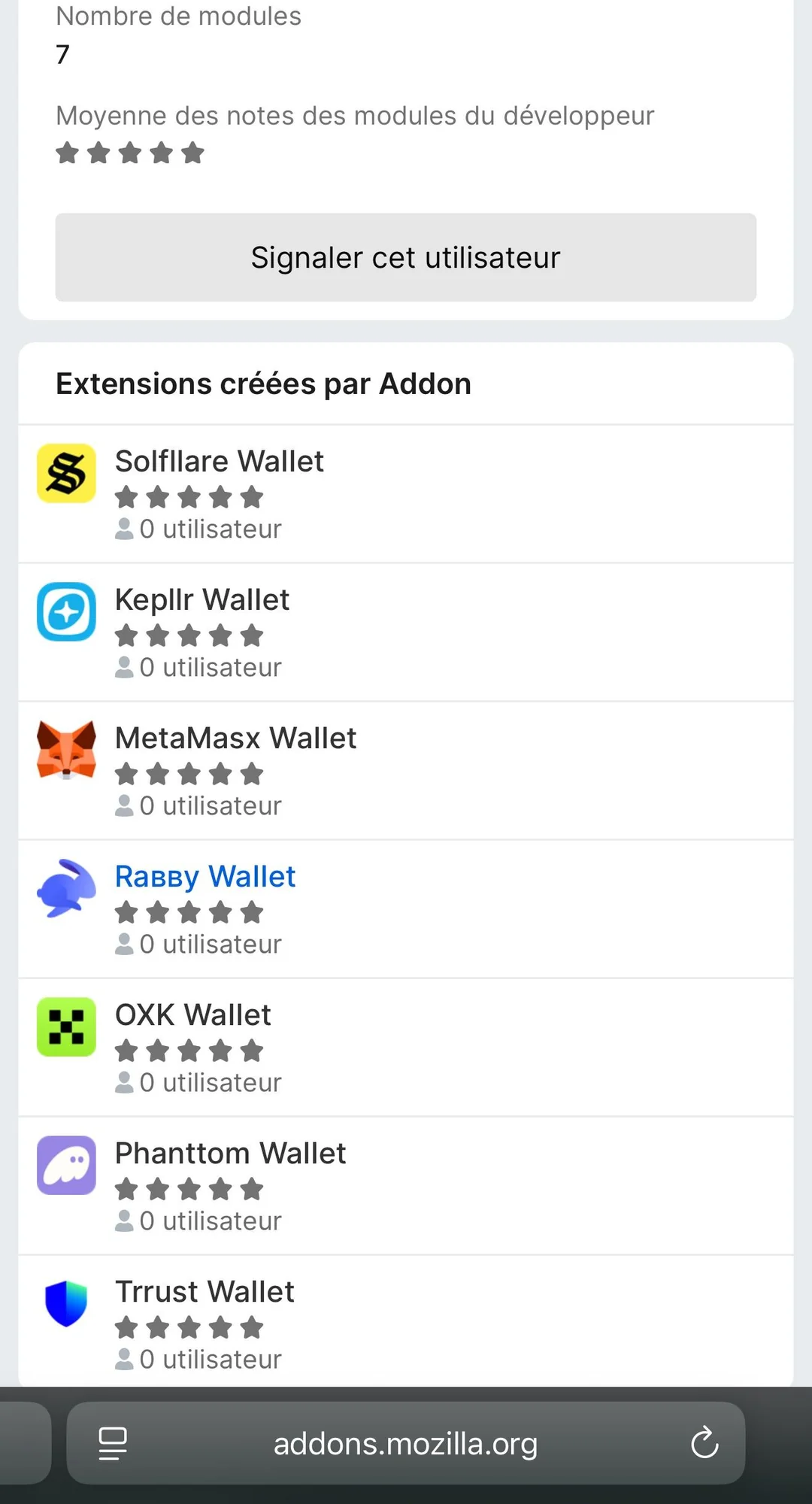
Objective: Either steal your seed phrase directly or generate a wallet whose private keys the attacker already controls.
How it works:
- Victim installs an app that mimics a known wallet brand (store clone, off-store APK, TestFlight link).
- App harvests a seed phrase or provides a compromised wallet from the start.
What you'll see:
- Publisher name mismatch (e.g., "MetaMask LLC" instead of "ConsenSys")
- A sudden spike in 5-star reviews with generic phrasing posted within days
- An APK download link or TestFlight invite distributed via Telegram, Discord, or a website rather than an official store
- Permission requests unrelated to wallet function (contacts, microphone, SMS)
- A setup screen asking for seed phrase entry before any wallet is shown
Why it succeeds: Authority plus exclusivity (“exclusive beta,” “faster version”).
Fast checks:
- Verify the publisher name exactly against the wallet’s official website before installing.
- Sort reviews by newest; clustered identical praise is a red flag.
- Never install wallet software from a link in a chat message or unofficial website.
Support Impersonation
Objective: Obtain your seed phrase, remote access to your device, or a wallet signature by posing as legitimate customer support.
The pattern is predictable: you post a question publicly; “support” responds instantly; they push you into Telegram/WhatsApp; then they ask for a seed phrase, remote access, or a signature/approval to “verify” your wallet.
Legitimate support service never does the following:
- Asks for your seed phrase or private key under any circumstances
- Initiates contact with you via DM after you post publicly
- Asks you to install AnyDesk, TeamViewer, or any remote-access software
- Requests you sign a transaction or approve a contract to “restore” access
- Moves the conversation to Telegram or WhatsApp to “escalate your ticket”
How it works:
- Your public post signals a problem; a scammer responds faster than real support.
- In private, the scammer extracts the seed phrase or screen access using urgency and authority.
What you'll see: A handle nearly identical to official support; a DM within minutes; a “wallet verification portal” requesting your phrase; a request to share your screen.
Why it succeeds: Authority during a crisis moment.
Fast checks:
- Use only support channels listed on the project’s verified website.
- No legitimate support request requires your seed phrase.
- If you’re asked to move to a new platform, stop the process entirely.
Social Media Direct Messages
Objective: Lure victims off-platform into scam flows via unsolicited DMs. Three common lures are:
(a) Giveaway/Airdrop: Requires wallet connection or seed phrase to “verify eligibility.”
(b) "Account Security" Alert: Mimics Coinbase, Binance, or MetaMask and routes you to a fake portal.
(c) Influencer "Investment Group": Impersonates a known figure, pushes you into a private group, then escalates deposits.
The common tell: pressure to move to Telegram/WhatsApp early.
Fast checks:
- Legitimate projects don’t DM airdrops.
- Verify “security alerts” by logging in directly, not via links.
- If the conversation moves to Telegram within two messages, treat it as a scam.
Wallet-Connected Phishing

Objective: Get you to sign a transaction or approval that grants the attacker control over your tokens.
Connecting your wallet to a dApp lets it see your public address and request signatures. It doesn’t move funds by itself. The risk is what you sign next.
A crypto wallet drainer works by making a malicious signature or approval feel routine.
Fast checks:
- Read transaction simulation screens; reject anything showing outgoing transfers you didn’t initiate.
- Never sign a “blind signature” (hex with no decoded meaning).
- If MetaMask or a Ledger confirmation screen shows an “unlimited approval” for an unrecognized spender, reject.
Malicious Smart Contracts
Objective: Hide permissions or multi-step authorizations inside routine interactions.
Two common mechanics:
(a) Approvals embedded in claim flows: “Claim rewards” silently includes setApprovalForAll or ERC-20 approve.
(b) Multi-call bundling approval + transfer: Approval and transfer execute in the same transaction.
Fast checks:
- Check contract address on Etherscan; if no verified source code, do not proceed.
- Review function names in wallet breakdown screens.
- Reject any transaction containing an approval you didn’t explicitly intend to grant.
Red Flags of a Crypto Wallet Scam
A fast red-flag recognition is often the only barrier between you and an irreversible loss. Summing up the common methods reviewed above, we can see many commonalities between different tactics.
Seed Phrase Requests
What you might see or hear:
- "Please validate your wallet to restore access."
- "Sync your recovery phrase to complete the upgrade."
- "Enter your seed phrase to confirm airdrop eligibility."
- "Our security review requires your 12-word phrase to unlock your account."
- "Submit your phrase for manual recovery assistance."
Why it's dangerous:
Your seed phrase encodes full wallet control. MetaMask, Ledger, Trust Wallet, and legitimate wallet builders have no troubleshooting flow that requires you to type a seed phrase into a website.
The only legitimate use: You enter your seed phrase yourself, locally, into a wallet app you intentionally opened to restore or import a wallet you already own.
Do this instead: If any message, pop-up, website, or person requests your seed phrase outside of your own deliberate restore/import process—refuse and close the interaction immediately.
Urgent Deadlines
Why it's dangerous:
Countdown timers and forfeiture threats exist to prevent verification. This maps directly to scam patterns documented in consumer fraud reports. (per DFPI Crypto Scam Tracker)
Do this instead: Open a new tab and navigate directly to the official platform domain yourself. If the alert isn’t inside your real account, it’s a scam.
Remote Access Requests
Why it's dangerous:
Remote access enables live coercion into signing, address swapping via clipboard malware, and stealth installation of additional payloads.
Do this instead: Refuse. If access was already granted, disconnect immediately, uninstall the tool, and do not transact from that device until it’s clean.
Unverified Download Links
Why it's dangerous:
Search ads, shortened URLs, and unofficial GitHub releases are common distribution vectors for clone apps and seed exfiltration malware.
Do this instead: Initiate every download journey from the wallet’s official website. Treat links sent via message or ad as hostile.
Address Substitution

Two types:
- (a) Clipboard malware substitution
- (b) Address poisoning via transaction history
Do this instead: Verify first 6 and last 6 characters, use an address book/allowlist, and confirm large transfers via an out-of-band channel.
Suspicious Approvals
What you may see:
- An unlimited spend approval
- setApprovalForAll
- Unknown spender addresses
- Signature requests that grant permissions via Permit / EIP-712
Do this instead: Reject unfamiliar approvals, then audit and revoke existing approvals using your wallet tools or a dedicated revocation interface.
How to Verify a Wallet App is Legitimate?
| Step | What to Check | Where to Check | Pass | Fail |
|---|---|---|---|---|
| Step 1 – Publisher & Domain | Official domain confirmed from ≥2 independent sources | Project's GitHub org, verified social profiles, documentation site | Domain matches exactly across all sources; no ad-sponsored results relied upon | Any mismatch, typo variant, or domain only found via search ad |
| Step 2 – App Store Listing | Developer name, release date, update cadence, permissions, reviews | iOS App Store / Google Play listing page | Consistent developer name, multi-year history, regular updates, normal permissions | Recently published, sparse update history, abnormal permissions, review burst |
| Step 3 – Open-Source & Audit | Code availability and audit report validity | GitHub repo, auditor's official site, wallet's docs page | Full or clearly scoped open-source code; audit report with firm name, commit hash, remediation notes | Audit badge with no linked report; closed-source with unverifiable claims |
| Step 4 – Community Reputation | Reproducible user complaints, moderator behavior, support instructions | Reddit, Discord, Telegram, Twitter/X, GitHub Issues | Maintainers respond to issues; long-running threads resolved; no deletion of questions | Identical complaints about withdrawals/fees; deleted questions; support pushing sideloads |
| Step 5 – Transaction & Permission | Approval prompts, allowance scopes, spender addresses | Wallet UI, block explorer (e.g., Etherscan for Ethereum) | Named spender, limited allowance, recognizable contract | Unlimited allowance, unknown spender, blind signing prompt, seed phrase request |
Publisher and Domain Verification
Confirming the official domain is the single most important step in scam detection, because impersonation attacks targeting wallets like MetaMask and Trust Wallet have grown sharply year-over-year—crypto scam losses reached record highs in 2024, a trend documented by Chainalysis (source).
How to confirm the official domain from two or more independent references:
- Verified GitHub organization
- Verified social media profiles
- Official documentation site (only if cross-linked from GitHub and app store listing)
Typosquatting check method:
- Character swaps (metamäsk.io, rnetamask.io)
- Extra words/hyphens (meta-mask-wallet.io)
- Alternate TLDs (metamask.net, trustwallet.org)
A domain passes only when it appears identically across sources you consulted.
App Store Listing Review
Treat the listing as an evidence trail:
- Developer name consistency across iOS and Android
- Multi-year version history vs. recent clone spikes
- Normal update cadence
- Normal permissions (camera/biometrics are common; SMS/contacts are not)
- Review manipulation patterns
If anything fails, capture screenshots immediately.
Open-Source and Audit Signals
Audit claims matter only if the following details are verifiable:
- Named audit firm
- Explicit scope (repo + commit hash)
- Date
- Remediation status
- Official hosting (linked from docs/GitHub, not file shares)
Community Reputation Signals
Focus on reproducible evidence, not sentiment:
- Transaction hashes and addresses that can be verified on a block explorer
- Maintainer responses with mitigation
- Long-running issue threads with technical detail
⛔ Stop Conditions — High-Severity Red Flags
If any single one of the following conditions appears at any point during your verification workflow, stop all activity immediately:
- Publisher name or developer entity does not match across app store and official sources
- Domain reached via a search ad, or domain contains typosquatting patterns
- Any party instructs you to sideload an APK or install software outside the official app store
- Wallet prompts you to enter your seed phrase outside of initial setup
- An unexplained unlimited approval or unknown spender address appears in a transaction prompt
- A platform demands fees, taxes, or certification payments before allowing fund withdrawal
What to do: Uninstall the app or disconnect the wallet immediately. Do not attempt another transaction.
How to Prevent Crypto Wallet Scams
Attackers win in two ways: they steal your seed phrase/credentials, or they trick you into signing a malicious authorization. Everything below targets one or both.
Device Security
A compromised device bypasses every other measure. Before installing any wallet app or extension:
- Download only from the official source (e.g., MetaMask from metamask.io, Trust Wallet from trustwallet.com) — verify the publisher matches exactly
- Avoid extension store search results; use the project’s official documentation link
- Check the extension’s developer, review count, and publication date
OS and browser hygiene are likewise a requirement:
- Enable auto-updates
- Use a separate browser profile exclusively for crypto
- Keep extensions to the minimum
For transfers above your risk threshold, use a known-clean device or fresh OS user profile.
Wallet Setup Hygiene
A clean setup of your wallet at the very start can also save you from headaches later down the line. However, if you screenshot or keep the backups in plain text in the cloud, they can leak and a malicious actor will be able to import your wallet. Therefore, the best practice is to always keep a seed phrase offline.
When prompted, write your seed phrase on paper during the first setup. You can always make a more durable backup of it later. Verify the written phrase before closing setup: sometimes the wallet software will ask you these questions but sometimes it won’t.
For extra security with cold storage, don’t settle for standard password managers unless you are using an explicitly offline vault (e.g., KeePass on an air-gapped machine).
Last but not least, don’t keep all your eggs in one basket: set up a hot wallet (custodial with a secure password and 2FA can be OK) for small amounts and daily activity, and move long-term savings into cold storage. If you wouldn’t carry that amount in cash, don’t keep it in a hot wallet
Hardware Wallet Use
A hardware crypto wallet is not automatically secure either. Buy only from official sources, not resellers or second-hand. When you make sure it was not tampered with, after initializing, confirm the device generates a new seed on-device. A pre-written seed card inside packaging is a compromise indicator.
Hardware wallet manufacturers are aware of clipboard-jacking: trust the address and amount on the hardware wallet screen, not the computer.
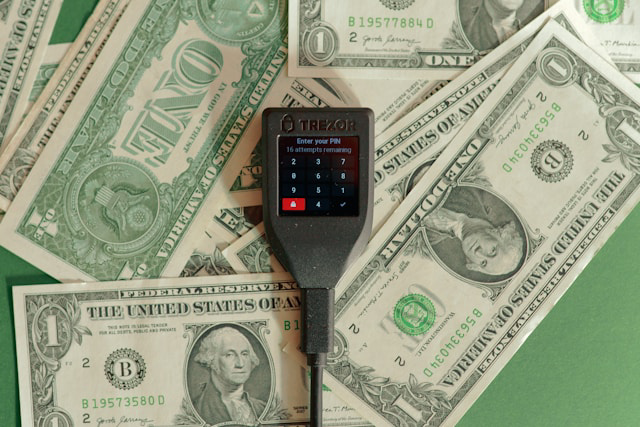
It is also not a panacea against all wallet-level attacks: a couple of known limitations is that hardware wallets don’t stop malicious approvals, and they don’t help if the seed was exposed. Although they can help against man-in-the-middle attacks, if you are coerced or misled into approving or signing a malicious transaction, not even the best device on the market can prevent that.
Transaction Verification
If you can, verify a destination address from an out-of-band source. Remember to compare the first and last 6 characters and validate the chain/network while you are at it. Use the labels, not the format, since some networks share formats and even whole addresses.
When available, review transaction simulation or decoded calldata. In any case, it is a good idea to pause and slow down before you make an irrational and irreversible decision.
To defend against address poisoning, never copy recipients from transaction history; use an address book/allowlist. Wallet-level saved contacts prevent input errors to boot, and exchange-level withdrawal allowlists restrict unauthorized withdrawals. When adding a new allowlist address, likewise, confirm via an out-of-band channel. Protect allowlist changes with 2FA and time delays where supported.
Finally, test transactions whenever possible are the ultimate measure of verifying addresses and transactions. The flow is very simple but will help to not lose the whole stack: send a small test amount, confirm the receipt on the correct chain via a block explorer, then send the remainder.
Approval Management
Approvals are standing permissions, which makes them liable to turn into an attack vector at any moment in the worst case. Not using them would be an overkill but exercise basic precautions to lower your risks:
- Use exact-amount approvals for new or unfamiliar contracts instead of granting them unlimited approvals from the start
- Reserve unlimited approvals only for protocols you use frequently, and only when wallet balance is capped
- Review approvals monthly and after unfamiliar dApp sessions
- Use tools like Revoke.cash, or your wallet’s approval manager (Rabby, MetaMask activity with scanners)
What to Do If You're Scammed: Incident Response and Reporting
If it’s too late for prevention, speed is not optional. Chainalysis estimates crypto scam losses reached into the billions in 2025, with on-chain data confirming scam receipts continue climbing year over year — the faster you act, the narrower the window a crypto wallet drainer has to move funds beyond reach. (Source)
Containment
The first measures have to be taken within the first 10 minutes within a suspected or actual exploit. Disconnect wallet sessions in Connected Sites or using a dApp disconnect feature. Stop further signatures by closing active tabs or apps, and isolate the device by disconnecting Wi-Fi/Bluetooth. Then you can start identifying assets at risk (native coins, tokens, NFTs).
If your seed phrase or private key was exposed, assume full compromise and proceed to Wallet Migration, the following section. If only a malicious signature/approval was granted, move on to Approval Revocation first, then migrate if needed.
In any case, do it within the first hour, and in addition, write down the TXIDs, hashes, and addresses, and note the exact UTC timestamps for each.
Wallet Migration

If the seed phrase or private key was exposed, the old wallet is permanently unsafe. Use a clean device to generate a new wallet with a new seed phrase. Record the seed phrase offline only, as you would normally do.
Move your assets from a compromised wallet in priority order: gas token → high-value tokens → NFTs.
Do not “import” the old seed into a new app (that is not migration)! After the proper migration, build an address book/allowlist and avoid copying from transaction history.
Approval Revocation
The tools relevant in this case are: Revoke.cash, Etherscan Token Approvals, or Rabby’s approval tab.
Audit and revoke approvals, whether regularly or urgently, by:
- Chain/network (check every chain used)
- Spender/contract address
- Token allowance amount (unlimited first)
- Last interaction date
Revoke approvals on every chain. After a wallet migration, re-check the old wallet for leftover balances and approvals.
Evidence Preservation and Incident Reporting
If stolen funds hit a centralized exchange deposit address, a rapid freeze request is the most actionable step. Include all details such as timestamps, transaction hashes and addresses in the support ticket reporting the incident.
Collect on-chain artifacts (TXIDs, contract addresses, token contracts) and off-chain artifacts (URLs, app package/version, email headers, chat logs, identities shared). Avoid contaminating evidence: don’t factory reset or run cleanup before exporting what you can.
| Law Enforcement Portal | Jurisdiction | Minimum Fields Typically Required |
|---|---|---|
| IC3 (Internet Crime Complaint Center) — ic3.gov | United States (federal) | Loss amount, crypto asset type, wallet addresses, tx hashes, platform used, scammer contact info |
| FTC ReportFraud — reportfraud.ftc.gov | United States (consumer) | Loss amount, payment method, scammer description |
| DFPI Scam Tracker — dfpi.ca.gov/consumers/crypto/crypto-scam-tracker/ | California / US consumers | Scam type, platform, loss amount, narrative description |
| Action Fraud — actionfraud.police.uk | United Kingdom | Crime reference fields, financial loss, contact with suspect |
| ACCC Scamwatch — scamwatch.gov.au | Australia | Scam category, contact method, amount lost |
| Europol / national cyber units | EU member states | Varies by country; contact national cybercrime unit |
If your own custodial account (exchange or wallet) was compromised: secure account, reset credentials from clean device, replace 2FA, whitelist withdrawals, report with evidence.
If the funds were sent to a destination exchange: submit a freeze request, provide IC3/police reference when available, include proof of ownership and a clear UTC timeline, and follow up on a set cadence (weekly, monthly).
Emerging Crypto Wallet Scam Patterns (2026)
The scam ecosystem is professionalizing faster than most users update their habits—which is exactly why a structured weekly monitoring routine matters more in 2026 than it ever has. TRM Labs' 2026 Crypto Crime Report reinforces the same trajectory and notes the accelerating availability of drainer kits and impersonation networks as a service. (Source: TRM Labs 2026 Crypto Crime Report) Scams are getting increasingly sophisticated with AI tools, which assist in creating convincing phishing emails and messages, videos for impersonation, increasing the scale of operations and even coding the malware.
Trend Monitoring Sources
Not all schemes are as “tried and true” as the most common ones we mentioned. Some iterate on the better-known ones but some newer schemes devise completely unexpected ways to defraud victims. Thankfully, information security specialists keep tabs on trends in this space, and staying in the know can help you with prevention.

Some of the most useful sources to stay updated to the security landscape, crypto included:
- Regulator scam trackers (DFPI, FTC, SEC, CFTC)
- On-chain analytics blogs (Chainalysis, TRM Labs, Nansen, Dune)
- Wallet provider advisories (MetaMask, Ledger, Trust Wallet, Coinbase, Binance)
- Extension store reviews
- Domain/SSL transparency logs (crt.sh, WhoisXML, URLScan.io)
- Social platform ad libraries
2026 Scam Pattern Watchlist
The more classic, if you will, scams we reviewed before have not gone anywhere; if anything, their scale has evolved in part thanks to AI-powered tools. Let’s list a few examples worth watching out for in 2026 in particular.
Pattern 1: Fee-Stacking Withdrawal Lock
This one is one of the classics, although reports show that it still defrauds a significant number of victims. Documented repeatedly in DFPI complaints; labels like “certification fee” and “additional fee before withdrawal” are recurring fingerprints.
Pattern 2: Impersonation Scaling — Mass Support Takeover
The (unsolicited) DM outreach after public posts has become as fast as ever; bots impersonating support service of legitimate providers trick the victims to wallet-connect to a drainer masquerading as “recovery,” among other things.
Pattern 3: Drainer-as-a-Service (DaaS) — Rapid Brand Rotation
Polished front-ends and rapidly rotated domains, all funneling victims to the same underlying approval-capture drain logic.
Pattern 4: Bait Seed Phrase
Although not the most novel one, there is a scam going around that lures victims with real seed phrases posted publicly in social media comments as text or even AI-generated photos. Importing that seed phrase is not dangerous as long as you stop there; what you might see there is a decent amount of assets in tokens. However, there is no native coin on balance to pay for the gas fees to withdraw those tokens to an external wallet. The scammer hopes that you attempt to top up this wallet with ETH or TRX, and their bot instantly intercepts your transfer to redirect it to a scammer-controlled wallet, before you can do anything. Treat these comments as fraud in broad daylight; “there is no free money” applies perfectly here.
Conclusion
Crypto wallet scams steal funds by manipulating users into surrendering seed phrases, signing malicious transactions, or acting under social-engineering pressure—and because blockchain transactions are typically irreversible, losses are permanent. The single most important protective habit is this: never share your seed phrase with anyone, and always verify what you are signing or sending before you confirm it.
More guides and updates from ChangeHero are posted on ChangeHero blog, so do check them out! To get market insights and crypto news as they happen, follow us on social media: X, Facebook, and Telegram.
Frequently Asked Questions
Can a wallet steal crypto without the seed phrase?
Yes, your crypto can be stolen without anyone ever touching your seed phrase. Attackers use at least five paths that bypass seed access entirely: you sign a transaction, you grant a token approval or allowance, a compromised device or clipboard swaps the recipient address, cloud backups or clipboard malware exfiltrate sensitive data, or a centralized account (exchange-linked wallet like Coinbase or Binance) is taken over directly.
If you're unsure, treat it as compromised — migrate remaining funds to a fresh wallet immediately.What happens if I have signed a malicious transaction?
What you signed determines what you lost and what risk remains. A single transfer means immediate, likely unrecoverable loss. An approval or allowance means an ongoing drain risk that can still be stopped. A signature login or message signing means your session or account may be under active takeover — act in the next ten minutes.
If you're unsure what you signed, treat it as compromised — revoke all allowances and move funds to a clean wallet now.How do I revoke token approvals?
A token allowance is a permission you granted — recorded on-chain — that authorizes a specific Spender address (possibly a malicious smart contract) to transfer tokens from your wallet up to a set limit. Revoking that approval does not send tokens anywhere; it sets the allowance to zero, which is a separate on-chain transaction you initiate and pay gas for.
On non-EVM chains (e.g., Solana), token approvals work differently — use chain-specific tools (e.g., Solana's revoke.cash equivalent or Step Finance) and consult chain documentation for closing delegate authorities.Are hardware wallets immune to scams?
Hardware wallets like Ledger protect your private keys from remote extraction, but they cannot stop you from approving malicious actions. The device signs whatever transaction you confirm on it — if you approve a malicious smart contract interaction or a token allowance to a crypto wallet drainer, the hardware wallet executes that instruction faithfully.
How do I check if a wallet app is official?
Fake wallet apps and typosquatting domains are a leading source of seed phrase theft. Do not rely on search ads to find wallet software; paid placement is trivially purchasable by scammers running lookalike developer accounts.
Always cross-reference the exact developer identity against the project's official GitHub or website.
If you're unsure whether an app is official, treat it as compromised — uninstall it and re-download only from the URL confirmed through official project channels.What should I do if I have sent funds to the wrong address?
The outcome depends entirely on which of four scenarios applies. Most wrong-address transfers to unknown wallets are unrecoverable — blockchain transactions are final — but two scenarios leave a path to recovery if you act immediately. If you own the receiving wallet (e.g., sent to a different account in your own Ledger or MetaMask), it’s recoverable: access that account using your seed phrase or account index.
Exchange deposit address with a missing memo or tag (common on Binance, Coinbase, or similar platforms) is also sometimes recoverable. The exchange's support team can manually credit your account if you provide the TXID and proof of ownership. Contact support immediately; do not wait.
If you're unsure whether recovery is possible, treat it as lost — preserve the TXID and contact the relevant exchange support before taking any other action.Can it be unsafe to import a seed phrase?
One common scheme involves social media comments with entire seed phrases posted publicly. These seed phrases lead victims to wallets that have token holdings but no funds for gas to withdraw these tokens. Importing this seed phrase does not lead to compromise but it is best to leave these alone and report the comments as a scam.