
Blockchain Wallet Setup Guide: How to Create a Crypto Wallet?


Key Takeaways
- To open a crypto wallet, you will need a cryptocurrency wallet app or a website that can create a crypto address. It is vital to choose a reliable provider, regardless of if you use a mobile crypto wallet or other methods.
- Some crypto wallets will take care of the backup themselves but others will require you to take care of a recovery or seed phrase. The first type is easier to spin up but less reliable; the second type is common and is believed to be more secure.
- There are also wallets that are always online or ones that are mostly offline. Making a decentralized Bitcoin or crypto wallet of the second type (cold) is more complicated and usual for someone who already has large crypto holdings. The first type (hot) is typically the choice for one’s first crypto wallet because a cryptocurrency mobile wallet is more accessible and free.
Contents
- 1. Introduction to Crypto Wallets
- 2. How Crypto Wallets Work
- 3. Types of Crypto Wallets
- 4. Key Factors When Choosing the Best Crypto Wallet
- 5. Step-by-Step: How to Set Up a Crypto Wallet
- 6. Creating and Managing Wallet Addresses
- 7. Security and Best Practices
- 8. Anonymous and Privacy-Focused Crypto Wallets
- 9. Decentralized Wallet Architecture and Benefits
- 10. Advanced Wallet Security Configurations
- 11. Physical Storage Solutions Beyond Hardware Wallets
- 12. Wallet Interoperability and Cross-Chain Management
- 13. Risks of Storing Crypto on Exchanges
- 14. How to Buy Crypto Safely with Your Wallet
- 15. Storing, Managing, and Growing Your Crypto
- 16. More Advanced Security Tips for Crypto Wallet Users
- 17. Conclusion
If you're reading this, you've probably realized something important: owning cryptocurrency without a proper wallet is like keeping cash in someone else's pocket. You don't really control it until you hold the keys yourself, leave alone using it.
Setting up a crypto wallet isn't really complicated, but it does require you to understand a few fundamental concepts first. Think of this guide as your friend walking you through the entire process—from choosing the right type of wallet to storing your seed phrase safely. By the end, you'll know exactly how to create a Bitcoin wallet, set up a cryptocurrency wallet for multiple assets, and avoid the most common (and expensive) mistakes.
Introduction to Crypto Wallets
What is a Crypto Wallet?
A crypto wallet is a digital tool that stores the cryptographic keys needed to access and manage your cryptocurrency. Think of it like a keychain rather than an actual wallet—it doesn't hold your coins directly (those live on the blockchain), but it holds the keys that prove you own them and let you send them wherever you want.
Every crypto wallet contains two essential components: a public key (which generates your wallet address where others can send you crypto) and a private key (your secret password that authorizes transactions). When you set up a crypto wallet, you're essentially creating a secure way to interact with blockchain networks like Bitcoin or Ethereum.
The purpose goes beyond just storage. A cryptocurrency wallet lets you send and receive digital assets, view your balance, and interact with decentralized applications (dApps). Some wallets support multiple coins across different blockchain networks, while others focus on specific cryptocurrencies like a dedicated Bitcoin wallet.
Crypto wallets come in different forms—from mobile apps and browser extensions to physical hardware devices and even paper printouts. They all serve the same core function: securing your private keys and giving you control over your crypto holdings.
Why You Need a Crypto Wallet
You simply cannot do without a pair of cryptographic keys to use crypto. Sometimes an exchange account suffices but if you plan to own cryptocurrency for more than a quick trade, you need your own wallet.
First, it gives you true ownership. When you buy crypto on an exchange and leave it there, the exchange controls those funds—not you. The saying "not your keys, not your crypto" exists for good reason. In 2023 alone, $1.1 billion was stolen from centralized finance (CeFi) platforms. Setting up a crypto wallet means you become your own bank, holding the private keys that prove ownership.
Second, consequently, self-custody wallet solutions protect you from exchange failures. We've seen major platforms freeze withdrawals, face regulatory crackdowns, or even collapse entirely. Your crypto wallet setup creates a safety net independent of any third party.
Third, many crypto activities require a non-custodial wallet. Want to stake tokens for passive income? Trade on decentralized exchanges? Interact with DeFi protocols managing around $124 billion in total value locked as of January 2026? You'll need direct wallet access. In a survey of 1,800 Web3 users, 93% identified "security of funds" as their top priority when choosing a wallet precisely because they understand that control equals safety.
Beyond security, having your own wallet opens doors to the full crypto ecosystem. You can explore anonymous crypto wallet options for privacy, use a hardware crypto wallet for maximum security, or keep funds in a hot wallet for quick access. The flexibility matters.
Bottom line: if you're serious about crypto, learning how to create wallet address access and manage your own keys isn't optional—it's essential protection for your digital assets.
How Crypto Wallets Work
Once you understand why wallets matter, the next step is to see how they actually function under the hood. The mechanics are simpler than they look from the outside.
Public and Private Keys Explained
A cryptocurrency wallet doesn't actually "store" your coins but the cryptographic keys that prove you own them but what does exactly that mean? Think of it like this: your crypto exists on the blockchain (a public ledger everyone can see), and your wallet holds the keys that let you access and move it.
Here's how the key pair works:
Your public key is like your email address. It's visible to everyone and used to generate your wallet address—the string of characters people use to send you crypto. You can share this freely without risk.
Your private key is like your email password. It's a secret code (usually a long string of random characters) that proves ownership and lets you authorize transactions. Anyone with access to your private key can control your funds. That's why protecting it is the single most important thing when you set up a crypto wallet.

Photo by Adi Goldstein on Unsplash
When you open a crypto wallet or create a Bitcoin wallet, the software generates this key pair using complex mathematics—cryptography. The public and private keys are mathematically linked, but you can't reverse-engineer the private key from the public one. That's what makes the system secure and public keys safe to share.
By the way, this is why non-custodial wallets are considered safer for self-custody: you hold the private keys yourself, rather than trusting an exchange or third party.
Blockchain and Wallet Addresses
Your wallet address is a shortened, readable version of your public key. When you create a wallet address, the software takes your public key and runs it through cryptographic hashing algorithms to produce a unique identifier—typically a string of 26–35 alphanumeric characters.
Each blockchain has its own address format. A Bitcoin wallet generates addresses starting with "1," "3," or "bc1," while Ethereum addresses begin with "0x." This is why you need the right cryptocurrency wallet for the coins you're holding.
Here's what happens when someone sends you crypto: they broadcast a transaction to the blockchain network, specifying your wallet address as the destination. The network validates the transaction, and once confirmed, the balance associated with your address updates. Your wallet app reads this data from the blockchain and displays your new balance.
The important detail is this: your wallet doesn't store coins locally, and at all. It reads blockchain data and uses your private key to sign transactions when you want to send funds. This is true whether you're using a hot wallet (connected to the internet), a cold wallet (offline hardware), or even a decentralized crypto wallet.
Most modern wallets can generate multiple addresses from a single private-key-like seed, which improves privacy and security. Sounds good, right? We'll cover that in more detail in the section on creating and managing wallet addresses.
Types of Crypto Wallets
Understanding the different types of crypto wallets is essential before you set up a crypto wallet. Each type offers a different balance of security, convenience, and control. If you can spare the time, you can read our guide linked above, or keep reading for a more brief version. Let’s now break down the main categories so you can figure out which one fits your needs.
Hot vs Cold Wallets
Short version: think of hot wallets as your everyday spending account and cold wallets as your savings vault.
Hot wallets are connected to the internet. They include crypto wallet apps on your phone, browser extensions, and to an extent, exchange accounts. They're convenient for quick transactions and active trading, but that constant internet connection also makes them more vulnerable to hacks. If you're setting up a crypto wallet for daily use or small amounts, a hot wallet works well.
Cold wallets stay offline until you need them. Hardware wallets and paper wallets fall into this category, with air-gapped offline devices sometimes being included. Because they're not connected to the internet, they're much harder for hackers to reach. This is where serious investors store the bulk of their Bitcoin or other cryptocurrencies.
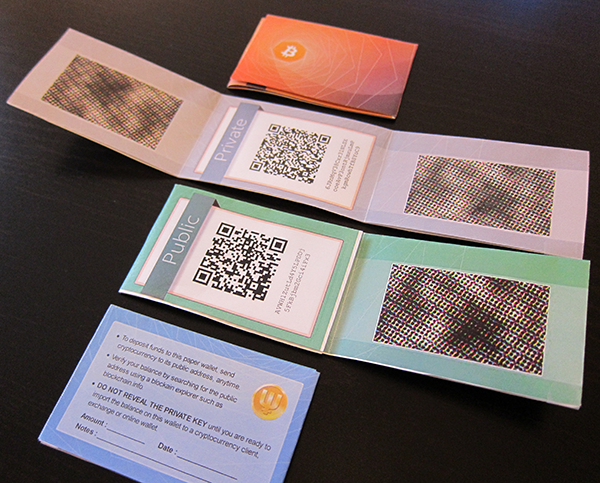
The trade-off? Cold wallets are less convenient for frequent transactions. But if you're holding crypto long-term, that extra security is worth the small inconvenience.
Custodial vs Non-Custodial Wallets
This distinction is about control. Who actually holds your private keys?
Custodial wallets are managed by a third party—usually an exchange like Coinbase or Binance. They handle your private keys for you, which makes the experience beginner-friendly. You don't need to worry about seed phrase storage or losing access. At the same time, you're trusting that platform to keep your funds safe. If the exchange gets hacked or freezes accounts, your cryptocurrency wallet is at risk.
Non-custodial wallets give you full control. You hold your own private keys and seed phrases. No one else can access your funds—not even the wallet provider. This is true self-custody, and it's what crypto was designed for. Decentralized crypto wallets like MetaMask or Trust Wallet fall into this category.
The downside to self-custody? If you lose your seed phrase, there's no customer service to call. Your funds are gone. If you're serious about crypto ownership, non-custodial is the way to go. You just need to take crypto wallet security seriously.
Software Wallets
Software wallets are digital applications that store your crypto on a device or in the cloud. They're the most common type of online crypto wallet and come in three main formats.
Desktop wallets are programs you install on your computer. They offer a good balance of security and functionality—examples include Exodus and Electrum for Bitcoin. Desktop wallets are considered safer than web wallets because your keys stay on your computer, not on a server. They're ideal if you want to create a Bitcoin wallet with more privacy and control than a mobile app but don't need portability.
The downside here? If your computer gets infected with malware or crashes without a backup, you could lose access to your wallet account.
Mobile wallets are crypto wallet apps designed for smartphones. They're perfect for people who want to manage crypto on the go. Popular options include Trust Wallet, Coinbase Wallet, and Exodus mobile.
Setting up a crypto wallet on your phone takes just a few minutes, and you can send or receive crypto anywhere. Mobile wallets are hot wallets, so they're convenient but less secure than cold storage options. They're best for holding smaller amounts you plan to use regularly—not your entire portfolio.
Finally, Web wallets run in your browser. Some are extensions like MetaMask, while others are accessed through a website. They're the most convenient option for interacting with decentralized apps (dApps) and DeFi protocols.
The catch? Web wallets are the least secure software option. They're vulnerable to phishing attacks and browser vulnerabilities. Use them for active trading or dApp interaction, but move larger holdings to a hardware wallet.
Hardware Wallets
Hardware wallets are physical devices that store your private keys offline. They're the gold standard for cold storage. Popular brands include Ledger, Trezor, and CoolWallet by CoolBitX.

Here's how they work: when you want to send crypto, you connect the device to your computer or phone, authorize the transaction on the device itself, then disconnect it. Your private keys never leave the hardware wallet, making them extremely resistant to hacking.
Hardware wallets aren't free—they typically cost between $50 and $200. But if you're holding significant value, that upfront cost is a small price for peace of mind.
Just remember: you still need to protect your seed phrase. If you lose both the device and the seed phrase, your funds are gone.
Exchange Wallets
Exchange wallets are cryptocurrency wallets built into trading platforms. When you buy Bitcoin on Coinbase or Binance, it's automatically stored in your exchange wallet account.
They're incredibly easy to use—no setup required, no seed phrases to manage. But they're custodial wallets, meaning the exchange controls your private keys. This introduces counterparty risk. If the exchange gets hacked, faces regulatory issues, or freezes accounts, you might lose access to your crypto.
Exchange wallets are fine for beginners or for holding small amounts while actively trading. But for long-term holdings, you should open a crypto wallet where you control the keys.
Paper Wallets
A paper wallet is exactly what it sounds like: your public and private keys printed on paper. It's a form of cold storage—completely offline and immune to digital hacks.
To create a paper wallet, you use a wallet generator tool to produce a Bitcoin wallet address and private key, then print them out. The paper becomes your physical crypto wallet. You can send funds to the public address, and later import the private key into software when you want to spend.
Paper wallets were popular in crypto's early days, but they've fallen out of favor. They're fragile—paper can be damaged, faded, or lost. There's also no easy way to spend part of your balance. You typically need to import the entire key into software, which defeats the cold storage purpose.
Key Factors When Choosing the Best Crypto Wallet
Once you understand the wallet landscape, the question becomes: which one is right for you? A few core factors make that decision much easier.
Security is the foundation of any good crypto wallet—and it should be your top priority when setting up a crypto wallet. When evaluating a cryptocurrency wallet, look for these core security features: multi-factor authentication (like biometric scanning or authenticator apps), seed phrase backup systems, and strong encryption. Hardware wallets and non-custodial wallets tend to offer the strongest protection because they keep your private keys offline and in your control. By the way, self-custody wallets—where you control the private keys—are generally safer for long-term holders than keeping funds on exchanges.
Supported Coins and Networks
Not all crypto wallets support every cryptocurrency. Some wallets are built specifically for Bitcoin, while others are designed for Ethereum and ERC-20 tokens. If you plan to hold multiple cryptocurrencies, you'll need a multi-asset wallet that supports the coins and blockchain networks you're interested in.
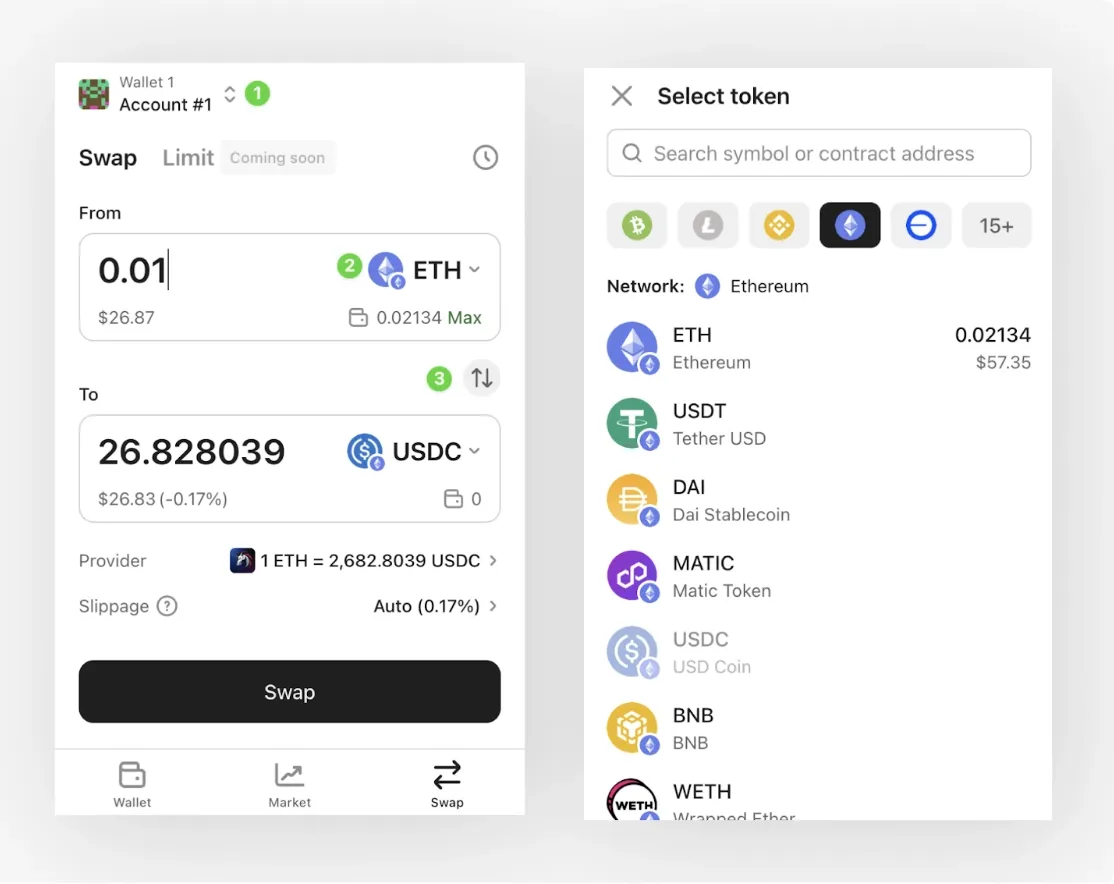
Check whether the wallet supports the coins you want to store—Bitcoin, Ethereum, stablecoins, altcoins—and whether it integrates with networks like Ethereum mainnet, Polygon, BNB Smart Chain, or Solana. Universal wallet solutions are becoming more popular because they let you manage assets across multiple blockchains in one place. If you're just getting started with a Bitcoin wallet or a decentralized crypto wallet for DeFi, make sure your chosen wallet handles those networks before you create your wallet address.
Ease of Use for Beginners
If you're new to crypto, ease of use matters as much as security. A beginner-friendly crypto wallet app should have a clean interface, simple setup process, and clear instructions for creating a wallet address, sending funds, and backing up your seed phrase.
Mobile wallets and online crypto wallets tend to be the most intuitive for beginners because they're designed like everyday apps. Desktop wallets and hardware wallets may require a bit more setup time, but many modern options (like entry-level hardware wallets) now include guided tutorials and mobile companion apps. The key is finding a balance between security and simplicity—you want something that protects your funds without overwhelming you during the crypto wallet setup process.
Fees and On-Ramp Options
Wallet fees can vary significantly depending on the type of wallet and the services it offers. Some wallets are completely free to download and use, while others (especially hardware wallets) require an upfront purchase. But the real cost often comes from transaction fees—also called gas fees—which are paid to the blockchain network, not the wallet provider.
On-ramp options refer to how easily you can buy crypto directly within the wallet. Some wallets integrate with payment processors that let you purchase Bitcoin, Ethereum, or other coins using a credit card, debit card, or bank transfer. These built-in buying features are convenient, but they may charge higher fees than using a standalone exchange. If you're opening a crypto wallet for the first time, check whether it supports your preferred funding methods and compare the fee structures before committing.
Staking and Earning Features
Some wallets let you earn passive income by staking your crypto. Staking means you lock up certain coins (like Ethereum, Cardano, or Solana) to help secure the network, and in return, you earn rewards.
If you're interested in staking, look for wallets that support native staking or integrate with DeFi platforms. Not all wallets offer this feature, and some limit staking to specific coins. Hardware wallets and cold wallets generally don't support staking directly, but you can connect them to software interfaces that do. If earning on your holdings matters to you, prioritize wallets with clear staking options and transparent reward structures.
Compatibility with Your Operating System and Devices
Before you set up a crypto wallet, make sure it works on your devices. Most software wallets are available on multiple platforms—iOS, Android, Windows, macOS, and Linux—but some are exclusive to certain operating systems. For example, desktop wallets may only run on Windows or macOS. Mobile wallets may be iOS-only or Android-only.
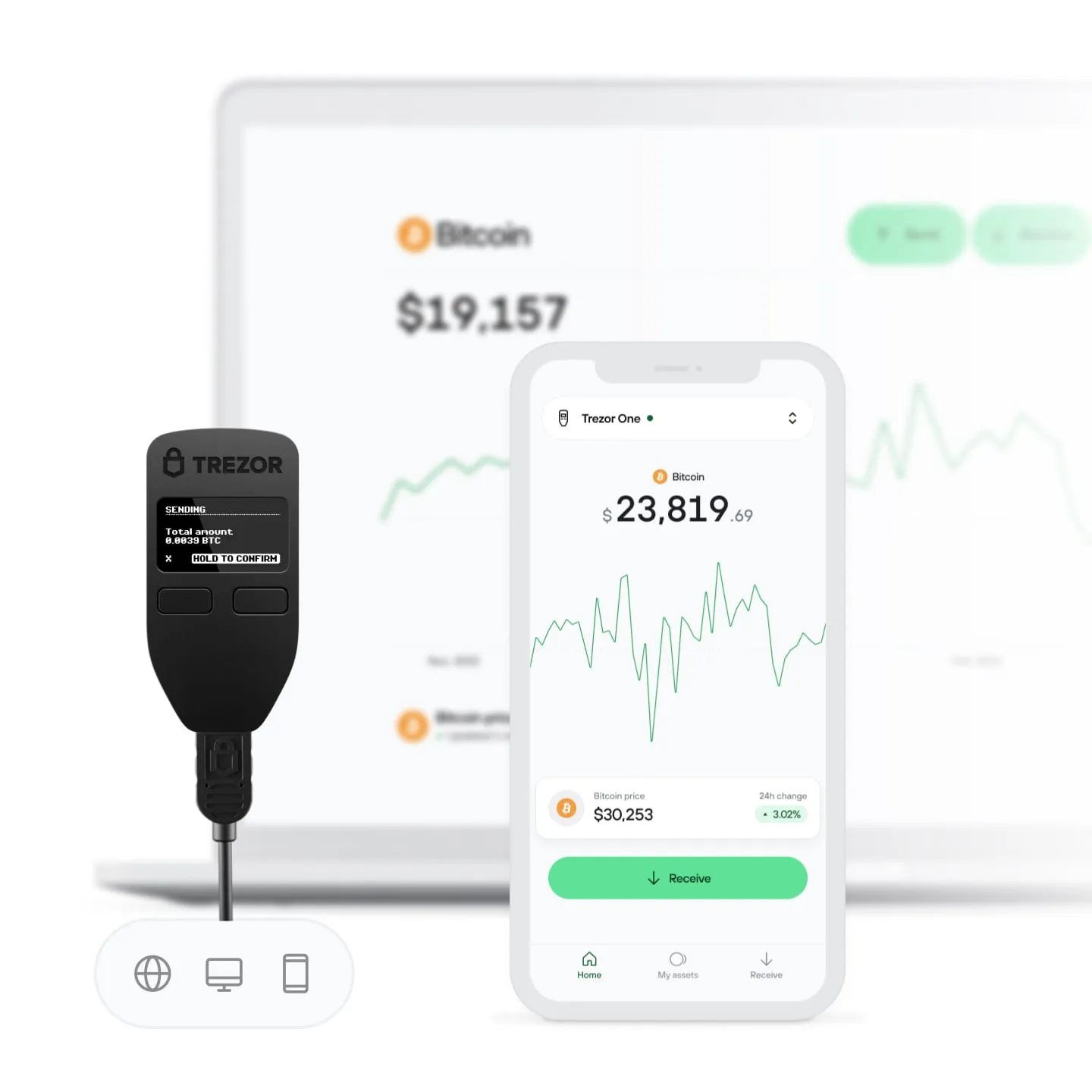
If you plan to use your wallet across multiple devices (like switching between your phone and laptop), choose one that syncs seamlessly or offers browser extensions. Hardware wallets typically connect to any computer via USB or Bluetooth, but you'll still need compatible wallet software to manage your funds. Always verify compatibility before downloading or purchasing a physical crypto wallet to avoid setup frustrations later.
Step-by-Step: How to Set Up a Crypto Wallet
Once you've picked a wallet that fits your needs, it's time to actually get it up and running. The process is simpler than most people expect—as long as you pay attention to a few critical details.
Essentials and Personal Information You Need
Before you open a crypto wallet, gather a few essentials. You'll need a secure device (laptop, smartphone, or dedicated hardware device), a stable internet connection for software wallet setup, and about 15–30 minutes of focused time.
Here's the good news: for most non-custodial wallets, you won't need to share personal information like your name or address. That's the beauty of self-custody—your wallet is yours, no KYC required. You will need to create a strong password and be ready to write down your seed phrase (more on that in a moment).
If you're setting up a hardware wallet, you'll also need the physical device itself and a USB cable. For paper wallets, you'll need a clean computer (ideally offline) and a printer.
But here's what matters most: your mental readiness to handle your own security. Unlike a bank account, there's no customer service to reset your password. You're in full control—which is empowering, but also means you're fully responsible.
Creating a Software Wallet
Software wallets are the fastest way to get started. They're apps you download to your phone or computer, giving you immediate access to your crypto.
First, choose your wallet app. Popular beginner-friendly options include Trust Wallet, MetaMask, or Exodus. Download the app directly from the official website or verified app store—never from third-party sources. (Phishing apps are a real risk!)
Once installed, open the app and select "Create New Wallet." You'll be asked to set a password. Make it strong: at least 12 characters, mixing letters, numbers, and symbols.
Next comes the critical part: your seed phrase. The app will generate a 12- or 24-word recovery phrase. This is your master key. If you lose access to your device, this phrase is the only way to recover your funds. Write it down on paper—never screenshot it or store it digitally. Keep it somewhere safe and private, like a locked drawer or safe.
The app will ask you to confirm the phrase by selecting words in the correct order or in a similar way. This ensures you recorded it accurately.
Once confirmed, you're in. Your cryptocurrency wallet is now active, and you'll get to see your wallet address—a long string of letters and numbers you can share to receive crypto.
Setting Up a Hardware Wallet

Hardware wallets offer the highest level of security because they store your private keys offline. They're physical devices—think of them like a USB stick, but specifically designed for crypto wallet setup.
Start by purchasing your hardware wallet from the official manufacturer. Never buy a used device or one from a third-party seller. Ledger and Trezor are the two most trusted names in the space, although not the only ones.
Unbox your device and connect it to your computer using the provided USB cable. Download the official companion app (Ledger Live for Ledger, Trezor Suite for Trezor). The app will guide you through initialization.
When prompted, choose "Set up a new device." Here's the key part: the hardware wallet will generate your seed phrase directly on the device screen—it never appears on your computer, which keeps it safe from malware. Write down all 24 words in order, avoid taking a photo. Store this phrase in a secure, offline location. Some users split it between two locations for extra redundancy.
Set a PIN code on the device itself. This protects against physical theft. If someone steals your hardware wallet but doesn't have your PIN or seed phrase, your funds remain safe.
Once setup is complete, your cold wallet is ready. You can now install apps for Bitcoin, Ethereum, or other supported coins directly through the companion software.
Creating and Using a Paper Wallet
A paper wallet is exactly what it sounds like: your private key and wallet address printed on paper. It's one of the oldest forms of cold storage crypto wallet solutions, and it's still used by some long-term holders.
To create a paper wallet, use a trusted generator, for example, BitAddress.org for Bitcoin. For maximum security, download the generator's code and run it on an offline computer. This ensures no internet connection during key generation.
The generator will produce a public address (where you receive funds) and a private key (which you use to spend funds). Print both. Some generators also create a QR code for easier scanning.
Store the printed paper in a waterproof, fireproof location. Many users laminate it or place it in a safe deposit box. Never photograph it or share it digitally—if it leaks, you will never be able to remove it from the internet and prevent bad actors from acquiring it.
By default, paper wallets are receive-only. To use funds from a paper wallet, you'll need to "sweep" or import the private key into a software wallet. This moves your crypto from the paper wallet to an active wallet from where you can send transactions. By the way, once you sweep a paper wallet, it's no longer secure—generate a new one if you want to return to paper storage.
All in all, paper wallets are secure but inconvenient. They're best for long-term holding, not frequent transactions.
Common Mistakes to Avoid
Setting up a crypto wallet is straightforward, but small mistakes can lead to big problems.

Photo by Marcos Paulo Prado on Unsplash
- Mistake #1: Not backing up your seed phrase. If you skip this step or store it digitally, you risk permanent loss of funds.
- Mistake #2: Using a weak password. A strong password protects your wallet app, but it's not a replacement for your seed phrase. Use a password manager if needed.
- Mistake #3: Downloading fake wallet apps. Always verify the source. Phishing apps mimic real wallets and steal your information.
- Mistake #4: Sharing your private key or seed phrase. No legitimate service will ever ask for this. If someone does, it's a scam.
- Mistake #5: Testing with large amounts or not testing. When you set up a new wallet, send a small test transaction first. Make sure you can receive and send funds before transferring significant amounts.
- Mistake #6: Forgetting to update wallet software. Security patches matter. Keep your software wallet and hardware wallet firmware up to date.
Creating and Managing Wallet Addresses
After your wallet is live, your next step is learning how wallet addresses work in practice—because every time you send and receive will depend on getting this right.
About Address Generation
When you set up a crypto wallet, creating a wallet address happens automatically—but understanding how it works helps you use your wallet safely and confidently.
Here's the quick overview: your wallet uses your private key to mathematically generate a unique public address. Think of it like this—your private key is the master blueprint, and your wallet address is the mailing address that anyone can use to send you crypto. The two are cryptographically linked, but someone knowing your address can't reverse-engineer your private key.
Most modern wallets generate addresses using a system called hierarchical deterministic (HD) derivation. This means your single seed phrase can create an essentially unlimited number of addresses—all tied back to one master key. Your seed phrase stays constant, but your addresses can keep changing.
Your wallet handles different blockchain address formats automatically based on which cryptocurrency you're receiving. You don't need to memorize formats—just know that addresses look different across blockchains, and that's completely normal. Some blockchains use similar address formats, though, so caution is still advised.
How to Create a Wallet Address
Creating a new wallet address is straightforward, whether you're using a software wallet, hardware wallet, or even a decentralized crypto wallet.
In most crypto wallet apps:
- Open your wallet and select the cryptocurrency you want to receive (Bitcoin, Ethereum, etc.).
- Tap or click "Receive."
- Your wallet instantly generates a new address.
- Copy the address or show the QR code to the sender.
The process is nearly identical across different wallet types. If you're setting up a crypto wallet for the first time, your wallet creates your first address during the initial setup. From there, you can generate new ones whenever needed. It takes seconds.
Some wallets, like hardware wallets from Ledger or Trezor, display addresses on their physical screens. This adds security—you can verify the address on the device itself before sharing it, protecting against malware that might try to swap addresses on your computer screen. Always double-check addresses before sharing them, especially for large transactions.
Photo by Rohan on Unsplash
By the way, if you're using a non-custodial wallet, you have full control over address generation. Custodial exchange wallets typically assign you one or two addresses and manage the rest behind the scenes. That's another reason experienced users prefer self-custody—you control when and how addresses are created.
Multi-Address Strategies
Using multiple addresses isn't just possible—it's often the smart choice.
Many experienced users create a new address for every transaction. Modern HD wallets make this effortless, and it significantly improves your privacy.
Consider this: when all your transactions flow through one address, anyone can see your entire balance and transaction history on the public blockchain. Multiple addresses break that visibility. It's like having several P.O. boxes instead of publishing your home address everywhere.
Common multi-address strategies include:
- Separate addresses for different purposes—one for savings in cold storage, another for daily transactions in your hot wallet.
- New address per transaction—maximizes privacy by making it harder to link transactions together.
- Labeled addresses—some wallets let you label addresses by source (work payments, personal transfers, etc.).
Even hardware crypto wallet users often maintain several addresses—a primary long-term storage address that rarely moves, and rotating addresses for incoming transfers. This isolates your main holdings from active transaction flow. Your largest funds stay quiet while your active addresses handle day-to-day movement.
The key benefit? If one address is ever compromised or publicly associated with you, your other funds remain separate and more private. It's compartmentalization at the blockchain level—simple to implement, significant in impact.
Address Reuse and Privacy Implications
Opposite to that, reusing the same crypto wallet address repeatedly creates a detailed public record of your financial activity.
Here's why it matters: blockchain transactions are permanent and public. If you give out the same Bitcoin wallet address to multiple people—or use it for all your transactions—anyone can search that address on a block explorer and see your complete balance and transaction history. Every deposit, every withdrawal, every trade. All visible, all permanent.
This isn't just a privacy concern. Address reuse makes you a more obvious target. If someone sees you're holding substantial funds, you become worth the effort to compromise.
Privacy implications of address reuse include:
- Others can see your total balance.
- Transaction patterns become visible (when you buy, sell, or move funds).
- Your financial activity can be linked across platforms if you use the same address.
- Large balances essentially advertise you as a potential target.
Most modern wallets automatically generate new addresses to help you avoid this. But if you're running an online crypto wallet or managing an older Bitcoin wallet account, you might need to manually request new addresses. Check your wallet settings—many have a "privacy mode" or "auto-rotate addresses" feature you can enable.
The solution is simple: generate a fresh address for each transaction. Your wallet still controls all of them through your single seed phrase storage most of the time—you're just spreading your activity across multiple public identifiers instead of one. It's a small habit that significantly improves your operational security and keeps your financial privacy intact.
Security and Best Practices
Source: Arina Habich / Alamy
Now that you know how wallets and addresses work, the next layer is protecting your wallet like the valuable asset it is. This is where seed phrases, authentication, and smart testing come in.
If you have the time, read our dedicated guide to securing your crypto wallet. Below is just a shorter version of that critical information.
Generating and Storing Your Seed Phrase Offline
When you set up a crypto wallet, your seed phrase generates the moment you initialize it—whether that's a hardware wallet, a mobile crypto wallet app, or a desktop wallet. This 12-to-24-word sequence is your master backup key. The critical part? Write it down offline. Never screenshot it, never email it to yourself, and never store it in cloud services or password managers connected to the internet.
Most wallets walk you through seed phrase creation during setup. They can display your words one by one, then ask you to confirm them in order. This confirmation step ensures you've recorded everything accurately before your wallet finalizes setup. It's not just for show—it's your safety net.
Here's the key part: generate your seed phrase on a device that's not connected to the internet whenever possible. Hardware wallets like Ledger or Trezor handle this automatically since the device itself stays offline during initialization. For software wallets, consider temporarily disabling Wi-Fi during setup if your wallet supports offline generation.
Importance of Seed Phrases
Your seed phrase is the single point of failure—or success—for your entire crypto wallet security. Lose it, and you lose permanent access to your funds. If someone else gets it? They own your Bitcoin, Ethereum, and everything else in that wallet.
In simple terms, your seed phrase mathematically generates your private keys. That means anyone with your seed phrase can recreate your wallet on any device, anywhere in the world, and move your assets without needing your permission. No customer service can reverse this. No blockchain protocol can undo it.
How to Store Your Seed Phrase Safely
If you have not been checking links before, the ChangeHero team also has a dedicated guide to securing seed phrases specifically. Considering the importance of keeping the master key secure, do try to read the walkthrough! In any case, here are some quick tips.
Physical storage beats digital every time. Write your seed phrase on paper or, better yet, engrave it onto metal using seed phrase storage solutions specifically designed for crypto. Metal backups resist fire, water, and corrosion; paper can and most probably will degrade over time.
Store your seed phrase in multiple secure locations. A fireproof safe at home is a good start. A safe deposit box at a bank adds redundancy. Some users split their seed phrase across two locations—though this requires careful planning to avoid making recovery impossible if one location is compromised.
Never store your seed phrase and your hardware wallet in the same location. If a thief takes both, you've lost everything. And avoid "clever" hiding spots like under a mattress or in a book.
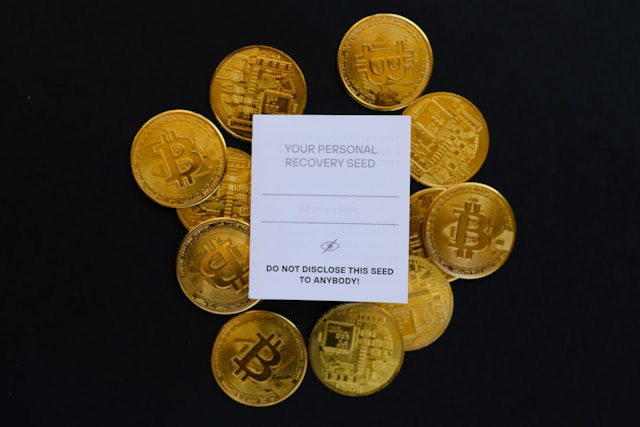
Photo by rc.xyz NFT gallery on Unsplash
Using Strong Authentication
Multi-factor authentication (2FA) adds a critical security layer when setting up a crypto wallet—especially for online crypto wallets or wallets connected to exchanges. Enable 2FA using an authenticator app like Google Authenticator or Authy. Not SMS: SIM-swap attacks (where hackers steal your phone number) can bypass SMS-based 2FA.
For non-custodial wallets, 2FA typically protects access to your wallet interface, not the blockchain itself. Your seed phrase still remains the ultimate key. But for custodial or exchange wallets, 2FA is essential since you're trusting a third party with custody.
By the way, many hardware wallets also support PIN protection and optional passphrase features (sometimes called a "25th word"). This passphrase acts like a second layer of encryption—even if someone finds your seed phrase, they can't access your funds without the passphrase. The catch with passphrases is that even if you remember the recovery phrase flawlessly, forgetting the passphrase attached to it will not let you restore the wallet.
Testing Send and Receive with a Small Amount
Before moving significant funds into your new crypto wallet, test everything with a small transaction. $10 worth of Bitcoin or Ethereum is fine. This is your safety net.
Here's the process: send a tiny amount from an exchange or another wallet to your new wallet address. Wait for the transaction to confirm on the blockchain (this can take a few minutes). Check your wallet to verify the funds arrived. Then send that same small amount back to the original address or to another wallet you control.
This two-way test confirms three things: your wallet address is correct, you can receive funds, and you can successfully authorize outgoing transactions. It also familiarizes you with transaction fees, confirmation times, and your wallet's interface before real money is at stake.
Always double-check wallet addresses character by character—one wrong digit sends your crypto into an irretrievable void. Copy-paste is safer than manual typing, but visually verify both the first few and last few characters before hitting send.
Anonymous and Privacy-Focused Crypto Wallets
Security is one side of the coin. Privacy is the other. Not everyone wants their financial history easily traceable on a public ledger.
Privacy in crypto wallets isn't one-size-fits-all—it exists on a spectrum. On one end, you have exchange wallets that require full KYC (Know Your Customer) verification, linking your real identity to every transaction. On the other end, you have anonymous crypto wallets designed to minimize traceability entirely.
Most non-custodial wallets fall somewhere in the middle. They don't require personal information to set up a crypto wallet, but every transaction you make is still recorded on the blockchain. Your wallet address acts like a pseudonym—it doesn't reveal your name, but if someone connects that address to your identity (say, through an exchange withdrawal), they can see your entire transaction history.
Here's what matters: privacy isn't just about hiding what you're doing. It's about preventing your financial history from becoming public record. In simple terms, blockchain transactions are transparent by design—privacy-focused wallets help you control who sees what.

Setting Up Anonymous Wallets
Setting up an anonymous wallet requires going beyond basic crypto wallet setup steps. First, choose a decentralized crypto wallet that doesn't collect personal data during installation. Wallets like Wasabi or Samourai (for Bitcoin) are built specifically for privacy.
The key difference? These wallets include features like CoinJoin, which mixes your transactions with others to obscure the trail. When you create a Bitcoin wallet using these tools, you're not just generating a standard address—you're opting into privacy-enhancing protocols.
Start by downloading the wallet from its official website (not an app store, where versions can be modified). During setup, you'll create a wallet address and receive your seed phrase as usual. Store that seed phrase offline immediately—privacy wallets are non-custodial by nature, meaning only you control access.
One critical step: never link your anonymous wallet to a KYC-verified exchange. The moment you send funds directly from a platform where you verified your identity, that anonymity layer breaks. Instead, use peer-to-peer platforms or Bitcoin ATMs that don't require identification.
Privacy Coins and Specialized Wallets
Privacy coins like Monero, Zcash, and Dash take anonymity further by building privacy directly into the blockchain itself. Unlike Bitcoin, where transactions are transparent, these coins obscure sender, receiver, and transaction amounts by default.
To use privacy coins, you need specialized wallets. For Monero, wallets like Cake Wallet or Monerujo are popular choices. These function like any other cryptocurrency wallet, but they're optimized for the unique privacy features of their respective blockchains. When you open a crypto wallet for Monero, for instance, you're working with hidden addresses and ring signatures that make tracking nearly impossible.
Why does this matter? If privacy is your primary concern—whether for personal security or philosophical reasons—privacy coins offer stronger guarantees than mixing tools alone. However, they come with trade-offs: fewer exchanges support them, and regulatory scrutiny is increasing. Some platforms have even delisted privacy coins under pressure from anti-money laundering (AML) authorities.
The bottom line: anonymous crypto wallets and privacy coins give you control over your financial visibility. But they require intentional setup and careful use to maintain that privacy effectively.
Decentralized Wallet Architecture and Benefits
Privacy leads naturally into decentralization—owning not just your data, but the actual infrastructure you use.
A decentralized crypto wallet operates entirely without intermediaries—meaning no company sits between you and your funds. When you set up a crypto wallet of this type, you generate your private key directly on your device, not on someone else's server. The wallet software (whether it's a crypto wallet app, hardware crypto wallet, or even a paper wallet) uses this key to sign transactions locally before broadcasting them to the blockchain.
Here's the core mechanic: your private key never leaves your device. When you want to send Bitcoin from your wallet, the wallet signs the transaction with your key, then publishes that signed transaction to the network. No third party can access, freeze, or reverse that transaction because no third party holds your key. This is what makes it a non-custodial wallet—you alone control the funds.
Photo by Mariia Shalabaieva on Unsplash
The wallet interface reads blockchain data to show your balance, but it doesn't store your coins. Think of it this way: your cryptocurrency wallet holds the keys that prove ownership of addresses on the blockchain, not the locker itself. It's like holding the password to your locker—the locker (blockchain) exists independently, but only your key opens it.
Advantages Over Centralized Solutions
The main benefit? Full self-custody. Unlike exchange wallets, where a company holds your private keys (and can lock your account or get hacked), a decentralized crypto wallet puts you in complete control.
By contrast, when you use a self-custody wallet—especially a cold wallet or physical crypto wallet—your funds remain isolated from online attacks targeting centralized servers.
Security consistently ranks as users' top priority. Decentralized wallets answer the need for keeping funds secure by eliminating counterparty risk entirely.
You also gain privacy. An anonymous crypto wallet setup (or privacy-focused non-custodial wallet) doesn't require KYC, email, or phone number. You generate a wallet address, and you're done. No company tracking your transactions or freezing your account because of regulatory pressure.
By the way, this matters more as governments tighten financial controls—self-custody keeps your funds truly yours.
Popular Decentralized Wallet Options
If you're ready to open a crypto wallet that's decentralized, here are the leading options:
- MetaMask — the most popular Web3 wallet for Ethereum and EVM-compatible chains.
- Trust Wallet — a mobile-first option supporting dozens of blockchains, great for beginners setting up a crypto wallet for the first time.
- Exodus — known for its clean interface and built-in exchange, working across desktop and mobile and integrating with Trezor hardware for cold storage.
- Ledger Live (paired with Ledger hardware) — combines cold storage security with decentralized control.
Each platform offers seed phrase storage as your recovery mechanism, ensuring you can restore access even if your device is lost. Just remember: if you lose your seed phrase and your device, no one—not even the wallet company—can help you recover your funds. That's the trade-off for true self-custody.
Advanced Wallet Security Configurations
Once you've mastered basic self-custody, you can go further. Advanced security setups dramatically reduce single points of failure—especially useful for higher-value holdings or shared funds.
Multi-Signature Wallet Setup
One of the more advanced security measures, multi-signature (multi-sig) wallet requires multiple private keys to authorize a transaction, rather than just one. Think of it like a bank vault that needs three different keys held by different people to open.
Here's how multi-sig works: when you create a multi-sig wallet, you define a signing threshold—for example, 2-of-3 means any two out of three designated private keys must sign a transaction before it executes. This setup is ideal for shared funds (like business accounts), inheritance planning, or simply adding an extra security checkpoint to your personal holdings.
To set up a multi-sig wallet, you'll need a compatible wallet provider like Electrum (for Bitcoin), Gnosis Safe (for Ethereum), or hardware wallet combinations. The process involves generating multiple key pairs, distributing them across different devices or people, and defining your signing policy. By the way, multi-sig significantly reduces single-point-of-failure risk—if one key is compromised, your funds remain safe.
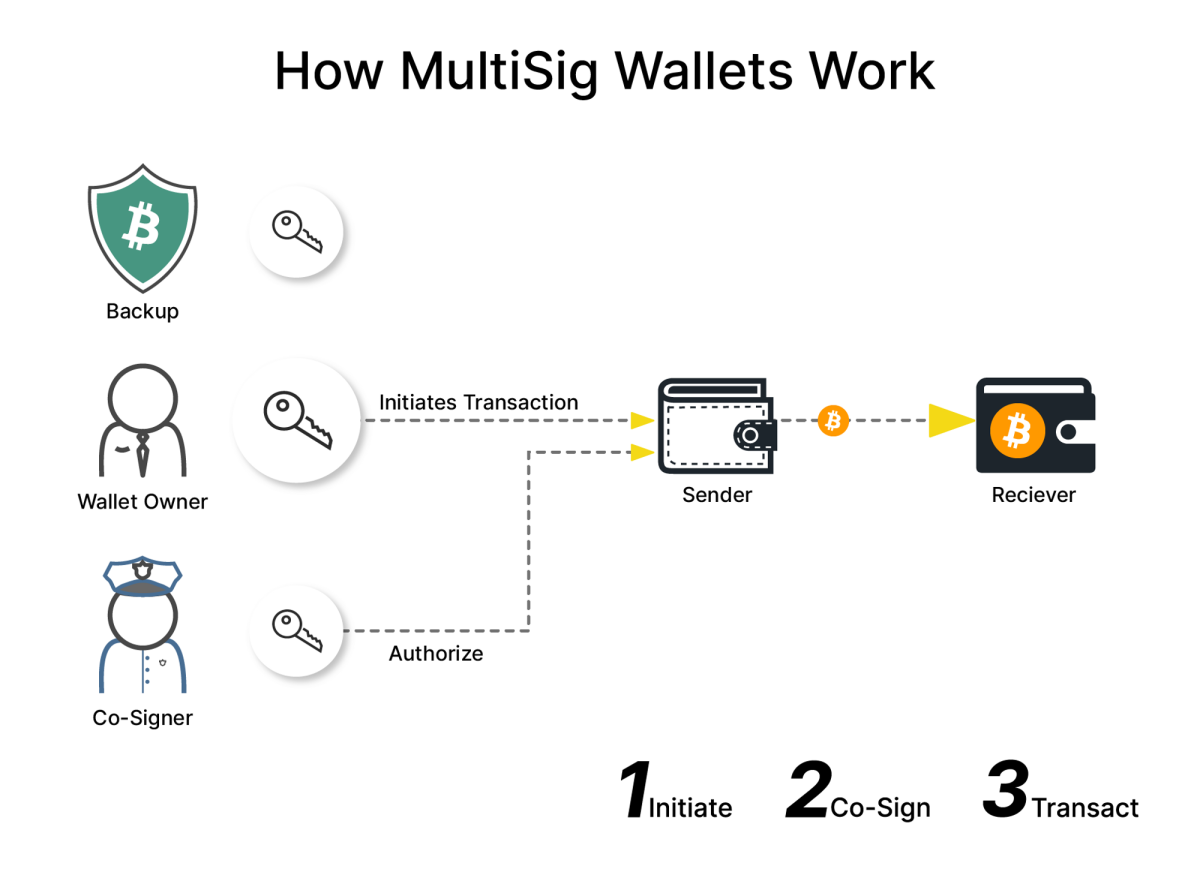
Source/credit: Gate
The tradeoff? Multi-sig wallets require more coordination and slightly higher transaction fees (since multiple signatures must be verified on-chain). But for high-value holdings, this extra step is often worth the peace of mind.
Time-Locked Transactions
Time-locked transactions let you schedule when funds become spendable. In simple terms, you're creating a transaction that won't execute until a specific block height is reached or a certain date arrives.
This feature is useful for inheritance planning (where funds unlock after a set period), vesting schedules, or protecting against impulsive decisions during market volatility. Bitcoin supports time-locks natively through its scripting language, while Ethereum-based wallets often use smart contracts to achieve similar results.
Setting up time-locks typically requires more technical knowledge—you'll need wallet software that supports advanced transaction options or direct interaction with smart contract platforms. The important detail is this: once a time-lock is set, it cannot be reversed. Test with small amounts first.
Social Recovery Mechanisms
Social recovery offers a middle ground between self-custody and the risk of losing your seed phrase. Instead of relying solely on your backup, you designate trusted contacts (called "guardians") who can help you regain access if something goes wrong.
Wallets like Argent pioneered this approach. Here's how it works: you choose several guardians—friends, family members, or even other devices you control. If you lose access to your wallet, a majority of these guardians must approve a recovery request to restore your account.
The key advantage? You're not putting all trust in one backup method. Even if you lose your seed phrase, your funds aren't gone forever. The downside is that you're introducing a small degree of trust—your guardians could theoretically collude to access your wallet, though most systems require a majority threshold to prevent this.
Social recovery works best when combined with hardware wallets and multi-sig setups, creating a comprehensive security architecture that protects against multiple failure scenarios.
Physical Storage Solutions Beyond Hardware Wallets
When you set up a crypto wallet and take full self-custody of your coins, your seed phrase becomes the single point of failure. If someone finds it, they own your crypto. If you lose it, your funds are gone forever.
Hardware wallets solve part of this problem by keeping your private keys offline, but the seed phrase itself is usually written on paper—and paper can burn, fade, or get damaged. That's why serious crypto holders go beyond basic seed phrase storage and use physical backup methods designed to survive worst-case scenarios.
Metal Seed Phrase Backups
Metal backups are the gold standard (pun intended) for storing your seed phrase offline. These are physical plates, tiles, or capsules made of stainless steel, titanium, or other fire-resistant metals where you engrave or stamp your 12- or 24-word recovery phrase. Unlike paper, metal backups can survive house fires (often up to very high temperatures), floods, and physical damage.
Popular options include Cryptosteel, Billfodl, and Blockplate. Most use a letter-stamping system where you punch in the first few letters of each word—enough to reconstruct the full phrase using the BIP39 word list. Some products use tiles or sliders to lock words into place; tests have found these to be more prone to loss of information, though.
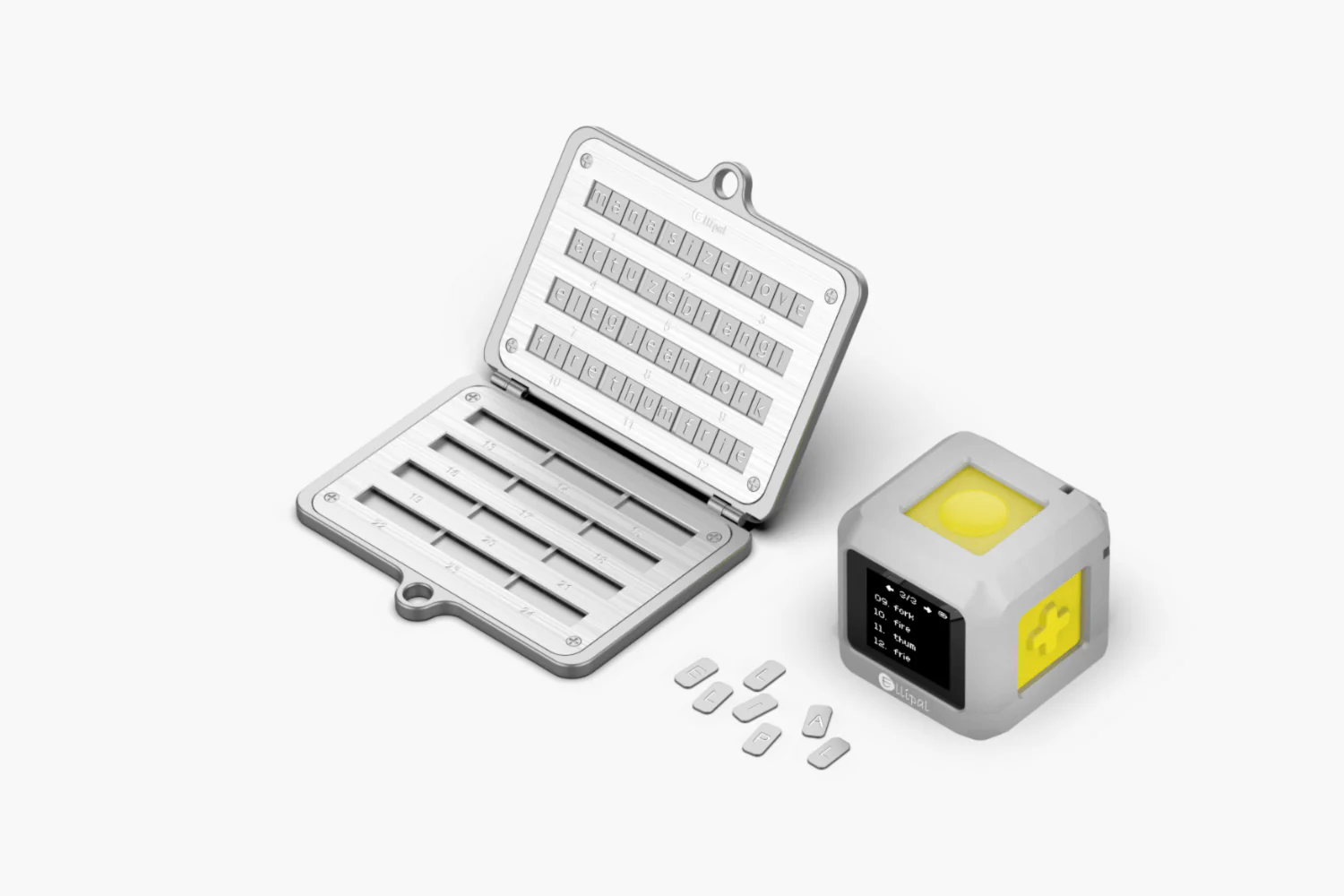
Source: Ellipal
The cost ranges from roughly $50 to $150, which is a small price compared to the value of your Bitcoin wallet or cryptocurrency wallet holdings.
Getting one is half the job; always store metal backups in secure, private locations. A fireproof safe at home works, but if you're holding significant assets, consider splitting your backup strategy across multiple methods (more on that below).
Safe Deposit Box Strategies
Bank safe deposit boxes offer another layer of security for seed phrase storage. They're climate-controlled, physically secure, and protected by institutional safeguards. If you're holding long-term cold storage for a self-custody wallet, a safe deposit box can be a practical choice—especially for metal backups.
However, there are trade-offs. Banks control access hours, and in rare cases (think regulatory crackdowns or bank failures), you might face delayed access to your box. Also, safe deposit boxes aren't insured by the FDIC, so the responsibility for protecting the contents is still yours.
Never store your only copy of a seed phrase in a single location. If that bank closes unexpectedly or restricts access, you could be locked out of your decentralized crypto wallet indefinitely.
One smart approach: store a metal backup in a safe deposit box and keep a separate secure backup in a different location. This way, no single point of failure can wipe out your access.
Geographic Distribution of Backups
Why do people do it? Spreading your seed phrase backups across multiple physical locations protects you from localized disasters. If your house burns down, floods, or gets broken into, having a second backup stored elsewhere ensures you can still recover your crypto wallet setup.
For maximum security, some users split their seed phrase using Shamir's Secret Sharing, where each location holds only a partial backup. This prevents any single location from having full access to your wallet. It's more complex to set up, but it's a proven method for high-value, long-term cold storage.
The important detail is this: geographic distribution works only if you've documented where each backup is stored and ensured trusted individuals (if applicable) know how to access or use them in an emergency.
Balance security with recoverability—because losing access to all backups is just as bad as getting hacked.
Wallet Interoperability and Cross-Chain Management
As crypto expands beyond Bitcoin and Ethereum, managing assets across multiple blockchains becomes a real challenge. Each blockchain operates independently—Bitcoin has its own network, Ethereum runs separately, and chains like Solana, Avalanche, and Polygon all use different wallet structures.
If you hold assets on three different blockchains, you might need three different wallets, three sets of seed phrases, and three separate apps just to check your balances. That's where interoperability and cross-chain management come in.
Managing Multiple Blockchain Wallets
Most crypto holders today use multiple wallets. You might have a Bitcoin wallet for long-term storage, an Ethereum wallet for DeFi, and a Solana wallet for NFTs. Each blockchain requires a unique wallet address format, and some wallets only support one chain at a time.
Photo by Kanchanara on Unsplash
Here's the basic setup: you create a wallet for each blockchain you use, store each seed phrase separately, and manage them independently. This approach gives you full control, but it also multiplies your security responsibility. Every new wallet means another seed phrase to back up (and store safely), another app to update, and another address to track.
The upside? Full isolation. If one wallet gets compromised, your other holdings stay safe. The downside? Managing multiple wallets gets messy fast, especially when you're moving funds between chains or tracking portfolio performance across networks.
Cross-Chain Bridge Integration
Cross-chain bridges solve the "locked assets" problem—in a way. Without bridges, your Bitcoin stays on Bitcoin, your ETH stays on Ethereum, and never the two shall meet. Bridges allow you to move assets between blockchains—like transferring USDT from Ethereum to Solana so you can use it in a Solana-based DeFi app.
Here's how it works: a bridge locks your asset on one chain and mints an equivalent version on another. For example, if you bridge ETH from Ethereum to Polygon, your ETH gets locked on Ethereum, and you receive "bridged ETH" on Polygon. When you bridge back, the process reverses.
Some wallets integrate directly with bridges, making cross-chain transfers easier. Instead of navigating multiple platforms, you initiate the transfer inside your wallet. The wallet handles the technical steps—locking, minting, confirming—while you just approve the transaction.
But bridges carry risk. Many of the hacks targeting centralized platforms affect bridges and similar infrastructure. Always use established, audited bridges and start with small test amounts before moving significant funds. Think of it as a test drive before the road trip.
Universal Wallet Solutions
Universal wallets, also called multi-chain wallets, let you manage multiple blockchains from a single app using one seed phrase. Instead of juggling three separate wallets, you open one app and see your Bitcoin, Ethereum, and Solana balances in the same interface.
These wallets generate blockchain-specific addresses from a single master seed phrase. When you set up a universal wallet, it automatically creates wallet addresses for each supported blockchain—all derived from the same 12- or 24-word recovery phrase.
This simplifies backup significantly: one seed phrase protects everything.
Popular universal wallet solutions include MetaMask (Ethereum + EVM chains), Trust Wallet (supports dozens of blockchains), and Exodus (desktop and mobile multi-chain support).
The trade-off? If someone gains access to your universal wallet's seed phrase, they can drain assets from every blockchain you use. That's why seed phrase storage becomes even more critical when using multi-chain solutions.
Universal wallets work best for users who actively move between blockchains, participate in DeFi across multiple networks, or simply want a cleaner portfolio view. They reduce complexity without sacrificing self-custody—a solid middle ground as crypto wallet technology continues evolving.
Risks of Storing Crypto on Exchanges
Even if you're comfortable buying crypto on exchanges, storing everything there long-term introduces risks you can't control. Understanding those risks helps you decide how much to leave on-platform versus in self-custody.
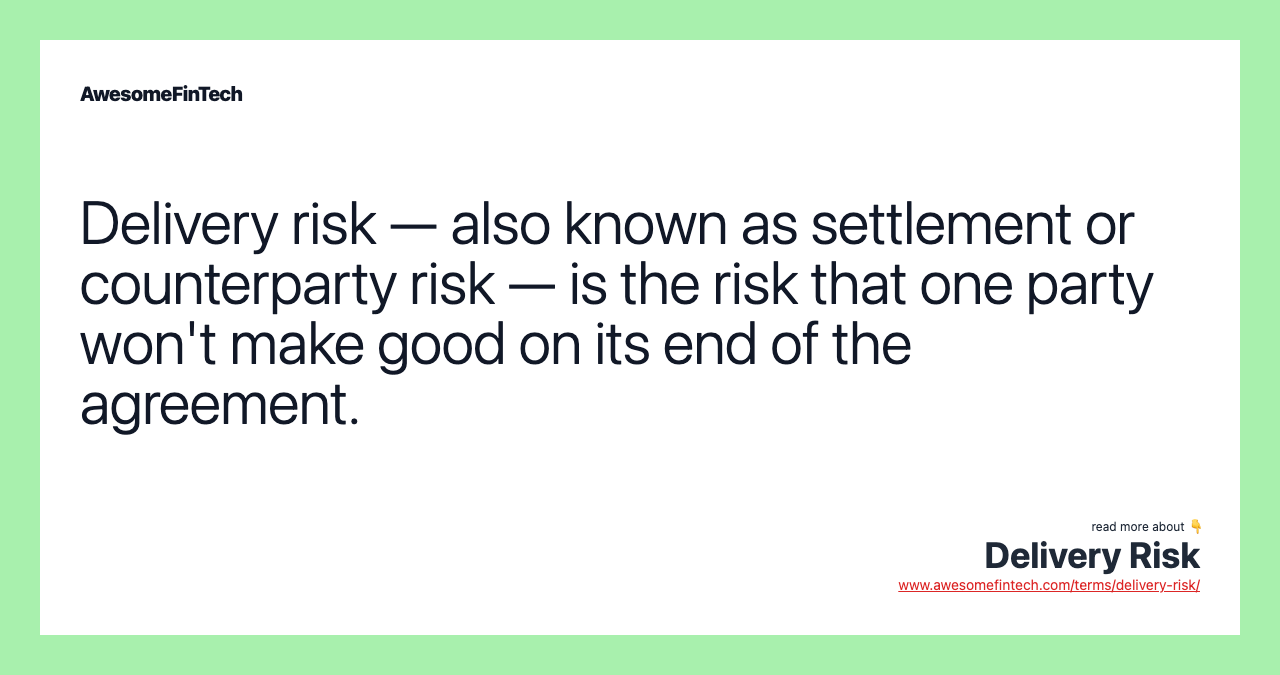
Credit/source: AwesomeFinTech.com
Centralized Exchanges’ Counterparty Risk
When you store crypto on a centralized exchange (CEX), you're trusting that platform to hold your funds safely. Here's the catch: you don't actually control those assets. The exchange does.
This is called counterparty risk—the risk that the other party (the exchange) fails to meet its obligations. If the exchange becomes insolvent, gets hacked, or faces liquidity problems, your funds can be frozen, lost, or stuck in lengthy recovery processes.
Unlike a self-custody wallet where you hold your private keys, exchange wallets are custodial. That means the exchange manages the private keys on your behalf. You're completely dependent on their security practices, financial health, and business decisions. If they go under, your crypto might go with them.
Hacks, Scams, and SIM-Swap Attacks
Centralized exchanges are prime targets for hackers because they hold enormous amounts of crypto in one place.
SIM-swap attacks are particularly dangerous for exchange users. Here's how they work: an attacker convinces your mobile carrier to transfer your phone number to a new SIM card. Once they control your number, they can intercept two-factor authentication (2FA) codes and access your exchange account. Even with strong passwords, you're vulnerable if your account recovery relies on SMS verification.
North Korea-linked hacking groups alone stole an estimated $779 million in 2023, often targeting centralized platforms with large holdings. These aren't random attacks but sophisticated operations aimed squarely at big custodial targets.
Regulatory and Banking Crackdowns
Exchanges operate under evolving regulations that can change quickly. Governments can freeze accounts, impose withdrawal restrictions, or shut down platforms entirely. Banking partners can cut ties with exchanges, limiting your ability to cash out.
When regulatory or banking pressure hits, your funds can be locked indefinitely while the platform works through compliance issues. You have no control over the timeline or outcome. That's a real problem when you're trying to access your own money.
Why Self-Custody is Safer for Long-Term Investors
Self-custody means setting up a crypto wallet where you control the private keys—specifically, a non-custodial wallet like a hardware wallet or decentralized crypto wallet app. This eliminates counterparty risk entirely.
With a cold wallet (offline storage) or self-custody wallet, no exchange hack, regulatory action, or platform failure can touch your funds. You're not dependent on any third party's security, solvency, or business decisions.
For anyone holding crypto long-term, moving assets off exchanges and into a Bitcoin wallet or cryptocurrency wallet you control isn't just smart—it's essential.
How to Buy Crypto Safely with Your Wallet
At some point you’ll want to actually get coins into that shiny new wallet, if you are not doing it for this express purpose in the first place. The safest path combines regulated on-ramps with proper withdrawal habits.
Connecting Your Wallet to a Regulated Exchange
The usual flow is: use a regulated exchange to buy crypto, then withdraw to your self-custody wallet.
For Web3 wallets like MetaMask, you can sometimes connect directly to exchange aggregators or swap services, but for most beginners, a centralized exchange plus manual withdrawal is clearer. Create an account with a reputable exchange, complete any required verification, and then add your self-custody wallet address to your withdrawal list.
Photo by Shutter Speed on Unsplash
Always verify you’re pasting the correct wallet address, and if your exchange supports address whitelisting, enable it. That way, withdrawals can only go to pre-approved addresses.
Using Bank Transfer, Card, or ACH to Fund Purchases
Most regulated exchanges support several funding methods:
- Bank transfers or ACH (often lower fees, slower settlement).
- Credit or debit cards (faster, higher fees).
- Sometimes third-party payment processors.
Choose the option that fits your cost and speed preferences. Remember, these payments happen between your bank and the exchange. Your self-custody wallet comes into play once you withdraw.
Buying Bitcoin, Ethereum, and Major Altcoins
Once your exchange account is funded, use the trading interface to buy your chosen assets—Bitcoin, Ethereum, or major altcoins. Market orders are simplest for beginners; limit orders give you more control over price.
After purchase, your crypto will sit in your exchange wallet by default. From here, your next move should be sending it to your personal wallet—especially for amounts you plan to hold.
Sending Crypto from Exchange to Your Wallet
To move funds into your own wallet:
- Open your wallet app and copy the receive address for the specific coin (e.g., your BTC address for Bitcoin).
- In the exchange, go to the withdrawal section and paste that address.
- Double-check the network selection (for example, withdrawing ETH on Ethereum mainnet, not a random side chain unless you intend that).
- Start with a small test amount.
- Confirm the withdrawal and wait for blockchain confirmations.
Once you see the small test deposit land in your wallet, you can confidently send the larger amount using the same process.
Checking and Confirming Transactions
Every blockchain transaction goes through a confirmation process. Your exchange will show a "pending" status at first, then "completed" once enough confirmations are received.
In your self-custody wallet, you’ll see the incoming transaction with a confirmation count. Many wallets link directly to block explorers so you can view the transaction on-chain. That’s your independent, verifiable proof the funds moved.
For larger transfers, wait for several confirmations before considering the transaction final. Bitcoin, for example, is often treated as fully confirmed after 3–6 blocks, depending on your risk tolerance.
Storing, Managing, and Growing Your Crypto
Once your crypto is safely in your own wallet, your focus shifts from "How do I get this set up?" to "How do I manage and grow this without taking unnecessary risks?"
Monitoring Your Portfolio and Market Prices
Most modern crypto wallet apps include built-in portfolio tracking that displays your current balance in both crypto units and your local currency. Apps like Trust Wallet, Exodus, and MetaMask show real-time price updates for all supported coins in one dashboard—simple as that.
For more detailed tracking across multiple wallets, consider using dedicated portfolio management tools. These platforms let you manually input all your holdings—even those stored in cold wallets—and monitor performance across different addresses. You can set price alerts, track historical gains or losses, and view market trends without exposing your private keys.

By the way, if you're using a hardware wallet like Ledger or Trezor, you can sync it with companion apps that display balances without compromising security. Your seed phrase stays offline while you monitor prices online. Best of both worlds.
Staking and Earning Passive Income on Crypto
Circling back to staking, it lets you earn rewards by locking up certain cryptocurrencies to support blockchain networks. In simple terms, you're helping validate transactions, and the network pays you interest-like rewards in return. Many non-custodial wallets now offer built-in staking for coins like Ethereum (after its shift to proof-of-stake), Cardano, Polkadot, and Solana.
Here's how it works: you delegate your coins to a validator through your wallet interface. Your funds remain in your control—you're not sending them to an exchange—but they're temporarily locked for a period (which varies by blockchain).
Keep in mind that staking rewards come with risks. Price volatility can offset gains, and some networks have lock-up periods where you can't immediately withdraw funds. Always stake only what you're comfortable locking away.
Taking Profits and Planning Exits
Taking profits is about strategy, not emotion—and this matters more than most beginners realize. A common approach is setting target prices before you invest: decide in advance at what percentage gain you'll sell a portion of your holdings. For example, you might take 25% profit at a 2x gain, another 25% at 3x, and leave the rest as long-term holdings.
Your cryptocurrency wallet can make this process straightforward. Send the amount you want to sell from your self-custody wallet back to a regulated exchange, convert to stablecoins or fiat, then withdraw to your bank account. Always test with a small amount first to confirm the process works smoothly.
On the other hand, rushing to take profits during every small price spike often means missing larger gains. Balance your exit strategy between securing wins and maintaining long-term positions in projects you believe in. Sounds reasonable, right?
Moving Coins Between Hot and Cold Storage
As your holdings grow, you'll want to move most funds into cold storage (offline hardware wallets) while keeping smaller amounts in hot wallets (online crypto wallet apps) for daily transactions. Think of it like keeping most cash in a safe deposit box but carrying spending money in your pocket.
The transfer process is identical to any crypto transaction: open your hot wallet, enter your hardware wallet's receiving address, specify the amount, and confirm. Your hot wallet sends the transaction to the blockchain, and your cold wallet receives it—all while your hardware wallet's seed phrase storage stays completely offline.
A smart approach is the 80/20 rule: keep 80% of your crypto in cold storage and 20% in a hot wallet for staking, trading, or DeFi activities. Rebalance periodically or whenever your hot wallet exceeds your comfort zone.
Tracking Transactions and Tax Implications
Every crypto transaction—buying, selling, swapping, or even receiving rewards—creates a taxable event in some countries. Your cryptocurrency wallet doesn't automatically generate tax reports, so you need to track transactions manually or use specialized software.

Photo by Kelly Sikkema on Unsplash
Tax tools can connect to your wallet addresses (no worries: they’re view-only, no private keys needed) and automatically categorize transactions for reporting. They calculate capital gains, losses, and income from staking or airdrops based on your local tax laws.
Keep these records for every wallet you use—both non-custodial wallets and any exchange accounts. Export transaction histories at least quarterly. The important detail is this: proper record-keeping protects you during audits and helps you identify exactly when and where you can harvest tax losses to offset gains.
By the way, consulting a crypto-savvy accountant is worth the investment once your portfolio reaches meaningful size. They'll help you navigate jurisdiction-specific rules and optimize your tax strategy legally.
More Advanced Security Tips for Crypto Wallet Users
As your portfolio grows, your threat model changes. The more you hold, the more attractive you become as a target—and the more intentional your defenses need to be.
Choosing the Right Level of Wallet Security
Your security needs depend on how much crypto you're holding and how often you access it. Here's the key part: there's no one-size-fits-all answer.
If you're holding less than $1,000 worth of crypto and making frequent transactions, a reputable mobile wallet or crypto wallet app with two-factor authentication works well. You get convenience without sacrificing basic protection. For amounts between $1,000 and $10,000, consider splitting your holdings—keep day-to-day funds in a hot wallet and move the rest to a hardware crypto wallet for cold storage. Once you're managing larger amounts (think $10,000+), a dedicated cold wallet becomes essential.
Protecting Against Malware and Phishing
Malware and phishing attacks are the most common threats to crypto wallet security, regardless of your holdings. Your first line of defense is to never click links in unsolicited emails or messages claiming to be from wallet providers.
It also helps to always bookmark the official website when you set up a crypto wallet and only access it through that bookmark. By doing so, you are avoiding Phishing sites that often use URLs appearing almost identical to legitimate ones—and one wrong letter can cost you everything.
Use dedicated antivirus software on any device where you access your cryptocurrency wallet. Keep your operating system and wallet software updated—patches often fix security vulnerabilities that hackers actively exploit.
Here's a practical tip: before entering your seed phrase or private key anywhere, verify the URL three times. Better yet, never enter your seed phrase on any website or app. Legitimate wallet providers will never ask for it.
For your Bitcoin wallet or other crypto holdings, consider using a separate computer or phone exclusively for crypto transactions if you are able. This air-gapped approach adds another layer of protection against malware that might exist on your everyday devices.
Avoiding Common Cold Wallet Mistakes
Cold wallet users often feel invincible, but mistakes still happen. The most dangerous one? Testing your hardware wallet's recovery process with real funds on the device. Always verify your seed phrase backup works conceptually before transferring significant amounts—without repeatedly exposing it.
Photo by engin akyurt on Unsplash
Another common error: assuming your hardware crypto wallet is indestructible. Physical damage, manufacturer defects, and firmware bugs do occur. That's why you need your seed phrase stored separately in at least two secure locations—not just written on paper, but potentially engraved on metal for long-term durability.
Never photograph your seed phrase or store it digitally. That defeats the entire purpose of cold storage. Also, when you create a Bitcoin wallet or any cryptocurrency wallet on a hardware device, do it offline. Some users connect their device during initial setup, exposing their seed phrase generation to potential network-based attacks.
One more thing: update your hardware wallet's firmware regularly, but only download updates directly from the manufacturer's official website.
What to Do if Your Wallet is Lost or Compromised
Quick action matters here. If you suspect your wallet is compromised (meaning someone may have access to your private keys) immediately transfer all funds to a new, secure wallet. Don't hesitate hoping the threat isn't real.
For a lost hardware wallet, stay calm. Your crypto isn't on the physical device—it exists on the blockchain. As long as you have your seed phrase, you can restore your Bitcoin wallet account or any other cryptocurrency wallet to a new device. Import your seed phrase into compatible wallet software or a new hardware device following the manufacturer's recovery instructions.
If you've lost both your device and seed phrase? Unfortunately, your funds are likely unrecoverable. This underscores why seed phrase storage deserves serious attention from day one.
For phishing attacks where you've entered credentials on a fake site, assume the attacker has immediate access. Create an entirely new wallet setup with a fresh seed phrase and transfer funds quickly.
Backing Up and Recovering Your Wallet Safely
At this point the guide sounds like a broken record but your seed phrase really is everything. It's the master key to your entire cryptocurrency wallet. When you first open a crypto wallet, write down your seed phrase on paper immediately—not on your phone's notes app, not in a password manager, not in a cloud document.
Store this backup in multiple physical locations. Many users keep one copy in a fireproof safe at home and another in a safety deposit box. For added protection against fire and water damage, consider metal seed phrase backup solutions.
The recovery process is straightforward: most wallet software includes a "restore from seed phrase" option during crypto wallet setup. You'll enter your 12 or 24 words in the exact order they were generated, and your wallet—including all addresses and transaction history—reappears.
Test your backup once (with small amounts) to verify it works, then never access it again unless absolutely necessary. Each time you expose your seed phrase, you increase risk. Keep it offline, keep it secure, and remember: anyone with your seed phrase controls your crypto completely.
Conclusion
Setting up a crypto wallet is your gateway to truly owning digital assets—and choosing the right one shapes your entire experience. There's no single "best" cryptocurrency wallet for everyone because your needs depend on how you plan to use crypto. Are you holding Bitcoin long-term? A hardware wallet like Ledger or Trezor offers maximum security for cold storage. Want to explore DeFi and Web3? A non-custodial wallet with dApp connectivity makes sense. Just getting started? A beginner-friendly crypto wallet app with low fees and intuitive design helps you learn without overwhelm.
Continue learning with guides from the ChangeHero blog! Let us know what else you want to learn on Telegram, X, and Facebook (and don’t forget to follow to keep learning every day).
Frequently Asked Questions
Are Crypto Wallets Free?
Most software wallets—including mobile, desktop, and web-based crypto wallet apps—are completely free to download and use. You won't pay for setting up a crypto wallet or creating wallet addresses. The wallet itself costs nothing.
Here's what you will pay for: network fees (also called gas fees or transaction fees) when you send cryptocurrency. These fees go to blockchain validators, not the wallet provider. The amount varies by network—Bitcoin and Ethereum transactions can range from a few cents to higher amounts during peak usage times, depending on how busy the blockchain is.
Hardware wallets require an upfront purchase. Entry-level devices typically cost around $50–$80, while premium models with advanced security features can reach $200 or more.
Some wallets charge optional fees for convenience features (like buying crypto directly within the app), but these are always disclosed upfront. The core wallet functionality? Should always be free.
Can I Have More Than One Crypto Wallet?
Yes—and many people use multiple wallets for different purposes. This is actually a smart security practice called "wallet segregation."
You might use a hot wallet (online crypto wallet) for daily transactions and DeFi, a cold wallet for long-term storage, and a separate Bitcoin wallet if you hold mostly BTC. Each cryptocurrency wallet serves a specific role in your strategy.
Managing multiple wallets isn't complicated. You'll have a different seed phrase for each non-custodial wallet, which means careful seed phrase storage becomes even more important. Label each wallet clearly in your records and keep backup information organized.
Think of it like having checking and savings accounts—different tools for different needs.
Do I Need a Wallet to Buy Crypto?
Technically, no. You can buy crypto directly on an exchange and leave it there in an exchange wallet. But here's the key part: you don't truly own that crypto until you move it to a wallet you control.
When crypto sits on an exchange, you're trusting the platform to hold it safely. In 2023, $1.1 billion was stolen from centralized finance (CeFi) platforms. Exchange hacks, regulatory freezes, and platform failures can all put your funds at risk.
If you're buying crypto for long-term holding or serious investment, you need a self-custody wallet—either a hardware crypto wallet or a decentralized crypto wallet where you control the private keys. This is the only way to truly own your cryptocurrency.
For small amounts or active trading? Keeping some funds on a regulated exchange might be convenient. But for anything you'd hate to lose, open a crypto wallet and transfer your assets to self-custody.
Are Hot Wallets or Cold Wallets Safer?
Cold wallets are significantly safer for long-term storage. Here's why: cold wallets store your private keys completely offline, making them largely immune to online hacking attempts. A total of $1.7 billion was lost to cryptocurrency hacks and fraud in 2023 across 320 incidents—almost all targeting hot wallets or exchanges.
Hot wallets (online crypto wallet solutions like mobile or web wallets) connect to the internet. That makes them convenient but vulnerable. Malware, phishing attacks, and remote exploits can all compromise hot wallets.
That said, hot wallets aren't inherently unsafe when used properly. They're perfect for smaller amounts you need to access frequently. Think of hot wallets like a physical wallet in your pocket—convenient but not for storing your life savings.
Cold storage crypto wallet solutions (hardware wallets or paper wallets) are like a safe deposit box. Less convenient but far more secure. The smart approach? Use both. Keep daily spending money in a hot wallet, and store the bulk of your holdings in a cold wallet.
What Happens if I Lose My Wallet or Seed Phrase?
If you lose access to your wallet but still have your seed phrase, you're completely safe. You can recover your wallet on any compatible device by entering your seed phrase. This works because the seed phrase is the master key that recreates your private keys.
If you lose both your wallet and your seed phrase, your crypto is permanently inaccessible. There's no customer service, no password reset, no recovery method. This is the trade-off of true self-custody—you're in complete control, which means complete responsibility.
This is why secure seed phrase storage is non-negotiable. Write your seed phrase on paper or metal (never store it digitally), and keep multiple copies in separate physical locations. Some people use safe deposit boxes or geographic distribution strategies for maximum security.
Hardware wallet manufacturers occasionally offer optional recovery services, but these reduce your security level. The safest approach is proper backup management from the start.
How Long Does It Take to Set Up a Crypto Wallet?
Setting up a crypto wallet typically takes 5–15 minutes for software wallets and 15–30 minutes for hardware wallets.
For a mobile or desktop wallet, the process is straightforward: download the wallet app, create a new wallet, write down your seed phrase, and verify it. Most modern wallets guide you through each step with clear instructions.
Hardware wallets take a bit longer because you need to initialize the physical device, install companion software, and complete security verification steps. The extra time is worth it—hardware crypto wallets provide the highest security level for self-custody.
Exchange wallets are fastest if you already have an account—often just seconds to activate. But remember, exchange wallets aren't true self-custody solutions.
The actual crypto wallet setup is quick. The important part is taking time to properly secure your seed phrase and test the wallet with a small transaction before transferring significant funds.
Can I Use the Same Wallet for Different Cryptocurrencies?
Most modern wallets support multiple cryptocurrencies, but there are important limitations to understand.
Multi-asset wallets (also called multi-coin wallets) can hold Bitcoin, Ethereum, and many altcoins in one place. Popular options support many different tokens across multiple blockchain networks. This is convenient—one seed phrase, one interface, many assets.
However, specialized wallets sometimes offer better features. A dedicated Bitcoin wallet might have more advanced Bitcoin-specific tools than a general-purpose wallet. Privacy-focused users might choose different anonymous crypto wallet solutions for different assets.
The key factor is blockchain compatibility. Your wallet needs to support each specific network and token standard. Most wallets clearly list which coins and networks they support. Before transferring any cryptocurrency, verify your wallet supports that specific asset.
For beginners, a reputable multi-asset wallet simplifies crypto wallet management significantly. You can always add specialized wallets later as your needs evolve.


