
How to Stake Solana in 2026? SOL Staking Guide


Key Takeaways
- 💹 Staking SOL most commonly means delegating your tokens to a validator that helps secure the Solana network. You keep control of your stake account in self-custody staking; you do not send SOL to the validator.
- 💹 The practical staking workflow is simple: fund a compatible wallet, keep a small liquid SOL fee reserve, choose a reliable validator, delegate, then monitor activation and rewards by epoch.
- 💹 Naturally, validator selection matters. Commission, uptime, vote performance, reputation, and stake distribution all affect the realized return you actually receive.
- 💹 Phantom, Solflare, Ledger, and Coinbase all support Solana staking in different ways, but they do not offer the same custody model or the same level of control.
- 💹 Unstaking SOL is not instant. You initiate deactivation, wait through the cooldown period aligned to Solana epochs, and then withdraw SOL back to a spendable wallet balance.
Disclaimer
This guide is for educational purposes only and does not constitute investment, tax, legal, or financial advice. Staking rewards are variable, validator performance can change, custodial platforms can alter their terms, and liquid staking introduces additional protocol and market risks. Readers should verify staking transactions on-chain where possible, review platform-specific terms before delegating, and consult a qualified tax professional for reporting obligations.
Unless you are a tech-savvy builder, staking SOL usually means delegating your tokens to a validator that helps secure the Solana network, and in return you earn staking rewards. The process can be completed through either a self-custody wallet or a custodial exchange platform, but the mechanics are not identical. With self-custody, you control the stake account directly. With custodial staking, the platform manages the underlying delegation for you.
In this guide, we will walk you through from setup to delegation to unstaking. The core steps are straightforward: choose a compatible wallet, fund it with SOL, leave enough liquid SOL for transaction fees, select a validator based on commission and reliability, and track the stake account once it becomes active. We will also cover platform-specific workflows for Phantom, Solflare, Ledger, and Coinbase, then move into post-stake topics such as reward tracking, liquid staking, staking calculators, scenario modeling, and tax reporting.
Solana Staking Basics
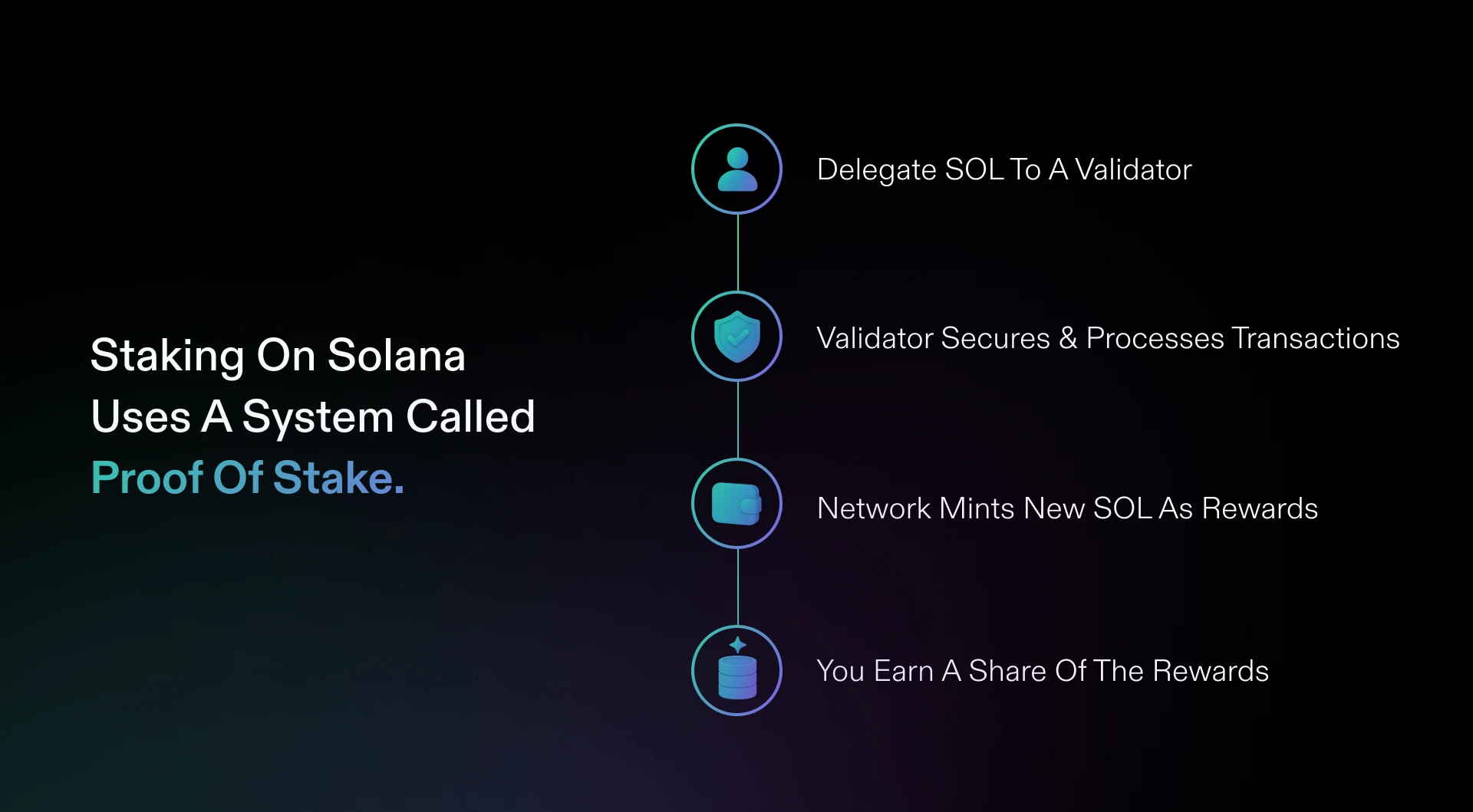
Most likely, you are coming into this guide with some basic knowledge about Solana and Proof-of-Stake. If not, catch up with what Solana is with our guides! Diving into Solana staking specifically, let’s unpack the basics before we delve into the details and practical advice.
A quick detour: what is staking in crypto? Staking is associated with the consensus mechanism called Proof-of-Stake (PoS). Solana uses a delegated proof-of-stake model. Its point is you do not need to run a validator yourself to participate in securing the network; you delegate your SOL’s voting power to a validator that already operates network infrastructure.
Here, staking does not involve transfer of ownership. It is an on-chain instruction that assigns voting weight while leaving the underlying SOL under your control in a stake account.
Delegation and Validators
When you delegate SOL, you are not handing your tokens to a validator. Three separate roles are involved:
- Delegator — you, the SOL holder choosing which validator to support.
- Validator vote account — the validator-controlled account where voting activity is recorded.
- Stake account — your on-chain account that holds delegated SOL and records the delegation state.
Delegating points your stake account to a validator’s vote account. The SOL remains in your stake account; the validator receives voting weight, not custody of your principal.
Several practical implications follow from this:
- Delegation is reversible. You can deactivate a stake account and later withdraw or redelegate the SOL.
- Validator commission affects net rewards. Commission is taken from rewards, not principal.
- Validator performance is key. Poor uptime or missed votes reduce realized rewards even if the advertised APY looks competitive.
So far we have established the mechanical channel: stake is assigned through a stake account. The next layer is understanding the lifecycle of that account.
Stake Accounts
A stake account is a distinct on-chain account type, separate from your regular wallet address. It exists specifically to hold delegated SOL and track staking status.
Therefore, a rough outline of staking lifecycle looks simple:
- Create a stake account and fund it with SOL.
- Delegate it to a validator.
- Wait for it to become active.
- Earn rewards while it remains active.
- Deactivate the stake account when you want to stop staking.
- Withdraw the SOL once deactivation completes, or merge it with another stake account where supported.
It is common to end up with more than one stake account. For example, you may split SOL across multiple validators, create a new account during a redelegation strategy, or receive multiple stake positions through wallet activity over time. Each stake account has its own validator assignment, status, and history, so it should be tracked as its own position.
One timing detail deserves attention early: activation and deactivation do not happen instantly. Stake state changes are aligned to Solana epochs, the network’s fixed time windows for processing staking transitions. “Deactivate” therefore does not mean “immediately spendable.”
Network Security
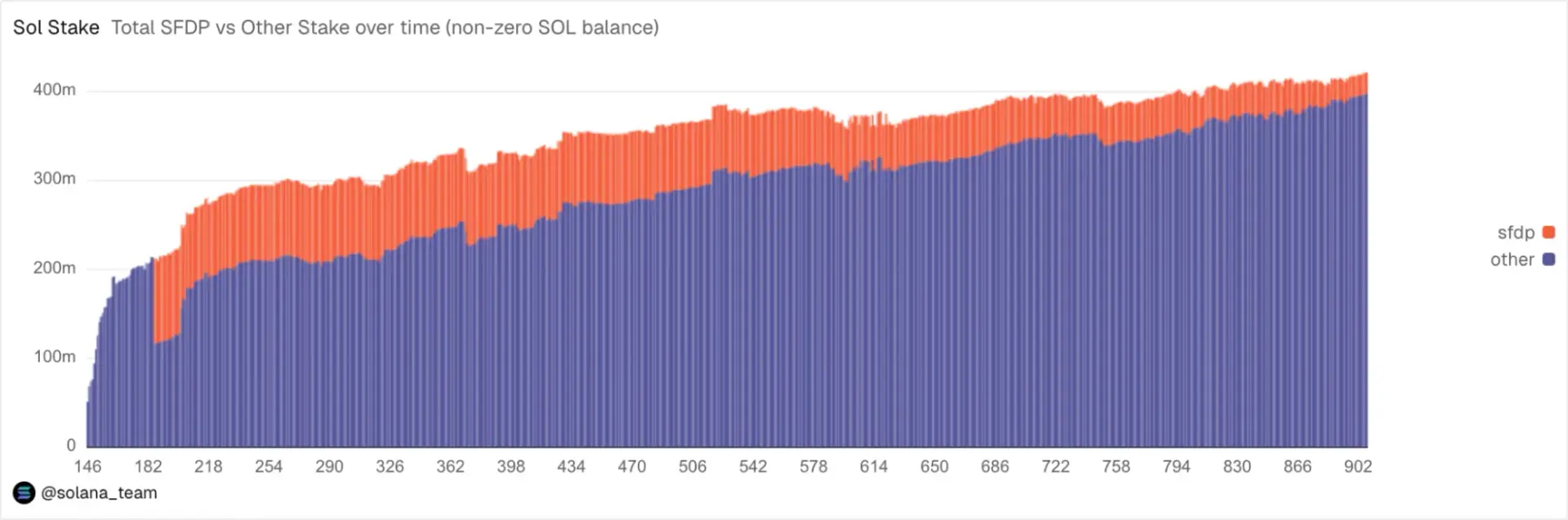
Delegated stake is not just an accounting detail or a perk. It is the mechanism that helps secure Solana. Stake is capital at risk that serves as proof or conviction in the integrity of the platform; the risk for a validator usually comes from penalties and opportunity cost. Plus, the more widely stake is distributed across independent validators, the more resilient the network becomes.
The opposite is also true. If too much stake concentrates around a small number of validators, the network carries more correlated risk because a failure affecting one dominant operator can have an outsized effect.
This is why validator choice has two dimensions:
- Individual outcome — your staking rewards depend on validator commission and performance.
- Network outcome — the broader distribution of stake affects decentralization and resilience.
Solana staking is generally not as slashing-heavy in the way some other proof-of-stake chains are. However, validator quality still matters. Downtime reduces rewards, unstable infrastructure creates a worse staking experience, and poor vote participation can quietly erode realized yield across epochs.
Reward Generation
Staking rewards on Solana come primarily from protocol inflation and are distributed at epoch boundaries. The APY shown in wallets and validator lists is normally an annualized projection based on those periodic rewards. It is anything but a guaranteed fixed rate.
There are two useful definitions here:
- Nominal rate — the displayed or advertised yield.
- Realized rate — what you actually receive after validator commission, uptime, vote performance, and epoch-to-epoch conditions.
If your rewards differ from the estimate you saw when delegating, the usual causes are:
- Validator commission;
- Validator uptime and vote performance;
- Slight changes in network conditions across epochs;
- Rewards being distributed in discrete epoch updates rather than continuously.
In other words, your SOL balance will not tick upward every second like a savings account display. Rewards arrive as periodic updates once the stake account is active.
Wallet Setup and SOL Funding
Before you try to delegate, the wallet must support Solana native staking, not just SOL storage. It also needs enough unstaked SOL to pay transaction fees. Most avoidable staking problems happen here: unsupported wallets, wrong-network transfers, or staking the full balance and leaving no fee reserve.
Compatible Wallets
Not every Solana wallet that stores SOL can create and manage stake accounts. Before sending funds, confirm the wallet supports the actual staking flow:
- The wallet supports SOL native staking, not only token storage.
- It can create and manage stake accounts directly.
- It allows validator browsing or validator selection.
- It displays activation, active, and deactivation status by epoch.
- It separates staking positions from the regular SOL token balance.
A practical check is simple: look for a dedicated Stake or Earn area and a stake account view that lists delegations individually. Phantom, for example, separates staking from the main token list and shows per-validator positions.
The custody model matters just as much as the interface. A self-custody wallet, also called a non-custodial wallet, requires you to sign each staking transaction yourself. Access depends on protecting your seed recovery details, or mnemonic phrase, offline. Custodial platforms abstract away the on-chain steps, but they also control the staking process, validator selection, unstaking flow, and sometimes fee handling.
Hardware Wallets

A hardware wallet like Ledger works alongside the staking interface. In practice:
- The hardware wallet stores the private key.
- A companion app such as Phantom, Solflare, or Ledger Live provides the staking interface.
- The device signs or rejects staking transactions.
- Validator lists, epoch status, and rewards appear in the companion interface, not on the device itself.
This setup improves key security but adds operational friction. You may need to approve creating the stake account, delegating it, deactivating it, and withdrawing from it as separate actions. A weak USB or Bluetooth connection can interrupt the flow, requiring you to reconnect and reauthorize the sending step.
Before staking through a hardware device, confirm:
- Firmware and companion apps are updated.
- The device is unlocked and connected before the staking flow begins.
- The SOL address shown on the hardware device matches the address shown in the companion UI.
That last check is basic but important. It prevents funding the wrong address before staking even begins.
SOL Transfers
Funding the wallet should be treated as a separate procedure, not an afterthought.
Follow this sequence:
- Verify the destination address carefully.
- If sending from a centralized exchange, confirm the Solana network is selected to withdraw.
- Send a small test transfer when using a new exchange withdrawal path or unfamiliar address.
- Wait for finality before initiating the staking transaction.
If SOL does not appear, check the likely causes in order:
- Wrong network selected on the sending side;
- Withdrawal still pending or under review by the sender;
- Mistyped address or address belonging to a different wallet.
Also remember that staking can only be initiated from the wallet that controls the SOL. Sending more SOL into the wallet later does not automatically increase an existing stake account. The new SOL remains unstaked until you explicitly delegate it, create another stake account, or use a wallet function that adds to an existing stake account where supported.
Fee Reserve
Every stake account action costs a small SOL transaction fee. Creating a stake account, delegating it, deactivating it, withdrawing from it, and performing routine wallet actions all require unstaked SOL.
This is why a fee buffer is necessary. SOL locked inside a stake account cannot be used to pay the next transaction fee.
Fee requirements can also rise during network congestion, especially when priority fees increase. Small holders can usually keep a modest liquid reserve, while users managing multiple stake accounts or frequent redelegations should keep a larger buffer.
If you stake your entire SOL balance, you may be unable to deactivate, withdraw, or adjust your stake because the wallet has no liquid SOL left to pay fees. The fix is straightforward: receive a small amount of SOL from another wallet or a crypto exchange, then retry the transaction. It is an avoidable problem, but it is also easily remedied.
Solana Validator Selection
Validator choice determines how close your realized rewards come to the yield you expected. Commission, uptime, reputation, and stake distribution are not separate boxes. They interact.
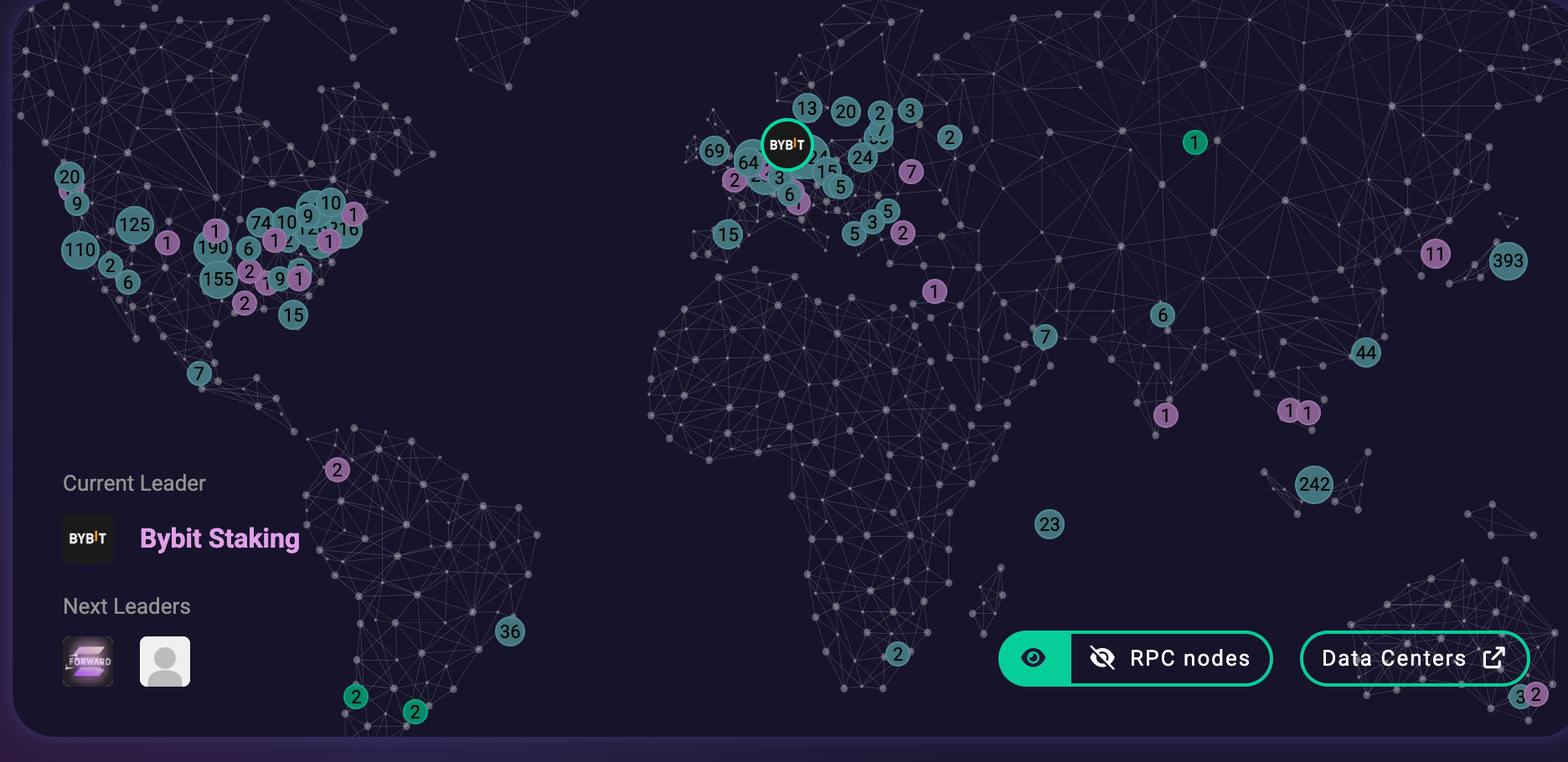
The mistake is optimizing for only one number. A 0% commission validator with poor performance can underperform a validator charging a modest fee but operating reliably.
Commission Fees
First thing first: commission is taken from rewards, not from staked principal. Your original SOL in the stake account is not reduced by validator commission. Only the reward generated each epoch is split between you and the validator.
For example, if three validators generate the same gross reward:
- At 0% commission, you keep the full reward.
- At 5% commission, the validator keeps 5% of the reward and you receive 95%.
- At 10% commission, the validator keeps twice as much as the 5% validator, reducing your net return accordingly.
The difference compounds over many epochs. However, ultra-low validator commission is not automatically superior. A 0% rate may be promotional, unsustainable, or paired with weaker infrastructure. Some operators raise commission later after attracting enough voting power from delegates.
Before delegating, check:
- Current vs. maximum commission — a low current rate may not tell the full story if the validator can raise it significantly.
- Commission change history — where available, review whether the operator has changed fees abruptly.
- Net vs. gross APY labeling — gross APY does not account for commission; net APY is closer to what you receive.
- Per-epoch vs. annualized display — make sure you understand what the wallet is showing.
Uptime and Reliability
The commission only describes the split of rewards. It does not show whether the validator is reliably generating those rewards in the first place.
Use this rubric wherever your wallet or block explorer surfaces validator data:
- Recent vote performance / skip rate proxy — missed votes reduce reward generation.
- Consistency across multiple epochs — one strong epoch is less meaningful than a stable record over five or ten.
- Operational stability signals — frequent identity changes, intermittent presence in the active set, or unexplained gaps are warning signs.
From the delegator’s side, weak performance appears as lower realized rewards, irregular epoch-to-epoch reward amounts, or staking status displays that seem delayed or inconsistent. If the pattern persists across several epochs, consider deactivating and redelegating to a more stable validator.
Validator Reputation
Reputation should mean verifiable behavior, not marketing. A validator with a large social media following but little operating history is not automatically safer than a quieter validator with consistent performance.
Prioritize trust signals in this order:
- Long operating history and stable performance;
- Transparent operator identity and clear communications;
- Visible community contributions such as tooling, documentation, or ecosystem support;
- Reasonable advertised yield rather than unusually high claims.
One due-diligence point is easy to miss: validators that look different in a wallet list may still be run by the same operator. Shared branding, overlapping operator identity, and common infrastructure can reveal this. If you split stake across what appears to be several validators but they are controlled by one entity, you have not truly diversified.
Stake Distribution
Delegating to a validator already near the top of the stake rankings can worsen concentration. Even if that validator performs well, adding more stake to an already-dominant operator reinforces network fragility.

A practical approach is to look for a mid-size reliable band:
- Not among the largest, most concentrated validators;
- Not so small or new that performance history is thin;
- Consistent enough to evaluate across multiple epochs;
- Reasonable on commission and transparent in operation.
If staking a larger amount, consider splitting it across 2–4 validators run by different operators. The trade-off is modest overhead: more stake accounts to monitor, more records to keep, and more entries to review when redelegating. The benefit is reduced exposure to one validator’s downtime or operational failure.
SOL Staking Process
Once the wallet is funded and the validator is chosen, the staking flow is short. Interfaces differ between Phantom, Solflare, Ledger Live, and other wallets, but the sequence is usually the same: open the staking menu, choose validator, enter amount, confirm delegation, then verify the transaction.
Stake Menu
You are in the correct area if the wallet shows most of these cues:
- A dedicated Stake or Earn entry point;
- Validator browsing or search;
- Mention of a stake account or “new stake”;
- A reward or commission preview;
- A choice between native staking and another earn product.
That last point matters. Some wallets show native staking and liquid staking side by side. Native staking delegates SOL directly into a stake account tied to a validator. Liquid staking gives you a derivative token instead. The two paths are not interchangeable.
Before continuing, confirm whether the wallet is about to create a new stake account or use an existing stake account. A new account is common on the first delegation. Existing stake account options appear when adding to or adjusting a prior position. This avoids accidentally creating several small stake accounts when your intention was to top up one position.
SOL Amount
The amount entry screen is where most failed transactions originate. Calibrate with these tips in mind:
- Keep a liquid SOL remainder for fees.
- Do not stake your entire wallet balance.
- Treat the “max” button as a starting point to reduce, not a final answer.
- If staking a large position, consider splitting across multiple stake accounts or validators.
Wallets often show SOL with several decimal places. Rounding up to the visible full balance can trigger an insufficient-funds error because the transaction fee must be paid from the liquid SOL remaining after the stake amount is deducted.
Delegation Confirmation
The confirmation screen is the last easy checkpoint. Verify:
- Validator identity/name — watch for similarly named validators.
- Commission shown at confirmation — it should match your earlier review.
- Stake amount — confirm it has not been rounded or auto-filled incorrectly.
- Source account — confirm whether SOL is coming from your main balance or an existing stake account.
If anything differs from expectation, cancel and go back. Before approval, the cost is only a few extra clicks. After approval, the transaction becomes part of the on-chain staking path.
After confirmation, the stake account will often show as “activating” rather than “active.” This is normal. Rewards do not begin immediately because activation aligns to epoch boundaries.
Transaction Verification

After confirming delegation, verify the result:
- Find the transaction in the wallet’s activity or history view.
- Confirm it is successful or finalized.
- Locate the new or updated stake position.
- Check whether its status is activating or active.
If something looks wrong:
- Transaction succeeded, but no stake account appears: refresh or reopen the wallet. Newly created stake accounts can take a moment to appear in the UI.
- Transaction failed: check whether enough liquid SOL remained for the fee. Top up if necessary and retry.
- Stake account exists but is not delegated: locate the stake account and complete the delegation step separately.
For larger or more active staking setups, record the stake account address and transaction signature. Both are useful for support requests, later redelegation, and tax reconciliation.
Common Failure Modes in the Staking Flow
- Wrong staking mode selected → you used liquid staking instead of native delegation, or vice versa. Fix: unwind through the relevant platform flow and restart from the correct staking path.
- Staking the max balance → the transaction fails due to insufficient liquid SOL. Fix: reduce the amount and leave a fee buffer.
- Approving the wrong validator → the confirmation screen shows a different name or commission. Fix: cancel before approving and reselect.
- Transaction fails due to fees → no liquid SOL remains. Fix: top up the wallet with a small amount of SOL.
- Stake shows “activating” for an epoch → not a bug. Fix: wait for epoch transition.
- Stake account created but not delegated → complete the delegation step from the wallet’s staking view.
Platform-Specific Solana Staking
The underlying mechanics are the same even for products of different brands, it’s the platform experience that changes the risks. Phantom and Solflare are self-custody wallets. Ledger is a hardware signer used with a companion interface. Coinbase is custodial and manages validator delegation on your behalf.
Phantom
Best for: Users who want native Solana staking inside a non-custodial wallet with minimal setup friction.
Path in UI: Wallet home → Stake/Earn tab → Solana (SOL) → select validator → confirm.
What you will choose: Validator, SOL amount, and implicitly whether the wallet creates a new stake account or adds to an existing one.
Confirmation checks: Validator name, commission rate, stake amount, and source balance.
Where to monitor: Phantom’s staking section lists each stake position separately from the token balance and shows activating, active, or deactivating status by epoch.
Platform-specific gotcha: Phantom’s Stake/Earn area may display native staking near lending, earn, or liquid-staking options. Make sure you are delegating to a validator through native staking, not swapping into a liquid staking token. Phantom may also abstract stake account details in summary view; open the individual stake position to find the underlying stake account address.
Solflare
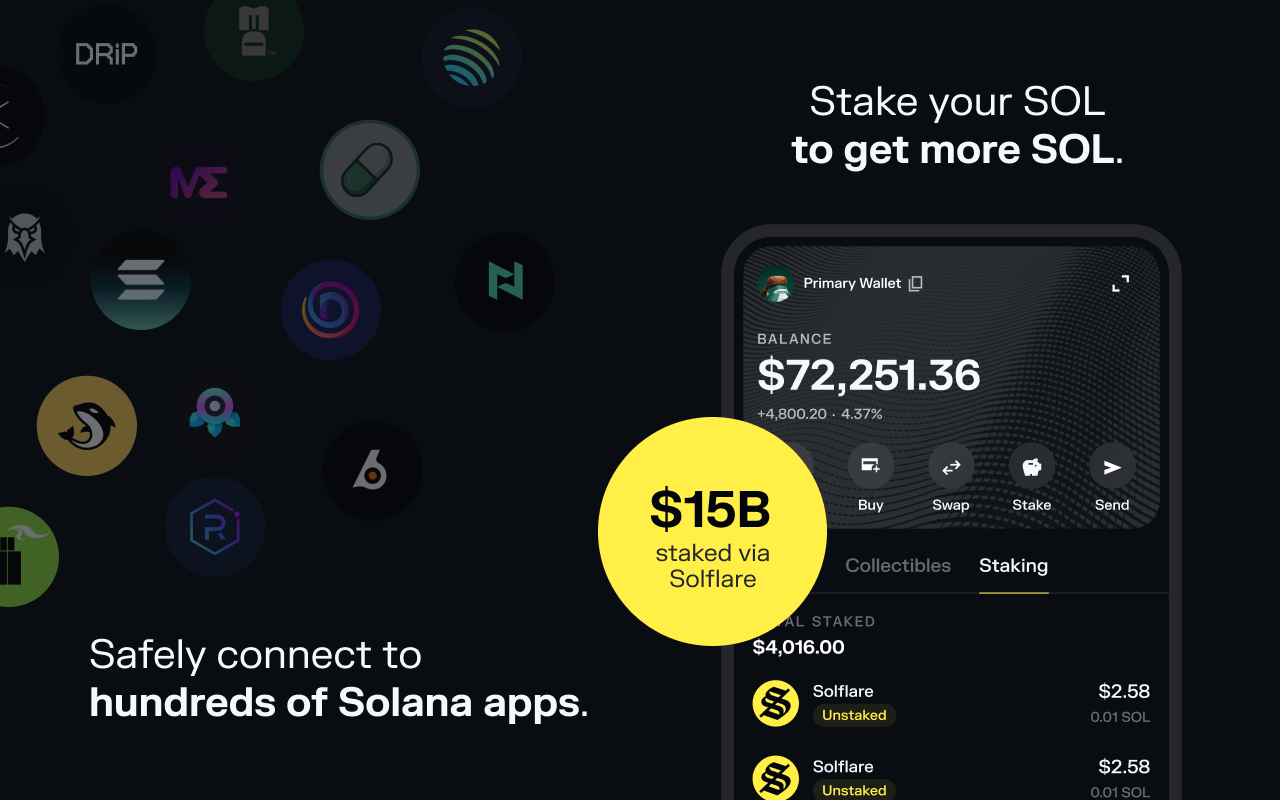
Best for: Users who want more granular validator-level visibility, especially across multiple stake accounts.
Path in UI: Wallet home → Stake → Solana (SOL) → choose validator → review → confirm.
What you will choose: Validator, delegation amount, and whether the transaction creates a new stake account or uses an existing one.
Confirmation checks: Validator identity, commission, delegated amount, and stake account used.
Where to monitor: Solflare’s staking screen shows stake accounts individually, each tagged with delegated validator and status.
Platform-specific gotcha: If you split stake across several validators, you will manage several stake accounts rather than one pooled balance. Check the full stake-account list before acting. Deactivating or redelegating the wrong entry sends your instruction to the wrong delegation.
Ledger
Best for: Users who want hardware-level key security while still using a companion interface for staking.
Path in UI: Companion app, such as Ledger Live or a compatible Solana wallet → Stake/Earn → Solana (SOL) → validator selection → approve on device.
What you will choose: Validator, SOL amount, and whether a new stake account is created.
Confirmation checks: In the companion app, verify validator, commission, and amount. On the Ledger device, verify the address and transaction details before approving.
Where to monitor: Stake status and rewards appear in Ledger Live or the connected wallet. The Ledger device signs; it does not display staking data.
Platform-specific gotcha: Ledger is a signer, not the staking interface. Expect separate physical approvals for creating the stake account, delegating, deactivating, and withdrawing. Also verify the SOL receiving address shown on the Ledger device matches the companion app before funding and before approving staking transactions.
Coinbase
Best for: Users who prioritize simplicity and are comfortable with custodial staking.
Path in UI: App or web → Portfolio/Asset page → Solana (SOL) → Earn/Staking toggle → confirm enrollment.
What you will choose: Usually the amount to stake. Coinbase manages validator delegation on your behalf.
Confirmation checks: Confirm the staked or “earning” balance after enrollment and verify staking is enabled rather than merely holding SOL.
Where to monitor: Coinbase displays the staked or earning balance and credits rewards according to its own schedule, not necessarily as a self-custody wallet would display epoch-by-epoch rewards.
Platform-specific gotcha: Coinbase staking is not the same as native delegation from a non-custodial wallet. You do not pick a validator, you do not directly manage stake accounts, and unstaking or transferring follows Coinbase’s platform flow. Do not expect a stake account address or on-chain delegation artifact in the same way you would with Phantom, Solflare, or Ledger-connected self-custody staking.
Before You Click Confirm on Any Platform
- Confirm the staking mode: native/self-custody delegation, liquid staking, or custodial staking.
- Confirm whether validator selection is available or assigned by the platform.
- Confirm a fee buffer remains in the wallet, except on custodial platforms where fees may be abstracted.
- Confirm where activating, active, and deactivating status will be displayed.
Managing Staked SOL, Returns, and Taxes

Staking is not a one-time action you complete and forget. Once SOL is delegated, you need to track rewards, validator performance, unstaking timing, and documentation. This is where a clean staking setup becomes a manageable long-term position instead of a pile of disconnected wallet entries.
Reward Tracking
Track each stake position, not only the wallet’s total SOL balance. For every stake account and validator pairing, record:
- Starting stake amount;
- Stake account address, if exposed by the wallet;
- Delegation date, with awareness of the epoch boundary;
- Validator commission at time of delegation;
- Recurring review cadence, such as per epoch or monthly.
Reconciliation is the practical habit that separates passive staking from unmanaged staking. Periodically compare wallet-displayed rewards against what you would expect from the validator’s commission and recent performance. Some variance is normal. Persistent underperformance across several epochs is a redelegation signal.
If you split stake across validators, created multiple stake accounts over time, or used liquid staking token redemptions or partial unstakes, track rewards per stake account. Mixing everything into one wallet-level total makes cost basis, reward history, and later tax reporting harder than necessary.
Unstaking Timeline
- Initiating deactivation — you submit the unstake request. SOL does not move yet.
- Cooldown period — the stake account is deactivating and not yet withdrawable.
- Withdrawal — a separate action moves SOL from the deactivated stake account back to your spendable wallet balance.
If you unstaked but cannot spend the SOL, the usual explanation is one of two things: the cooldown period is not complete, or deactivation completed but the withdrawal step has not been performed.
Plan backward from the date you need liquidity. If you need SOL for a transfer to an exchange, a bill, or a rebalance, initiate deactivation early enough to clear the full cooldown window. Do not assume staking can be unwound and spent the same day.
Liquid Staking
Liquid staking lets you stake SOL while receiving a liquid staking token that represents the position. That token can potentially be moved, traded, or used in DeFi without waiting through the native unstaking process.
Native staking is simpler. You delegate SOL directly to a validator through a stake account and avoid the extra derivative token layer.
The trade-off between the two is operational. With liquid staking, you are exposed not only to validator performance but also to the issuing protocol’s smart contracts, redemption rules, and the market behavior of the liquid staking token. Its price can diverge from the underlying SOL. Its reporting history can also become more complex because swaps, rebases, and redemptions may all create separate records.
Native staking follows the cleaner cycle: activate, earn, deactivate, withdraw. Liquid staking can be more flexible, but it is not mechanically identical.
Staking Calculators
A staking calculator like the one on Staking Rewards is only as good as its assumptions. Before relying on an output, check:
- Validator commission used — is it your validator’s actual commission or a generic default?
- Uptime assumption — does it assume perfect uptime?
- Compounding assumption — does it assume automatic compounding or manual restaking?
- Nominal vs. realized output — is the displayed return before or after commission and performance effects?
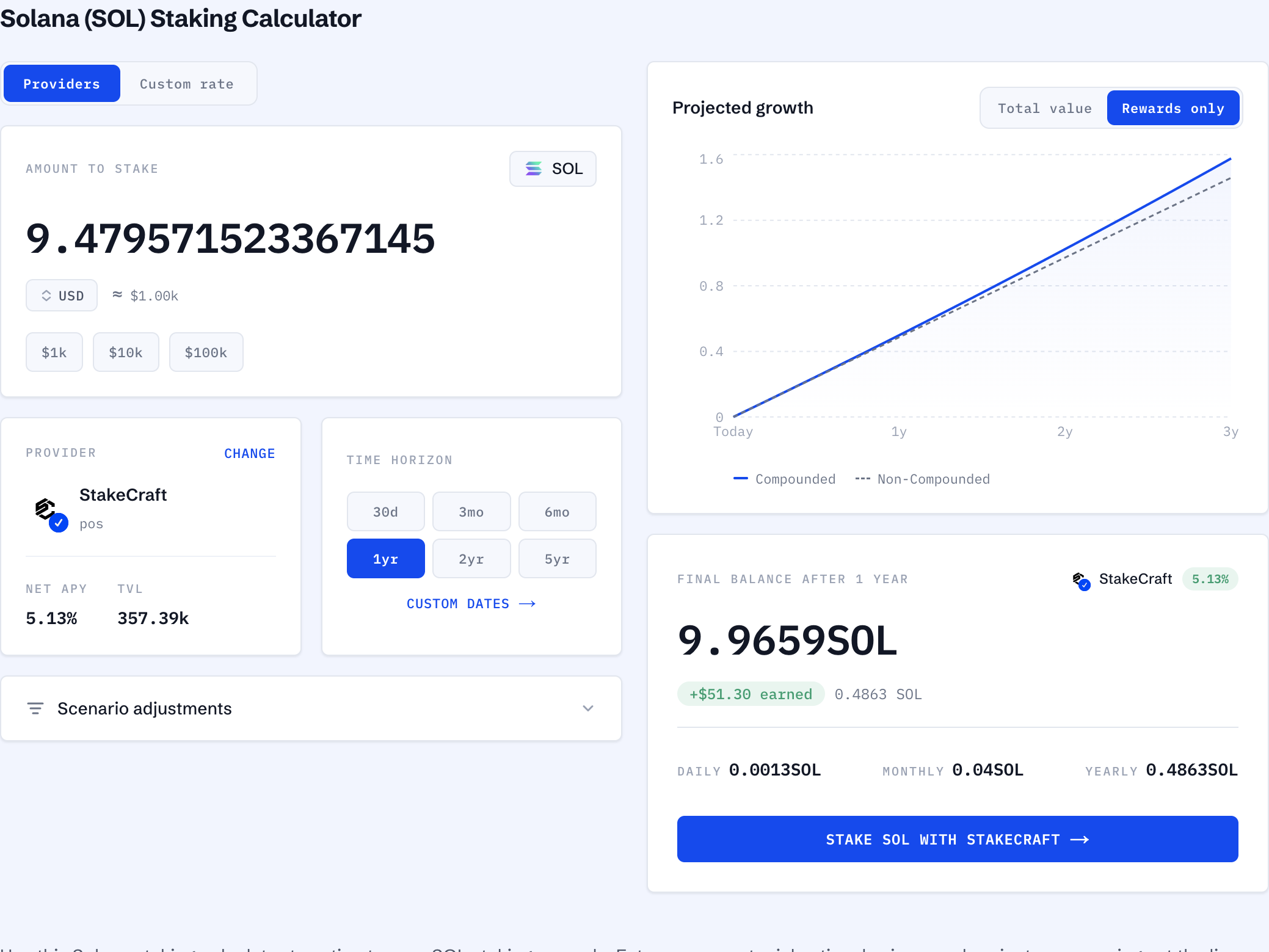
Do not compare apples to oranges. Two calculators can show different results simply because they use different commission, uptime, or time horizon assumptions. That is not a difference in reality; it is a difference in model inputs.
Even small changes matter. A slightly higher commission or slightly lower uptime assumption can shift the projected annual figure more than expected because the effect compounds across many epochs.
Scenario Modeling
Run a few scenarios before committing a large position:
- Split stake across 2–4 validators vs. one validator → compare overhead, reward variance, and concentration risk.
- Restaking rewards vs. leaving rewards liquid → compare projected balance with near-term liquidity needs.
- Planned liquidity date → work backward to determine the latest safe date to initiate deactivation.
- Native staking vs. liquid staking → compare added liquidity against smart contract, redemption, and reporting complexity.
- Changing validators after underperformance → weigh expected reward improvement against transition timing.
The edge condition is important: stake state changes and reward payments happen in discrete epochs, not as smooth continuous interest. Model in epoch-sized steps. A continuous daily compounding timeline will overstate how quickly things actually happen.
Tax Reporting
Just in case, this is not tax advice. Here are some recordkeeping tips. At minimum, retain:
- Wallet addresses used for staking;
- Stake account addresses for each position;
- Transaction signatures for delegate, deactivate, and withdraw actions;
- Reward accrual records by date and amount;
- Liquid staking token swap or redemption transactions;
- CSV exports from wallets or exchanges where available.
Use consistent event labels:
- Delegate;
- Stake activation;
- Reward payment/accrual;
- Redelegate;
- Deactivate;
- Withdraw;
- Swap to/from liquid staking token;
- Transfer to a centralized exchange.
Consistent labeling is what makes later reconciliation possible. The main problem at tax time is often not that the blockchain record disappeared. It is that the context around each transaction was never recorded clearly.
A practical habit: capture records at least monthly. Wallet UIs and third-party dashboards change over time, and reconstructing a full year of activity from memory is where reporting errors begin.
Conclusion
Staking in general is a solid and safe way to put your holdings to work, though definitely not risk-free. It’s not worth committing to it expecting parabolic growth and immediate results, at least if we are talking about legitimate projects such as the Solana blockchain.
Let us know if you found this guide to staking helpful! We offer more educational and informative content in our blog but with your input it can be even better. Same goes for ChangeHero in social media—X, Facebook, and Telegram—subscribe and connect with us!
Frequently Asked Questions
Is staking Solana safe?
Yes, staking SOL through native delegation is generally safe in the sense that your principal is not transferred to the validator. Your SOL remains in your stake account, under your control, and the validator receives voting weight rather than custody.
The more common risk is reward variance. If you delegate to a validator with poor uptime or inconsistent voting, your rewards may be lower and less predictable than the advertised rate. A bad validator choice usually costs yield, not principal.
What is the minimum amount needed to stake?
There is no fixed protocol-wide minimum that applies in the same way across every interface. The practical minimum is enough SOL to delegate plus enough remaining liquid SOL to pay fees for delegation, deactivation, and withdrawal.
Some wallets and exchanges may impose their own minimums. When entering the amount, look for any “minimum stake” or “minimum to earn” field, and never stake the full wallet balance.
Can I lose my staked SOL?
With self-custody native delegation, delegating is not the same as sending SOL to the validator. Your SOL stays in your stake account. You can later deactivate and withdraw it.
However, custody changes the risk model. On a custodial platform, the platform controls the funds and staking process, so your risk is tied to that platform’s solvency, policies, and withdrawal rules. With liquid staking, you also take on protocol and derivative-token risks.
How often are rewards paid?
Rewards follow Solana’s epoch schedule. They are distributed in discrete updates at epoch boundaries rather than continuously.
After you delegate, your stake must first become active. Rewards will not appear immediately after the delegation transaction confirms, because activation and reward accrual are aligned to epoch timing.
Is Phantom or Solflare better for staking SOL?
Both can be suitable for Solana native staking. Phantom is often simpler for users who want a clean staking flow, while Solflare can be more useful for users who want granular stake account visibility across multiple validators.
The better choice depends on how you manage positions. If you want minimal friction, Phantom may feel easier. If you split stake across several validators and want detailed stake account management, Solflare may be more practical.
Can I stake Solana with Ledger?
Yes. Ledger can be used as the hardware signer while a companion interface such as Ledger Live, Phantom, or Solflare manages the staking workflow.
The important distinction is that Ledger signs transactions; it is not the complete staking dashboard by itself. Validator selection, stake status, and rewards appear in the companion app.
Is Coinbase staking the same as native Solana staking?
No. Coinbase staking is custodial. You do not choose the validator directly, and you do not manage the underlying stake account yourself.
This can be simpler, but it gives up control. Unstaking, rewards display, and transfers follow Coinbase’s own platform rules rather than the direct self-custody flow.
Can I switch validators after staking?
Yes. In practice, you deactivate the current stake account, wait for the cooldown process, then redelegate to a different validator. Some wallet interfaces may simplify parts of the flow, but the underlying concept remains the same: stop one delegation and create or assign another.
Before switching, confirm that the underperformance is persistent across several epochs. One weak epoch alone is not always enough evidence.
Should I use liquid staking or native staking?
Use native staking if you want simplicity, direct validator delegation, and fewer reporting events. Use liquid staking only if you specifically need the liquidity or DeFi flexibility that a liquid staking token provides.
The extra flexibility comes with extra risks: smart contract exposure, redemption rules, market price divergence, and more complex tax records.
