
Best Monero Wallets in 2026

Key Takeaways
- 🔘 The best Monero wallet depends on how you use XMR: full-node desktop wallets maximize privacy and control, lightweight desktop wallets reduce setup time, mobile wallets prioritize spending convenience, and hardware wallets suit cold storage;
- 🔘 The main tradeoff is not simply “security versus convenience” but local validation versus remote-node reliance. A full node reduces third-party metadata exposure, while a remote node gets you transacting faster;
- 🔘 Self-custody only works if the surrounding habits are sound: seed phrase backup, restore-height documentation, canonical downloads, subaddresses, and deliberate node choice matter as much as the wallet name.
Disclaimer
This guide is informational and does not constitute financial, legal, tax, or investment advice. Monero wallet availability, app-store listings, device support, and exchange access can change over time. Before storing significant XMR in any wallet, verify the official download source, test recovery from your seed phrase, and confirm that your chosen setup matches your own threat model.
Unlike with other coins and tokens, Monero users won’t spend too long thinking if anything but self-custody is an option. This is not to say that choosing the best wallet for XMR is a foregone conclusion; from there, they need to ask: “Which setup gives me the right balance of privacy, security, and usability for the way I actually use XMR?”
With this rating, we hope to cover the most popular and reliable options available to both current and future XMR holders in 2026 but also equip them with frameworks that won’t leave them reliant on lists like ours.
Best Monero Wallets by Category
The fastest way to choose the best Monero wallet is to start with the category, not the brand name. Full-node desktop, lightweight desktop, mobile, and hardware wallets solve different problems.
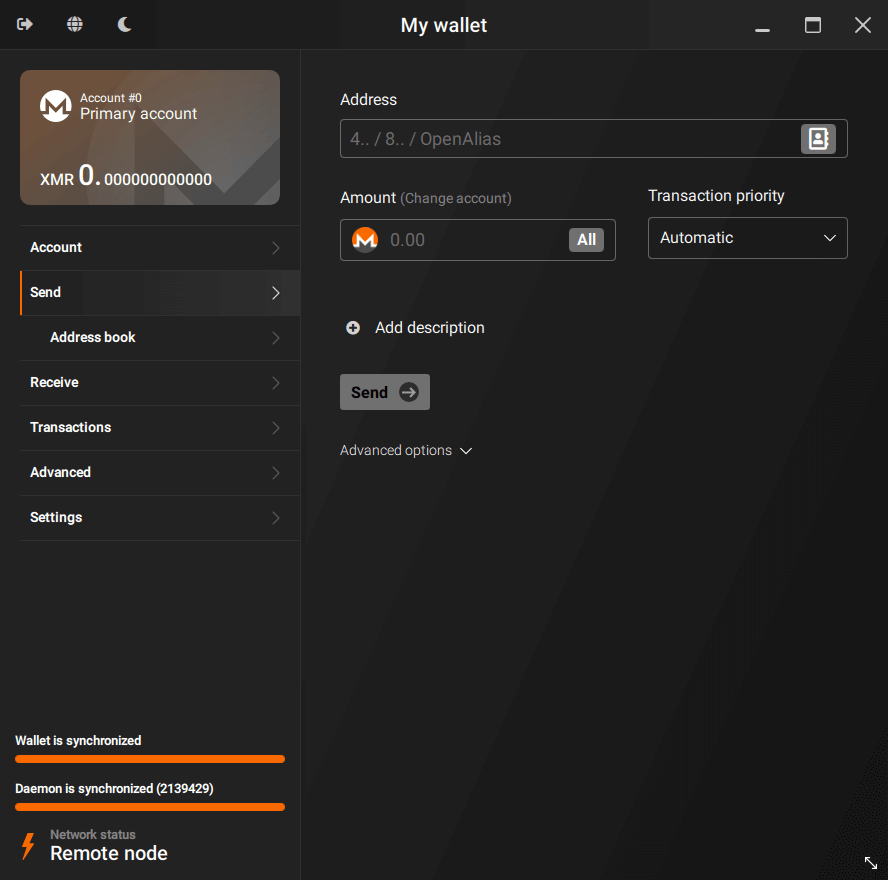
Official Monero GUI Wallet
Best for: maximum desktop privacy with a local node.
Why pick it: the Official Monero GUI Wallet is built and maintained directly by the Monero Project. It can run a full node, meaning you validate the blockchain yourself and do not have to depend on third-party infrastructure for the basic wallet view. It also gives you deeper control over broadcast and relay behavior than a typical mobile or lightweight setup.
Main tradeoff: running a full node means significant initial blockchain synchronization time and multiple gigabytes of local storage before the wallet is fully usable.
Good fit if: you want the strongest privacy guarantees on desktop and do not mind the setup overhead. The official download hub at getmonero.org is the canonical starting point for getting the GUI.
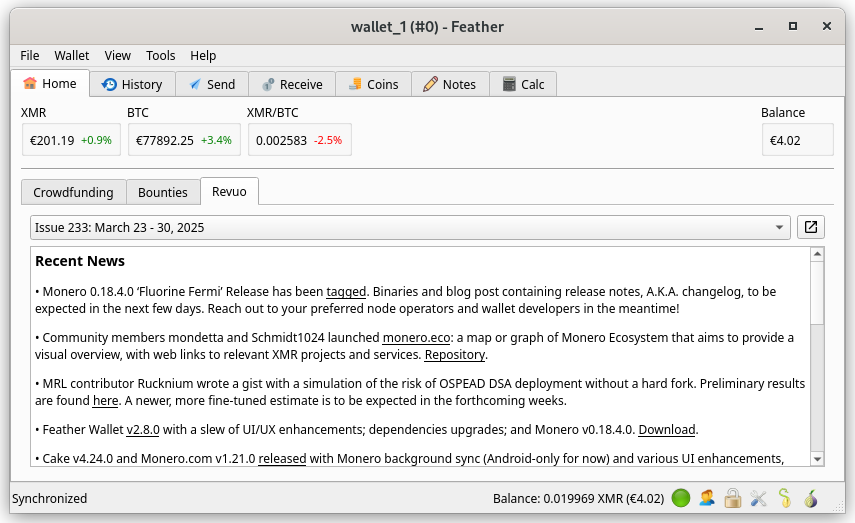
Feather Wallet
Best for: lightweight desktop use without running your own node.
Why pick it: Feather Wallet connects to a remote node by default, has a lighter footprint than the official GUI, and gets you transacting on desktop much faster because there is no full sync to wait through.
Main tradeoff: the convenience comes from using someone else’s remote node unless you configure your own. That does not mean the wallet is unsafe by default, but it does change the metadata exposure surface.
Good fit if: you want a desktop Monero wallet you can use within minutes rather than hours.
Cake Wallet
Best for: everyday mobile use on iOS or Android.
Why pick it: Cake Wallet works as a mobile all-rounder. It is quick to open, practical for checking a balance, and convenient for spending or receiving XMR while you are away from a desktop environment.
Main tradeoff: mobile usability usually means leaning on remote-node connectivity rather than full-node operation, trading some independence for speed, battery life, and portability.
Good fit if: you want one wallet that handles routine Monero transactions from your phone without friction.
Monerujo
Best for: an Android-first Monero wallet experience.
Why pick it: Monerujo is built specifically for Android, integrates closely with the platform’s sharing and notification systems, and stays focused on a streamlined Monero-native mobile interface rather than trying to serve iOS and Android equally.
Main tradeoff: Monerujo is Android-only, so it does not help if you also need iOS coverage.
Good fit if: you want a dedicated Android-native option. Choose Monerujo over Cake Wallet if you are committed to Android and prefer an app built around that ecosystem specifically rather than a cross-platform wallet.
Trezor
Best for: cold storage of XMR.
Why pick it: Trezor devices are hardware wallets that keep your private keys offline for cold storage workflows. The hardware device signs transactions, while companion software handles transaction construction, broadcasting, and wallet interaction.
Main tradeoff: hardware wallets are built for holding, not for frequent spending. They add deliberate friction to routine transactions because you need the physical device available for signing.
Good fit if: you are holding XMR long-term rather than moving it often. If you spend Monero regularly, a software wallet is usually the more practical daily driver.

In summary, the category tells you more than the logo. Full-node wallets like the GUI optimize for privacy and control; lightweight desktop wallets like Feather Wallet optimize for speed; mobile wallets like Cake Wallet optimize for portability; hardware wallets like Trezor optimize for offline key storage.
How to Choose a Monero Wallet Type
Before picking a specific app, be it from the rating above or not, match your real-world constraints to a wallet type: device, time, storage, privacy posture, and spending frequency. The table below gives the practical comparison of the categories first; the sections after it explain the tradeoffs that you can expect for each type.
| Wallet Type | Full-Node Wallets | Lightweight Desktop Wallets | Mobile Wallets | Hardware Wallets |
|---|---|---|---|---|
| Setup Time | Hours, due to full sync | Minutes | Minutes | Moderate, device + companion setup |
| Ongoing Maintenance | Periodic sync, disk management | Minimal | Minimal | Low, but device custody matters |
| Storage/Bandwidth | High, multi-GB and grows over time | Low | Very low | Low, keys only; companion app varies |
| Privacy Exposure Surface | Local-first, no remote dependency | Depends on remote node trust | Depends on remote node + mobile OS | Local key storage, remote node via companion |
| Portability | Low, tied to one machine | Medium | High | Low-medium, device required |
| Best For | Maximum privacy/control | Fast desktop convenience | On-the-go spending | Long-term cold storage |
Full-Node Wallets
Running a full node means your wallet downloads and validates the entire Monero blockchain locally. This gives you the strongest assurance that no third party is filtering your view of the chain or observing your transaction relay through a remote-node connection. The Official Monero GUI Wallet belongs in this category, and it is the closest desktop option to a “trust no one” workflow.
Choosing this type, you are committing to an initial blockchain synchronization that can take hours depending on your connection and hardware and multiple gigabytes of disk usage that grows over time, plus meaningful IO load during sync; plus, a background daemon that needs to keep running, or be restarted and resynced, to stay current. The option of a pruned node, which trims older blockchain data to save disk space, as a reasonable compromise when you want local validation without archival storage; a full archival node is for when you want to retain everything locally.
Choose this if you want maximum privacy and control over how your transactions are broadcast and relayed and you are comfortable with upfront setup time in exchange for not depending on remote infrastructure.
If you have limited disk space or a slow, unreliable connection for the initial sync or need a wallet ready to use within minutes rather than hours, it might be best to avoid this option.
Lightweight Desktop Wallets
“Lightweight” means two things in this context. First, these wallets typically do not run a local node; they connect to a remote node instead. Second, they use fewer local resources because they are not storing or validating the full blockchain. Feather Wallet is the common example here.
Before installing a lightweight desktop wallet, check the following: does it let you connect to a remote node of your choosing, rather than locking you into one operator? Does it expose advanced controls such as fee settings, node switching, or output management that power users may want later? Can it coexist with a locally run daemon if you decide to upgrade to full-node behavior down the line?
A lightweight desktop wallet is not the same as a weak wallet. It simply moves part of the infrastructure burden away from your own machine. That is useful, but the tradeoff should be explicit.
Mobile Wallets
Mobile wallets prioritize convenience, as is expected from the platform. Checking a balance, scanning a QR code, or sending XMR from your phone in seconds is the point. Cake Wallet and Monerujo both fall into this category, built for quick everyday use on iOS or Android.
There are a few mobile-specific tradeoffs that are not necessarily a part of the experience but have to be taken into account regardless: for one, background operation and push notifications can be less consistent than on desktop, depending on OS battery optimizations. Switching between apps to scan addresses or QR codes adds a small UX step compared to desktop copy-paste. Mobile use often happens on untrusted networks such as public Wi-Fi or cellular hotspots, and mobile wallets favor convenience and remote-node connectivity over the sustained resource use that full-node operation requires.
So, if you are spending small, routine amounts of XMR, mobile is the practical choice. Once your holdings grow into what you would consider long-term savings, it is worth shifting that balance toward a desktop or hardware setup.
Hardware Wallets
Hardware wallets like Ledger and Trezor devices hold your private keys and sign transactions inside a physically isolated device. They do not operate independently. You still need companion software running on a computer or phone to build the transaction, relay it to the network, and display the result back to you.
The hardware handles signing; the companion app handles everything else.
As a result:
- You need the physical device on hand to sign any transaction, which rules out spontaneous, device-free access;
- Each transaction involves extra steps, including reviewing and confirming details on the device screen before signing;
- This back-and-forth between device and companion app makes hardware wallets noticeably less convenient for frequent spending.
Best pairing: hardware wallets are typically paired with a desktop companion app for cold storage of long-term holdings. Mobile-only users often find the extra device and confirmation steps more cumbersome than they are worth for routine use.
Platform Compatibility and Availability
Monero wallet availability splits cleanly between mobile and desktop, something you may expect for most cryptocurrencies. Android and iOS each support a narrower set of mobile wallet apps, while Windows, macOS, and Linux open the full range from lightweight desktop wallet options to full-node software.
Android Wallets
Bottom line: Android supports genuine Monero self-custody, with both a Monero-native app and a multi-asset mobile wallet available. You are not choosing between compatibility and convenience.
Best-fit wallet picks: Monerujo, Cake Wallet.
What to watch for: app permissions around notifications and background sync, battery-optimization settings that can throttle background node connections, and QR-scanning as your main input method rather than desktop-style copy-paste.
If you are switching devices: moving between Android wallets typically means setting up a new wallet instance and transferring funds, rather than literally transplanting the app itself.
Decision rule: if you want a Monero-native Android experience with tight platform integration, prioritize Monerujo. If you want a multi-asset mobile wallet experience that also handles XMR well, prioritize Cake Wallet.
iOS Wallets
Bottom line: iOS self-custody for Monero is workable but narrower than desktop, with availability centered on a smaller set of well-known apps rather than a broad ecosystem.
Best-fit wallet picks: Cake Wallet.
What to watch for: App Store review policies that limit which Monero apps appear at all, fewer power-user controls than you would get on desktop, and the same reliance on QR codes and remote-node connectivity as Android.
If you are switching devices: expect to set up a fresh wallet instance on iOS rather than carrying over a desktop wallet configuration directly.
Practically, this means iPhone users should expect a streamlined mobile wallet experience with fewer advanced settings exposed, rather than desktop-style fee tuning or node management.
Desktop Operating Systems
Bottom line: desktop is where Monero wallet options are most complete, covering both full-node privacy setups and lightweight desktop wallet alternatives across all three major operating systems.
Best-fit wallet picks: Official Monero GUI Wallet, Feather Wallet.
What to watch for: disk space and sync time if you choose full-node operation, background daemon uptime, and whether your machine can stay on long enough to keep a node current.
If you are switching devices: a desktop wallet instance is generally tied to the machine it was set up on, so moving to a new computer means reinstalling and reconnecting rather than simply copying files.
- Windows: both the Official Monero GUI Wallet and Feather Wallet run natively, and most users start here without extra configuration. Full-node sync is the main time cost.
- macOS: the same two options are available, with similar tradeoffs. Full-node validation demands more storage and sync time, while a lightweight desktop wallet gets you transacting sooner.
- Linux: desktop coverage is strong here too, and Linux users running a full node often have an easier time managing background daemons through standard system tools.
Generally speaking, “desktop” can mean two very different workflows: a full-node setup where your wallet validates the blockchain locally, or a remote-node setup where it connects out to someone else’s node. Both are legitimate desktop configurations. They simply carry different operational overhead.
Security, Privacy, and Common Pitfalls
Honestly, picking a wallet is only half the job. How you run it day to day determines whether Monero’s privacy guarantees hold up in practice. The recurring themes are node choice, cold storage discipline, address hygiene, backup readiness, and download hygiene.
Full Node and Remote Node Privacy
The node your wallet connects to can see which addresses you are checking and when, plus rough timing and IP-level metadata. It cannot see your Monero balance or decrypt your transaction contents, but metadata still matters.
Shortly put, running your own full node avoids handing that metadata to someone else. Connecting to a remote node means accepting that exposure in exchange for faster setup.
Prefer a self-run node when your hardware and connection allow it. This is the only option that avoids third-party metadata exposure entirely. If using a remote node:
- pick one you personally control, such as on a VPS, or one from an operator you have real reason to trust;
- Avoid hard-coding a single public remote node indefinitely. Rotating nodes limits how much any one operator can correlate about your habits over time;
- Remember that the exposure is about connection timing and traffic correlation, not transaction contents. Monero’s own privacy tech still protects the transaction itself.
A common pitfall is when your wallet shows “synced,” but balances or recent transactions seem to lag or not appear. This is usually a poor-quality or overloaded remote node, not a problem with your funds. The fix is tool-agnostic: switch to a different remote node, or your own, then rescan or refresh the wallet so it re-checks the blockchain against the new connection.
Hardware Wallet Cold Storage
A hardware wallet keeps your private keys physically isolated on the device. That is device security. However, the device does not operate alone. Most cold-storage frustration comes from the workflow side, not the device itself.
There are more sources of this frustration than you might think
- Firmware and companion app version mismatches that cause signing to fail or hang partway through;
- Forgetting your PIN or an optional passphrase, which can lock you out of the device entirely;
- Treating a single computer as your only working setup, with no fallback if that machine breaks or is unavailable;
- Confusion over what actually lives on the device, meaning keys, versus what lives in the companion software, such as transaction history, address book, or wallet file;
- Assuming a firmware update will not change signing behavior, then being surprised when an old workflow no longer matches the new prompts.
However, if you spend XMR regularly, a hardware wallet adds real friction. Needing the physical device, connecting it to companion software, and confirming details on-screen for every transaction gets old quickly. It is also a poor fit if you travel frequently or need funds accessible without a specific device on hand. In those cases, a software wallet used with good habits is more practical than cold storage.
Subaddresses and Account Separation
Monero gives every wallet a set of subaddresses that all route funds to the same underlying wallet but look unrelated to outside observers. Used well, they are a practical privacy and bookkeeping tool for everyday operations.
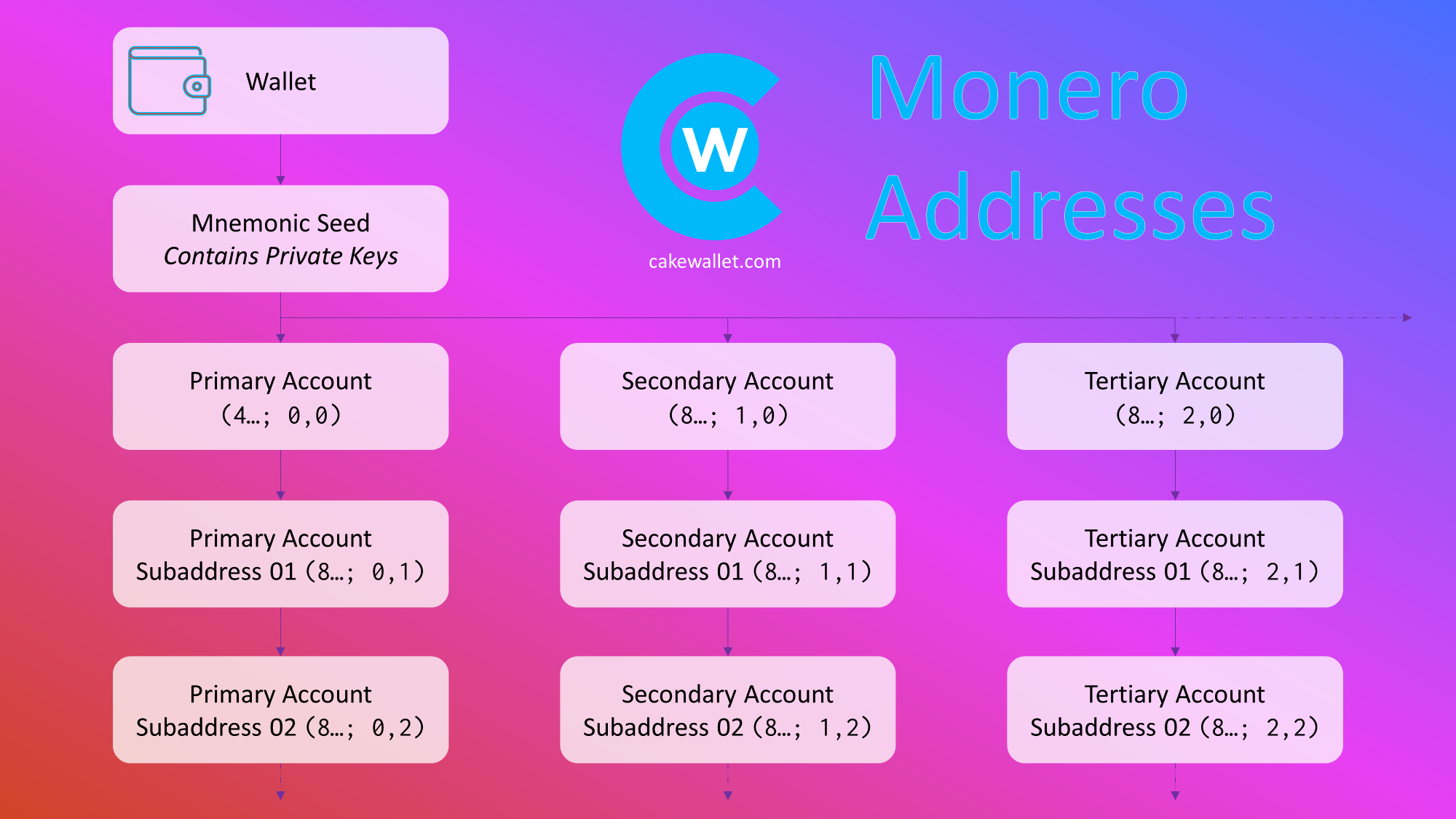
Why would you want your wallet to support the feature? For instance:
- Separate incoming donations from salary or invoice payments so the two funding streams are not linkable by address alone;
- Use a distinct subaddress for exchange withdrawals versus personal receiving addresses;
- Generate a per-merchant address for anything you buy repeatedly from the same vendor;
- Give each counterparty their own address as a default habit, rather than reusing one address everywhere.
Subaddresses exist to organize funds and reduce address reuse, they do not replace safe node choice or good backup practices. A well-organized set of subaddresses connected through an untrusted remote node can still leak the metadata described earlier.
Decision rule: use subaddresses for inbound separation, meaning who is paying you and for what. Use separate wallet accounts or entirely separate wallet files when you need stronger operational separation, such as keeping business finances fully apart from personal XMR.
Seed Phrase Backup and Recovery
Your seed phrase, sometimes called a mnemonic phrase, is the master backup for your Monero wallet. Losing it, or keeping it in a form you cannot actually use later, is one of the most common and avoidable ways people lose access to their funds.
Recovery-prep checklist:
- Record the seed phrase offline, on paper or another durable, non-digital medium;
- Verify you can actually restore the wallet from that seed before funding it heavily;
- Store a second copy in a different physical location in case the first is lost or damaged;
- Note the wallet’s restore height, or at least the approximate date of first use, so a future restore does not have to scan the entire blockchain from the beginning;
- Document whether an optional passphrase is attached to the seed, since forgetting that detail can make an otherwise valid seed phrase unusable;
- Keep backups both readable years later and tamper-evident, so you would notice if a copy had been altered.
Keep in mind that after restoring a wallet, it is normal to see a zero balance while the wallet is still scanning from the restore height. This is expected behavior, not lost funds. Give the wallet time to finish scanning, double-check that the restore height and any passphrase were entered correctly, and resist the urge to assume the worst before the scan completes.
Fake Wallets and Download Sources
Because Monero wallets handle real value, they are frequent targets for lookalike apps and cloned websites. Where you download from matters as much as which wallet you choose.
How do you know you are downloading the real and safe app?
- Only use the official website or an app-store listing you have independently verified belongs to the real publisher;
- Avoid clicking ads or sponsored search results for wallet downloads. Scammers routinely outbid legitimate listings;
- Confirm the publisher identity shown in the app store or on the download page matches the known, established project;
- Watch for lookalike domains that swap letters, add hyphens, or use different top-level domains from the canonical site;
- Keep a note of the exact canonical sources you used, so future reinstalls or updates do not require re-verifying from scratch.

If anyone is asking for your seed phrase on an “import” or “restore” screen before you have even set up the wallet; redirecting you to a “support” chat that pressures you to share recovery information; pushing urgent “upgrade now or lose funds” prompts designed to short-circuit careful checking; or using interfaces that look almost identical to a legitimate wallet but sync or behave subtly differently, all of those are red flags and common crypto wallet scam patterns to avoid.
If you suspect a fake wallet, stop using it immediately, move any funds to a fresh install from a verified canonical source, and treat the old wallet’s seed phrase as compromised by generating a new one rather than reusing it.
Conclusion
Landing on the right Monero wallet comes down to matching a category to how you actually use crypto, not chasing a single “best” option. If maximum privacy and full control over broadcast and relay behavior matter most to you, the Official Monero GUI Wallet’s full-node approach is worth the sync time. If you want desktop convenience without that setup overhead, Feather Wallet gets you transacting sooner by connecting to a remote node. For everyday mobile use, Cake Wallet works across both iOS and Android, while Monerujo is the stronger pick if you are committed to a dedicated Android-native experience. And if you are holding XMR long-term rather than spending it regularly, pairing a hardware device like Trezor with a desktop companion app gives you offline key storage without asking your daily wallet to do a cold-storage job.
Frequently Asked Questions
Which Monero wallet is best overall?
There is no single best overall Monero wallet. It depends on whether you prioritize maximum desktop privacy and control through a full node or the convenience of a lighter, more mobile-friendly setup.
For a typical reader who wants a practical default, Feather Wallet is a strong starting point because it connects to a remote node and gets you transacting on Monero quickly without a lengthy sync. If you prioritize maximum control over how your XMR transactions are broadcast and relayed, choose the Official Monero GUI Wallet and its full-node approach instead.
Which Monero wallet is best for Android?
Monerujo is the primary pick for Android if you want a Monero-first, platform-native experience built specifically around XMR. If you would rather have a multi-asset mobile wallet that also handles Monero well, Cake Wallet is the stronger alternative.
Both are legitimate self-custody options on Android. The choice mainly comes down to whether you want a dedicated Monero app or broader cross-platform convenience.
Does Coinbase Wallet support Monero?
No. Coinbase Wallet does not support holding, sending, or receiving XMR on-chain.
Coinbase Wallet, the self-custody app, is separate from Coinbase the exchange, price listings, or general market availability. Viewing an asset is not the same as being able to hold or transact it in a wallet.
Where can I buy Monero in the USA?
In the USA, Monero is generally acquired through one of two paths: centralized exchanges where XMR trading and withdrawal are available, or peer-to-peer channels when exchange access is limited.
Before funding any account, confirm that the exchange still supports XMR withdrawal to a self-custody wallet. Availability has shifted over time and is not guaranteed to remain consistent.
Is Feather Wallet safe for Monero?
Feather Wallet is safe for Monero when it is downloaded from its legitimate, canonical source (featherwallet.org or feather-wallet/feather Github repository) and used with sound operational habits, such as a trustworthy remote node and verified backups.
A safe app and a safe setup are different things. The software itself can be secure while a poorly chosen remote node, skipped backup verification, or unofficial download source still puts your XMR at risk.