
Best Cold Wallet Shortlist for Your Crypto in 2026

⚠️ Cryptocurrency Investment Risk Disclaimer
Cryptocurrency investments carry significant risk. Digital asset values can fluctuate dramatically, and you may lose your entire investment. Cold wallet security depends entirely on your ability to properly manage seed phrases and private keys—losing these results in permanent loss of funds with no recovery option.
This guide provides educational information only and does not constitute financial or investment advice. Always conduct your own research, understand the technology you're using, and never invest more than you can afford to lose. Hardware wallet manufacturers cannot recover lost seed phrases or restore access to your funds if you lose your backup.
Contents
- 1. What is a Cold Wallet and Why You Need One
- 2. Best Cold Wallets in 2026: Top Picks and Reviews
- 3. ChangeHero's Picks for the Best Cold Wallets (2026)
- 4. How to Choose the Right Cold Wallet for Your Needs
- 5. Cold Wallet Security Features and Standards
- 6. Setting Up and Using Your Cold Wallet
- 7. Seed Phrase Management and Recovery
- 8. Cold Wallet Risks and How to Avoid Them
- 9. Supported Cryptocurrencies and Compatibility
- 10. Cold Wallet Maintenance and Longevity
- 11. Advanced Cold Storage Strategies
- 12. Cold Wallet Alternatives and Comparisons
- 13. Future of Cold Wallet Technology
- 14. Conclusion
A cold wallet is a cryptocurrency storage device that keeps your private keys completely offline, away from internet-connected devices and potential hackers. Think of it as a digital safe for your crypto—physically separate from the online world where most threats operate.
Cold storage is often said to be one of the best practices to secure your crypto holdings against hacking. What are cold wallets and are they the same as hardware? What is the best cold storage wallet for crypto? The ChangeHero team reviews the best cold wallets for crypto in 2025 to show you the options.
What is a Cold Wallet and Why You Need One
Understanding Cold Wallet Technology
The terms ‘hot’ and ‘cold’ come from system design, where they mean two types of data storage. While hot data is accessed frequently and requires constant accessibility, cold data is kept in slower but more reliable storage. In the context of crypto wallets, the meaning is similar but not exactly the same.
A cold wallet in cryptocurrency is a more secure storage method that keeps keys to digital assets offline, typically using a hardware device not connected to the internet. Unlike hot wallets, another type of crypto wallet which are online and more vulnerable to hacking, cold wallets provide enhanced security by storing private keys disconnected from potential cyber threats.

The best crypto hardware wallets work by generating and storing your private keys inside a secure chip that never connects directly to the internet. When you want to make a transaction, the wallet signs it internally using your private key, then sends only the signed transaction to your computer or phone. Your actual key never leaves the device.
Modern hardware wallets use Secure Element chips—the same tamper-resistant technology banks use for credit cards. These chips have achieved security certifications like EAL5+, an international standard that demonstrates strong protection against physical attacks. In simple terms, if someone tried to physically break into the chip to steal your keys, the device would detect the tampering and wipe itself clean.
Cold Wallets vs Hot Wallets: Key Differences
Just like in data storage systems, hot wallets stay connected to the internet, making them convenient for daily transactions but vulnerable to hacks. Cold wallets remain offline, sacrificing convenience for maximum security.
Here's the practical difference: a hot wallet is like cash in your pocket—easy to access, easy to lose. The best cold wallet for crypto functions like a safe deposit box—harder to reach, but virtually impossible to steal remotely. You can't hack something that isn't connected.
With approximately 28% of American adults now owning cryptocurrencies, and 67% planning to increase their holdings, understanding this distinction has become essential. As your holdings grow, the security trade-off becomes increasingly worth it.
Why Cold Storage is Essential for Crypto Security
In 2024 alone, roughly $2.2 billion in cryptocurrency was stolen through wallet-based attacks. The best cold storage crypto wallet protects you from many of these threats because hackers can't access what isn't connected.
Cold storage becomes critical once your holdings reach a meaningful value—what "meaningful" means varies by person, but a common threshold is anything you'd regret losing. Security experts recommend moving long-term holdings to cold storage and keeping only what you need for active trading in hot wallets. This approach balances security with usability.
Common Myths and Misconceptions About Cold Wallets
Myth: Cold wallets are only for tech experts. Today's best cold wallet for beginners comes with guided setup processes that walk you through every step. You don't need technical knowledge—just the ability to follow instructions carefully and take your time during setup.
Myth: If the company goes bankrupt, you lose your crypto. Your funds aren't stored in the device itself. The best hardware crypto wallet simply holds your keys. As long as you have your seed phrase (which we'll cover in detail later), you can recover your funds using any compatible wallet. The device manufacturer going under doesn't affect your access.
Myth: Cold wallets are hack-proof. While extremely secure, they're not invincible. Physical theft, user error (like losing your seed phrase), and supply chain attacks remain possible risks. The key word is "possible"—these risks are significantly lower than keeping everything in a hot wallet, but they do exist.
Best Cold Wallets in 2026: Top Picks and Reviews
Choosing the best cold wallet means balancing security, usability, and your specific crypto storage needs. Security experts have tested dozens of hardware wallets, and three consistently rise to the top: Tangem for overall versatility, Ledger Nano X for beginners, and BCVault for apocalypse-scenario security. Each serves different priorities, so understanding what matters most to you makes all the difference.
Here's how the leading cold wallets stack up across the features that matter:
| Feature | Tangem | Ledger Nano X | Trezor Model T | CoolWallet S | BCVault | OneKey | Ellipal |
|---|---|---|---|---|---|---|---|
| Price Range | $50–$70 | $149 | $219 | $99–149 | $120–1,200 | $79–278 | $99–169 |
| Secure Element Chip | EAL6+ certified | EAL5+ certified | No (open-source MCU) | EAL5+ certified | No dedicated SE (FeRAM storage) | EAL6+ certified | EAL5+ certified |
| Screen | No (card format) | Yes | Color touchscreen | E-ink display | 2.42" OLED | Monochrome/Color (model dependent) | 2.7"–4" color touchscreen |
| Bluetooth | NFC | Yes | No | Yes | No | Yes (Classic models) | No (air-gapped QR) |
| Multi-Signature | No | Limited | Yes | Limited (via Gnosis Safe on Pro) | Yes | Yes | No |
| Cryptocurrency Support | 6,000+ | 5,500+ | 1,600+ | 10,000+ (14 chains) | 20,000+ (Full EVM-compatible chain support) | 30,000+ | 10,000+ |
| Battery/Power | None needed | Rechargeable | USB-powered | Rechargeable (2 weeks) | USB-powered | Rechargeable/USB (model dependent) | Rechargeable (600–1400 mAh) |
| Open-Source | Partial | No | Fully open-source | Partial (SE firmware open-sourced) | No | Fully open-source | No |
| Backup Method | 2–3 card system | 24-word seed phrase | 12/24-word seed phrase | 12-word recovery seed | Encrypted microSD card | 12/18/24-word seed phrase | 12/24-word seed phrase |
| Best For | Simplicity & portability | First-time users | Privacy advocates | Mobile users & portability | Long-term storage & security | Open-source enthusiasts | Maximum air-gapped security |
ChangeHero's Picks for the Best Cold Wallets (2026)
Tangem — the Best Cold Wallet for the Crypto- and Style-Conscious
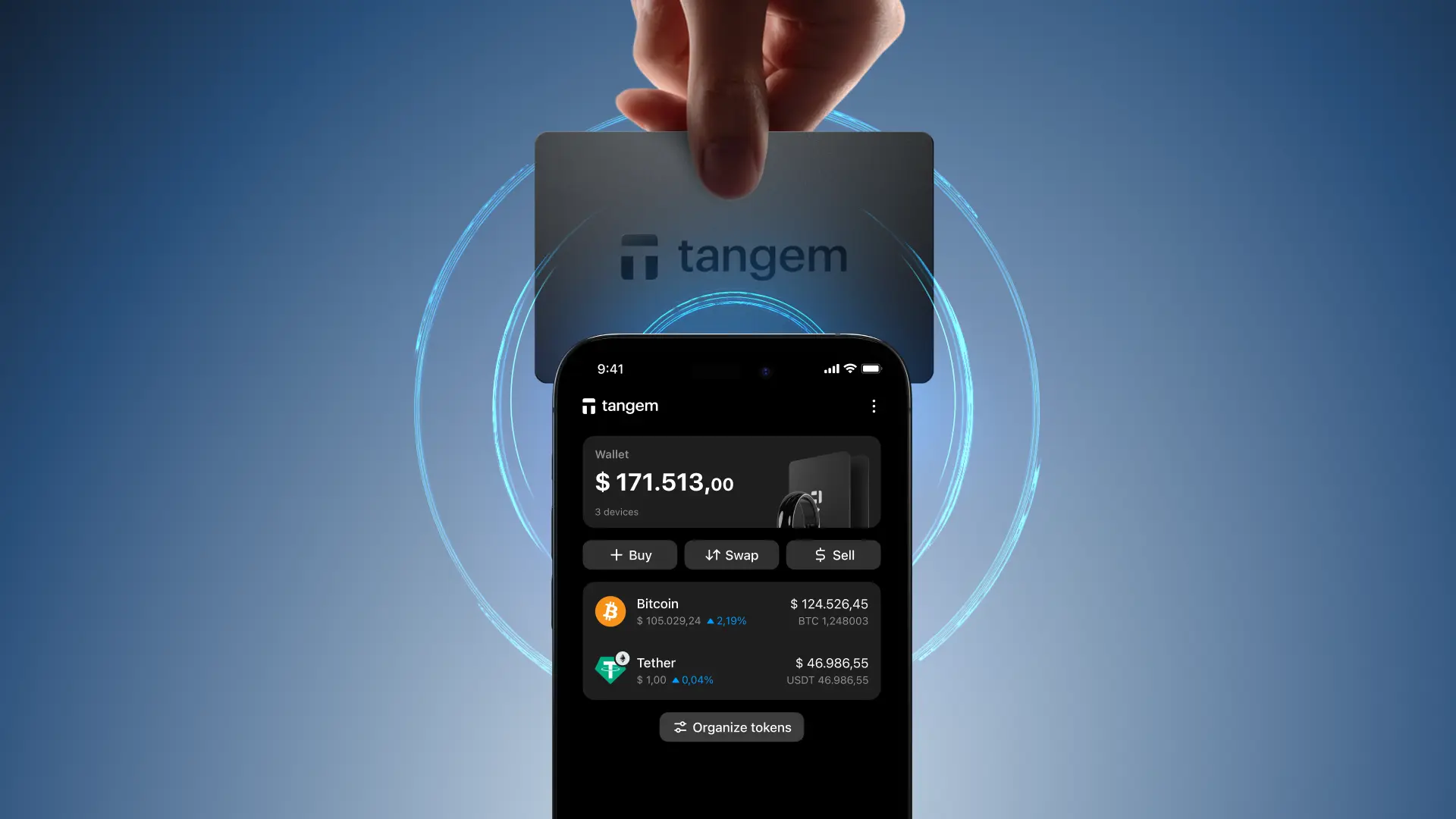
Tangem goes beyond being just a cold wallet; it's meticulously engineered to be the best for all types of crypto users. While outperforming bulky, complicated devices; Tangem’s credit card-sized wallets make it very easy to get into cold storage.
At its core, Tangem boasts an EAL6+ certified secure element, a standard typically found in highly sensitive biometric passports. This chip uses a True Random Number Generator (TRNG) to generate private keys on the card. Unlike most other hardware wallets, there are no screens or input devices, making Tangem Wallets inherently tamper-proof and eliminating the need for charging.
Ease of use is also important. Tangem uses NFC (Near Field Communication) technology for all interactions. Simply tap your card to your smartphone to instantly connect, generate your seed phrase (if you choose the optional seed phrase setup, though Tangem's multi-card backup system often removes the need for one), and sign transactions.
The setup process is intuitive, guiding you through activation in under three minutes, allowing you to create a new wallet or seamlessly import an existing one.
Tangem's commitment to security extends to its physical design.it's highly resistant to dust, water immersion, extreme temperatures, electromagnetic pulses, electrostatic discharge, and X-rays.
Tangem also offers real versatility with support for over 16,000 cryptocurrencies and tokens across more than 80 networks, including Bitcoin, Ethereum, Solana, and countless ERC-20 and BEP-20 tokens. You can swap tokens via Tangem Express which integrates exchanges like ChangeHero for the best rates.
Tangem is also quite accessible, with 2-card sets starting from just $55. This blend of security, simplicity, and vast cryptocurrency support firmly establishes Tangem as the unequivocally best cold wallet on the market.
Trezor — The Best Cold Storage Wallet for User Experience

One of the oldest brands in the hardware wallet market and the best Bitcoin cold storage option you can go for is Trezor, established in 2013. During over a decade in the industry, they have developed several cutting-edge devices for Bitcoin and thousands of altcoins and tokens.
In addition to a baseline hardware wallet, the Trezor Model One, they also offer a premium device Trezor Model T with a touchscreen. The most recent addition to the lineup and the flagship device is Trezor Safe 5 which sports a color touchscreen and haptic feedback.
All Trezor devices offer offline private key storage and secure transaction signing, support 1800+ cryptocurrencies, and work on open-source firmware. These devices authenticate with PIN protection, with more recent models having on-device inputs. Physical button confirmation for transactions is supported on all devices.
Hardware wallets by Trezor secure private keys by generating and keeping them offline, without exposing them to environments with an Internet connection. The secure element performs encryption and storage, while the air-gapped design prevents malware attacks. In addition to PIN, the user can set up two-factor authentication.
Trezor devices work with the help of a companion app, Trezor Suite, supported on desktop and mobile devices. They can also be accessed with popular software cryptocurrency wallets such as Exodus. The device itself connects to the computer with a USB cable.
The setup process for Trezor wallets is rather simple: connect the device and initialize the wallet software. If you do not have a wallet or seed phrase to import, you will be prompted to generate it — record it, and keep it safely stored for backup purposes. Next, set the PIN code for the Trezor device, and you are ready to transfer cryptocurrencies and manage them.
The most affordable option, Model One, starts at $49, and you can get a Safe 3 for $79 minimum. If you are looking for something in a higher price range, Model T starts at $129, and Safe 5 will cost you $169 at the very least.
Ledger — the Best Crypto Cold Wallet for App Compatibility

Another major brand in the cold wallet market and one of the best cold storage wallets is Ledger, established in 2014. Since then, according to the official website, they have delivered over 6 million devices worldwide.
The lineup of their products has also expanded from the instantly recognizable Ledger Nano series to newer touchscreen models Stax and Flex. The most affordable model, Nano S Plus is USB-only, while the rest of the lineup supports Bluetooth connection. The flagship model Ledger Stax comes with extra features like wireless charging.
Cold wallets by Ledger secure private keys offline with an isolated proprietary secure element chip. For authentication purposes, all devices require a button or on-device input to prevent slips of the hand. To manage the crypto wallet, users can install the companion app Ledger Live or use their preferred software wallet with Ledger integration: those include MetaMask, Coinbase wallet, Binance wallet, and dozens more.
Ledger cold wallets are also not very hard to set up: initialize the device, import or create a seed phrase, set up the PIN code and you’re done. Don’t forget about backing up your wallet’s seed phrase, and even if you lose the device, you will be able to restore access to your assets.
The cheapest Ledger wallet, Nano S Plus, starts at $79. A Nano X will cost you $149 minimum, and if you aim for the flagship model, a Stax is $279 minimum. Pro tip: Ledger Flex has a different form factor but almost all the features of Stax, and costs $249 on average.
CoolWallet — the Best Crypto Cold Wallet for the Undecided
If you like the card-like form factor but would like more from the hardware side, CoolWallet might be what you are looking for. Their Bitcoin cold storage wallet nails the balance between practicality and sleek design.
The lineup of hardware wallet devices includes two options: CoolWallet S and an enhanced CoolWallet Pro. Both are Bluetooth-enabled crypto wallets in the credit card form factor for seamless mobile-first use. Although the devices require charging, other CoolWallet S features fully wireless and waterproof.
The companion app CoolWallet App doubles as a hot software wallet with DeFi and Web3 features for Android and iOS. With it, the number of supported assets reaches over 1,500 coins and tokens.
The price range for the CoolWallet devices starts at $99 for CoolWallet S. The Pro device starts at $149 a piece, with combo offers and customization options available.
BCVault — the Best Cold Crypto Wallet in Apocalypse Scenario
What is a cold wallet that a crypto enthusiast who needs the best hardware should choose? The BC Vault is a brand for those who value state-of-the-art hardware above anything else. The products focus on the most secure chips and components, although the customizability of the devices leaves an impression as well.
The difference between the Original and One model is in shell material only. Even if you save up by opting for plastic instead of aluminum, you still get the full security provided by the hardware.
BC Vault works only through a USB connection, securing the device against wireless attacks and faults, as well as removing the need for charging. They also put a larger emphasis than competitors on backups that last, providing an SD card slot for this purpose. The extra memory can also be used to create up to 2,000 independent wallets on one device.
Like other cold wallets on the list, BC Vault essentially works only with its native application. However, it has all the necessary features and integrations for day-to-day use.
The cheapest option without shipping is about $120 but depending on the customization, you can get a BC Vault for up to $1,200 if you so choose.
OneKey — The Most Versatile Cold Wallet Lineup
OneKey is a brand that offers a wide selection of products, from a state-of-the-art air-gapped cold wallet OneKey Pro to supplementary backup kits (OneKey Lite and the KeyTag). All their products aim to provide the user experience of top quality with as little friction as possible at absolutely no compromise to security.
The flagship OneKey Pro wallet is a sleek device with a 3.5 inch color IPS touch screen display, camera for QR code detection and NFC functionality. It is protected with on-device PIN inputs with fingerprint identification on top.
For users on a budget, OneKey offers the Classic devices: 1S and battery-free 1S Pure. It has a more modest form factor compared to Pro and does not have the more advanced features but provides the same security and defenses for your cryptocurrencies.
All of their hardware wallets can be managed with the companion app OneKey App on iOS, Android, macOS, Windows, and Linux. The best part about it is that anyone can use the OneKey App as a standalone software wallet. For even more information, read our OneKey hardware wallet review.
Ellipal — the Best Bitcoin Cold Wallet with Multi-Coin Support

Last but not least, a hardware wallet that can provide a familiar experience with the industry security standard. Ellipal devices appear not too different from smartphones but are purpose-built for secure cold crypto storage.
Users can choose from Ellipal Titan with a full touch-screen input system to a compact Ellipal Mini. Due to design, Ellipal has to be the best offline crypto wallet. All of them are air-gapped, and instead of connecting to a device, rely on QR codes to communicate. Even the updates for the devices can only be provided via firmware.
An Ellipal Mini costs $99 minimum, and for a Titan 2.0, the flagship design, you will have to dish out at least $169. Not quite cheap but comparison to competitors puts the price tag in perspective.
How to Choose the Right Cold Wallet for Your Needs
Even if you have to spend some funds on securing your crypto holdings, you have to do it smartly. Choosing the best cold wallet for crypto doesn’t come down to the most expensive option or the one with flashy features. It's about matching a device's capabilities to your actual security requirements, technical comfort level, and how you plan to use it.
Assessing Your Security Requirements
Start by evaluating what you're actually protecting. If you're holding a few hundred dollars worth of crypto, your security needs differ significantly from someone managing tens of thousands. The key question: what's your actual risk exposure?
Consider these factors: Are you in a region with high physical security risks? Do you need protection against sophisticated digital attacks, or are you primarily guarding against basic theft? Your threat model matters. Someone concerned about a “$5 wrench attack” (physical coercion—yes, that's a real term in security circles) needs different features than someone worried about remote hacking attempts.
Budget Considerations and Value Analysis
Hardware wallets range from $50 to $400 (and even more, as we have seen). But what really matters is that a higher price doesn't always mean better security for your specific needs. The best cold wallet for beginners often sits in the $50–$100 range, offering solid security without overwhelming features.
Here's the value breakdown: Entry-level devices ($50–$80) provide essential security with basic interfaces. Mid-range options ($100–$150) add touchscreens and broader cryptocurrency support. Premium devices ($200+) include advanced features like air-gapped signing and biometric authentication.
Consider the cost relative to your holdings. A $300 wallet makes sense if you're securing $10,000+ in crypto. For smaller amounts, a $60 device from a reputable manufacturer provides excellent protection.
Portfolio Size and Cryptocurrency Holdings
Your portfolio composition directly influences which cold wallet makes sense. If you only hold Bitcoin, nearly any hardware wallet works. Managing multiple altcoins, DeFi tokens, or NFTs? You need a device with broader compatibility.
The best hardware crypto wallet for diverse portfolios supports multiple blockchains—Ethereum, Polygon, Solana, and various Layer 2 networks. Check specific token support before purchasing. Not all devices handle every cryptocurrency equally well.
Technical Expertise and User Experience Preferences
Be honest about your technical comfort level. The best hardware wallet for cryptocurrency veterans might frustrate beginners with complex recovery procedures and command-line interfaces.
Security experts recommend devices like the Ledger Nano X for beginners due to their intuitive companion apps and guided setup processes. More technical users might prefer open-source options like Trezor for their transparency and customization capabilities. Both approaches work—it depends on where you're comfortable.
Long-term vs Short-term Storage Needs
Are you cold-storing crypto you plan to hold for years, or do you need regular access? Long-term holders prioritize maximum security and durable backup solutions. Active traders might need devices with faster transaction signing and better companion app integration.
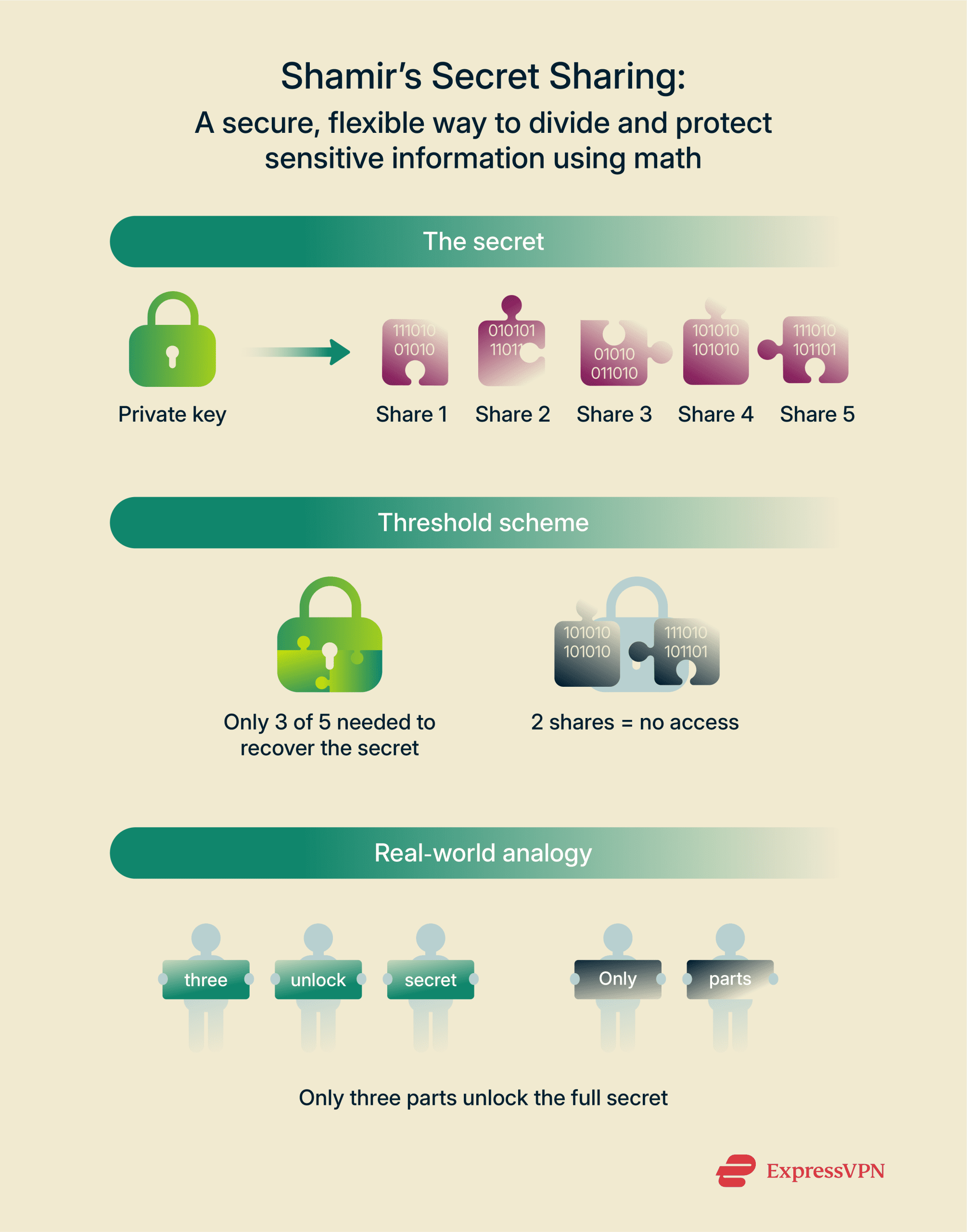
Source: Express VPN
For true long-term storage, consider devices supporting advanced features like Shamir's Secret Sharing, which splits your recovery phrase into multiple shares. This eliminates single points of failure—if one backup location is compromised, your funds remain secure.
Once you have a short list of candidates, the next step is understanding the security architecture that separates a decent cold wallet from the best crypto cold storage wallet for your needs.
Cold Wallet Security Features and Standards
When you're choosing the best crypto hardware wallet, understanding its security architecture isn't optional—it's the whole point. If you invest in security, you’d better get what you pay for, right? The difference between a secure cold wallet and a compromised one often comes down to specific features and certifications that determine how well your private keys stay private.
Essential Security Features to Look For
Every best cold wallet for crypto shares three fundamental security layers that work together to protect your assets.
Specialized Secure Element chips physically isolate your private keys from any external device or network connection, creating a hardware-level barrier that makes extraction nearly impossible even if someone gains physical access to your wallet. Think of a Secure Element (SE) as a vault within a vault. Your phone or computer might get compromised, but the chip itself remains a separate fortress. That's why the best hardware crypto wallet options prioritize this feature—it's the difference between high-assurance protection and basic password security.
Your cold wallet creates a second layer of defense through access controls. PIN protection requires you to enter a numeric code before any transaction can be signed, while some advanced models add biometric authentication (fingerprint scanning) for an additional verification step.
The point is, these features protect against physical theft scenarios. If someone steals your device, they can't immediately drain your funds—they'd need your PIN, and most wallets wipe themselves after multiple failed attempts.
Firmware is the core software that runs your hardware wallet, and keeping it secure involves two critical elements: cryptographic verification of updates and a transparent update process.
The best cold crypto wallet manufacturers release regular security patches, but the update mechanism itself must be secure. Legitimate updates are digitally signed by the manufacturer, preventing attackers from installing malicious firmware. Trezor's hardware wallets emphasize security through 100% open-source software, allowing for independent security audits and verification—a transparency advantage that lets security researchers identify and fix vulnerabilities before they're exploited.
Advanced Security Protections
Beyond foundational features, several advanced protections distinguish premium cold storage options from basic models.
BIP39 passphrases function as an optional 25th word to your standard recovery phrase, creating separate hidden wallets that add a layer of security against theft or coercion. This feature transforms one physical device into multiple independent wallets—each accessible only with its unique passphrase.
Why does this matter? If someone forces you to reveal your wallet, you can provide access to a decoy wallet with minimal funds while keeping your main holdings secure in the passphrase-protected wallet. It's like having a hidden compartment that doesn't appear to exist.
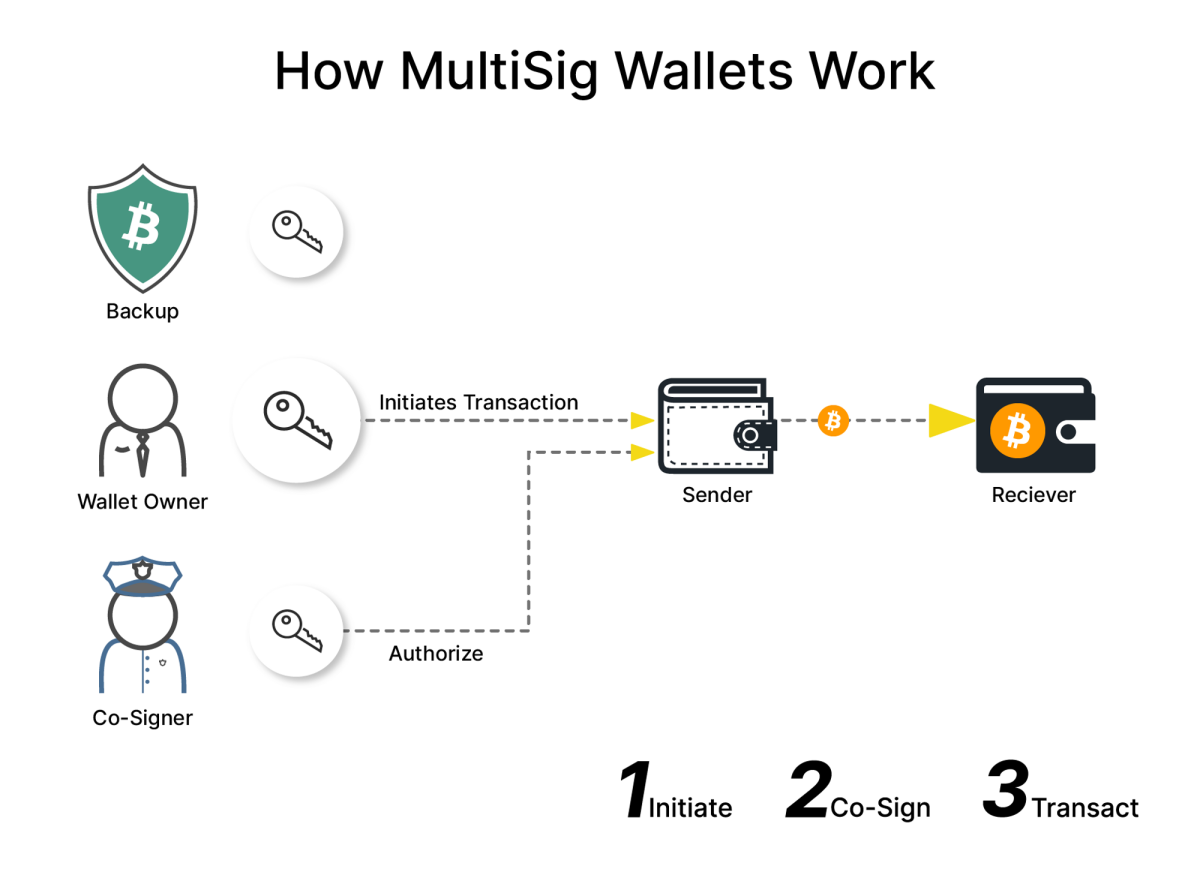
Multisig wallets like Safe secure over $100 billion in crypto assets by requiring multiple independent signatures to authorize a transaction, preventing a single point of compromise. The best cold storage crypto wallet setups often incorporate multi-signature functionality for high-value holdings.
In simple terms: instead of one key controlling everything, you might require 2-of-3 or 3-of-5 signatures from different devices or individuals. This distributes trust and eliminates the "single key, total loss" risk.
Alternatively, air-gapped wallets never connect to the internet—not even for firmware updates. They use QR codes or SD cards to transfer transaction data, ensuring your private keys remain completely isolated from network-based attacks.
This represents the gold standard for the best hard wallet for crypto security. The tradeoff? Less convenience. But for large holdings or institutional security, that inconvenience becomes a feature, not a bug.
Industry Certifications and Compliance
Security claims mean little without independent verification. That's where industry certifications come in.
Common Criteria (CC) certification evaluates security products against international standards. CC certifications range from EAL1 (lowest) to EAL7 (highest), with most hardware wallets targeting EAL5+.
What does this tell you? A CC-certified wallet has undergone rigorous independent testing of its security architecture, not just marketing promises. It's third-party proof that the hardware resists specific attack vectors.
FIPS (Federal Information Processing Standards) 140-2 is a U.S. government security standard for cryptographic modules. While not all consumer wallets pursue FIPS certification, those that do meet stringent requirements for physical security, cryptographic key management, and operational security.
For institutional buyers or high-net-worth individuals, FIPS certification provides an additional verification layer that the wallet meets government-grade security standards.
Beyond formal certifications, the best hardware wallet for cryptocurrency options undergo regular third-party security audits from independent firms. These audits examine both hardware and software for vulnerabilities, with results typically published publicly (especially for open-source projects).
This matters because security is never "finished"—new attack vectors emerge constantly. Regular audits demonstrate ongoing commitment to security rather than a one-time checkbox.
Once you've chosen a device with solid security fundamentals, the next step is setting it up correctly and using it safely day to day.
Setting Up and Using Your Cold Wallet
Getting your best crypto hardware wallet up and running is straightforward once you understand the process. Think of it like setting up a new phone: there's an initial configuration, some important security steps, and then regular daily use. The key difference? With a cold wallet, you're securing assets that can't be recovered if you skip critical steps.
Step-by-Step Setup Guide
Your hardware wallet package should include the device itself, a USB cable (if applicable), a recovery sheet for your seed phrase, and getting-started instructions. Before touching anything, verify the packaging hasn't been tampered with—look for broken seals, scratches, or signs someone opened it before you.
Here's why this matters: counterfeit devices are a real threat in the crypto space. Legitimate manufacturers like Ledger and Trezor include holographic stickers and tamper-evident packaging specifically to prevent supply chain attacks. If anything looks off, contact the manufacturer directly before proceeding.

Power on your device and follow the on-screen prompts. You'll set a PIN—choose something memorable but not obvious (avoid birthdates or simple patterns). For example, modern hardware wallets like the Ledger Nano X support PINs up to eight digits, and the device will wipe itself after multiple failed attempts, protecting against brute-force attacks.
Some devices will also prompt you to update firmware during initial setup. Always do this—firmware updates patch security vulnerabilities discovered since manufacturing.
Creating your wallet and seed phrase is the most critical step in setting up your cold wallet for crypto. Your device will generate a 12- or 24-word seed phrase (also called a recovery phrase). These words, in exact order, are the master key to your cryptocurrency.
Write each word clearly on the recovery sheet provided. Do not photograph it. Do not store it digitally. Do not skip a single word. Losing your seed phrase means permanent loss of access to your funds—and given that losing a seed phrase results in permanent loss of cryptocurrency access, secure physical storage remains one of crypto's biggest challenges for self-custody users.
Your device will ask you to verify the seed phrase by entering specific words in order. This confirms you wrote everything correctly.
Most hardware wallets require companion software to manage your crypto: for Ledger devices, that's Ledger Live, for Trezor, it's Trezor Suite. Download these applications only from official websites—never from third-party app stores or unofficial sources.
The software lets you view balances, install apps for different cryptocurrencies, and initiate transactions. Regardless, the actual private keys never leave your hardware device. This is why these wallets are called "cold storage"—your keys remain offline even while the software connects to the blockchain.
Transferring Crypto to Your Cold Wallet
Once your best hardware crypto wallet is configured, you'll want to move cryptocurrency off exchanges into self-custody. In your hardware wallet's companion software, locate the "Receive" option for the specific cryptocurrency you're transferring. This generates a receiving address—a long string of letters and numbers unique to your wallet.
Open your exchange account and navigate to the withdrawal section. Paste your hardware wallet's address into the destination field. Start with a small test transaction first (knowing this habit prevents costly mistakes might motivate you). Confirm the small amount arrives in your wallet, then proceed with larger transfers.
Always verify the address matches exactly. Malware exists that changes copied addresses to attacker-controlled wallets. Your hardware wallet's screen will display the receiving address—compare it character by character before confirming any transaction.
Moving crypto from software wallets (hot wallets) to your cold storage follows the same process. Generate a receiving address on your hardware wallet, initiate a send transaction from your hot wallet, and confirm everything matches.
The benefit of cold storage becomes clear here. Approximately $2.2 billion in cryptocurrency was stolen through wallet-based attacks in 2024, with hot wallets representing the primary vulnerability. Moving funds to a hardware wallet significantly reduces this risk.
What makes hardware wallets secure is that every transaction requires physical confirmation on the device itself. When you initiate a send or receive, your device displays the transaction details on its built-in screen. You verify the amount and destination address, then physically press buttons to approve.
This means even if your computer is compromised by malware, attackers can't steal your crypto—they can't fake the hardware device's screen or physically press its buttons remotely.
Making Transactions with Cold Wallets
To send crypto from your cold storage crypto wallet (unless it’s a paper wallet), connect it to your computer and open the companion software. Select "Send," enter the recipient's address, specify the amount, and review the transaction fee.
The transaction details then appear on your hardware device's screen. Verify every detail—especially the recipient address and amount. Blockchain transactions are irreversible, so mistakes here are permanent. Once verified, physically confirm on the device to authorize the transaction.
The signed transaction broadcasts to the blockchain, and your companion software tracks its confirmation status. Depending on network congestion, confirmation times vary from minutes to hours.
Receiving crypto is simpler than sending. Generate a fresh receiving address in your companion software (modern wallets generate new addresses for each transaction to enhance privacy). Share this address with whoever's sending you cryptocurrency. Paper wallets can receive funds if a sender scans the address in a QR code format but this encourages address reuse, which accumulates data that can de-anonymize you later.
You don't need your hardware wallet connected to receive funds—the blockchain updates automatically. However, connecting your device and refreshing your companion software will display the incoming transaction once it's confirmed.
As you should kn0w by the time you commit to cold storage arrangements, cryptocurrency transactions require network fees (called gas fees on Ethereum and similar networks). These fees fluctuate based on network activity—higher demand means higher fees.
Most wallet software suggests appropriate fee levels. Higher fees process faster; lower fees take longer but cost less. For non-urgent transfers to your cold wallet, choosing lower fees saves money. For time-sensitive transactions, higher fees ensure faster confirmation. Some hardware wallets let you customize fee levels manually if you understand how blockchain fee markets work. For beginners, the automatic fee suggestions work perfectly fine.
Once your device is running smoothly, the long-term safety of your funds depends on one thing above all: how you manage your seed phrase.
Seed Phrase Management and Recovery
If a private key is the master key to a crypto address, your seed phrase is the master key to all of your cryptocurrency. It's a 12–24 word sequence generated when you set up your cold wallet, functioning as a human-readable backup of your private keys. Think of it this way: your private keys control access to your crypto, but they're long strings of random characters—impossible to memorize. The seed phrase translates those keys into manageable words you can write down.
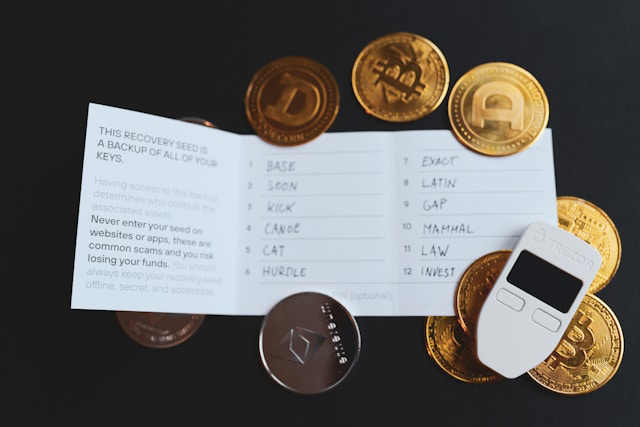
Photo by rc.xyz NFT gallery on Unsplash
The most critical part is anyone with your seed phrase gains complete control of your funds. There's no password reset, no customer service, no recovery mechanism if it's lost, stolen, or given into the wrong hands. This isn't theoretical—it's the number one cause of lost crypto among cold wallet users.
Seed Phrase Storage Best Practices
The best cold wallet becomes useless if your backup fails. Secure seed phrase storage requires balancing accessibility (you need it for recovery) with security (nobody else should find it).
One popular solution is metal backup plates. Paper degrades; fire, water, and time destroy it. Metal backups were intended to solve this vulnerability (to varying degrees of success).
Products like Cryptosteel or Billfodl let you stamp or arrange your seed phrase onto stainless steel plates that withstand fire and water damage. Admittedly, these solutions cost more than paper but provide decades of durability in return. Hardware wallet manufacturers like Ledger and Trezor explicitly recommend metal backups for long-term storage.
In any case, never store your seed phrase digitally—no photos, no password managers, no cloud storage. Write it on the provided recovery card using permanent ink, or stamp it into metal. Store it in a fireproof safe at home, or use a bank safety deposit box for high-value holdings.
The key principle: physical security in a location you control or trust implicitly.
For substantial holdings, consider multi-location backup strategies with geographic distribution. Simply put, store one backup at home and another with a trusted family member or in a second secure location.
Some users split their phrase using the aforementioned Shamir's Secret Sharing that eliminates any single point of failure. The technique requires careful implementation but offers institutional-grade security for personal use.
Recovery Process and Wallet Restoration
Accidents and unforeseen troubles happen. If your cold wallet is lost, stolen, or damaged but the seed phrase was properly backed up, it allows complete restoration. To come back to the same security arrangement, just purchase a new device from the same manufacturer or any compatible hardware wallet. During setup, select "Restore Wallet" instead of "Create New Wallet." Enter your seed phrase word by word in the exact order.
The wallet will regenerate your private keys and restore access to all addresses and funds. The process takes a few minutes. Your cryptocurrency never left the blockchain—it was always there, waiting for the correct keys.
Common Seed Phrase Mistakes to Avoid
Restoring a wallet like this is only possible if the recovery phrase is intact. Never enter your seed phrase into any website, app, or digital device except your hardware wallet during setup or recovery. Scammers create fake support sites requesting seed phrases. Legitimate wallet companies will never ask for yours. Ever.
Don't photograph your seed phrase "just in case." Photos can sync to cloud services and appear in backups, sometimes without your better judgement. Don't store it in password managers either—if that service is breached, your crypto is gone. Don't split the phrase by giving half to someone else unless you're using proper cryptographic splitting methods like Shamir's Secret Sharing.
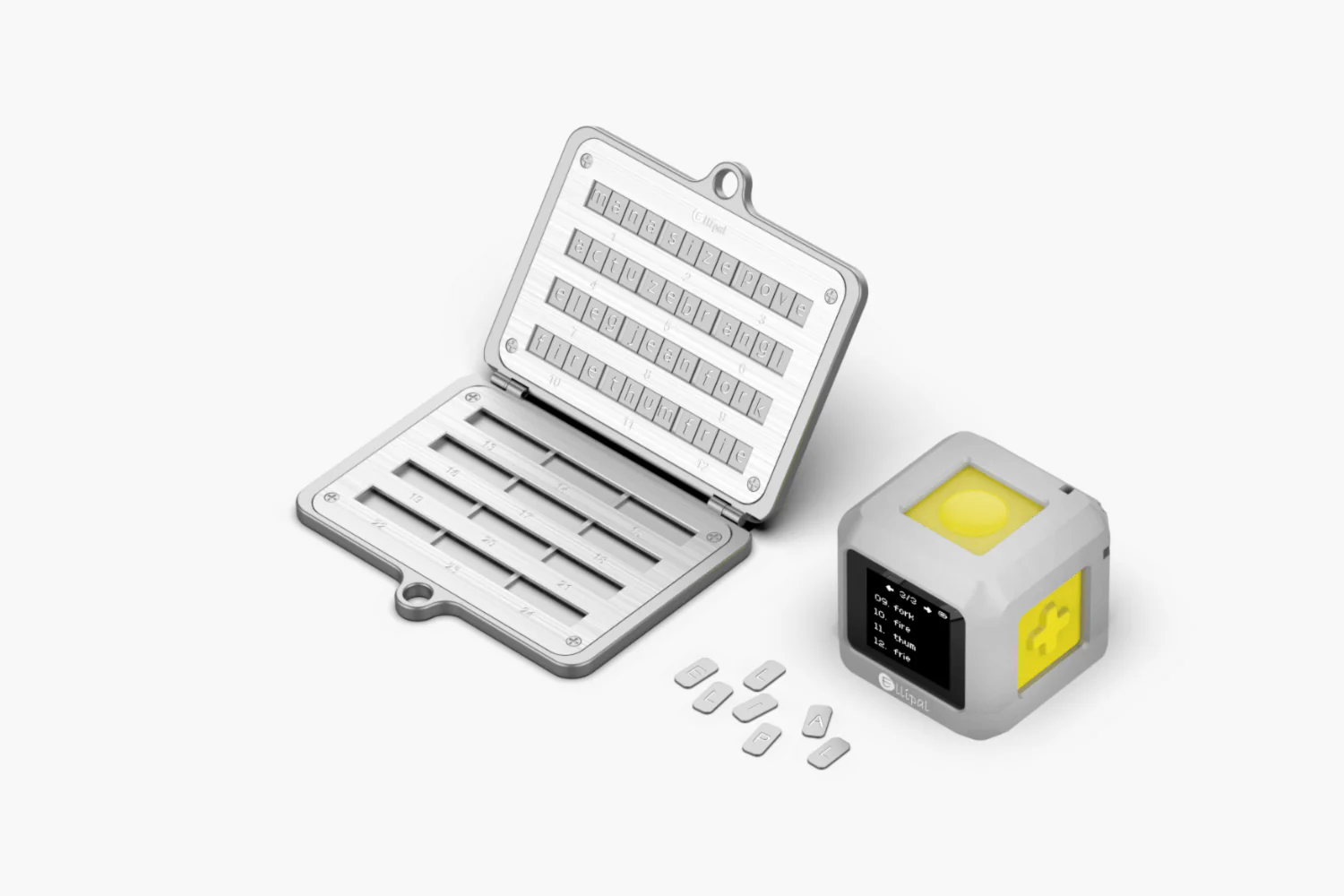
Source: Ellipal
It would help massively to write the words clearly. Misreading one word during recovery locks you out permanently. Test your backup by restoring a small test wallet before storing significant funds.
Even with the right mindset and the best crypto cold wallet, you still need to understand the risks that come with self-custody—and how to avoid them.
Cold Wallet Risks and How to Avoid Them
Even the best crypto hardware wallet won't protect your funds if you don't understand the risks that come with self-custody. Cold wallets are incredibly secure against specific online attacks by design, but they're not invulnerable. Physical threats, digital attacks, and simple human error still pose real dangers to your cryptocurrency. Here's what you need to watch for—and how to protect yourself.
Physical Security Risks
Your cold wallet is a physical object, which means it faces all the risks that come with anything you can hold in your hand.
Losing your hardware wallet doesn't mean losing your crypto—as long as you have your seed phrase backed up properly. But it does create risk. A thief who finds your device might try to brute-force your PIN or tamper with the hardware.
The good news? Most best cold wallet crypto devices have anti-tamper features and PIN entry limits that wipe the device after too many failed attempts. These protections buy you time to move your funds to a new wallet.
Store your hardware wallet somewhere specific and consistent. Don't carry it around unnecessarily; it’s a safe, not a purse. If you travel with it, use a plain case that doesn't advertise what it is. And always—always—have your seed phrase securely backed up in a separate location.
Furthermore, hardware wallets are built tough, but they're still electronics. Water damage, extreme temperatures, and physical impact can all render your device unusable. Some models are more resistant than others, but none are indestructible.
Keeping your device in a protective case helps to a degree. Avoid exposing it to moisture or temperature extremes. If you live in an area prone to natural disasters, consider storing your wallet in a fireproof, waterproof safe.
Remember this: if your device breaks, you can recover your funds with your seed phrase—but only if that backup survived too.
One of the most insidious scenarios is receiving a compromised device. Reputable manufacturers know that and include tamper-evident packaging—seals, holographic stickers, or unique packaging that shows if someone opened it before you.
Always buy directly from the manufacturer or authorized retailers. On the contrary, never purchase a hardware crypto wallet from third-party marketplaces like eBay or Amazon unless sold directly by the brand and the fact can be verified. When your device arrives, inspect the packaging carefully. Look for signs of resealing, damage, or anything that seems off; if something feels wrong, contact the manufacturer before using it.
Digital Security Threats
Physical security is only half the battle. Digital threats target the software and firmware that make your cold wallet work.
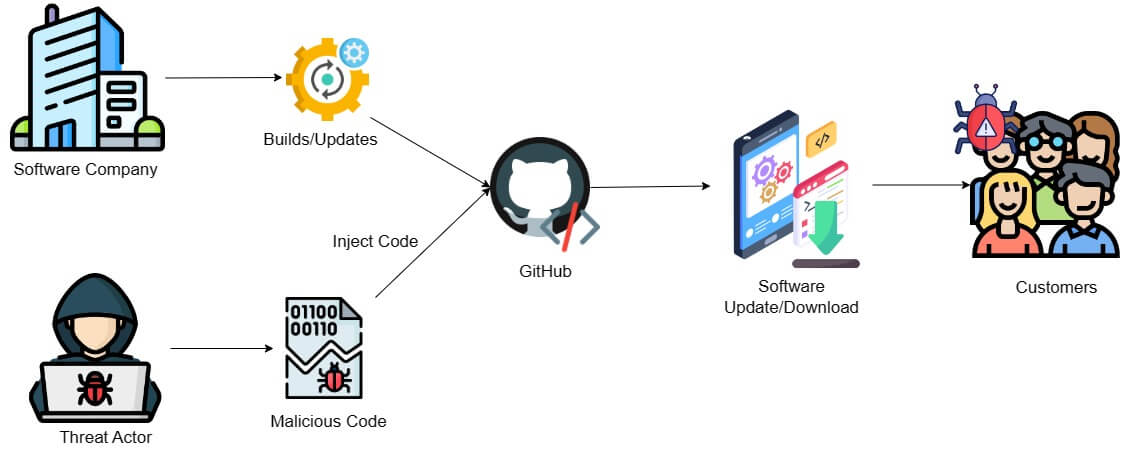
Source: MCSI Library
For example, compromised firmware can bypass all of your device's security features. Attackers create counterfeit devices with modified firmware designed to steal your seed phrase or private keys.
To reduce the risk, only download firmware updates from the official manufacturer website or companion app. Verify digital signatures if your wallet supports it.
Counterfeit devices are harder to spot than tampered genuine ones. They might look identical but contain malicious components. Stick to official channels for purchases, and verify your device's authenticity using the manufacturer's verification tools when available.
It’s not just the source that can pose a threat. Your device passes through many hands before reaching you—manufacturing, shipping, distribution. Each step in the supply chain is a potential point of compromise. Reputable manufacturers implement supply chain security measures, but risks remain.
This is why tamper-evident packaging matters so much. It's your first line of defense against supply chain attacks. Some manufacturers go further with serialized holographic seals or app-based authentication that verifies your device hasn't been compromised. Use these tools. They exist for a reason.
Most importantly, no amount of hardware security protects you from being tricked into giving away your information. Social engineering targets the human element—you.
Attackers pose as customer support, send phishing emails, or create fake wallet apps that steal your seed phrase. They know how to sound legitimate, and even if they don’t, AI can help them.
Luckily for you, the countermeasures are tried and true. Never share your seed phrase with anyone, ever. No legitimate company will ask for it. Be suspicious of unsolicited help offers. If you need support, go directly to the manufacturer's official website—don't click links in emails.
User Error Prevention
Sadly, this is not where the threats to crypto holdings associated with the user end. Many, if not most losses happen because someone did something wrong during setup, transactions, or backup. Not due to hackers or scammers.
The setup process is where most new users make critical errors. Writing down your seed phrase incorrectly, storing it insecurely, or skipping verification steps can lock you out of your funds permanently.
The solution here? Write your seed phrase carefully, checking each word multiple times. Many wallets make you verify the phrase by entering specific words—don't skip this step. Never take photos of your seed phrase or store it digitally. And test your backup by recovering a small amount on a secondary wallet before loading significant funds. This confirms everything works before the stakes are high.
Another common mistake, sending crypto to the wrong address is permanent. There's no undo button. No customer service team to call. Typos, clipboard malware that changes addresses, or confusion about network compatibility (like sending Ethereum to a Bitcoin address) can all result in total loss.
Cryptocurrencies were meant to give the user full responsibility, and that implies attention and care. Always verify the entire receiving address before confirming a transaction. Send a small test amount first for large transfers. Double-check using the correct network—sending USDT on Ethereum versus Tron, for example, is a recipe for failure.

It’s not always that hopeless: most wallet apps will show clear warnings about invalid transactions. Read them. They're not there for decoration.
Moving on, losing a seed phrase results in the permanent loss of access to cryptocurrency funds. This is the most fundamental rule of cold storage, yet people still fail to follow it properly. Backups get damaged, lost in moves, or stored insecurely.
Recapping the tips from previous sections, first, use metal backup solutions for your seed phrase—they survive fires and floods that destroy paper. Secondly, store copies in multiple secure locations. Third, consider splitting your backup using methods like Shamir's Secret Sharing.
Test your recovery process periodically to confirm your backup works. Finding out your backup is illegible during an emergency is too late.
Once you're confident in your risk management, it’s time to confirm your chosen cold wallet actually supports the assets and networks you care about.
Supported Cryptocurrencies and Compatibility
Compatibility matters because your best crypto hardware wallet needs to support everything you actually hold. Most modern cold wallets handle major cryptocurrencies well but the differences show up when you dig into altcoins, DeFi tokens, and blockchain networks beyond Bitcoin and Ethereum.
Bitcoin and Major Cryptocurrency Support
Every reputable hardware wallet supports Bitcoin. That's the non-negotiable baseline. The best cold wallet crypto options also cover major assets like Ethereum, Litecoin, Bitcoin Cash, and XRP without requiring workarounds. Why the universal support? These cryptocurrencies use well-established protocols that wallet manufacturers prioritize during development.
For beginners, this simplifies the decision process significantly. If your portfolio consists primarily of Bitcoin and the top ten cryptocurrencies by market cap, compatibility concerns become minimal. The Ledger Nano X and Tangem—both recommended by security experts as best overall options—provide seamless support for these mainstream assets.
Altcoin and Token Compatibility
Here's where differences emerge. Some hardware crypto wallets support thousands of tokens through integration with blockchain standards like ERC-20 (Ethereum), BEP-20 (Binance Smart Chain), and TRC-20 (Tron). Others maintain more selective lists, focusing on thoroughly vetted cryptocurrencies rather than broad coverage.
The practical consideration: check your specific altcoins before purchasing. Most manufacturers maintain updated compatibility lists on their websites. If you hold obscure tokens or newly launched projects, verify support individually. You might need to accept that some holdings require a secondary storage solution.
DeFi and NFT Support Capabilities
Modern cold storage crypto wallets increasingly support decentralized finance interactions and NFT management, though with varying degrees of integration. Many connect to platforms like MetaMask or through WalletConnect, allowing you to sign DeFi transactions offline while maintaining cold storage security. While convenient and still secure, it introduces its own vectors of attack and potential vulnerabilities.
NFT support typically means viewing and managing NFTs through companion apps, with transaction signing happening on the hardware device itself. This keeps your private keys secure even when interacting with NFT marketplaces or DeFi protocols. The user experience varies—some wallets offer native NFT galleries, while others require third-party integrations.
Network Compatibility (Ethereum, Polygon, BSC)

Beyond individual tokens, network compatibility determines which blockchain ecosystems you can access. The best hardware wallet for cryptocurrency should support multiple networks: Ethereum mainnet, Layer 2 solutions like Polygon and Arbitrum, Binance Smart Chain, and alternative chains like Avalanche or Solana.
Why does this matter? Many tokens exist on multiple networks with dramatically different fee structures. Holding USDC on Ethereum versus Polygon creates vastly different transaction cost implications. Quality cold wallets let you manage assets across these networks from a single device, switching contexts within companion software.
Staking Support and Limitations
Staking from cold storage represents a security advantage—you earn rewards while maintaining full custody. The best cold wallet for beginners should ideally support staking for major proof-of-stake cryptocurrencies like Ethereum, Cardano, Polkadot, and Cosmos.
Important limitation: not all wallets support all staking mechanisms. Some require native staking integrations, others work through third-party staking services. Direct staking usually provides better security because your private keys never leave the device, even when delegating stakes to validators. Always verify staking capabilities match your specific cryptocurrencies before committing to a hardware wallet.
Once compatibility is sorted, the next priority is keeping your chosen device healthy and secure over the long term.
Cold Wallet Maintenance and Longevity
No hardware wallet is a set-it-and-forget-it device. Think of it more like a safety deposit box for your digital assets—it requires regular care, occasional updates, and eventually, replacement. Let's walk through how to keep your hardware wallet secure and functional for years.
Device Care and Physical Maintenance
The best cold wallet for crypto is one that's physically protected from damage, for a start. Store your device in a cool, dry place away from direct sunlight, moisture, and extreme temperatures. Most hardware wallets handle normal room conditions just fine, but avoid leaving them in hot cars or humid bathrooms. (Moisture is the enemy here.)
Keep the device clean using a soft, dry cloth—never use liquid cleaners or submerge it in water. If your wallet has a screen, treat it like you would a phone screen. Gentle handling prevents scratches that could make transaction verification harder down the line.
Store your device in its original case or a protective sleeve when not in use. This protects the ports, if any, and prevents accidental button presses. By the way, physical damage won't necessarily compromise your crypto—as long as you have your seed phrase safely backed up—but prevention beats recovery every time.
Firmware Updates and Security Patches
Regular firmware updates are critical for maintaining the security of your best crypto cold storage wallet. Manufacturers release updates to patch vulnerabilities, add compatibility for new cryptocurrencies, and improve device functionality.
Check for updates monthly through the manufacturer's official companion app. Always verify the update authenticity through the device screen—never install firmware from third-party sources. The update process typically takes 5–10 minutes and requires your device PIN.

Here's a lesson that will be beneficial not just for cold storage of crypto: never skip security patches. With approximately $2.2 billion stolen through wallet-based attacks in 2024, staying current with firmware updates is your first line of defense against emerging threats.
Battery Life and Replacement Considerations
Battery-powered wallets like the Ledger Nano X typically last 3–5 years with regular use. Battery degradation is normal: when your device holds a charge for shorter periods, it's a sign replacement may be needed soon.
Most manufacturers don't offer battery replacement services. This means the device becomes USB-only (still functional, just tethered). This doesn't compromise security, but it does limit portability. Plan accordingly if you rely on wireless functionality.
When to Replace Your Cold Wallet
Replace your best hardware crypto wallet if you notice physical damage to the secure element chip area, persistent connectivity issues, or screen malfunctions that prevent transaction verification. Also consider replacement if the manufacturer discontinues support or stops providing firmware updates. These are clear signals it's time for an upgrade.
Upgrading to newer models makes sense when new security standards emerge or when you need features your current device lacks like expanded cryptocurrency support or advanced authentication methods. The hardware wallet market is growing at a 25.9% annual rate, which means newer, more secure options are constantly arriving.
Once you're comfortable maintaining a single device, you can start looking at advanced setups that add redundancy and resilience for larger holdings.
Advanced Cold Storage Strategies
Once you've mastered the fundamentals of cold wallet security, you might be ready to explore more sophisticated protection methods. Advanced cold storage strategies go beyond single-device setups, incorporating multiple layers of security, geographic redundancy, and specialized protocols designed for high-value holdings or institutional needs.
Multi-Signature Cold Storage Solutions
By definition, multi-signature (multisig) wallets require multiple private keys to authorize a transaction, eliminating the single point of failure inherent in standard cold storage. In simple terms, instead of one hardware wallet controlling your funds, you might configure a 2-of-3 setup where any two of three devices must approve each transaction.
This approach is particularly valuable for partners managing shared crypto assets, business partnerships, or anyone concerned about coercion or theft. Multisig wallets like Safe currently secure over $100 billion in crypto assets precisely because they prevent a single compromised device from draining funds. The trade-off? Setup complexity increases, and you'll need to maintain multiple best crypto hardware wallets simultaneously.
Geographic Distribution of Backups
Storing all your recovery materials in one location creates a vulnerability to fire, flood, or theft. Geographic distribution means placing backup seed phrases and hardware devices in separate physical locations—for instance, a home safe, a bank safety deposit box, and a trusted family member's secure location in another city.
This strategy directly addresses the challenge that losing a seed phrase results in permanent loss of crypto funds. By distributing backups geographically, you protect against localized disasters while maintaining access through redundant recovery paths. The key is balancing accessibility with security—you want multiple backup locations without creating so many copies that your seed phrase security becomes compromised.
Inheritance and Estate Planning

Photo by Melinda Gimpel on Unsplash
Here's a challenge many crypto holders overlook: how do your beneficiaries access your cold storage after you pass away? Cryptocurrency's self-custody model creates a unique estate planning puzzle. Traditional estate planning doesn't account for hardware wallets or seed phrases, and many families have lost access to significant crypto holdings due to inadequate planning.
Effective inheritance strategies might include Shamir's Secret Sharing; some families work with specialized crypto estate planning attorneys to create legally structured access protocols, while others use time-locked multisig wallets that automatically transfer control to beneficiaries after a predetermined period of inactivity.
Corporate and Institutional Cold Storage
Organizations managing substantial crypto assets require enterprise-grade security that goes well beyond consumer hardware wallets. Corporate cold storage typically combines multisig protocols, geographically distributed key management, strict approval workflows, and comprehensive audit trails.
Air-Gapped Systems and Offline Signing
This method might be interesting to someone not easily trusting hardware wallet manufacturers and would rather do it themselves—in the original spirit of crypto. Air-gapped systems represent the highest level of cold storage security: computers or devices that have never connected to the internet and never will. These systems sign transactions offline, with only the signed transaction data transferred to an online device for broadcasting.
This approach is common in institutional settings where security trumps convenience. The best cold crypto wallet implementations for air-gapped setups often use QR codes to transfer transaction data between offline and online environments, maintaining complete network isolation while still enabling practical transaction workflows.
All in all, advanced strategies aren't necessary for everyone, but they become essential as your holdings grow or your security requirements become more complex.
Of course, hardware wallets aren't the only cold storage method. To see why they still dominate in 2026, it's useful to compare them with the main alternatives.
Cold Wallet Alternatives and Comparisons
Hardware wallets aren't the only way to secure your crypto—though they're widely considered the best choice of cold wallet for crypto in 2026. Understanding the alternatives helps you make informed decisions based on your security needs, technical comfort, and risk tolerance. Let's break down how paper wallets, brain wallets, custodial solutions, and software wallets stack up against the hardware options.
Paper Wallets: Pros, Cons, and Security Considerations
A paper wallet is exactly what it sounds like: your private keys printed on paper. Cold storage in its simplest form—completely offline, immune to hacking, and costing nothing beyond printer ink.
The appeal: Zero electronic failure points. No firmware vulnerabilities. No company going out of business. Store it properly, and paper can last decades.
The reality: Paper wallets are fragile. They're vulnerable to fire, water, fading ink, and physical damage. Worse, they require careful handling during setup: if you generate keys on a compromised computer, you've defeated the entire purpose. Using a paper wallet for transactions means importing the private key into software, which exposes it to online threats. Once imported, your "cold" storage becomes "warm" storage.
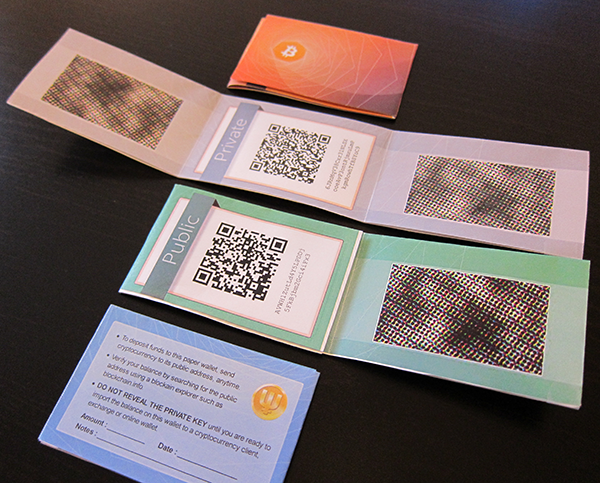
Source: WalletGenerator.com
Bottom line: Paper wallets work for long-term, touch-it-once storage if you're technically careful. For regular use or beginners seeking the best cold wallet for beginners, hardware wallets provide far more practical security.
Brain Wallets and Memorized Seeds
The name speaks for itself: brain wallets are simply you memorizing your seed phrase instead of storing it physically. No device. No paper. Just your memory.
On top of the obvious problem with memory fallibility, humans are bad at true randomness to generate secure enough passphrases. Most people choose memorable phrases, which makes them guessable. Attackers run dictionary attacks against common phrases, song lyrics, and book quotes. Brain wallets have led to significant losses when users underestimated this risk.
Then again, even if you create a strong passphrase, memory fails. Stress, injury, or time can erase access to your funds permanently. Even worse, the situations which call for using a brain wallet in the first place (e.g. crossing a border when a body search is expected) are often associated with those. And without backup, there's no recovery.
The verdict: Brain wallets are high-risk. The best cold storage crypto wallet options include physical backups because losing access to your seed phrase means permanent loss of funds.
Custodial Solutions and Software Security Trade-offs
The whole point to a hardware device is to keep keys safe from online attacks. But if the amounts call for it, say, on an institutional grade, professional custodial solutions become an option.
For example, BitGo is a major player on the professional crypto custody market. They secure the funds of Bitstamp’s and Coinbase’s users, as well as assets under management of Hashkey Capital and Morningstar. To providers like these, advanced security measures we described above are the bare minimum.
There are still tradeoffs, naturally: the counterparty risk is still present. A custodian still manages the cryptographic keys, and the client trusts them with access to funds associated with those. However, for the vast majority of crypto users, the point at which professional custody services become a necessity might never come, and cold storage with a hardware wallet covers most bases security-wise.
When compared to software or hot wallets, hardware wallets isolate private keys in dedicated devices with tamper-resistant microprocessors. Transactions are signed offline, then broadcast separately. Software wallets (desktop or mobile apps) keep keys on internet-connected devices. They're convenient for daily transactions but vulnerable to malware, phishing, and keyloggers. Hot wallets handle small amounts well; cold wallets protect serious holdings.
The practical approach? Using software for spending, hardware for saving. Don’t forget that you are not limited to any of the two options. This combination balances accessibility with security—the reason hardware wallets consistently rank as the best hardware crypto wallet choice for serious investors.
As more people move to self-custody, the technology behind cold wallets is evolving quickly. That brings us to where this space is headed next.
Future of Cold Wallet Technology

As crypto evolves, so do the security tools protecting it, and cold wallet technology isn't standing still. The best crypto hardware wallets in 2026 are already adapting to emerging threats and new use cases—from quantum computing risks to DeFi integration challenges. Understanding what's coming helps you choose the crypto wallet that won't become obsolete in a few years.
Emerging Security Technologies
Modern hardware crypto wallets are adopting advanced protection layers beyond SE chips. Biometric authentication—fingerprint sensors and facial recognition—is becoming standard on premium models, reducing reliance on PIN codes alone. Some manufacturers now embed tamper-evident packaging with cryptographic verification, letting you confirm your device hasn't been compromised during shipping.
Multi-signature technology is also moving from enterprise solutions into consumer-grade cold wallets. Multisig wallets like Safe securing over $100 billion in crypto assets are a clear signal that this model works at scale. Then there's Shamir's Secret Sharing, which eliminates the traditional single point of failure inherent in standard seed phrases.
Quantum Resistance and Future-Proofing
Here's the uncomfortable truth that might not be on your radar yet but should be: quantum computers could eventually break the cryptographic algorithms protecting your crypto. Experts estimate this threat could materialize in 5 to 15 years, possibly around 2030. That's no longer science fiction but an engineering timeline that wallet manufacturers are taking seriously.
The best cold wallet crypto options are already preparing quantum-resistant algorithms. These post-quantum cryptographic standards use mathematical problems that even quantum computers can't efficiently solve. Leading hardware wallet makers are implementing firmware architectures that can upgrade to quantum-safe algorithms once blockchain networks adopt them. This ensures your best hard wallet for crypto remains secure as the threat landscape changes.
By the way, future-proofing isn't just about quantum threats. It's also about firmware flexibility. Open-source wallets (like those from Trezor) allow independent security audits and faster adaptation to new standards, giving users more confidence in long-term protection.
Integration with DeFi and Web3
Cold wallets historically meant sacrificing convenience for security and still do to an extent but that's changing. The best crypto cold wallets now support seamless DeFi interactions without compromising offline security. Modern devices can sign transactions for decentralized exchanges, liquidity pools, and NFT marketplaces while keeping private keys completely air-gapped.
Web3 connectivity is the bridge here. Many hardware crypto wallets now integrate directly with browser extensions like MetaMask or WalletConnect, letting you interact with dApps (decentralized applications) while transaction signing happens on your cold device. This means you can stake assets, provide liquidity, or mint NFTs using a best cold wallet for beginners without ever exposing your seed phrase to an internet-connected device.
The challenge? Balancing usability with security. Some wallets are adding Bluetooth connectivity for mobile convenience, but this introduces potential attack surfaces. The best implementations use encrypted channels and require manual confirmation on the device screen for every transaction—keeping your cold wallet crypto truly secure even when connected.
Regulatory Developments and Compliance

Cryptocurrency regulation is tightening globally, and cold wallet manufacturers are adapting. Privacy-focused designs must now balance user anonymity with emerging compliance requirements around KYC (Know Your Customer) and AML (Anti-Money Laundering) regulations.
Some jurisdictions are considering mandatory registration for self-custody solutions above certain value thresholds. This doesn't mean governments can access your wallet, but it might mean documenting your holdings for tax purposes. Leading cold wallet companies are building optional compliance tools that help users generate transaction reports without compromising seed phrase security.
The good news? Regulations are also forcing higher security standards. The hardware wallet market is projected to grow at a 25.9% CAGR through 2033, partly driven by institutional adoption requiring certified security standards. This means the best crypto cold storage wallets will likely achieve even stricter certifications and undergo more rigorous third-party audits.
Conclusion
After comparing security features, user experience, and supported assets across the best cold wallets available in 2025, here's what matters most for protecting your crypto investments.
The best cold wallet for crypto is the one you'll actually use consistently. Whether you choose the beginner-friendly Ledger Nano X or the maximum-security BCVault, moving your assets off exchanges into self-custody is the most important decision. The hardware wallet market is growing rapidly because users recognize that true ownership means controlling your own keys. Start with a small investment, master the basics, and scale your cold storage strategy as your holdings grow.
If you found our top hardware wallets list useful, learn more about cold storage and crypto from the ChangeHero blog! What do you think about our top cold wallets for crypto storage? Let us know your thoughts on Telegram, X, and Facebook, and don’t forget to follow.
Frequently Asked Questions
Do I Really Need a Cold Wallet?
If you're holding crypto long-term or managing amounts you'd be upset to lose, yes—a cold wallet is essential. Hot wallets (apps or exchanges) work great for small balances and frequent trades, but they stay connected to the internet, which makes them vulnerable. In 2024 alone, approximately $2.2 billion in cryptocurrency was stolen through wallet-based attacks. Cold wallets eliminate much of this risk by keeping your private keys completely offline, meaning hackers can't reach them remotely.
Think of it like the difference between carrying cash in your pocket versus storing it in a home safe. By the way, with 28% of American adults now owning crypto and 67% of current owners planning to increase their holdings, the need for secure self-custody solutions has never been higher. If your portfolio matters to you, cold storage isn't optional—it's foundational.
Can I Recover My Crypto if I Lose My Cold Wallet?
Yes, but only if you've backed up your seed phrase. When you set up any cold wallet, it generates a 12- to 24-word recovery phrase that represents your private keys. This phrase is your ultimate backup. If your device breaks, gets lost, or stops working, you can restore your funds on a replacement wallet using that same seed phrase.
Here's the critical part: losing your seed phrase results in permanent loss of access to your cryptocurrency funds. There's no password reset button. No customer service team can help. This is why secure physical storage of your seed phrase is one of the most important aspects of self-custody. Store it offline—metal backups, fireproof safes, or split storage locations work well.
How Long Do Cold Wallets Last?
Hardware wallets are built to last years, but longevity depends on how you treat them. Most devices use durable components that can survive regular use for 5–10 years or more. Screens, buttons, and USB ports can wear out over time, though.
The good news? Your crypto is actually stored on the blockchain—not inside the device—so your wallet's physical lifespan doesn't determine your access. As long as you have your seed phrase, you can always restore your funds on a new device. Regular firmware updates from manufacturers also extend functionality and security, so keeping your wallet updated matters.
Can Cold Wallets Be Hacked?
Cold wallets are extremely difficult to hack because they operate offline. Unlike hot wallets, which can be compromised remotely, cold wallets require physical access to the device and your PIN or passphrase to unlock.
That said, no security is 100% foolproof. Physical theft is the main risk. If someone steals your device and knows (or guesses) your PIN, they could access your funds. This is why features like BIP39 passphrases (an optional 25th word) are valuable—they create hidden wallets that add an extra layer of protection even if your device is compromised. The real vulnerability isn't the hardware itself; it's how you store your seed phrase and manage physical security.
What Happens if My Cold Wallet Company Goes Out of Business?
Your funds remain safe. This is one of the most misunderstood aspects of cold wallets. Your crypto isn't stored in the device or controlled by the manufacturer—it lives on the blockchain, secured by your private keys. The wallet is just a tool to access those keys.
If a company shuts down, you can still recover your funds using your seed phrase on any compatible wallet that supports the same standards (like BIP39 or BIP44). For example, a Ledger seed phrase works with Trezor devices and many software wallets. That's why open-source wallets like Trezor offer an additional advantage—community developers can continue maintaining firmware even if the original company disappears.
Should I Use Multiple Cold Wallets?
Yes, if you're managing significant holdings or want added security layers. Using multiple cold wallets lets you separate risk—think of it like diversifying where you store physical cash. You might keep a high-value cold wallet secured at home and a secondary device for mid-range transactions.
Multisig wallets like Safe take this further by requiring multiple independent signatures to authorize transactions, which is why they currently secure over $100 billion in crypto assets. Another approach: use Shamir's Secret Sharing to split your recovery phrase into multiple shares, requiring a specific threshold of shares to reconstruct the full seed. This eliminates a single point of failure while maintaining control.
How Much Crypto Should I Keep in Cold Storage?
A common rule: keep amounts you'd hold for months or years in cold storage, and only small amounts you need for active trading or DeFi in hot wallets. If losing the balance would genuinely disrupt your life, it belongs in cold storage.
For most users, anything over $1,000–$5,000 justifies the investment in a hardware wallet. As your portfolio grows, the security benefits compound. The best hardware crypto wallet isn't the one with the most features—it's the one that matches your security needs and usage patterns.
Can I Use Cold Wallets for DeFi and Staking?
Yes, but with limitations. Most cold wallets let you interact with DeFi protocols and staking platforms by connecting to Web3 interfaces like MetaMask or WalletConnect. Your keys stay offline on the device, and you approve transactions manually on-screen—this keeps you protected even when interacting with smart contracts.
However, some cold wallets handle this better than others. Devices like the Ledger Nano X offer built-in apps for popular DeFi platforms and staking services. Just remember: the moment you connect your wallet to a dApp, you're trusting that protocol's security. Cold wallets protect your private keys, but they can't prevent you from signing a malicious transaction. Always verify what you're approving.