
Where to Buy Crypto Instantly? Top Platforms & 2026 Guide

Key Takeaways
- If you care about payment method speed, prioritize debit card, Apple Pay, or Google Pay over ACH—card-based rails settle credit to your account in seconds, while bank transfers introduce holds measured in days.
- If you care about verification and limits, prioritize completing full KYC before you need to buy—unverified accounts face the lowest purchase ceilings, sensitive precisely when markets move fast.
- If you care about instant purchase vs instant withdrawal, keep in mind that “instant buy” might describe an arrangement when funds hit your exchange balance, not when you can send, receive, or move them off-platform.
- If you care about wallet custody, see if your chosen platform keeps assets in third-party custody on your behalf or whether you can move them to self-custody immediately after purchase.
Contents
This guide is written for buyers who want the fastest path to owning cryptocurrency using a card or mobile payment — think Apple Pay, Google Pay, Venmo, PayPal, or a debit card.
“Instant” doesn’t always mean what you think it does. When a platform advertises instant crypto buying, it can mean one of three distinct things: (a) your purchase is approved immediately, (b) your balance is credited on the platform right away (third-party custody, not your coins yet), or (c) the crypto is delivered on-chain to a self-custody wallet you control. These are not the same outcome. This guide differentiates all three — especially in the sections covering delivery timeframes and hold policies — so you know exactly what you’re getting.
Throughout this article, these terms carry specific, consistent meanings tied to observable outcomes: instant purchase means your order is approved and filled without manual delay; instant access has your balance on the platform credited immediately; and instant withdrawal will refer to an arrangement when your crypto is sent on-chain to a self-custody wallet without a hold period.
Step-by-Step: How to Buy Crypto Instantly

Speed on instant-buy rails is rarely about one magic “fast” button. It is almost always about removing friction before your first purchase attempt: identity checks, card verification steps, and withdrawal eligibility rules.
Account Creation
Whether you’re starting fresh or returning to an existing account, the steps you take here directly affect how fast your first purchase goes through.
- Already have an account? Log in, confirm your payment method is saved and verified, and check that 2FA is active — some platforms require 2FA to be enabled before you can purchase or withdraw.
- New account? Work through the minimum required fields in order:
- Email address or phone number (used for verification codes)
- Password (use a unique one — account recovery delays purchases)
- Device trust confirmation (some platforms send a device-verification email before allowing transactions)
- Two-factor authentication (2FA) setup — on some platforms this is mandatory before any purchase or withdrawal is permitted, not optional
Speed blockers — what actually stalls an “instant” buy:
- KYC/identity verification pending — uploading a government ID can take minutes to hours depending on the platform's verification queue
- Name or address mismatch — the name on your account must match your payment method; a single discrepancy can trigger a manual review
- Bank or debit card verification step — some platforms send a small test deposit or require a micro-authorization before your card is trusted
- Risk or fraud flags — these are triggered silently and include: using a prepaid card (commonly flagged as higher-risk), connecting through a VPN or proxy (can trigger location-based fraud rules), or repeated failed payment attempts in a short window
Resolving any one of these before you intend to buy is the single most effective way to keep the purchase flow instant.
Payment Selection
There is no “best” payment method in the abstract, and frankly, you might not even need one. What you really need is the payment method that produces the outcome you want right now: immediate price exposure, immediate trading access, or immediate on-chain delivery.
| Your goal | Best payment behavior | Typical trade-off |
|---|---|---|
| Fastest to receive crypto | Debit card, credit card, Apple Pay, Google Pay | Higher fees and spreads |
| Lowest fees | Bank transfer (ACH/wire) | Slower authorization; crypto may not release until payment settles |
| Highest limits today | Bank transfer or verified card on file | May require prior account history or enhanced verification |
Cards — including debit card and credit card options — offer the fastest authorization because the funds are confirmed in seconds. Apple Pay and Google Pay layer on the same card rails with tokenized authentication, which can reduce friction further; apps that support wallet-embedded payments (such as PayPal and Venmo where available) often behave similarly because they still route through underlying card or bank funding sources. Bank transfers are often cheaper but introduce settlement lag that delays when the platform credits your balance.
Be aware that even “instant” purchase methods can have hidden friction at checkout:
- Card issuer declines — your bank may block a crypto purchase as a precaution even if your card details are correct
- 3DS/OTP step — a one-time passcode sent by your bank is required to authorize the transaction; missing it cancels the attempt
- Billing address check — the ZIP or postal code entered must match your card's registered billing address exactly
- Local availability and state eligibility — not all payment methods are available in every region or state
If you hit any of these: retry with the correct billing ZIP first, then contact your bank to confirm crypto purchases aren't blocked on the card, then switch to a different payment method if the issue persists.
Purchase Confirmation

Treat the confirmation screen as a checklist, not a formality. Most “instant buy” mistakes happen here because the interface encourages speed — but speed reduces error tolerance.
Double-check before confirming:
- Total cost — does it include the platform fee and the spread (the difference between the market rate and the quoted rate)? The spread is often where the real cost hides.
- Quoted rate lock/expiration — many platforms lock a rate for 10–30 seconds; if you wait too long, the price refreshes and you must re-confirm
- Network and asset selected — confirm you're not buying a wrapped or tokenized version unless that's your intent; if you’re buying a fast-moving retail asset like meme coins, double-check you selected the correct asset ticker and network before confirming.
- Delivery destination — will the assets be delivered to a platform (custodial) balance, or directly to an external self-custody wallet address? Verify the address character-by-character if sending externally.
- Stated hold period — some purchases show a hold notice (e.g., "funds available in 5 days"); this appears on the confirmation screen and is easy to overlook
Payment authorization and crypto delivery are not the same as transaction finality. Card purchases can be disputed by the cardholder through their bank, which is precisely why platforms apply risk controls, rate locks, and in some cases hold periods on crypto bought with cards. This is not a platform-specific quirk — it reflects the asymmetry between reversible payment rails and irreversible on-chain transactions.
Delivery Timeframes
“Instant” often describes authorization speed, not the full delivery chain. In practice, you should think in timestamps, not slogans:
- Payment authorization confirmed — your bank or card network approves the charge. For cards, Apple Pay, and Google Pay, this typically takes seconds. This is the moment right before the platform considers your payment received.
- Platform credits your account (custodial balance) — the platform reflects the purchased crypto in your account balance. For fast-transaction payment methods like cards, this can happen within minutes of authorization. Using MoonPay as a benchmark: processing can take approximately 4 minutes, with receipt typically within ~10 minutes after payment confirmation. Your crypto is held in third-party custody at this stage — you own it on the platform's ledger, but it has not left their system.
- On-chain broadcast and confirmations (self-custody wallet) — if you directed the purchase to an external wallet, the platform must broadcast the transaction to the blockchain. Bitcoin requires a number of network confirmations before most wallets consider funds spendable. This step is independent of the platform and depends on network congestion and the confirmation threshold your wallet requires. This is the only timestamp that places crypto in true self-custody.

What to do if it’s not instant — in order:
- Check the platform's status page and your order status dashboard first — platform-wide delays appear there before support can address them
- Verify your payment actually succeeded — check your bank statement or card app for the charge; a missing charge means the payment did not go through
- Determine whether you're waiting for an account credit (custodial balance update) or an on-chain send — these have different resolution paths
- Look for a stated hold period on your order receipt — if one exists, the delay is expected and documented
- If none of the above explains the delay, contact support with your order ID and, if available, the transaction hash (tx hash) — this is the fastest way to get a specific resolution
Best Places to Buy Crypto Instantly in 2026
“Best” in this rating means the fastest from payment to usable crypto, while “usable” splits into two outcomes: instant authorization or access when you can see and often trade the crypto immediately in-app (third-party custody); or instant on-chain delivery withdrawal: the crypto arrives in an external wallet you control with no platform-side hold. Before committing to a platform, confirm which model you’re actually buying into at checkout.
ChangeHero
- Best for: Users who want to swap or convert crypto across a wide range of assets without creating an exchange account
- Fastest funding method: Debit card or credit card for fiat-to-crypto on-ramp; existing crypto for swap transactions
- Delivery type: Crypto is sent directly to a wallet address you provide—no account to hold balance; functions as a non-custodial swap and on-ramp service through licensed partners
- Typical time-to-crypto: Swap and on-ramp transactions typically complete within minutes; actual receipt depends on the asset's blockchain confirmation time
- Key limits/holds to expect: No account required reduces friction, but transaction size limits apply; some currency pairs may have minimum swap amounts; no ongoing platform hold since assets go directly to your wallet
- Fees/spread: Rates include a spread that varies by pair and market conditions; compare the quoted rate to spot before confirming, especially for less liquid pairs
ChangeHero is primarily a non-custodial swap service with fiat on-ramp options—you're not opening an exchange account or trading on an order book. The value is breadth and direct-to-wallet delivery across a range of assets, not the lowest possible spread on a single pair.
Coinbase
- Best for: First-time buyers who want a regulated, beginner-friendly on-ramp with broad asset selection
- Fastest funding method: Debit card, Apple Pay, or Google Pay—all authorize in seconds at checkout
- Delivery type: Crypto is credited to your Coinbase in-app balance by default; withdrawal to an external wallet address is supported but subject to hold periods on new accounts
- Typical time-to-crypto: Authorization is near-instant with card or mobile wallet payments; on-chain delivery to a self-custody wallet can take minutes to days depending on your account standing and funding method
- Key limits/holds to expect: New accounts face withdrawal holds after debit card or Apple Pay purchases—you can see the price move in your balance, but you may not be able to send until the hold clears; instant buy limits vary by verification tier
- Fees/spread: Card and mobile-wallet purchases carry a convenience fee plus a spread built into the quoted price; bank transfers are cheaper but slower—factor in both when comparing the "instant" premium
Apple Pay and Google Pay typically authorize faster than debit card entry and can reduce friction at checkout. However, "instant buy" on Coinbase refers to immediate balance crediting—not immediate withdrawal eligibility. New accounts should expect a hold before sending crypto to an external wallet.
Coinme
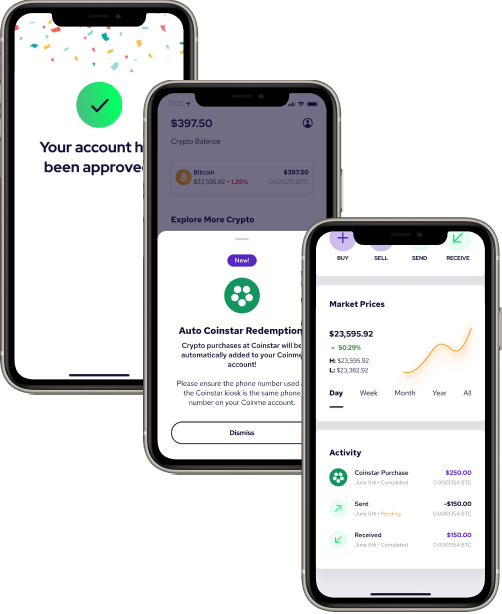
- Best for: Buyers who prefer cash-based or in-person ATM crypto purchases at retail locations
- Fastest funding method: Debit card for online purchases; cash at physical kiosks and Bitcoin ATMs for in-person buying
- Delivery type: Online debit-card purchases credit to your Coinme account balance; ATM and kiosk purchases can send Bitcoin directly or to a provided wallet address depending on the machine configuration
- Typical time-to-crypto: Online purchases authorize quickly; physical ATM transactions complete within minutes once cash is accepted and the transaction is broadcast to the network
- Key limits/holds to expect: ATM transaction limits vary by machine and verification level; online purchases may require identity verification before first transaction; daily and weekly purchase caps apply
- Fees/spread: Bitcoin ATM fees are typically 5% to 10%—significantly higher than online alternatives. Coinme operates across 30,000+ Bitcoin ATM locations in the U.S., so access is wide, but the cost of convenience at an ATM is real and should factor into your decision before you insert cash.
Where you can buy: Online via debit card at coinme.com, or in person at one of thousands of retail partner kiosks and ATMs. The fee structure differs substantially between channels—online debit purchases carry lower fees than ATM-based buying.
Strike
- Best for: Bitcoin-focused buyers who want fast, low-fee BTC purchases tied to Lightning Network functionality
- Fastest funding method: Debit card or linked bank account; debit card purchases authorize near-instantly
- Delivery type: Bitcoin credited to your Strike in-app balance; sending to an external wallet address is supported
- Typical time-to-crypto: Balance crediting is fast with card funding; on-chain send times depend on network conditions and Lightning vs. base-layer routing
- Key limits/holds to expect: Verification required before purchasing; new-user purchase limits apply and increase with account history; withdrawal eligibility may depend on funding method
- Fees/spread: Strike's fee structure is competitive for Bitcoin specifically; compare quoted rates carefully since spread can vary by funding method
Strike is Bitcoin-first by design—if your goal is to buy Bitcoin quickly and cheaply, it's a strong fit. If you need Ethereum, altcoins, or advanced order types (limit orders, trading pairs), Strike is a poor fit and a multi-asset exchange will serve you better.
Cash App
- Best for: Existing Cash App users who want to add Bitcoin exposure without opening a separate exchange account
- Fastest funding method: Cash App balance or linked debit card; both authorize quickly within the app
- Delivery type: Bitcoin is held in your Cash App in-app balance (third-party custody); sending to an external self-custody wallet is supported but involves additional eligibility steps. For a guide on how to send Bitcoin in Cash App to other users and externally, read our guide.
- Typical time-to-crypto: In-app crediting is near-instant; sending Bitcoin externally requires enabling withdrawals, which may involve identity verification steps not required for in-app holding
- Key limits/holds to expect: Weekly buy limits apply; sending Bitcoin out of Cash App requires a separate verification step and may not be available to all users immediately after purchase
- Fees/spread: Cash App charges a service fee plus a spread on the quoted price; the spread varies and is most visible when comparing the in-app price to market rates on an external source
Like Strike, Cash App is Bitcoin-only for crypto purchases—if you need Ethereum or any other asset, you'll need a different platform.
Kraken

- Best for: U.S. buyers who want access to a wide range of assets with a reputable, regulated exchange and faster trading access after funding
- Fastest funding method: Debit card or Apple Pay for instant funding; bank transfers are cheaper but slower
- Delivery type: Crypto is credited to your Kraken exchange account balance; withdrawal to an external wallet address is supported after funding method-specific hold periods clear
- Typical time-to-crypto: Card funding credits your account quickly for trading; withdrawing to a self-custody wallet is subject to hold periods that vary by payment method
- Key limits/holds to expect: Instant buy with a card feels fast because trading access is immediate—but withdrawal to an external wallet can still be delayed by method-dependent hold periods; verify your specific funding method's hold schedule before purchasing if same-day withdrawal matters
- Fees/spread: Card purchases carry a higher fee than bank transfers; instant buy pricing includes a spread in addition to stated fees—compare total cost versus limit orders on the pro interface if you're buying larger amounts
BitPay
- Best for: Users who want to buy crypto and have it delivered directly to a wallet at checkout, without maintaining an exchange account
- Fastest funding method: Debit card or credit card at checkout; Apple Pay and Google Pay supported depending on device
- Delivery type: BitPay functions as a checkout-style on-ramp—you enter a wallet address at purchase and crypto is sent directly to that address rather than held in a platform balance; this is a key differentiator from exchange-based buying
- Typical time-to-crypto: Payment authorization is fast; actual crypto receipt in your wallet depends on blockchain confirmation times for the asset purchased
- Key limits/holds to expect: No ongoing exchange account required, but identity verification is required at purchase; transaction limits apply per purchase
- Fees/spread: Card processing fees apply and vary by card type; BitPay supports 16+ cryptocurrencies for instant purchase—useful breadth for direct-to-wallet buying across assets beyond just Bitcoin and Ethereum.
MoonPay
- Best for: Users who want a widget-style, direct-to-wallet crypto purchase embedded across many wallets and platforms
- Fastest funding method: Debit card, credit card, Apple Pay, or Google Pay; card and mobile wallet payments authorize quickly
- Delivery type: Crypto is sent directly to a wallet address you provide at checkout—no MoonPay account balance; self-custody delivery is the default model
- Typical time-to-crypto: Payment authorization can take as little as ~4 minutes; Bitcoin can arrive in your wallet within ~10 minutes after payment confirmation, though times depend on payment processing and network confirmation conditions. Minimum purchase starts around $2, making small test transactions practical.
- Key limits/holds to expect: Identity verification required; limits vary by region and verification tier; card declines from issuing banks are a common friction point for first-time purchases
- Fees/spread: MoonPay charges a fee plus a spread; card fees are higher than bank transfer options where available—the convenience of instant card-to-wallet delivery comes at a cost premium versus exchange-based buying
Speed expectations: The ~4-minute authorization window refers to payment processing time. Blockchain confirmation time is separate and network-dependent—Bitcoin confirmation, for example, varies with network congestion regardless of how fast MoonPay processes your payment.
Platform Comparison: Fees, Speed, and Features
| Platform | Fees (service/payment) | Spreads (price markup) | Speed (approval → usable) | Supported Assets | Wallet Delivery Options | Recurring Purchases |
|---|---|---|---|---|---|---|
| ChangeHero | Network/exchange fee; no account required | Spread varies by pair liquidity | Fast for exchange-based flow; speed depends on network | 400 + crypto and fiat currencies | On-chain to self-custody | Limited |
| Coinbase | ~1.49 %–3.99 % depending on payment method | ~0.5 %–2 % markup on quoted price | Instant approval; crypto tradable immediately, withdrawable after hold period | 200 + coins | Custodial account credit; on-chain to self-custody | Yes — daily/weekly/monthly |
| Coinme | ~4 % service fee + ATM/kiosk surcharge | Embedded in quoted rate | Minutes to account credit; on-chain withdrawal may be delayed | BTC, select coins | Custodial account credit; partner wallet | Limited |
| Strike | Low/no service fee on BTC buys | Minimal spread on BTC | Near-instant for BTC; Lightning-enabled for fast on-chain delivery | Bitcoin-only | On-chain to self-custody; Lightning | Yes — recurring BTC buys |
| Cash App | ~1.76 % service fee + network fee on withdrawal | Spread embedded in quote | Instant in-app; on-chain withdrawal within minutes | Bitcoin-only | Custodial account credit; on-chain to self-custody | Yes — scheduled buys |
| Kraken | 0.9 %–1.5 % instant buy fee; lower on Pro | Tighter spreads than most instant-buy interfaces | Fast approval; near-instant tradable balance | 200 + coins | Custodial account credit; on-chain to self-custody | Yes — recurring via instant buy |
| BitPay | Service fee + card/Apple Pay/Google Pay payment fee | Spread built into quoted rate | Fast; delivery to BitPay wallet within minutes | 16 + cryptocurrencies | Third-party custody (BitPay wallet); on-chain to self-custody | Yes |
| MoonPay | ~1 %–4.5 % service fee; payment method fee varies | Spread embedded in quoted rate | ~4 min processing; within ~10 min after payment confirmation | 160 + assets | On-chain to self-custody; custodial option via partners | Yes |
Fees
When you buy crypto instantly, you can encounter up to four separate cost layers in a single transaction. Understanding where each appears — before you tap “confirm” — prevents surprises.
1. Platform / service fee
The percentage or flat fee the platform charges for executing the purchase. This is the most visible cost layer.
- How to spot it before confirming: It appears as a labeled “fee” or “service fee” line item on the order preview screen, before you reach the final confirmation button.
2. Payment method fee (card, Apple Pay, Google Pay)
Card networks and payment processors charge for instant funding. Platforms pass this through — sometimes blended into the service fee, sometimes listed separately.
- How to spot it before confirming: Look for a secondary fee line labeled “card fee,” “payment fee,” or similar on the same preview screen. If it is not shown separately, check the platform's fee schedule for your payment method before starting. Using Apple Pay or Google Pay typically triggers the same card-rate surcharge as a debit card.
3. Network / miner fee (on-chain withdrawals)
When you move purchased crypto off-platform to an external wallet, the blockchain charges a network fee. This is paid to miners or validators, not the platform, and fluctuates with network congestion.
- How to spot it before confirming: It appears at the withdrawal confirmation screen — not at the buy screen. The amount depends on current network conditions and is not fixed. Always check it at the moment of withdrawal, not at purchase time.
4. Express / instant delivery surcharge
Some platforms charge an additional fee if you want immediate on-chain delivery rather than a standard settlement window.
- How to spot it before confirming: Usually labeled “instant delivery,” “express,” or “priority” on the delivery options screen. If you select standard delivery, this fee disappears — but your crypto may be held for a longer period before it is withdrawable.
Spreads
A spread is the difference between the mid-market rate (the real-time exchange price you see on a reference site) and the rate quoted to you by the platform. It is not a labeled fee — it is baked into the price itself, and many buyers miss it entirely.
How to detect spread at purchase time:
- Compare the quoted price to a reference rate. Before confirming, open CoinGecko, CoinMarketCap, or a major exchange in another tab. If the platform's quoted Bitcoin price is noticeably higher than the reference, the gap is largely spread.
- Check whether the quote is “locked” for a countdown window. Most instant-buy platforms lock a rate for 10–30 seconds while you confirm. A locked quote is a signal that a spread is already embedded — the platform accepted the rate risk for that window and priced it in.
- Compare buy vs. sell quotes on the same platform. If the platform also lets you sell crypto, check both directions. A buy price higher than market and a sell price lower than market — simultaneously — is the clearest visible demonstration of spread.
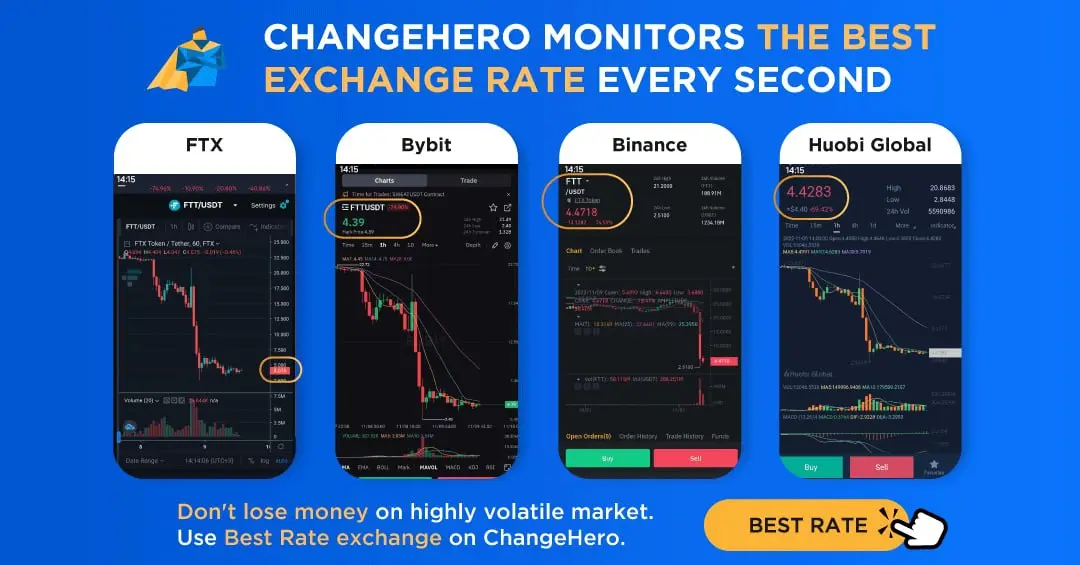
When you use an instant-buy interface, the platform absorbs three risks it does not face on a limit-order screen: it must execute immediately regardless of current liquidity, it guarantees a price before your payment clears, and it cannot predict short-term volatility in the seconds between quote and confirmation. The spread is supposed to compensate for all three. Advanced trading screens (spot markets, order books) shift those risks to the buyer — you set the price, you wait for a fill, and you accept slippage if liquidity is thin. The convenience of instant buy has a measurable rate cost, and spread is most of it.
Speed
Speed on an instant-buy platform has two distinct meanings, and conflating them leads to bad decisions.
Part A — Time to purchase approval
This is the time from tapping “buy” to receiving confirmation that the transaction is authorized. It covers card authorization, identity/anti-fraud checks, and payment processing. Most major platforms complete this in seconds to a few minutes under normal conditions.
Part B — Time to usable crypto
This is where platforms diverge significantly. “Usable” has two very different outcomes:
- Tradable in-app: The crypto appears in your platform balance and you can sell or swap it immediately. This can happen within seconds of purchase approval on platforms like Coinbase, Cash App, and Kraken.
- Withdrawable to an external wallet (on-chain): The crypto is released for on-chain transfer to your own self-custody address. This can be delayed by hours or days, depending on the platform's fraud-hold policy, your account verification level, and your payment method. A bank transfer purchase almost always has a longer withdrawal hold than a debit card purchase.
Key point: A platform can be near-instant for Part A and still impose a 3–7 day hold for Part B. “Instant buy” describes the purchase authorization speed, not the withdrawal availability.
This represents one of the faster on-chain delivery timelines among instant-buy platforms, though actual speed depends on network congestion at the time of the transaction.
Supported Assets
Not every platform sells every asset, and catalog size does not equal availability. In fact, the number of supported assets is not necessarily correlated with the quality in this case. Treat it as a spectrum:
1. Bitcoin-only apps
Strike and Cash App are Bitcoin-only. They offer the tightest focus, lowest complexity, and are purpose-built for fast BTC transactions.
2. Major coins (BTC + ETH focus)
Platforms like Coinme and BitPay cover the core pairs without a deep long-tail catalog. BitPay supports 16+ cryptocurrencies — enough for most common needs but not a broad multi-asset exchange.
3. Long-tail / multi-asset catalogs
Coinbase (200+), Kraken (200+), and MoonPay (160+) cover a wide range of assets. However, catalog size does not imply equal liquidity or availability for instant buys; many pairs on large catalogs have thin liquidity, slower settlement, or are restricted by jurisdiction.
4. Stablecoins
If you need to buy USDC, USDT, or similar stablecoins instantly, confirm availability specifically — not all platforms that list them support instant purchase via card or Apple Pay/Google Pay. Stablecoin availability also varies by state and payment method even within the same platform.
Wallet Delivery Options
How and where your crypto lands after purchase determines your control over it, your exposure to withdrawal holds, and whether you pay blockchain fees at delivery time.
1. Custodial account credit
The platform holds the crypto in an account it controls on your behalf. You have a balance, not a wallet with private keys.
- The platform can freeze withdrawals, impose holds, or restrict access. No blockchain network fee applies at the moment of purchase — the fee only appears when you later withdraw on-chain. This is the default for Coinbase, Cash App, and Kraken on instant buys.
2. On-chain to self-custody address
The platform sends purchased crypto directly to a wallet address you own, at the time of purchase.
- No platform-imposed withdrawal hold applies because delivery happens at purchase. You or the platform pays the network fee at delivery time — confirm which before buying. Strike (via Lightning), MoonPay (to external wallet), and ChangeHero operate this way.
3. Third-party custody / partner wallet
The crypto is delivered to a wallet operated by a third party (neither you nor the main platform). BitPay's own wallet is an example of this model.
- You hold a key to a partner wallet, but the custody model and key control terms depend on that third party's policies. Withdrawal holds likelihood depends on the partner. Blockchain fees at delivery depend on the partner wallet's structure. Read the partner wallet's terms separately from the platform's terms.
Recurring Purchase Options
Recurring buys (also called dollar-cost averaging or scheduled purchases) vary more than the checkbox on a platform’s feature list suggests:
- Frequency options: Does the platform support daily, weekly, bi-weekly, and monthly — or only one or two intervals? A limited frequency range constrains your DCA strategy.
- Minimum purchase size: Some platforms set a higher minimum for recurring buys than for one-time purchases. Confirm the recurring minimum before assuming the one-time minimum applies.
- Payment rails supported: Not all payment methods are available for recurring purchases. Bank transfers (ACH) are broadly supported; card-funded recurring buys are less common and may carry higher payment method fees.
- Price execution time window: Recurring buys execute at a scheduled time, but the exact price depends on the spread and rate available at that moment — not a pre-agreed rate. Confirm whether the platform uses a fixed-time execution or a best-available rate within a window.
- Auto-withdraw to self-custody: Most platforms do not automatically send recurring purchases to an external wallet. If on-chain self-custody is your goal, check whether the platform supports automatic withdrawal after each recurring buy, or whether you must manually initiate each transfer.
A word of caution: Recurring buys frequently execute at a fee and spread profile that differs from a manual instant buy — sometimes higher, because the platform factors in the payment method and execution model used for scheduled transactions. Review the recurring-buy fee schedule separately from the standard instant-buy fee schedule before activating.
Payment Methods for Instant Crypto Purchases

Not all payment methods deliver the same “instant” experience — and the gap between purchase confirmation and on-chain finality is where most confusion lives. Before choosing a payment rail, separate three timelines:
- (a) authorization time — how long the platform takes to confirm your payment
- (b) platform processing time — how long until funds appear in your trading balance or are released for withdrawal
- (c) blockchain confirmation time — how long until a transaction is irreversible on-chain
| Payment Method | Typical Speed to Buy | Typical Speed to Withdraw/Send | Fee & Pricing Patterns | Chargeback / Reversal Risk | Common Failure Points | Best For |
|---|---|---|---|---|---|---|
| Debit Card | Authorization time: seconds; trading balance: usually immediate | Withdrawal/on-chain send: minutes to 72 hours depending on platform hold policy | 1–4% processor fee; spread baked into quoted price | Low–medium (disputes possible but harder than credit) | Issuer block on crypto MCC, 3DS failure, daily card limits | Fast access to trading balance; small-to-mid purchases |
| Credit Card | Authorization time: seconds; trading balance: usually immediate | Withdrawal/on-chain send: same as debit, but hold periods may be longer | 3–5%+ processor fee; cash-advance APR applies; higher decline rate | High (chargebacks common; platforms price this in) | Cash-advance classification, issuer crypto block, credit limit | Users who accept cost tradeoff for card convenience |
| Apple Pay | Authorization time: seconds (biometric); trading balance: immediate | Withdrawal/on-chain send: same as underlying card | Same as underlying debit or credit card | Same as underlying card | Underlying card issuer block, Face/Touch ID failure | Reducing checkout friction on mobile |
| Google Pay | Authorization time: seconds (biometric); trading balance: immediate | Withdrawal/on-chain send: same as underlying card | Same as underlying debit or credit card | Same as underlying card | Underlying card issuer block, device authentication failure | Reducing checkout friction on Android/desktop |
| Bank Transfer | Hours to 2+ business days depending on rail | Withdrawal/on-chain send: after platform clears funds | Low fees (flat or small %) | Low | Ambiguous rail type (ACH vs wire vs RTP), manual processing delays | Moderate amounts where speed is secondary to cost |
| ACH Transfer | 1–3 business days to post; some platforms credit balance instantly pending risk hold | Withdrawal/on-chain send: often delayed 3–7 days by platform risk hold even after buy posts | Low (often $0–1.50 flat or small %) | Medium (ACH reversals possible for days) | Cutoff times, bank account name mismatch, insufficient funds, risk holds blocking withdrawals | Cost-sensitive buyers comfortable waiting |
| Wire Transfer | Same-day if initiated within bank cutoff hours; next-day if after hours | Withdrawal/on-chain send: typically released faster than ACH once wire confirms | $15–$50 sender bank fee; platform may charge receipt fee | Very low (near-irreversible once sent) | Initiation friction, after-hours bank delays, incorrect routing/account details | High-limit purchases where ACH caps are insufficient |
Verification, Limits, and “No-Verification” Options
Identity Verification Requirements
Most platforms that let you buy crypto structure access in tiers. Each tier unlocks more capability, and knowing your tier before you try to buy prevents failed transactions, unexpected holds, and confused “why can’t I send?” moments.
| Tier | What You've Provided | Payment Methods Available | Buy Limit (Typical) | Can Withdraw / Send On-Chain? | Common Hold Triggers |
|---|---|---|---|---|---|
| Email / Phone Only | Email address + phone number | Limited or none (some allow small card purchases) | Very low (e.g., $30–$150/day) | No | Nearly any purchase |
| Basic Identity | Name, date of birth, address | Debit/credit card, some instant bank | Low–moderate (e.g., $500–$2,000/day) | Sometimes, with cooldown | First purchase, new device, address mismatch |
| Full KYC | Government ID + selfie/liveness check | All supported rails including bank transfer/ACH | Higher or unlimited per platform policy | Yes, typically after clearing period | Large ticket size, new wallet address |
This table is largely generalized and platform-agnostic. Specific platforms adjust these thresholds, but the pattern—more data exchanged for more capability and higher limits—is consistent across licensed services operating in most jurisdictions.
Having these ready before you begin reduces retries significantly:
- Document type: Government-issued photo ID (passport, national ID, or driver's license). Confirm the platform accepts your document's country of issue.
- Selfie / liveness check: A front-facing camera is required. Poor lighting and covered faces are the leading causes of automated rejection.
- Name match: The name on your ID must match the name on your payment method. A nickname, maiden name, or middle-name discrepancy commonly causes a retry loop.
- Address match: Your registered address should match your billing address on file with your bank. Mismatches trigger AVS failures that look like payment declines.
- Document validity: Expired documents fail immediately. Damaged or partially obscured documents often require manual review, adding hours or days.
- What causes retries: Glare on ID, cropped edges, mismatched names, and mismatched addresses account for the majority of verification delays.
No-Verification Options
“No verification” is not one thing. It describes at least two distinct product categories with different trade-offs, and conflating them is one of the fastest ways to misunderstand what a checkout flow can actually do.
Category 1: No Account / No Login Checkout
You do not create a profile or log in. You provide a destination wallet address, select an amount, and pay. The platform still performs card network checks (including 3DS authorization), screens your payment instrument, and may run the transaction against sanctions lists. Some instant checkout providers in this category include ChangeHero, which emphasizes direct-to-wallet flows rather than maintaining a hosted exchange balance.
- What you can do immediately: Complete a one-time purchase; receive crypto to your own wallet.
- What is commonly restricted: Repeat purchases above a low threshold, refunds to the original payment method, any form of stored balance or account history, and customer support recovery if something goes wrong.
Category 2: No Identity Verification / Limited KYC
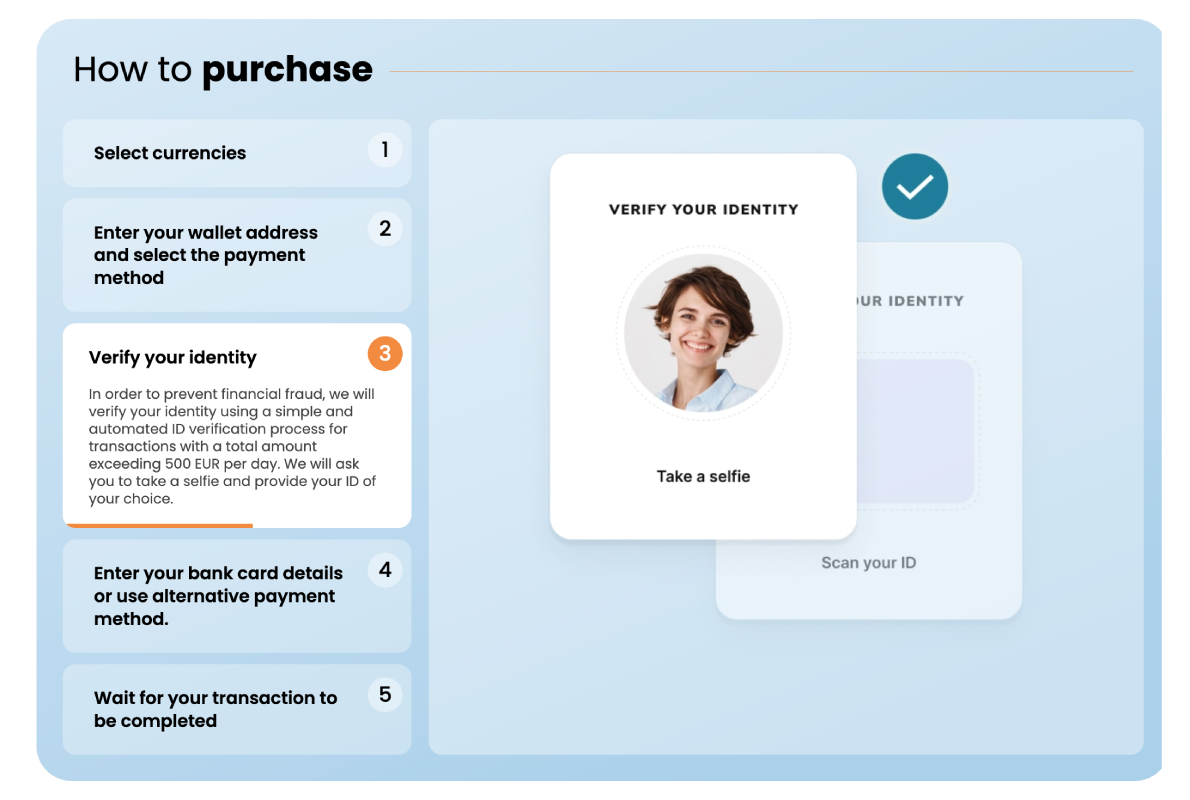
You create an account with an email address or phone number but are not asked to submit a government ID. The platform collects your payment data (card number, billing address) but does not verify your identity document. ChangeHero’s integrated fiat-to-crypto partners also enable KYC-free purchases for amounts up to 700 EUR.
- What you can do immediately: Buy crypto up to a low per-transaction and daily ceiling; in some cases, receive crypto to a linked wallet.
- What is commonly restricted: Withdrawals above the tier's ceiling, sending to new or external wallet addresses, and purchasing again within a short velocity window. Increasing limits requires moving to a higher verification tier.
No-verification flows almost always carry higher fees or wider spreads than fully verified accounts. This is not arbitrary. When a platform cannot verify who you are, it cannot dispute a chargeback with evidence of identity. The chargeback and fraud risk is priced into the transaction. Specifically:
- Higher spreads: The markup on the exchange rate absorbs expected fraud losses across the pool of unverified buyers.
- Stricter limits: Low per-transaction ceilings cap the maximum loss exposure per fraudulent transaction.
- Delayed or restricted withdrawals: Holding crypto on-platform or delaying on-chain delivery gives the platform a window to reverse a transaction if the payment is flagged after settlement.
If your priority is speed and anonymity rather than lower cost or higher limits, the cost premium is the mechanism that makes the service viable for the platform.
Risk Controls
Even when a purchase is approved, automated risk controls determine what you can do next. Understanding each control and its remediation path saves time when something unexpected happens.
Common Risk Controls at the Point of “Instant” Purchase:
3DS / AVS (Payment Verification)
- What you experience: A redirect to your bank's authentication page (3DS), or a silent decline because your billing address doesn't match bank records (AVS).
- Fastest legitimate fix: Complete the 3DS prompt immediately—it times out. For AVS failures, update your billing address in your platform account to match your bank exactly, then retry.
Device / IP Reputation Check
- What you experience: A soft decline or an added verification step (e.g., SMS code, ID prompt) when purchasing from a new device, browser, or IP address—particularly a VPN or datacenter IP.
- Fastest legitimate fix: Disable VPN if active. If purchasing from a new device, complete the device verification step before retrying. Avoid switching devices mid-session.
First-Time Buyer Throttle
- What you experience: A lower limit than your verified tier suggests, or a hold on the purchased crypto, on your first purchase. The restriction typically eases automatically after 24–72 hours or after a second successful transaction.
- Fastest legitimate fix: Make a smaller first purchase to establish account history, then increase size on the second transaction.
Chargeback / Fraud Flag

- What you experience: A declined purchase with a generic error code, or an account review hold after the transaction completes.
- Fastest legitimate fix: Contact support with proof of identity and payment ownership. Attempting to re-submit the same transaction repeatedly after a fraud flag typically deepens the restriction.
Withdrawal Cooldown
- What you experience: Your purchased crypto is credited to your platform account instantly, but the "send" or "withdraw" button is disabled or shows a timer.
- Fastest legitimate fix: Wait out the cooldown period (see explanation below). There is no shortcut; the cooldown is tied to payment settlement, not blockchain speed.
When your buy gets approved but no sending is available yet is one of the most common points of confusion. When you buy crypto, two separate things happen:
- Instant account credit: Your platform balance updates immediately. You own the crypto in your account.
- On-chain delivery: The platform sends crypto to your external wallet address. This step is held until the platform has sufficient confidence that your payment will not be reversed.
The delay between (1) and (2) is a risk control, not a blockchain speed issue. The platform is waiting for your payment to clear enough that a chargeback can no longer reverse the funds it has already sent. The length of this hold depends on your verification tier, payment method, and account history—not on network congestion.
Risks, Legality, and Key Considerations
Buying crypto instantly is fast, almost as much as the name implies it should be — which also means your window to catch mistakes is compressed. The right mental model is simple: instant buying is a convenience product, and convenience increases both cost (fees/spreads) and operational risk (holds, reversals, irreversible sends).
Security and Scam Avoidance
Before completing any instant buy, run through these steps:
- Confirm the domain or app publisher. In a browser, check the exact URL for typosquatting (e.g., "colnbase.com"). In an app store, verify the developer name matches the official company—not a third-party clone.
- Cross-check the receiving wallet address on a second channel. If you're sending to an address provided by a platform or peer, confirm it via the platform's official app or a verified email thread—not a chat message or link someone sent you.
- Verify support contact paths before you need them. Legitimate platforms list support within their authenticated dashboard. If "support" contacts you first via Telegram, Discord, or SMS, treat it as a red flag.
- Test with a small first transaction. For any new platform or wallet address, send the minimum amount and confirm receipt before committing a larger sum.
- Reject any remote-access request. No legitimate exchange or wallet provider will ask you to install screen-sharing or remote-desktop software to complete a purchase or resolve an issue.
- Recognize impersonation patterns. Scammers frequently pose as exchange staff, government officials, or well-known figures to create urgency. Official platforms never ask for your seed phrase, password, or 2FA codes.
- Scrutinize "too-fast" KYC flows. If a site claims to verify your identity in under 30 seconds with no document upload, that is a signal—not a feature. Legitimate instant KYC still involves real document capture.
- Inspect payment links before paying. Payment-link invoice scams mimic platform checkout pages with altered destination addresses or amounts. Always initiate payments from inside the authenticated platform, not from a link in an email or message.

Two instant-buy specific scam patterns to recognize:
- Fake "instant KYC" pages: A cloned site replicates a real exchange's verification flow to harvest your ID documents and payment details. The giveaway is usually a slightly wrong URL, no two-factor prompt, and a request to "verify" by entering your existing account credentials.
- Fake payment-link invoices: You receive an email or message with an invoice that looks like it's from a legitimate platform. The link goes to a spoofed checkout page. Your payment goes to the scammer's account, and no crypto is ever delivered.
If you already sent funds:
- Freeze your payment method immediately—call your bank or card issuer to flag or freeze the card used.
- Contact the platform's official support through the authenticated dashboard, not a number found via search engine.
- File a report with your local police; if you are US-based, with the FBI's Internet Crime Complaint Center (IC3) at ic3.gov. Also consider filing with the FTC at reportfraud.ftc.gov.
Payment Fraud Prevention
Different payment methods carry different fraud profiles. Here is a decision-oriented breakdown:
| Payment Method | Typical Fraud Vector | Who Can Reverse the Payment | What the Platform Typically Does |
|---|---|---|---|
| Debit card | Stolen card number or account takeover (ATO) | Your bank (limited window, varies by bank policy) | May impose velocity limits, require extra verification, apply temporary withdrawal holds |
| Credit card | Stolen card, ATO, or friendly fraud chargebacks | Card issuer (chargeback rights under Reg Z/network rules) | Often applies longer withdrawal holds or disables credit card as a payment method; some platforms do not accept credit cards for crypto |
| Apple Pay / Google Pay | Device compromise or ATO on the linked card | Underlying card issuer (same chargeback mechanics as the linked card) | Treated similarly to debit or credit depending on the linked funding source; device-level tokenization reduces raw card exposure |
| Bank account / ACH | Account takeover, unauthorized ACH pull | Your bank (ACH reversal window is typically 60 days for unauthorized transactions) | Frequently triggers the longest withdrawal holds (sometimes 3–10 business days) because ACH settlement is delayed and chargebacks are possible after crypto is released |
The practical implication is mechanical, not moral: the faster your payment method can be reversed by a third party, the longer the platform is likely to hold your crypto before you can move it off-platform or to self-custody.
Account takeover (ATO) is a top fraud vector across all payment methods. Controls that matter specifically when you're making instant purchases:
- Use a passkey or authenticator app (TOTP) for 2FA, not SMS. SMS-based two-factor authentication is vulnerable to SIM-swap attacks, where a fraudster convinces your carrier to transfer your phone number to a device they control—giving them access to every SMS 2FA code sent to that number.
- Enable anti-phishing codes where the platform offers them. This is a unique string shown in every legitimate email from the platform, so you can distinguish real emails from spoofed ones.
- Use device approval or trusted-device lists. Platforms that require explicit approval for new devices slow down an attacker even after a password compromise.
- Treat SIM-swap risk as real. If your mobile number is your account recovery method, a SIM swap can bypass every other control. Use an authenticator app, a hardware key, or a platform that supports passkeys instead.
Transaction Finality and Chargebacks

Two separate timelines often run in parallel after an instant purchase—and confusing them is a common source of frustration.
- Blockchain settlement finality refers to when a transaction on the blockchain is considered irreversible by the network. For Bitcoin, this is commonly treated as 6 confirmations (roughly 60 minutes). For Ethereum, finality under proof-of-stake is typically reached within minutes. For faster networks like Solana or Avalanche, it can be seconds. Once a transaction reaches finality on-chain, no one—including the platform—can reverse it at the protocol level.
- Payment settlement refers to when the platform has actually received cleared funds from your bank, card issuer, or payment processor. A debit card authorization may be instant, but full settlement can take 1–3 business days; ACH can take longer. Until payment settles, the platform carries the risk that you could dispute or reverse the payment.
When a platform gives you “instant” crypto access after purchase, it is extending credit to you against uncleared funds. To manage its risk, it typically places a hold on withdrawals until payment fully clears; during the hold, you can usually trade within the platform (swapping one asset for another, for example).
Sending crypto off-platform to an external wallet address, or withdrawing to self-custody is usually restricted during this time. This is not a bug—it is the platform protecting itself against chargebacks. Once your payment clears, the hold lifts and full transfer rights are restored.
Tax Records and Reporting Basics
For minimum viable recordkeeping for instant purchases, save the following for every instant buy, at the time of purchase:
- Date and time of the transaction (including time zone)
- USD amount paid (the fiat value at the moment of purchase)
- Fees and spread paid (platform fee, network fee, and any spread built into the quoted price—these affect your cost basis)
- Asset amount received (exact quantity, e.g., 0.00412 BTC)
- Transaction ID (TXID) if the asset moves on-chain—this is the on-chain receipt
- Receiving wallet address (the address credited, whether on-platform or in self-custody)
- Platform transaction statements or confirmations (download or screenshot at time of purchase; platforms can close accounts, delist assets, or change their history interfaces)
In most jurisdictions including the US (per current IRS guidance), simply purchasing and holding cryptocurrency is generally not a taxable event. What commonly triggers a taxable event later:
- Selling crypto for fiat (USD)
- Trading one crypto asset for another
- Spending crypto on goods or services
- Receiving crypto as income, rewards, or staking returns
This means the records you keep at the time of an instant purchase form the cost basis for every future taxable event involving that asset. If you do not have accurate purchase records, calculating gains and losses accurately becomes difficult or impossible.
Multiple wallets and exchanges complicate cost basis even further: if you buy the same asset across multiple platforms or move assets between a third-party custody platform account and a self-custody wallet, each movement can create a new cost basis event question. Different exchanges report data in different formats. Self-custody wallets do not generate tax forms. Crypto tax software can help reconcile across sources, but only if you have the raw records (TXIDs, wallet addresses, purchase amounts) to feed into it.
Even with all this in mind, this is not intended to be personalized tax advice—consult a qualified tax professional for your specific situation. The point here is practical: save everything at purchase time, because reconstructing it later is harder than it sounds.
Conclusion
With the total crypto market cap sitting at approximately $2.2 trillion as of June 2026, the infrastructure for buying Bitcoin, Ethereum, and hundreds of other assets instantly has never been more mature—but “instant” still means different things depending on where you look in the UI.
To reiterate, “instant” account credit and on-chain delivery to a self-custody wallet are not the same event. When you complete a purchase, check the UI carefully: funds labeled “available to trade” mean the platform holds them on your behalf in third-party custody; funds labeled “available to withdraw” or “available to send” mean you can actually move them to an external address. Never assume you can send or receive on-chain until you see the withdrawal-available status confirmed.
Frequently Asked Questions
How fast will I receive crypto after purchase?
Speed depends entirely on whether you need the crypto credited to your account or actually withdrawn to an external wallet — those are two different timelines. Most platforms reflect your purchase in your internal balance within seconds to a few minutes, letting you trade, swap, or hold immediately inside the app. Sending to a self-custody or external address requires a blockchain transaction, which adds confirmation time on top of any platform-side hold.
Is buying crypto instantly secure?
Buying crypto is as secure as the weakest link in your setup — and that link is usually the user's account, not the platform itself. A licensed, regulated platform can protect your funds at the custody layer — but it cannot protect you from approving a malicious transaction yourself. Note also that "instant" purchase options sometimes trigger stricter automated risk controls on the platform side, which can appear as unexpected delays or temporary holds — this is a security feature, not a bug.
Can I use both custodial and self-custodial wallets?
Yes, but the right choice depends on what you need to do with your crypto in the next few hours versus the next few months. If you need to send to another person or external app today → prioritize platforms that support immediate withdrawals and confirm there's no hold period. If you only need price exposure today → custodial credit inside the platform may be sufficient. Always confirm the asset and network match before initiating a send or receive. Sending an Ethereum token over the wrong network, for instance, can result in permanent loss with no recourse from any platform.
What are the fees for buying crypto?
The total cost of buying crypto is almost always higher than the single fee percentage displayed.
"Instant" purchases often shift cost into the spread even when the displayed fee looks low or zero — you're paying through the price, not a labeled charge. For context on how high fees can get outside of online platforms: Bitcoin ATM fees commonly range from 10–20% or higher, far above typical online on-ramp rates.What is the difference between instant purchase and instant withdrawal?
“Instant purchase” means the trade executes immediately, while “instant withdrawal” means you can immediately send that crypto to an external address. For example, you buy Bitcoin instantly using a debit card. Your balance updates immediately and you can see the BTC in your account. However, when you try to send it to a hardware wallet, the platform shows a hold of 24–72 hours before the withdrawal is enabled. Your purchase was instant but the withdrawal was not.
Can I buy crypto instantly without KYC verification?
Some platforms allow small purchases with minimal friction, but what you can do with that crypto — and how much you can buy — is often tightly limited without identity verification. Certain non-custodial or peer-to-peer on-ramps allow small purchases with only an email or phone number. Higher purchase limits, the ability to cash out to a bank account, and withdrawals above threshold amounts almost always require KYC (Know Your Customer) identity verification on licensed, regulated platforms.