How to Pay with Bitcoin? Beginner's Guide to Crypto Payments

Contents
- 1. Bitcoin Basics: What You Need Before You Can Pay
- 2. Setting Up a Bitcoin Wallet: Your First Step to Paying with Bitcoin
- 3. How to Buy Bitcoin with Apple Pay or Google Pay
- 4. How to Pay with Bitcoin Online
- 5. How to Pay with Bitcoin In Store
- 6. Can You Pay with Bitcoin Without a Wallet?
- 7. How to Pay Someone with Bitcoin (Friends, Family, Freelancers)
- 8. Paying Bills with Bitcoin
- 9. Bitcoin in PayPal and Other Payment Systems
- 10. Security Best Practices for Bitcoin Payments
- 11. Legal, Tax, and Compliance Considerations for Bitcoin Payments
- 12. Bitcoin Payment Times, Fees, and Choosing the Right Method
- 13. Troubleshooting Common Bitcoin Payment Issues
- 14. Real-World Examples and Case Studies: Paying with Bitcoin Day to Day
- 15. Conclusion: Making Bitcoin a Practical Part of How You Pay
Picture this: you're checking out online or standing at a store register, and you see "Bitcoin accepted here." You've got some Bitcoin sitting in an exchange or app, and you're genuinely curious—how do you actually pay with it? What wallet do you need? What about fees? Could you mess this up and lose your Bitcoin? And wait, do you owe taxes on this?
These are the exact questions that keep people from using Bitcoin for everyday purchases, even when they're ready to try. Which wallet should you use? How do you pay someone on Cash App? Can you buy Bitcoin with Apple Pay or Google Pay and then spend it? How do you pay bills with Bitcoin? Can you even pay with Bitcoin without a wallet at all? Add in concerns about security, legal compliance, and what happens if something goes wrong, and it's no wonder most people stick to traditional payment methods.
Here's what you need to know: Bitcoin payments are real, they're growing fast, and they're becoming easier to use every year thanks to tools like the Lightning Network and integrations with major platforms like PayPal. But they still require some upfront understanding.
This guide walks you through everything step by step. You'll learn how to pay with Bitcoin online and in physical stores, how to pay individuals directly, and how to handle platforms like PayPal and Cash App. We'll also cover how to buy Bitcoin using Apple Pay or Google Pay, how to pay your bills with Bitcoin, security best practices, tax implications, troubleshooting common issues, and real-world examples.
This is a practical guide, not investment advice. By the end, you'll know exactly how to use Bitcoin as a payment method—safely, confidently, and without unnecessary confusion.
Bitcoin Basics: What You Need Before You Can Pay

If you have time to spare, learn everything about Bitcoin transactions in this comprehensive guide. In this guide, the round-up is going to be more brief to get to the gist of paying with Bitcoin faster but if you are completely unfamiliar, better to learn it in theory before you screw up in practice.
Anyway, before you can pay for things with Bitcoin, you need two essentials: a wallet and some BTC in it. Unlike paying with a debit card or PayPal where your bank or payment provider handles everything behind the scenes, BTC payments put you in direct control of your money. That means having to understand a few foundational concepts upfront.
What Is Bitcoin and How Do Bitcoin Payments Work?
In simple terms, Bitcoin is a decentralized digital currency. No government, bank, or company controls it. Instead, it operates on a global network of computers that maintain a shared record of all transactions—a public ledger called the blockchain.
Here's how a payment actually works: when you pay someone with Bitcoin, you're creating a transaction in your wallet and broadcasting it to the Bitcoin network. Miners collect these transactions, verify them, and include them in the next block added to the blockchain. Once your transaction is included in a block, it gets one confirmation.
Most recipients consider a payment secure after three to six confirmations, which typically takes 30–60 minutes on the main Bitcoin network. On-chain Bitcoin transaction times average around 10 minutes for one confirmation but can take 30–60 minutes to be considered secure, while Lightning Network payments are settled in seconds.
This differs significantly from credit card or PayPal payments, which rely on intermediaries to approve, process, and settle your transaction. With Bitcoin, once the network confirms your payment, it's final. No chargebacks. No reversals.
Why Use Bitcoin for Payments? Key Advantages and Disadvantages
Bitcoin payments come with real benefits—and a few trade-offs you should know about.
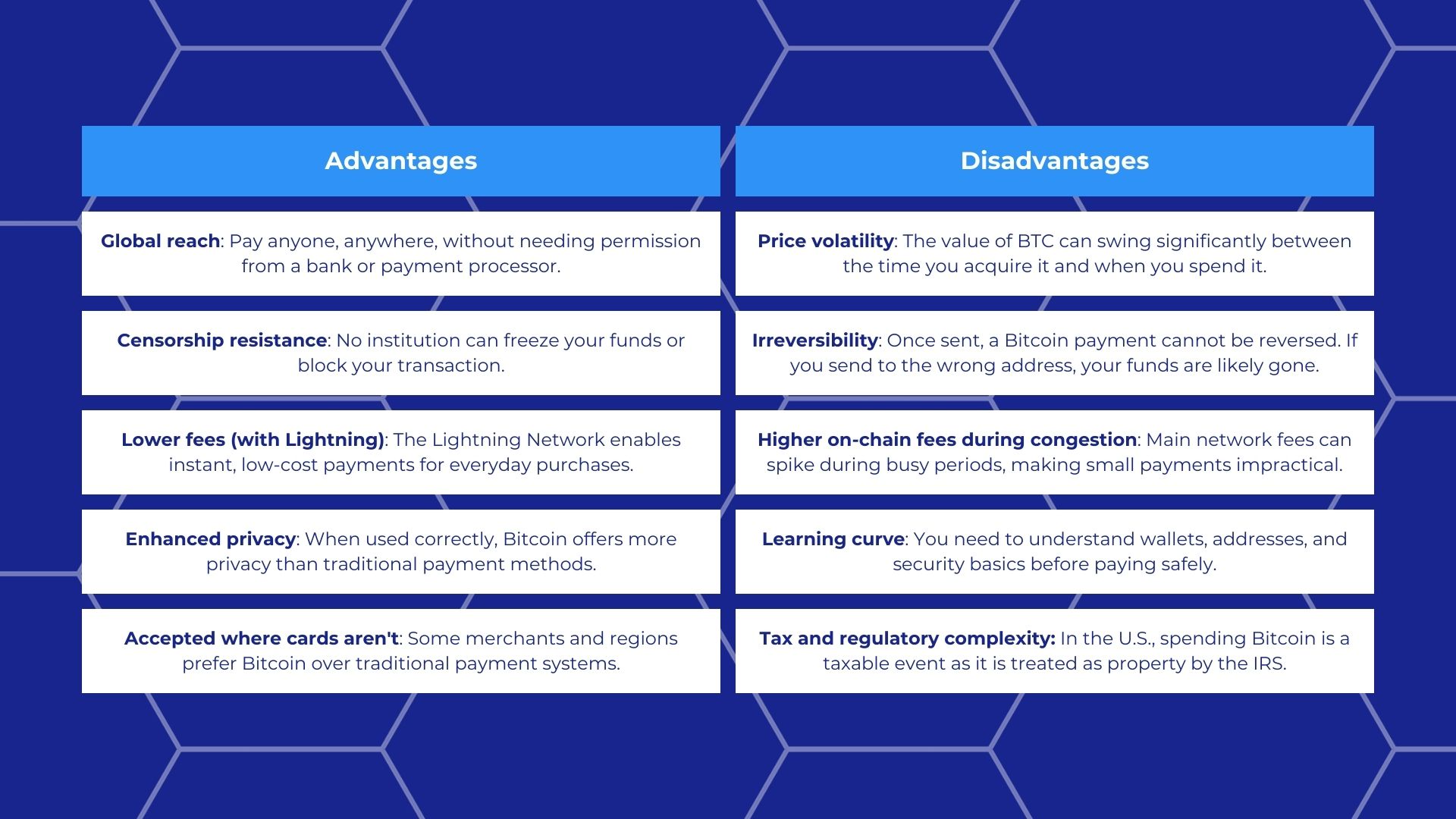
Later sections will walk you through setting up a wallet, choosing the right payment method, and avoiding common pitfalls so you can confidently use Bitcoin for everyday purchases, whether you're paying someone directly, shopping online, or even covering your bills.
Setting Up a Bitcoin Wallet: Your First Step to Paying with Bitcoin
Once again, if you have time to spare, we have a dedicated guide to setting up a wallet. After all, it is a necessary step to use BTC, whether to buy things with it or anything else! Taking a few minutes to learn more will certainly pay off later down the line.
Before you can pay for things with Bitcoin—whether online, in a physical store, or sending it to someone directly—you need a Bitcoin wallet. A wallet in crypto is the tool that instead of storing cryptocurrency stores your private keys, the cryptographic credentials that prove you own your Bitcoin and allow you to spend it. No wallet means no ability to pay. The good news? Setting up your first wallet is straightforward once you understand the options.
Types of Bitcoin Wallets: Custodial vs. Self-Custody
Bitcoin wallets fall into two main categories: custodial and self-custodial (also called non-custodial). The key difference is in who controls the private keys, and consequently, the funds.
Custodial wallets are managed by a third party, typically an exchange like Coinbase or an app like Cash App or PayPal. You don't hold the private keys yourself; the service does. This makes them easy to use and ideal for beginners who want to buy Bitcoin with Apple Pay or Google Pay and start paying with Bitcoin quickly. The trade-off is trust: you're relying on the platform to safeguard your funds. If the service is hacked or goes offline, you could lose access.
By the way, when people search for how to pay with Bitcoin without a wallet, they're often referring to these custodial services. They do have a wallet—it's just managed for them.
Self-custodial wallets give you full control of your private keys. Options include mobile wallets (like Exodus or Edge), desktop wallets (like Electrum), hardware wallets (like Ledger or Trezor), and browser-based wallets. These are ideal if you value sovereignty and security. The trade-off? You're responsible for your seed phrase storage (also called a recovery phrase)—a 12- or 24-word backup that can restore your wallet if your device is lost.
Here's a quick comparison:
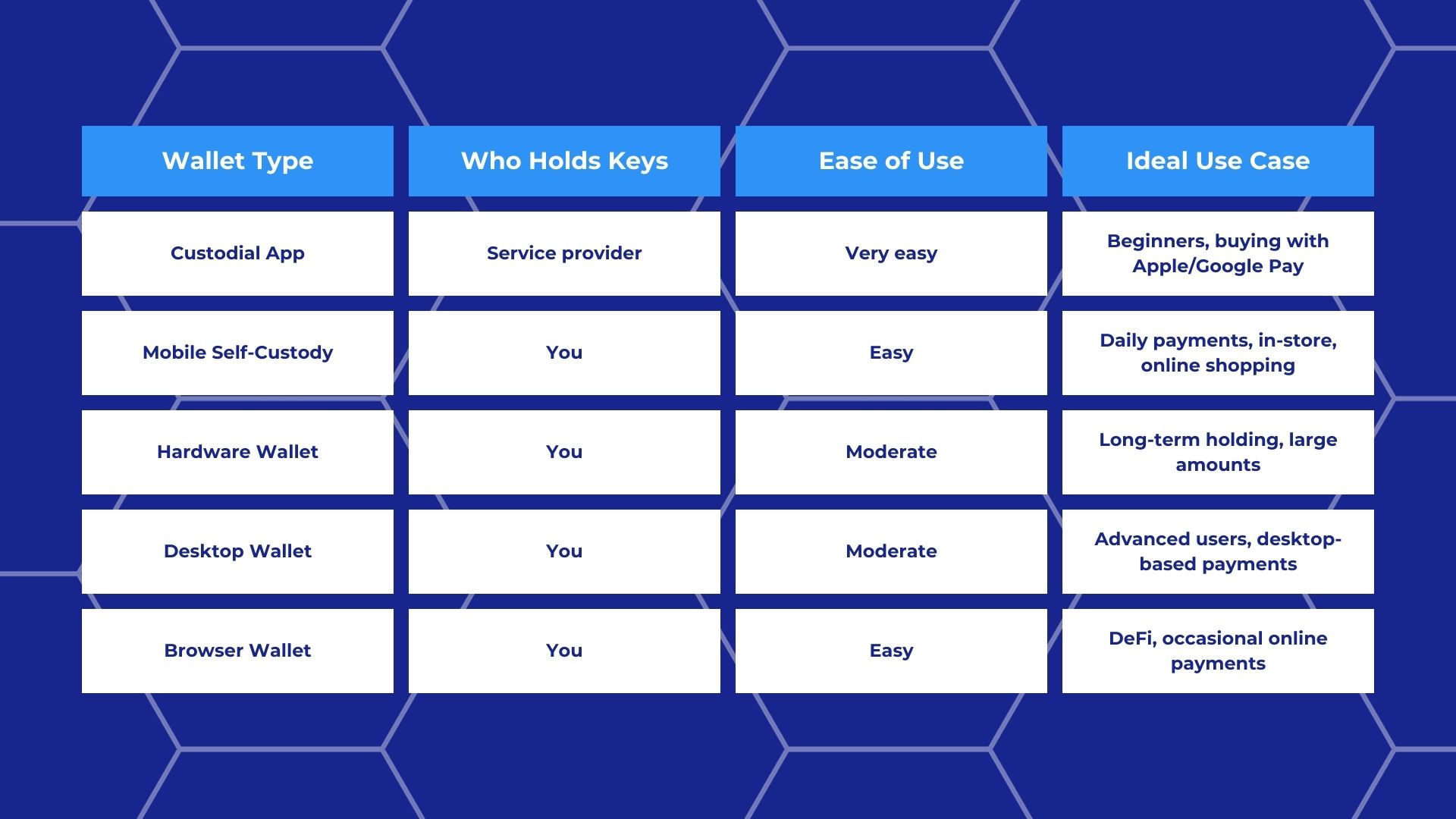
Your choice directly affects how you pay. Custodial apps make it simple to pay bills with Bitcoin or pay someone on Cash App. Self-custodial mobile wallets give you flexibility for peer-to-peer transfers and in-store QR code payments. Hardware wallets are overkill for daily purchases but critical for securing larger holdings.
Step-by-Step: Creating and Securing Your First Bitcoin Wallet
Let's walk through setting up a self-custodial mobile wallet—the most versatile option for learning how to pay with Bitcoin.
- Step 1: Download a reputable wallet.
Choose a well-reviewed wallet like BlueWallet, Muun, or Exodus. Download only from official app stores or the project's verified website—third-party links can be unsafe. - Step 2: Create a new wallet.
Open the app and select "Create New Wallet." The app will generate a recovery phrase: 12 or 24 words that represent your private keys. - Step 3: Write down your recovery phrase offline.
This is critical. Never take a screenshot, never store it digitally; any digital exposure makes it susceptible to leaking. Write it on paper instead and keep it somewhere safe. If you lose your phone and your backup, your Bitcoin is gone forever. No exceptions. - Step 4: Set a strong password or PIN.
This adds a layer of security if someone gains physical access to your device. - Step 5: Enable two-factor authentication (2FA) if available.
Not all wallets offer this, but if yours does, use it. - Step 6: Test with a small amount.
Once your wallet is set up, send yourself a tiny amount of Bitcoin—even $5 worth. Practice receiving and sending to make sure you understand the process before using larger amounts.
Common beginner mistakes:
- Taking a screenshot of the seed phrase (risky because it could be backed up to cloud storage or stolen by malware)
- Losing the backup entirely (treat your recovery phrase like cash)
- Sending Bitcoin to the wrong network (for example, sending Bitcoin to an Ethereum address—if it goes through, it's gone)
Funding Your Wallet: Getting Bitcoin Ready to Spend
Now that your wallet is set up, you need BTC in it. There are three main ways to acquire Bitcoin:
- Buy on a centralized exchange or app.
Platforms like Coinbase, Kraken, or Cash App let you buy Bitcoin using a bank transfer, debit card, or payment methods like Apple Pay and Google Pay. (We cover how to buy Bitcoin with Apple Pay and Google Pay in detail in a separate section.) After purchasing, you can either keep the Bitcoin in the app's custodial wallet or withdraw it to your self-custodial wallet for full control. - Peer-to-peer (P2P) purchase.
Platforms like Bisq or local meetups allow you to buy Bitcoin directly from another person. This method offers more privacy but requires extreme caution. Always use escrow services and verify the seller's reputation to reduce the risks. - Receive Bitcoin as payment.
If you're freelancing or selling goods, you can simply request payment in Bitcoin directly to your wallet address. No middleman required.
A note on KYC: Most exchanges and apps require Know Your Customer (KYC) verification—uploading ID and proof of address—to comply with anti-money laundering (AML) regulations. This is standard practice in most jurisdictions. P2P platforms may offer more privacy but can come with higher risks.
“Start small” is a mantra we repeat often. If you're new to paying with Bitcoin, begin with small amounts until you're comfortable with wallet security, transaction fees, and the payment process. Once you've funded your wallet, you're ready to pay for things with Bitcoin—whether that's online shopping, in-store purchases, or sending Bitcoin to a friend.
How to Buy Bitcoin with Apple Pay or Google Pay
Buying Bitcoin with Apple Pay or Google Pay is essentially the funding step before you can actually pay for things with Bitcoin. These mobile payment methods let you move money from your bank account or card into a crypto platform quickly, but they're only the first part of the process. Once you own the Bitcoin, you'll still need to transfer it to a wallet if you want to spend it freely.
Using Apple Pay to Buy Bitcoin
To buy Bitcoin with Apple Pay, you'll need to use a crypto exchange or app that supports Apple Pay as a funding method. As of 2026, several major platforms offer this option—especially mobile-first services targeting new users. Here's how the generic flow works: create an account with a reputable provider, complete identity verification (KYC) if required, navigate to the buy section, select Bitcoin as the asset you want to purchase, choose Apple Pay as your payment method, enter the dollar amount you want to spend, and confirm the transaction.
Within minutes, the Bitcoin should appear in your account balance on the platform. But here's the catch: Apple Pay purchases often come with higher fees or built-in markups compared to bank transfers. Some platforms charge convenience fees on top of the standard spread (the difference between buy and sell prices), so it's worth comparing costs across providers before you commit. The speed and simplicity make it appealing for small, fast purchases. But if you're buying larger amounts to pay bills or send to someone, a lower-fee method might make more sense.
Using Google Pay to Buy Bitcoin
The process for using Google Pay to buy Bitcoin is nearly identical. Choose a platform that accepts Google Pay, link your Google Pay account to the crypto service, select Bitcoin, enter your purchase amount, and confirm. Google Pay pulls funds directly from your linked bank account or card, and the Bitcoin lands in your account on the platform shortly after.
That said, availability can be inconsistent. Not all exchanges support Google Pay, and even when they do, some banks or regions may block crypto purchases through mobile wallets. In 2025, this is improving, but it's still smart to verify on the provider's website whether your location and bank are supported. Like Apple Pay, Google Pay purchases can come with extra processing fees—so keep an eye on the total cost before clicking confirm.
From Purchase to Payment: Moving BTC into a Spendable Wallet
Once you've bought Bitcoin using Apple Pay or Google Pay, it's sitting on the exchange or app where you purchased it. That's fine for holding, but not ideal if you want to pay someone with Bitcoin or spend it at a store. To actually use it for payments, you'll usually need to send the Bitcoin to a personal wallet—either a mobile wallet for on-chain payments or a Lightning-enabled wallet for instant, low-fee transactions.
Here's a quick checklist for moving your Bitcoin safely:
- Check the platform's withdrawal fees before you send (some charge flat fees, others charge a percentage).
- Send a small test amount first to confirm the address and network are correct.
- Copy the receiving wallet address carefully and double-check it.
- Wait for the required confirmations to complete (this can take 10–30 minutes on-chain depending on network activity).
Keeping Bitcoin on an exchange may be convenient for buying and selling, but it means the platform controls your private keys. If you're planning to pay for things with Bitcoin regularly, moving it to a wallet you control gives you full ownership and flexibility.
How to Pay with Bitcoin Online
Paying for something with Bitcoin online is straightforward once you know the typical checkout flow. Most merchants that accept Bitcoin use a payment processor like BitPay or BTCPay Server to handle the transaction, meaning you'll see a Bitcoin invoice at checkout rather than dealing directly with the merchant's wallet. The merchant's system converts your purchase total into Bitcoin at the current exchange rate, generates a payment request with a QR code and a Bitcoin address, and waits for your payment. You complete the transaction from your wallet or exchange account, and the merchant receives confirmation once the network processes it.
Step-by-Step: Paying a Merchant Online with Your Wallet
Here's how a typical online Bitcoin payment works from start to finish:
- Select Bitcoin at checkout.
After adding items to your cart, proceed to checkout and choose Bitcoin as your payment method. The merchant's payment processor will generate an invoice. - Review the invoice details.
You'll see a QR code, a Bitcoin address, the exact amount to send (usually displayed in both BTC and your local currency), and a countdown timer (often 10–15 minutes). The timer exists because Bitcoin's price fluctuates: the invoice amount is locked for a limited window so both you and the merchant know exactly what's being exchanged. - Send payment from your wallet.
Open your wallet app, tap "Send," and either scan the QR code or manually paste the address. The amount should auto-fill if you scanned the code. If not, enter the exact amount shown on the invoice. - Choose your network (if applicable).
Some merchants offer both on-chain Bitcoin payments and Lightning Network payments. Lightning is faster and cheaper for smaller purchases. On-chain works better for larger amounts. Select the option that matches what the merchant supports. - Confirm and wait.
Review the transaction details carefully—double-check the address and amount—then confirm. Your wallet will broadcast the payment to the network. On-chain payments take around 10 minutes for the first confirmation, though merchants may wait for additional confirmations (30–60 minutes total) for larger purchases. Lightning payments confirm in seconds. - What if the invoice expires?
If you don't complete the payment before the timer runs out, the invoice becomes invalid. Don't panic, just contact the merchant's support team and request a new invoice. Never send payment to an expired invoice address, as the merchant's system won't recognize it.
By the way, most payment processors handle the complexity of converting Bitcoin to fiat for the merchant, so the business receives dollars or euros while you pay in Bitcoin. This setup is a big reason Bitcoin payments are growing.
Paying from an Exchange or Custodial App

As we covered before, not everyone keeps Bitcoin in a personal wallet. Some users prefer to pay directly from a custodial exchange account like Coinbase, Kraken, or Binance. Here's how that works:
- Copy the merchant's payment details.
At checkout, copy the Bitcoin address or open your exchange app and prepare to scan the QR code. - Go to your exchange account.
Open the exchange app or website, navigate to your Bitcoin balance, and select "Send" or "Withdraw." - Paste the address or scan the QR code.
Enter the merchant's address. Some exchanges allow QR code scanning directly in-app. - Set the network (critical step).
If your exchange supports multiple networks, make absolutely sure you select the Bitcoin network. Sending to a Bitcoin address on the wrong network (like Ethereum or Binance Smart Chain) will result in permanent loss of funds. No recovery. No customer service fix. - Choose your fee/speed.
Exchanges often let you pick a transaction speed—fast, standard, or economy—which determines the network fee. For time-sensitive payments, choose a faster option. - Confirm and submit.
Double-check the address and amount, then confirm. The exchange will process the withdrawal, which may take a few minutes before it hits the blockchain.
Keep in mind that exchanges often have withdrawal limits, processing delays, and extra fees beyond the standard network fee. Most exchanges still don't support Lightning Network payments, so if the merchant only accepts Lightning, you'll need to transfer Bitcoin to a Lightning-compatible wallet first.
Common Online Payment Issues and How to Avoid Them
Even with a clear process, things can go wrong. Here are the most common issues and how to prevent them:
- Sending the wrong amount.
Always verify the exact amount in BTC, down to the last decimal, before confirming. If you underpay due to rounding or fee deductions, the merchant may not release your order. Some payment processors have zero tolerance for partial payments. - Missing the payment window.
Invoice timers are strict. Start the payment process as soon as you see the invoice, especially if you're paying from an exchange with withdrawal delays. Exchanges can take 5–10 minutes just to process your send request. - Using the wrong address or network.
Bitcoin addresses and Ethereum addresses can look similar. Always copy-paste rather than typing manually, and triple-check the network selection if you're paying from an exchange. One wrong character means lost funds. - Underpaying due to fees.
Some wallets deduct the network fee from the total you're sending. If the invoice says to send 0.01 BTC, make sure 0.01 BTC arrives at the merchant's address, not 0.0098 BTC after fees. Set your wallet to cover fees separately if possible. - Test transactions for large payments.
If you're making a significant purchase, consider sending a tiny test amount first (if the merchant allows it) to confirm the address is correct. This adds a few minutes but can save thousands.
Quick tip: read the merchant's payment instructions carefully. Some platforms provide specific guidance on currency units (BTC vs. sats), network selection, or how to handle expired invoices. If something feels unclear, contact support before sending funds—Bitcoin transactions are irreversible.
For detailed troubleshooting steps on stuck payments, wrong addresses, or expired invoices, see a later section in this guide.
How to Pay with Bitcoin In Store
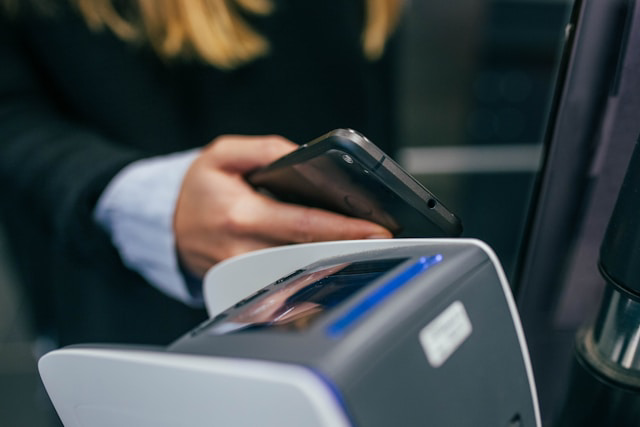
Paying with Bitcoin in a physical store works differently than online payments, but the core idea is simple: the merchant generates a payment request (usually a QR code), you scan it with your wallet, verify the details, and confirm. Unlike online purchases where you enter payment info, in-store Bitcoin payments are almost always initiated by the merchant's point-of-sale (POS) system.
Some merchants accept Bitcoin directly through their own wallets or payment processors like BitPay, while others use intermediaries—crypto debit cards or gift card services that convert your Bitcoin to fiat at the moment of purchase. The method you use depends on what the merchant supports and how much control you want over the transaction.
QR Code Payments at the Point of Sale
QR code payments are the most common way to pay with Bitcoin in store. When you're ready to check out, the cashier or POS terminal generates a payment invoice that includes the amount due and the merchant's Bitcoin address, all encoded as a QR code. You open your wallet app, tap "Send" or "Pay," scan the QR code with your phone's camera, and the wallet automatically fills in the payment details.
Before confirming, always double-check the merchant name (if shown) and the exact amount—this simple habit protects you from spoofed invoices or incorrect amounts. Some wallets will display whether the payment is on-chain or Lightning based on the invoice format (more on that in a moment). Once you confirm, the transaction is broadcast to the network.
Depending on the method, the merchant may see the payment instantly (Lightning) or wait for network confirmation (on-chain). This process is fairly standardized across countries and POS providers, making it easy to use your wallet at Bitcoin-accepting merchants worldwide.
NFC and Contactless Bitcoin Payments
Some wallets and services now support NFC (Near Field Communication) payments, where you tap your phone or a special crypto card against the merchant's terminal to pay with Bitcoin. This feels like using Apple Pay or Google Pay, and in fact, some crypto wallets integrate with these platforms to enable contactless payments.
While NFC payments are convenient, they are most often not direct BTC payments, since they involve a third party that converts your Bitcoin to fiat at the moment of sale. For example, crypto debit cards issued by companies like BitPay or Crypto.com technically sell your Bitcoin and send fiat to the merchant behind the scenes. You're still spending your Bitcoin balance, but you sacrifice some privacy and direct control because the card issuer processes the transaction.
Availability varies widely by country and issuing provider, so check whether your wallet or card supports NFC payments in your region.
Using the Lightning Network for Instant, Low-Fee Payments
The Lightning Network is a layer built on top of Bitcoin specifically designed for fast, cheap transactions—think of it as an express lane for small payments. Instead of recording every payment directly on the blockchain (which can take 10+ minutes and incur higher fees), Lightning opens payment channels between users and merchants, allowing transactions to settle instantly for fractions of a cent.
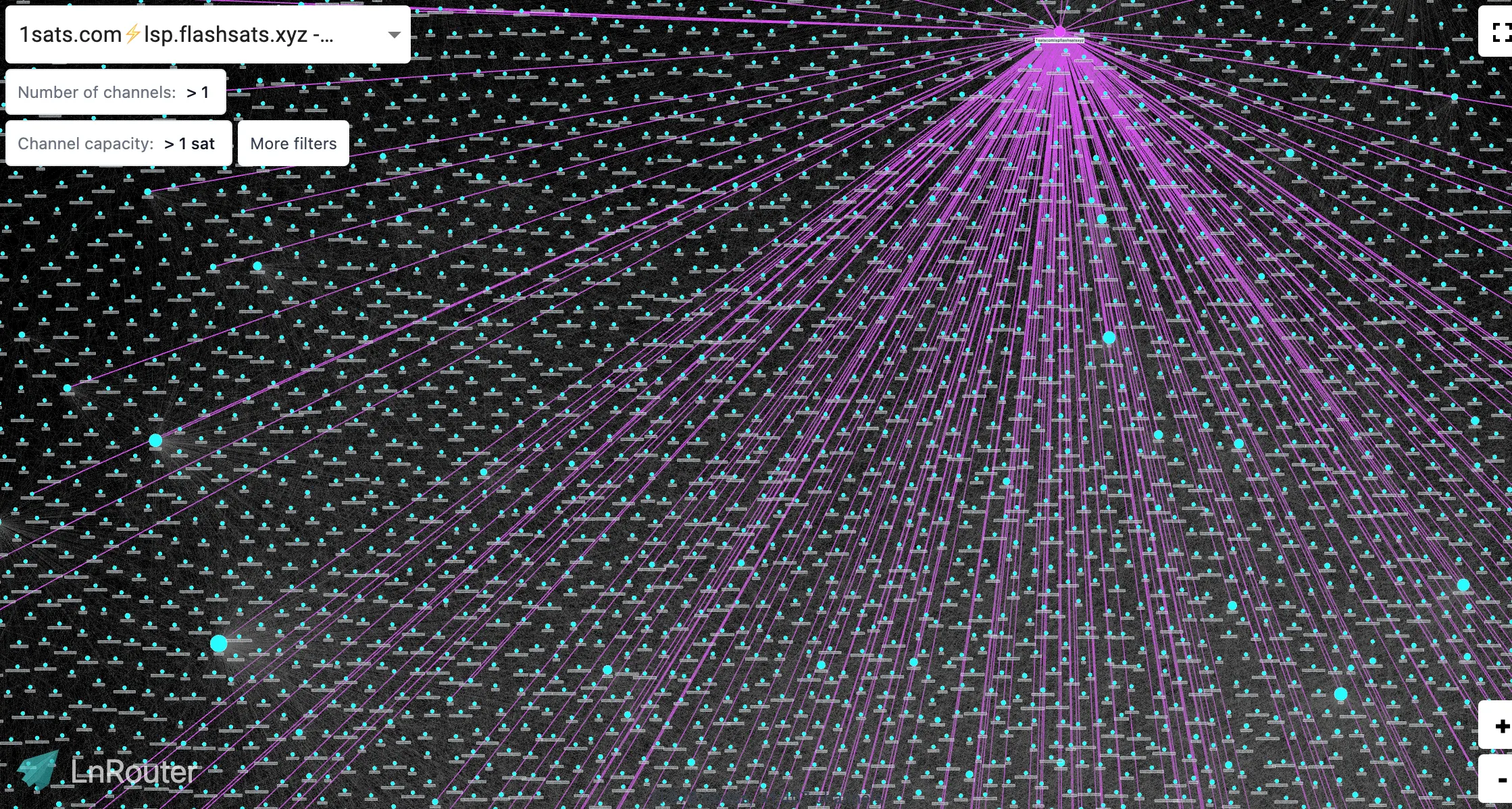
For in-store purchases—coffee, groceries, or any small-ticket item—Lightning is a game-changer. Research shows the Lightning Network had a public capacity of approximately 5,630 BTC as of June 2024, and Bitcoin plus Lightning accounted for 78% of all crypto payment volume processed by BitPay in 2023. Current LN capacity is at 5.43k according to The Block.
When a merchant supports Lightning, their POS will display a Lightning invoice QR code. You scan it with a Lightning-enabled wallet (like Phoenix, Wallet of Satoshi, or BlueWallet), verify the amount, and confirm. The payment settles in seconds.
Both you and the merchant avoid the $0.66+ median fees typical of on-chain transactions. Not all wallets or exchanges support Lightning yet, so if you plan to pay with Bitcoin in stores frequently, make sure your wallet is Lightning-compatible.
Can You Pay with Bitcoin Without a Wallet?
Short answer: technically, no. Every Bitcoin payment requires a wallet somewhere in the chain. The real question is whether you manage that wallet or if a service does it for you.
When people search "how to pay with Bitcoin without wallet," it could be because they don't want to deal with seed phrases, private keys, or blockchain mechanics. That's fair, and there's a solution.
Custodial platforms maintain a wallet infrastructure, and you get an account that represents your Bitcoin balance within their system. When you pay someone using one of these apps, you're instructing the platform to move Bitcoin from its wallet to another address. You never touch the private key (the cryptographic code that proves ownership) directly.
Examples of custodial services include cryptocurrency exchanges, Cash App, PayPal, Venmo (where available), and some newer bill-pay platforms. This model reportedly dominates in many emerging markets—peer-to-peer transfers through custodial apps are a very common use case in regions like Sub-Saharan Africa, where users often prioritize ease of access over self-custody (according to Chainalysis—2023 Geography of Cryptocurrency report).
The trade-off: convenience versus control. Custodial services let you pay for things with Bitcoin, send money, or pay your bills without managing keys. But you don't truly own the Bitcoin in the self-custody sense—the platform does. If the service locks your account, experiences downtime, or faces regulatory issues, your access disappears. You also sacrifice privacy. The platform tracks every transaction and typically requires KYC (Know Your Customer) verification.
Using Custodial Apps and Services as Your Wallet
If you've decided a custodial app fits your needs, here's how to initiate a payment. Most apps follow a similar flow:
- Open the app and navigate to "Send," "Pay," or "Withdraw" (wording varies by platform).
- Choose Bitcoin as your payment method.
- Enter the recipient's Bitcoin address manually or scan their QR code.
- Review the amount, recipient address, and any fees displayed.
- Confirm and send.
Sounds straightforward, right? It usually is—but there are important limitations to check before relying on any platform.
First, some apps only allow internal transfers. For instance, you might be able to pay someone with Bitcoin on Cash App if they also use Cash App, but not send to an external Bitcoin address (one outside the app's ecosystem). PayPal's "Checkout with Crypto" feature doesn't send actual Bitcoin either. It sells your Bitcoin for fiat behind the scenes and pays the merchant in dollars. That functions more like a conversion tool than a true Bitcoin payment.
If you want to learn how to send Bitcoin on PayPal anyway, we have a dedicated guide about it.
Second, some services restrict or don't support external Bitcoin withdrawals at all. This matters if you want flexibility to pay any merchant or individual who accepts Bitcoin. Always verify whether the platform supports sending to external addresses before assuming it will work for every use case. If external sends aren't supported, you're limited to their internal ecosystem or indirect payment methods.
Custodial apps simplify how to pay with Bitcoin online, how to pay someone with Bitcoin, and even how to pay your bills with Bitcoin—but only if their feature set matches your intended use.
How to Pay Someone with Bitcoin (Friends, Family, Freelancers)
Sending Bitcoin to someone you know works the same way as any other Bitcoin payment—but with a personal layer of trust involved. You're not dealing with a merchant or platform here, so it's on you to verify the recipient's address, confirm the amount, and send the transaction securely.
Direct Wallet-to-Wallet Bitcoin Transfers
To send Bitcoin from your wallet directly to someone else's, you'll need their Bitcoin address. Ask them to share it as a QR code (easiest option) or a copy-and-paste text string. Open your wallet, tap "Send," and either scan their QR code or paste the address into the recipient field. Enter the amount you want to send—most wallets let you choose between BTC or your local currency equivalent—and select your transaction fee if your wallet gives you that option. Higher fees speed up confirmation; lower fees take longer.
Before you hit send, double-check the address carefully. Bitcoin transactions are irreversible, so a single typo means your funds could be lost forever. For large amounts, send a tiny test payment first (like 0.0001 BTC) to confirm everything works. Smart move, right? Once you confirm the transaction, the recipient can see it as "pending" in their wallet almost immediately. Full confirmation usually takes around 10 minutes for one block, but you may want to wait for two or three confirmations (20–30 minutes) for complete security.
How to Pay Someone with Bitcoin on Cash App and Similar Platforms
If both you and the recipient use Cash App, paying with Bitcoin is even simpler. Open the app, tap the Bitcoin tab, and select "Send" or "Pay." Enter the recipient's $cashtag (their Cash App username) or paste their external Bitcoin address if they're using a different wallet. Type in the amount, review the details, and confirm. If you're sending to another Cash App user, the transfer happens instantly within the app's ecosystem and doesn't require on-chain confirmation.
To send Bitcoin from Cash App to an external wallet, you may need to enable Bitcoin withdrawals and verify your identity first. The process is similar: paste the external address, enter the amount, and confirm. The transaction then moves on-chain and follows standard Bitcoin confirmation times. Other platforms like PayPal (with limitations) or custodial exchanges work similarly—check whether the transfer stays internal or goes on-chain, as this affects both speed and fees.
Best Practices for Paying Individuals Safely
On top of keeping in mind the legal implications of paying someone with BTC (check your local and recipients laws before you commit to the transaction), there are a few more tips to make sure it goes smoothly.
Always confirm the recipient's identity through a second channel before sending. If they sent you an address via email, verify it over text or a call. Double-check the entire address string, especially the first and last few characters—malware can intercept clipboard data and swap addresses without you noticing. Never share screenshots of QR codes publicly, as anyone can scan them and see the address (or worse, if it's your receiving address).
Beware of impersonation scams. If a friend suddenly asks for Bitcoin via an unusual method or platform, confirm it's really them before sending anything. Use encrypted messaging apps like Signal when sharing addresses for added security. And remember: Bitcoin transactions are final. Take your time and verify every detail before you hit send.
Paying Bills with Bitcoin
Did you know you can pay your regular bills with Bitcoin, even when your utility company, landlord, or credit card provider doesn't accept it directly? The key is using intermediary services that convert your BTC into the fiat currency your biller expects. It's not as seamless as traditional bill pay yet, but it's possible, and the ecosystem keeps growing.
Services and Platforms That Let You Pay Bills with BTC
Bill-pay platforms that accept Bitcoin act as a bridge: you send them BTC, and they handle the fiat payment to your biller. The typical process works like this: sign up for the service, add your bill or payee details (like your electricity provider's account number), generate a Bitcoin invoice for the amount you owe, pay that invoice from your wallet, and the platform sends the fiat payment to your biller on your behalf.
Keep in mind that the list of available platforms changes over time. Some operate only in specific regions, and new services launch while others shut down. Always check current providers and read user reviews before committing. Some well-known names in this space have included services like Bitrefill and various crypto payment gateways, but availability varies by country and bill type.
Another indirect route? Gift cards. Platforms like Bitrefill let you buy prepaid gift cards or top-up cards with Bitcoin. If your bill allows payment via a prepaid card (like some mobile phone plans or internet services), this becomes a workaround—though it's less direct and usually better suited for smaller recurring costs.
Setting Up One-Time and Recurring Bitcoin Bill Payments

One-time bill payments are straightforward: generate an invoice, send BTC, done. But what about recurring bills?
True automated recurring Bitcoin payments are rare because of security trade-offs. Most wallets don't (and shouldn't) auto-send large amounts without your explicit approval each time. However, you can set up reminders to pay manually each month, or automate fiat purchases of BTC so you're always ready to pay when bills arrive. Some custodial platforms allow recurring conversions, though this means trusting the service with ongoing access to your funds.
If you go this route, keep recurring amounts modest and monitor your account closely to avoid surprises.
Things to Watch Out For When Paying Bills with Bitcoin
Paying bills with Bitcoin comes with a few extra layers of complexity.
First, exchange rate risk: Bitcoin's price can move between the moment you generate an invoice and when you send the payment, potentially leaving you short (or overpaying). Second, service fees add up—both the bill-pay platform and Bitcoin network fees apply. Third, processing time delays can be an issue. Your BTC payment might confirm quickly, but it can take a day or more for the fiat to reach your biller. This matters for critical bills like rent or utilities, where late fees kick in fast.
The safest approach? Pay bills early and always double-check that the biller has actually received the payment before the due date. As of 2026, using Bitcoin for everyday bill pay is still more of a workaround than a seamless solution—but it works if you plan ahead.
Bitcoin in PayPal and Other Payment Systems
These days, PayPal and similar mainstream payment platforms offer another convenient entry point for Bitcoin users, but they work differently than traditional Bitcoin wallets. Understanding what you can and can't do with these services helps you decide whether they fit your payment strategy or whether you need a self-custody wallet for true peer-to-peer Bitcoin transactions.
How PayPal’s Bitcoin Features Work
PayPal allows users in eligible regions to buy, hold, and sell Bitcoin directly within the app. You can also use PayPal's "Checkout with Crypto" feature to pay merchants—but here's the important detail: this isn't a direct Bitcoin payment.
When you choose to pay with Bitcoin via PayPal, the platform sells your BTC for fiat currency behind the scenes and sends dollars (or your local currency) to the merchant. The result is that the merchant never receives actual Bitcoin. This matters because it's fundamentally different from how to pay with Bitcoin using a wallet that sends BTC on-chain or over the Lightning Network.
PayPal essentially acts as a custodial exchange where you own Bitcoin in name, but you don't control the private keys or the actual on-chain addresses. As of 2026, PayPal has expanded Bitcoin transfer capabilities in some regions, allowing users to send BTC to external wallets but availability still varies by country and account type. Always check PayPal's official documentation for current features in your region, since these policies evolve regularly.
The key takeaway: PayPal's Bitcoin integration prioritizes ease of use over decentralization. You're trading convenience for control.
Using PayPal and Similar Platforms to Indirectly Pay with Bitcoin

Some users treat PayPal as a bridge tool in their broader Bitcoin payment strategy. For example, you might buy Bitcoin with PayPal, then withdraw it to a personal wallet (if your region supports transfers) to use for direct Bitcoin payments elsewhere. Or you could sell BTC inside PayPal to fund your fiat balance, then use that balance for regular PayPal payments.
If your priority is supporting Bitcoin as a payment network—sending actual BTC from your wallet to a merchant's address—PayPal won't satisfy that goal. But if you want the simplicity of buying Bitcoin easily and using it indirectly to fund purchases, PayPal and similar platforms (like Venmo, which also supports crypto) offer a user-friendly starting point.
Just know the trade-offs: you're using Bitcoin as an asset within a closed system, not as a decentralized payment method.
Security Best Practices for Bitcoin Payments
When you pay with Bitcoin, it means you are responsible for keeping it safe. Bitcoin transactions are irreversible, so once funds leave your wallet, there's no customer service line to call if something goes wrong.
The good news? With a few practical habits, you can protect yourself from the most common risks: losing access to your funds, sending payments to the wrong address, falling for scams, and having your wallet compromised.
Protecting Your Private Keys and Recovery Phrases
Your Bitcoin wallet is controlled by a private key—a long string of characters that proves ownership of your funds. Most wallets simplify this by giving you a seed phrase (also called a recovery phrase): a list of 12 or 24 words that can restore your wallet if you lose your device.
Here's the critical part: anyone who has either your private key or a seed phrase can take your Bitcoin. And if you lose it, your funds are gone forever. There's no reset button.
Best practices:
- Write your seed phrase on paper (or engrave it on metal for long-term storage), always offline and not digitally.
- Store it in a secure, offline location. Many people keep one copy at home and another in a safe deposit box or with a trusted family member.
- For larger balances, use a hardware wallet. These devices keep your private keys offline, so even if your computer is compromised, your funds stay safe.
- Keep your wallet software updated. Wallet providers regularly release security patches, and running outdated versions can expose you to known vulnerabilities.
Bottom line: lose the phrase, lose the Bitcoin. Guard it like you'd guard cash in a safe.
Verifying Payment Addresses Before You Send
Bitcoin addresses are long strings of letters and numbers—easy to mistype or misread. Send funds to the wrong address? They're gone. No undo.
How to verify safely:
- Visually check at least the first 4–6 characters and the last 4–6 characters of the address. Even a single character difference means a completely different wallet.
- If you're paying someone, confirm the address with them using a second communication channel (a phone call, a different messaging app). Don't rely solely on the channel where they sent the address.
- When scanning a QR code, double-check the resulting address on your screen. Malware can hijack your clipboard and swap addresses without you noticing.
- For large or first-time payments, send a small test transaction first. Once the recipient confirms they received it, send the rest.

Warning: Phishing and Fake Sites
Scammers create fake versions of popular wallets and exchanges to steal login credentials and payment addresses. To avoid it, always type URLs directly or use bookmarks; check for HTTPS and look for official domain names—one letter off can mean a phishing site.
Multi-Signature and Additional Security Layers
For everyday payments, a standard wallet is fine. But if you're managing larger balances, shared funds, or business payments, multi-signature (multi-sig) wallets add an extra layer of protection.
In simple terms: a multi-sig wallet requires multiple approvals before a transaction goes through. For example, a 2-of-3 setup might require two out of three designated keys to sign off. This protects against a single compromised device or lost key.
When multi-sig makes sense:
- Business treasuries where no single person should control all funds
- Shared family accounts
- High-value holdings where losing one key won't lock you out permanently
Multi-sig is more advanced and not necessary for small, routine payments but it's a proven way to reduce single-point-of-failure risk.
Other security layers to consider:
- Use two-factor authentication (2FA) on any exchange or custodial app where you hold Bitcoin.
- Enable address whitelisting if your platform supports it (only pre-approved addresses can receive funds).
- Set spending limits on hot wallets used for daily payments.
- Store the bulk of your Bitcoin in cold storage (hardware wallet or offline paper wallet) and keep only spending amounts in your mobile or desktop wallet.
It can be relieving to know professional wallet providers regularly undergo security audits to identify and patch vulnerabilities. If you're choosing a wallet for serious use, look for ones with transparent security practices and a track record of responsible disclosure.
Common Bitcoin Payment Scams
Bitcoin's irreversibility is an asset for scammers, which they can and do use to their advantage.
Common scams targeting Bitcoin payments:
- Fake merchants: Websites that look legitimate but disappear after you pay.
- Fake escrow services: A "middleman" who's actually working with the seller to steal your funds.
- Investment schemes: Someone promises huge returns if you pay them in Bitcoin. Classic fraud, new wrapper.
- Tech support impersonation: A scammer pretends to be from a company and pressures you to pay a "fee" or "unlock" your account with Bitcoin.
- QR code swapping: At physical locations, a scammer places a sticker with their QR code over the merchant's real one.
Rules to stay safe:
- If someone pressures you to pay quickly in Bitcoin, treat it as a red flag. Legitimate businesses give you time to verify.
- Always verify merchant URLs before making a payment. One character off can mean a fake site.
- For person-to-person payments, use trusted platforms like Cash App or PayPal when possible—they add a layer of accountability.
- Remember: Bitcoin transactions are irreversible. If something feels off, take the time to double-check.
- Never pay someone claiming to be from the government, a utility company, or tech support who demands Bitcoin. These entities never request payment in crypto.
- Be skeptical of "too good to be true" offers. If an online deal seems unbelievable, verify the seller independently before paying.
Whether you're paying for something online, sending Bitcoin to a friend, or paying bills through a crypto gateway, these habits will keep your funds secure. A little caution up front saves a lot of regret later.
Legal, Tax, and Compliance Considerations for Bitcoin Payments

Disclaimer: This section provides general information only and is not legal or tax advice. Rules vary widely by jurisdiction and change frequently. Always consult a qualified tax professional or legal advisor in your region before making decisions about cryptocurrency payments.
When you pay with Bitcoin—whether you're buying something online, paying someone with Bitcoin on Cash App, or covering your bills with Bitcoin—in addition to making a payment, you're also potentially triggering tax and compliance obligations that depend on where you live and how regulators classify cryptocurrency.
Tax Implications of Paying with Bitcoin
In many jurisdictions, spending Bitcoin is treated as disposing of property. That means each time you pay for something with Bitcoin, you may need to report a capital gain or loss.
Here's how this works in practice: you buy 0.01 BTC for $1,000. A few months later, when Bitcoin's price rises, that 0.01 BTC would be worth $1,200. If you use it to pay your bills with Bitcoin, you've realized a $200 capital gain—and you may owe taxes on that profit.
In the U.S., the IRS treats virtual currency as property, requiring users to report capital gains or losses on each transaction. Some countries offer de minimis exemptions (small payment thresholds that don't require reporting), but these rules vary widely.
The key takeaway? Check your local tax authority's guidance and keep accurate records of every transaction: the date, BTC amount, value in your local currency at the time, and what you purchased. This documentation becomes essential when tax season arrives and you have to report.
Regulatory Requirements by Region (KYC, AML, and Reporting)
Exchanges, payment processors, and custodial platforms that let you pay with Bitcoin online or in store are almost always required to comply with Know Your Customer (KYC) and Anti-Money Laundering (AML) regulations. In simple terms, this means you'll likely need to verify your identity to use services like PayPal's Bitcoin features, buy Bitcoin with Apple Pay or Google Pay, or access higher transaction limits.
Regulatory attitudes vary dramatically by country. Some embrace crypto payments and have clear frameworks; others restrict or outright ban their use. Laws are evolving rapidly, so research your jurisdiction's current stance before you pay for things with Bitcoin regularly.
By the way, if you're paying someone with Bitcoin across borders, remember that both jurisdictions' rules may apply. International payments can trigger compliance requirements on both ends of the transaction.
Record Keeping and Documentation for Bitcoin Transactions
Whether you pay with Bitcoin without a wallet (using a custodial app) or from your own self-custody wallet, keeping organized records is important. For each payment, document these key details: the transaction ID (hash), date and time, BTC amount sent, equivalent value in your local currency, recipient details (if appropriate), and the purpose of the payment.
Many portfolio trackers and crypto tax tools can sync with wallets and exchanges to automate this process. This makes tax reporting and potential audits far less painful. Back up your records securely, though: they contain sensitive financial data.

The clearer your documentation, the easier it is to demonstrate compliance and calculate any taxes owed when you pay with Bitcoin in store, online, or peer-to-peer. Think of good record keeping as insurance against future headaches.
Bitcoin Payment Times, Fees, and Choosing the Right Method
When you pay with Bitcoin, understanding how long it takes, how much it costs, and which method works best for your situation can save you time, money, and frustration. The answer depends on the payment method you choose—on-chain transactions, Lightning Network, or custodial platforms—and each comes with different trade-offs in speed, cost, and control.
How Long Does a Bitcoin Payment Take?
On-chain Bitcoin transactions typically take around 10 minutes for the first confirmation, which happens when your payment gets added to the next block on the blockchain. However, merchants often want 3–6 confirmations for security, so your payment could take 30–60 minutes to be considered final. If the network is congested or you set a low transaction fee, confirmation times can stretch even longer, sometimes for hours.
For small purchases, some merchants accept zero-confirmation transactions, meaning they trust your payment before it's confirmed. This speeds things up but is not too widespread because of the risk for the seller.
The Lightning Network changes the game entirely. Lightning payments settle in seconds, making it practical for everyday purchases. Lightning works best for smaller amounts and situations where you need instant settlement—like how to pay with Bitcoin in store or how to pay for things with Bitcoin online without waiting.
Network congestion and the fee you choose directly affect speed. When demand spikes, payments with low fees can sit in the mempool (the waiting area for unconfirmed transactions) for hours. If you're paying your bills with Bitcoin or sending a time-sensitive payment, choose a higher fee to prioritize your transaction.
How Bitcoin Transaction Fees Work
Bitcoin transaction fees are based on the size of your transaction in bytes, not the dollar amount you're sending. Sending $10 or $10,000 could cost the same if the transaction structure is identical. These fees fluctuate with network demand; during congestion, miners prioritize transactions that pay more per byte.
The median Bitcoin transaction fee is 5 to 45 cents in January 2026, according to BitInfoCharts. For small purchases, that fee can eat up a significant percentage of your payment. Some wallets let you choose between slow/cheap and fast/expensive fee levels. So if you're paying someone with Bitcoin and speed matters, you’d opt for the higher fee. If you're moving funds with no rush, the slow option saves money.
Lightning Network fees are typically fractions of a cent because payments route through existing channels rather than requiring on-chain confirmations. Lightning shines for microtransactions—paying for something with Bitcoin without worrying about fees eating your purchase.
Always check estimated fees before sending, especially when paying with Bitcoin online or paying bills with Bitcoin. Some wallets preview the total cost, helping you avoid surprises.
Comparing Payment Methods: On-Chain, Lightning, and Custodial Platforms

Here's the practical guidance: use Lightning for small, frequent purchases where supported—like how to pay with Bitcoin in store or how to buy Bitcoin with Apple Pay and spend it immediately. Use on-chain wallets for higher-value transfers where security and finality matter most. Choose custodial platforms like PayPal or Cash App when convenience outweighs control, especially if you're just learning how to pay for something with Bitcoin and want a simpler experience.
Troubleshooting Common Bitcoin Payment Issues
Even experienced users occasionally run into hiccups when paying with BTC. The good news? Most issues have straightforward solutions once you understand what's happening behind the scenes. This section walks you through the most common problems—stuck payments, wrong addresses, invoice mismatches, and fee spikes—and what you can do to resolve them or prevent them in the first place.
When a Bitcoin Payment Seems Stuck or Pending
If your payment shows as "pending" for longer than expected, don't panic. On-chain Bitcoin transactions average around 10 minutes for one confirmation, but they can take 30–60 minutes to be considered secure depending on network conditions and the fee you attached.
Start by checking your transaction status on a block explorer like Blockchain.com or Mempool.space using your transaction ID (you can find this in your wallet's transaction history). If the transaction is unconfirmed and sitting in the mempool, it usually means you set a fee that's too low for current network congestion. Miners prioritize higher-fee transactions during busy periods. Lower-fee ones wait longer.
Some wallets support Replace-by-Fee (RBF), which lets you rebroadcast the same transaction with a higher fee to speed things up. Another option is Child-Pays-for-Parent (CPFP), where the recipient can create a new transaction that incentivizes miners to include both. If your wallet doesn't offer these options, you may need to wait it out or contact wallet support for help.
Do not worry too much, truly failed transactions—ones that never broadcast or get dropped from the mempool after a few days—simply return your funds to your spendable balance. They're not always losing funds.
What to Do If You Paid the Wrong or Incorrect Address
If you send Bitcoin to the wrong address due to a typo or copy-paste error and it goes through, there's almost no way to undo it.
There are two scenarios. If the address you sent to doesn't exist or is invalid, the transaction won't broadcast at all. If you sent BTC to a valid but incorrect address, though, recovery depends entirely on whether someone controls that address and is willing to voluntarily send the funds back. In most cases, you won't know who that is.
Your best immediate step is to contact the intended recipient or merchant, provide your transaction ID, and explain what happened. If you sent to another person's valid address by mistake, you can try reaching out if you know their identity. Success is rare, however.
This is why address verification matters so much. Always double-check the full address before confirming, use wallet address books for frequent contacts, and consider sending a small test amount first when paying someone with Bitcoin for the first time.
Underpayments, Overpayments, and Expired Invoices
Bitcoin payment processors and merchants often generate invoices with specific amounts and time limits. If you send slightly less or more BTC than requested or pay after the invoice expires, the merchant's system may not automatically credit your account.
Some payment processors refund under- or overpayments automatically. Others require you to open a support ticket. Expired invoices can be trickier since exchange rates may have shifted between when you initiated the payment and when it was confirmed.
The solution is straightforward: contact the merchant or payment processor's support team immediately. Provide your transaction ID, explain the discrepancy, and follow their instructions. Keep all communication, screenshots, and receipts until the issue is fully resolved. Most reputable platforms will work with you to sort things out, but response times vary.
Solving Network Congestion and High-Fee Periods
When the Bitcoin network gets busy, on-chain fees can spike quickly. It is a few dozen cents right now but during peak congestion, fees can climb much higher. This unfortunately makes small payments impractical.
Here's how to work around high-fee periods. First, use the Lightning Network whenever possible—it handles payments instantly for fractions of a cent regardless of on-chain congestion. Second, if you're paying bills with Bitcoin or making non-urgent purchases online, wait for lower-fee periods (weekends and off-peak hours often see reduced activity). Third, use wallets that estimate fees accurately and support RBF so you can adjust if needed.
For microtransactions or frequent payments, custodial apps like Cash App or PayPal's internal transfers bypass on-chain fees entirely. This makes them more practical when you're paying someone with Bitcoin on Cash App or similar platforms during congestion. Batching multiple small payments into one larger transaction, if your wallet supports it, can also reduce your total fee burden.
Real-World Examples and Case Studies: Paying with Bitcoin Day to Day
Seeing Bitcoin payments in action makes the whole process feel less abstract. Here are three scenarios showing how different people and businesses integrate Bitcoin into their everyday transactions.
Case Study: A Frequent Online Shopper Using Bitcoin
Alex, a digital nomad, buys most services online and prefers paying with Bitcoin whenever possible. Alex keeps roughly $500 worth of BTC in a non-custodial mobile wallet specifically for spending, separately from long-term holdings.
When shopping, Alex first checks if a merchant accepts Bitcoin directly or through a payment processor like BitPay. For example, when purchasing a VPN subscription (one of the top industries for crypto payments according to BitPay), Alex copies the payment address or scans the QR code, double-checks the amount in both BTC and USD, then sends the payment. During busy network periods, Alex uses a slightly higher fee to ensure confirmation within 10–20 minutes.
By the way, Alex keeps detailed records for tax purposes. Every purchase is logged with the transaction hash, date, amount paid in BTC, and USD value at the time. Alex uses wallet transaction history and a simple spreadsheet to stay organized year-round.
Case Study: A Small Business Accepting Bitcoin In Store
Now consider Maria, who owns a coffee shop and started accepting Bitcoin in 2023 to attract tech-savvy customers and reduce credit card fees. Maria partnered with a payment processor that provides a tablet-based point-of-sale system. When a customer wants to pay with Bitcoin, the POS generates a QR code denominated in the local currency (USD). The customer scans it with their mobile wallet, pays instantly via the Lightning Network, and the transaction settles in seconds.
Maria's processor converts 90% of received Bitcoin to USD immediately, protecting her from volatility while keeping 10% in BTC as a speculative position. She trained her staff in about 20 minutes—the process is simpler than handling foreign currency. The benefits? Lower chargeback risk and a small but growing segment of customers who specifically seek out Bitcoin-friendly businesses. The challenge? Explaining to older customers why her shop accepts "internet money," though that's becoming less common as awareness grows.
Popular Platforms and Services That Accept Bitcoin Today
Bitcoin acceptance is expanding but still uneven. The top industries include crypto services, VPN and hosting providers, precious metals and jewelry vendors, and online gaming platforms.
Other areas gaining traction include travel booking sites, select online retailers, charities, and a growing number of brick-and-mortar stores (especially in crypto-friendly cities). Rather than listing specific merchants—which changes frequently—check directories maintained by payment processors like BitPay or BTCPay Server. These are updated regularly and show who accepts Bitcoin both online and in store, helping you find opportunities to pay for things with Bitcoin in your daily routine.
Conclusion: Making Bitcoin a Practical Part of How You Pay
You've now got a solid foundation for paying with Bitcoin—online, in stores, for bills, and with friends. The essential pieces come down to three things: you need a wallet (whether custodial or self-custody), basic security habits (protecting your private keys and verifying addresses before you send), and a clear understanding of which payment method works best for your situation. Whether you're scanning a QR code at checkout, sending Bitcoin to someone on Cash App, buying Bitcoin with Apple Pay or Google Pay, or using PayPal's indirect Bitcoin features, the core principle stays the same: double-check your details, start small, and keep good records.
Your next steps: set up a secure wallet, make a small test payment to build confidence, and if you plan to make Bitcoin a regular part of how you pay for things, consult a tax professional to ensure you're meeting all compliance requirements. For tax and legal questions, check your local regulatory authority on virtual currency transactions.
Start small, stay secure, and Bitcoin can become a genuinely practical payment tool.
Frequently Asked Questions About Paying with Bitcoin
How do I pay for something with Bitcoin online?
To pay for something with Bitcoin online, start by choosing a merchant that accepts Bitcoin, add your items to cart, and select Bitcoin as your payment method at checkout. The merchant will generate a payment invoice with a Bitcoin address and the exact amount due. Open your wallet, scan the QR code or paste the address, confirm the amount matches, and send the transaction.
You can pay from a personal non-custodial wallet or directly from some exchanges and apps like Cash App or PayPal's crypto feature (though PayPal converts your BTC to fiat behind the scenes). Always double-check the address and amount before confirming—Bitcoin transactions are irreversible. For step-by-step screenshots and tips on avoiding common mistakes, refer back to the How to Pay with Bitcoin Online section.
How can I pay with Bitcoin in an offline store?
Most in-store Bitcoin payments work through a QR code displayed at the point of sale. The cashier generates an invoice on their payment terminal, you scan the QR code with your mobile wallet, confirm the amount, and send. Some stores also support Lightning Network payments for instant settlement or accept crypto debit cards that convert BTC to fiat at the moment of payment.
Before you shop, confirm the merchant accepts Bitcoin and make sure your wallet is funded and ready—having BTC on the Lightning Network can speed things up significantly and reduce fees.
Do I need a special wallet to pay someone with Bitcoin?
Any standard Bitcoin wallet that can send transactions will work for paying someone with Bitcoin, as long as it supports the same network the recipient uses (on-chain or Lightning). You don't need specialized software—basic wallets like BlueWallet, Electrum, or even custodial apps like Cash App can handle peer-to-peer transfers.
That said, keep in mind that some custodial platforms limit external sends or charge withdrawal fees, so read the fine print. Choose a reputable wallet, verify the recipient's address carefully, and test with a small amount first if you're new to direct transfers.
Can I pay my regular bills with Bitcoin?
Most utility companies and service providers don't accept Bitcoin directly, but you can pay bills with Bitcoin using third-party bill-pay services that convert your BTC to fiat behind the scenes or by purchasing retailer gift cards with Bitcoin. Fees, exchange rates, and availability vary widely by region and platform, so compare your options before committing.
Timing matters too—Bitcoin's price can fluctuate between when you initiate the payment and when it settles, potentially leaving you short if the value drops. For a detailed breakdown of platforms, setup steps, and cautions about volatility and timing, check the Paying Bills with Bitcoin section above.
Is it safe and legal to pay with Bitcoin?
In many countries, it is legal to pay with Bitcoin, but regulations and tax treatment differ by jurisdiction. For example, in the U.S., spending Bitcoin is a taxable event because the IRS treats it as property—you must report any capital gain or loss on each transaction.
Safety depends entirely on following best practices: secure your wallet and private keys, verify every address before sending, and avoid scams by double-checking URLs and never sharing your seed phrase. For significant amounts or frequent Bitcoin payments, consult a tax professional or legal advisor familiar with local crypto regulations to ensure you're compliant and protected.